вступ
Thank you for choosing the COSTWAY Mobile Standing Desk. This manual provides essential information for the safe assembly, operation, and maintenance of your new desk. Please read it thoroughly before use and retain it for future reference.

Image: The COSTWAY Mobile Standing Desk in a modern living room, showcasing its design and versatility.
Важливі інструкції з безпеки
- Ensure the desk is not overloaded. The maximum weight recommendation is 66 pounds (30 kg). Overloading can compromise stability and safety.
- Always engage the brakes on the lockable casters when the desk is in a stationary position to prevent unintended movement.
- Keep hands and fingers clear of moving parts during height adjustment and desktop tilting to avoid pinching.
- Поставте стіл на рівну поверхню, щоб забезпечити стійкість.
- Не дозволяйте дітям гратися на столі або біля нього без нагляду дорослих.
- Regularly check all fasteners to ensure they are tight. Retighten as necessary.
Вміст упаковки
Перед складанням перевірте наявність усіх компонентів та їх цілісність. Якщо якісь деталі відсутні або пошкоджені, зверніться до служби підтримки клієнтів.
- 1 x Mobile Standing Desk (main frame and desktop components)
- 4 x Casters (2 lockable, 2 non-lockable)
- 1 х Інструкція з експлуатації
- Assembly Hardware (screws, bolts, wrenches, etc.)
Інструкції зі складання
Перш ніж почати
- Звільніть простору ділянку для складання.
- It is recommended that 1 person assemble this desk.
- Розкладіть усі деталі на м’якій, чистій поверхні, щоб запобігти подряпинам.
- Ensure all included assembly tools are at hand.
Етапи складання
- Attach the casters to the base frames. Ensure the 2 lockable casters are placed on the same side for easier access.
- Connect the vertical support poles to the base frames using the provided hardware.
- Secure the lower desktop (fixed shelf) to the vertical support poles at the desired height.
- Attach the upper desktop (tilting shelf) mechanism to the remaining vertical support poles.
- Переконайтеся, що всі гвинти та болти надійно затягнуті, але не перетягуйте.

Image: A person using the COSTWAY Mobile Standing Desk with a laptop while on a treadmill, demonstrating its mobile and standing capabilities.
Інструкція з експлуатації
Регулювання висоти
The desk features an adjustable height mechanism, allowing you to switch between sitting and standing positions. To adjust the height:
- Loosen the adjustment knobs located on the vertical support poles for both desktop sections.
- Carefully raise or lower the desktop to your desired height. The height can be adjusted from 27.5 inches to 40 inches for the lower desktop, and 28.5 inches to 49 inches for the upper desktop.
- Once the desired height is reached, firmly tighten the adjustment knobs to secure the desktop in place.
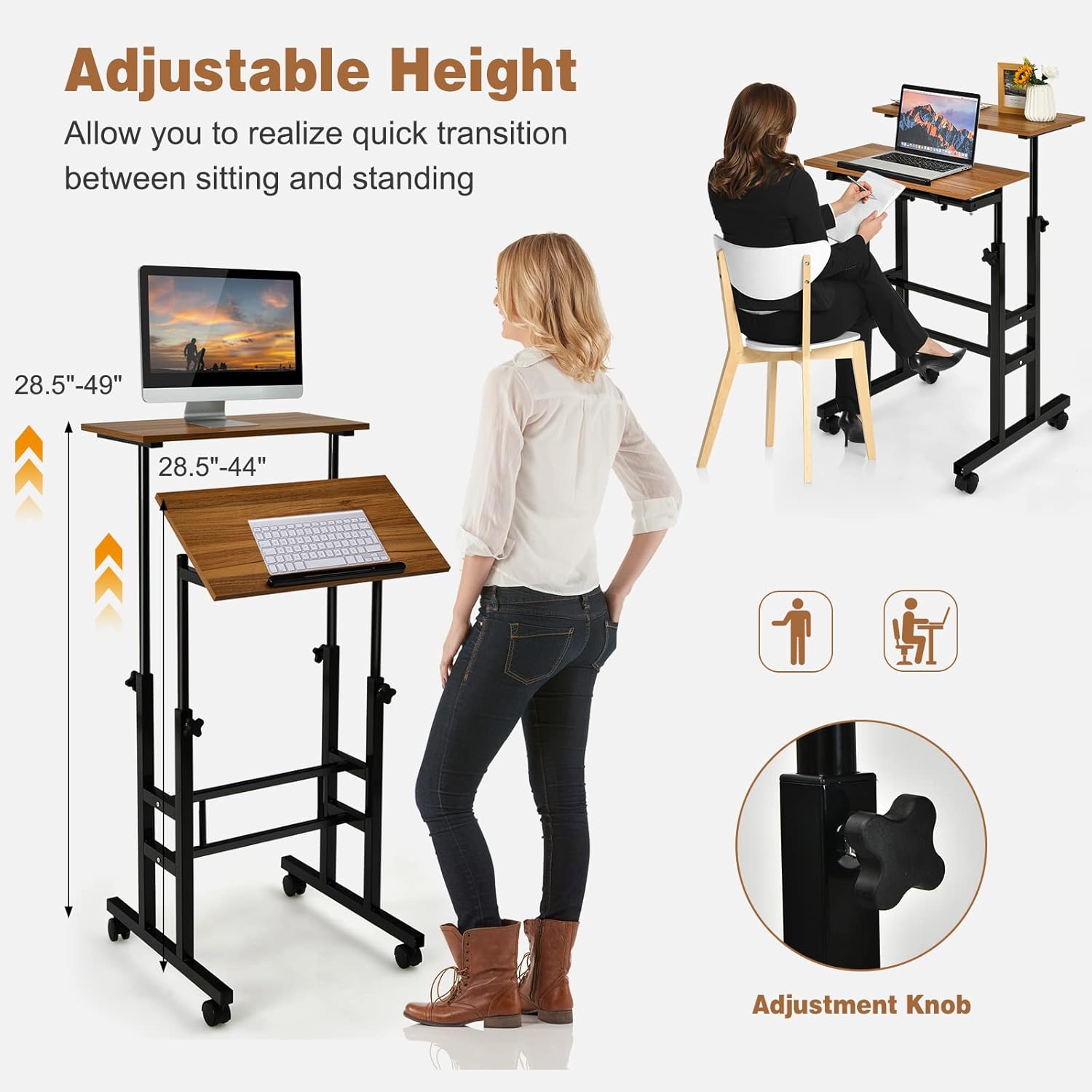
Image: A diagram illustrating the adjustable height range of the desk, showing both sitting and standing configurations.
Tilting the Desktop
One of the desktop boards can be tilted to provide an ergonomic angle for reading or typing. To tilt the desktop:
- Locate the tightening knobs beneath the tilting desktop section.
- Loosen these knobs to allow the desktop to tilt.
- Adjust the desktop to your preferred angle.
- Firmly tighten the knobs to lock the desktop in the tilted position.
- An anti-skid strip is present on the tilting board to prevent items from sliding off.
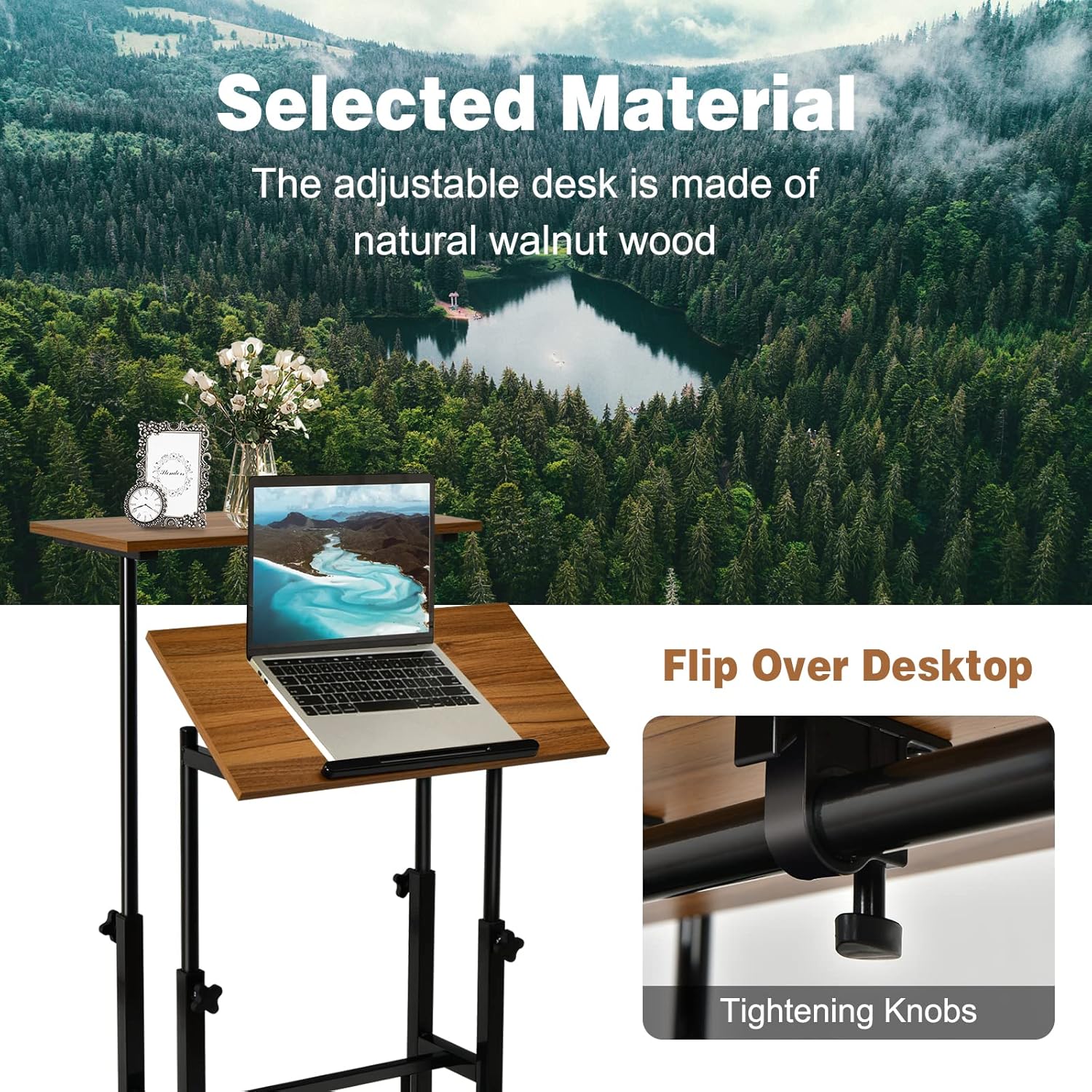
Зображення: Крупний план view of the tilting desktop feature, highlighting the anti-skid strip and the tightening knobs for angle adjustment.
Moving and Locking the Desk
The desk is equipped with four universal casters for easy mobility. Two of these casters are lockable.
- Рухатись: Ensure the brakes on the lockable casters are disengaged. Gently push the desk to its desired location.
- Замкнути: Once the desk is in position, press down on the levers of the two lockable casters to engage the brakes. This will prevent the desk from rolling.

Зображення: Детальне view showing the anti-skid barrier strip on the desktop and the smooth, lockable casters for mobility and stability.
Технічне обслуговування
Догляд і очищення
- Протріть поверхні столу рекламоюamp тканиною для видалення пилу та розливів.
- Уникайте використання агресивних хімікатів або абразивних засобів для чищення, оскільки вони можуть пошкодити покриття.
- Periodically check all screws and connections for tightness and retighten if necessary to maintain stability.
- Keep the desk away from direct sunlight and extreme temperature changes to prevent material warping or discoloration.
Усунення несправностей
Поширені проблеми та рішення
- Стіл хитається: Ensure all assembly screws and bolts are securely tightened. Check that the desk is on a level surface.
- Регулювання висоти складне: Loosen the adjustment knobs sufficiently before attempting to change height. Ensure no objects are obstructing the poles.
- Desk rolls unintentionally: Verify that the brakes on the lockable casters are fully engaged.
- Tilting desktop does not hold position: Ensure the tightening knobs for the tilting mechanism are firmly secured after adjustment.
Технічні характеристики продукту
| Бренд | COSTWAY |
| Номер моделі | 67483-CYWH-CA |
| матеріал | Інженерна деревина, сталь |
| Колір | Brown (Walnut Wood Grain Finish) |
| Розміри продукту (Д x Ш x В) | 23.5" x 24" x 27.5"-40" (Lower Desktop Height) / 28.5"-49" (Upper Desktop Height) |
| Вага товару | 18.5 фунтів (8.4 кг) |
| Рекомендована максимальна вага | 66 фунтів (30 кг) |
| Кількість полиць | 2 |
| Коліщатка | 4 (2 із замками) |
| Потрібна збірка | так |
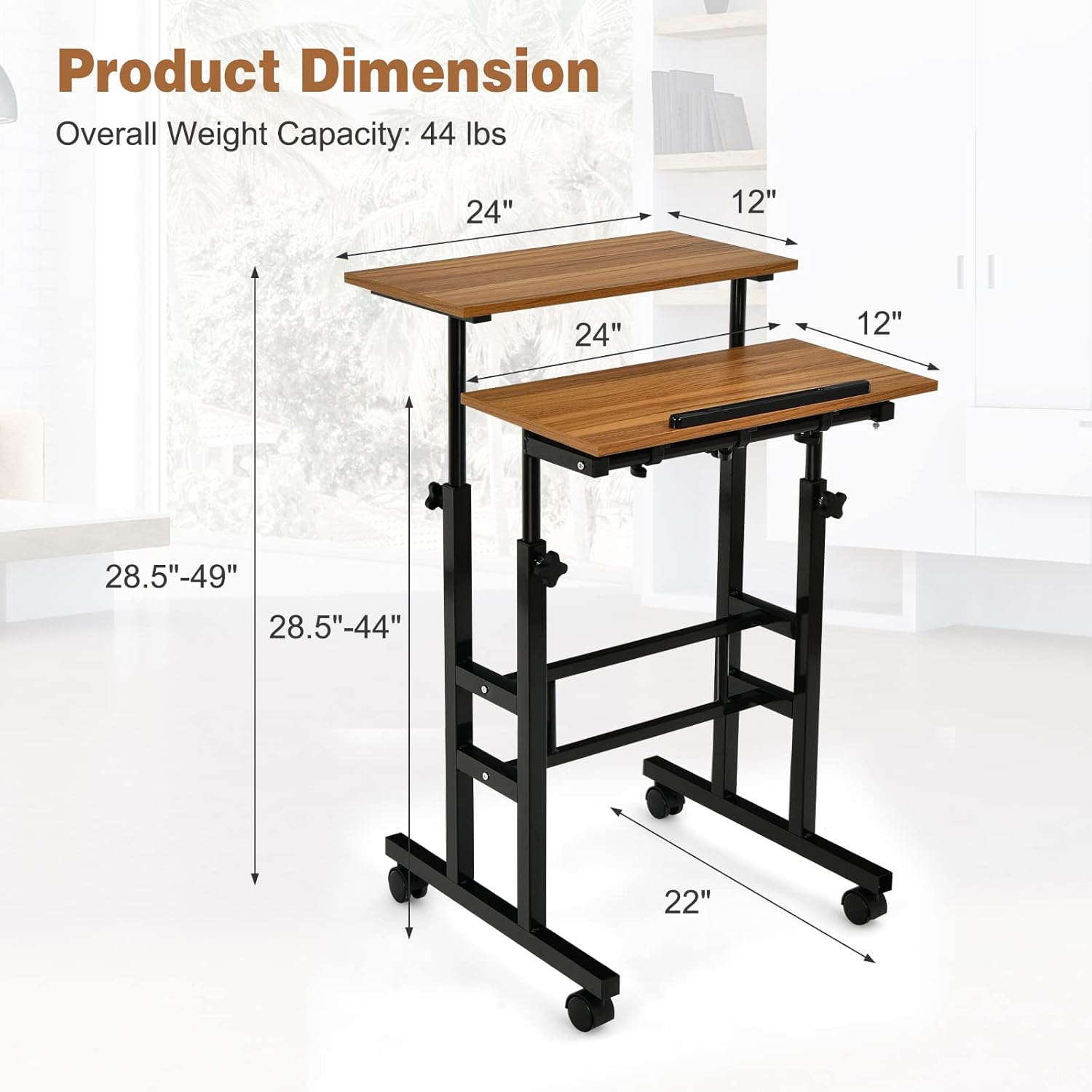
Image: A detailed diagram illustrating the overall dimensions and weight capacity of the COSTWAY Mobile Standing Desk.
Інформація про гарантію
This COSTWAY Mobile Standing Desk comes with a limited warranty. For specific details regarding warranty coverage, duration, and terms, please refer to the warranty documentation included with your purchase or contact COSTWAY customer support.
Підтримка клієнтів
If you have any questions, require assistance with assembly, or need to report missing/damaged parts, please contact COSTWAY customer service. You can typically find contact information on the product packaging, the official COSTWAY webсайті або через вашого продавця.
Для отримання додаткової інформації відвідайте офіційну сторінку Магазин COSTWAY.


