вступ
Thank you for choosing the Inateck KB02017 AZERTY Keyboard. This manual provides detailed instructions for setting up, operating, and maintaining your keyboard to ensure optimal performance and longevity. Please read this manual thoroughly before use.
Сумісність
The Inateck KB02017 keyboard is compatible with the following iPad models:
- iPad 10.2-inch (9th Generation, 2021)
- iPad 10.2-inch (8th Generation, 2020)
- iPad 10.2-inch (7th Generation, 2019)
- iPad Air 3 (10.5-inch, 2019)
- iPad Pro 10.5 дюймів

This image illustrates the compatible iPad models and how to locate your iPad's model number for verification.
Вміст упаковки
Будь ласка, перевірте упаковку на наявність наступних предметів:
- Inateck KB02017 Magnetic Detachable Keyboard
- Захисний футляр
- USB-кабель для зарядки
- Посібник користувача
Особливості продукту
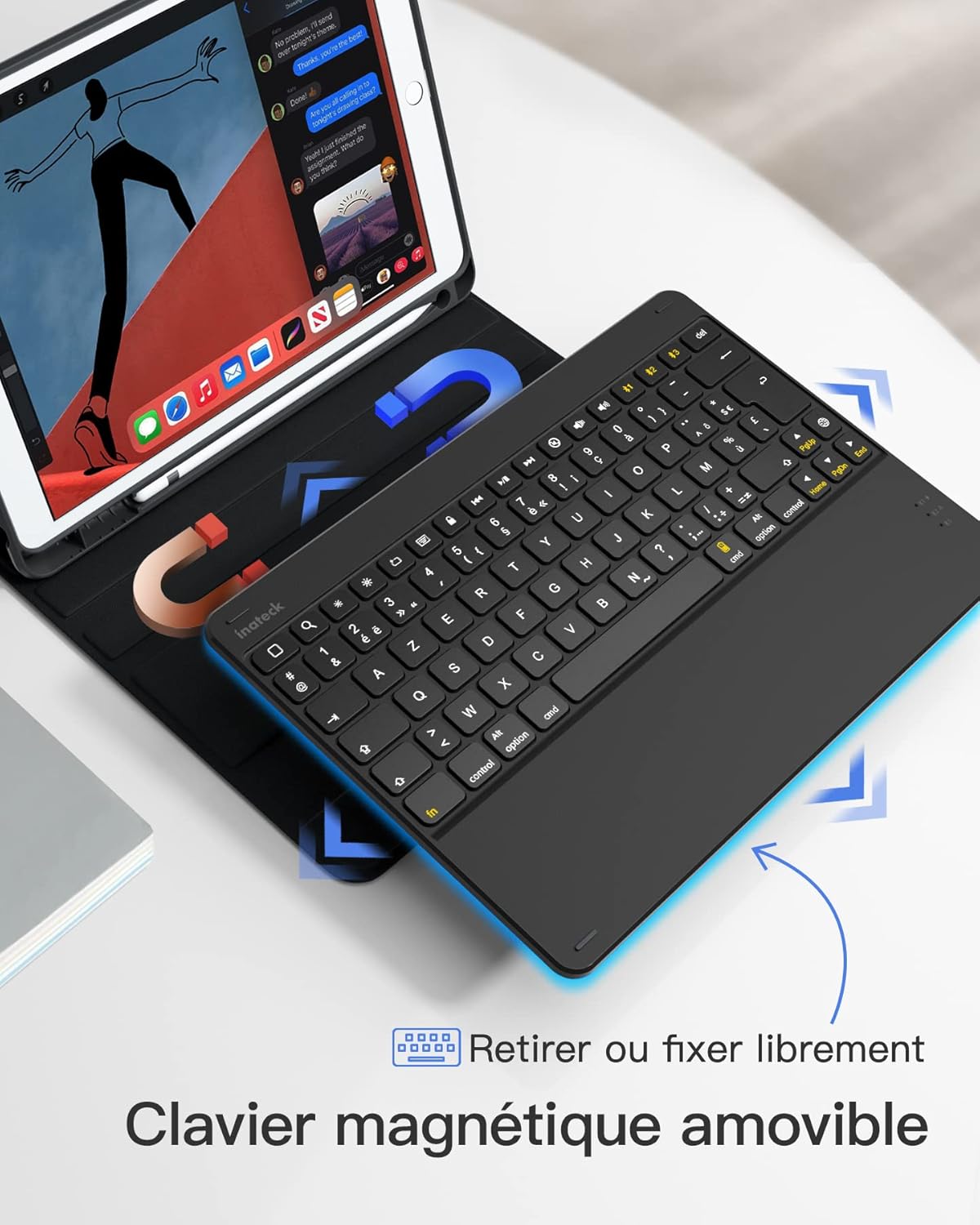
- Магнітна знімна конструкція: The keyboard can be easily detached from the protective case, offering flexibility and portability. This allows you to use the iPad with or without the keyboard.
- True French AZERTY Layout: Designed with a genuine French AZERTY keyboard layout for comfortable and familiar typing.
- множинний Viewкути нахилу: The case supports three adjustable viewing angles, allowing you to find the most comfortable position for typing, viewмалювання.
- Independent iOS Shortcut Keys: A dedicated row of shortcut keys provides quick access to various iOS functions, enhancing productivity.
- Повний захист: The flexible and shock-resistant protective case safeguards your iPad from daily bumps and scratches.
- Тривалий термін служби батареї: Enjoy up to 100 hours of continuous operation or 50 days of standby time on a single charge.

The keyboard features a magnetic detachable design for versatile use.

The keyboard features a true French AZERTY layout.

Регульована viewing angles provide ergonomic comfort.
Налаштування
1. Заряджання клавіатури
Before first use, fully charge the keyboard. Connect the provided USB charging cable to the keyboard's charging port and a USB power source. The charging indicator light will show the charging status.
2. Підключення Bluetooth
- Переконайтеся, що клавіатура заряджена та увімкнена.
- На вашому iPad перейдіть до Налаштування > Bluetooth та увімкніть Bluetooth.
- Натисніть і утримуйте Fn + C keys simultaneously on the keyboard for 3 seconds. The Bluetooth indicator light will start flashing, indicating the keyboard is in pairing mode.
- On your iPad, look for "Inateck KB02017" (or similar name) in the list of available devices and tap to connect.
- Once connected, the Bluetooth indicator light on the keyboard will stop flashing and remain solid for a few seconds, then turn off.
The keyboard connects to your iPad via Bluetooth.
Інструкція з експлуатації
Використання комбінацій клавіш
The top row of the keyboard features dedicated iOS shortcut keys for quick access to various functions. These keys allow you to control your iPad efficiently without touching the screen.
| Значок ключа | функція |
|---|---|
| додому | Повернутися на головний екран |
| Пошук | Activate Spotlight Search |
| Зменшення яскравості | Зменшити яскравість екрана |
| Підвищення яскравості | Збільшити яскравість екрана |
| Keyboard Hide/Show | Hide or show the on-screen keyboard |
| Попередній трек | Перейти до попередньої доріжки медіа |
| Відтворення/Пауза | Play or pause media playback |
| Наступний трек | Перейти до наступної доріжки медіа |
| Вимкнути звук | Вимкніть або ввімкніть звук |
| Зменшення гучності | Зменшити гучність |
| Збільшення гучності | Збільшити гучність |
| Екран блокування | Lock the iPad screen |

Dedicated shortcut keys for iOS functions.
Технічне обслуговування
прибирання
Щоб очистити клавіатуру, обережно протріть її поверхню м’якою губкоюamp тканиною. Уникайте використання агресивних хімікатів або абразивних матеріалів. Переконайтеся, що рідина не потрапила всередину клавіатури.
Догляд за акумулятором
The keyboard is powered by a rechargeable battery. To prolong battery life:
- Charge the keyboard regularly, even if not in frequent use.
- Уникайте впливу на клавіатуру екстремальних температур.
- Якщо ви зберігатимете пристрій протягом тривалого періоду, зарядіть акумулятор приблизно до 50% перед зберіганням.

The keyboard offers long battery life for extended use.
Усунення несправностей
Keyboard Fails to Connect via Bluetooth
- Clear the paired device history for "Inateck KB02017" on your iPad.
- Deactivate and then reactivate the keyboard's Bluetooth.
- Натисніть і утримуйте Fn + C keys for 3 seconds to enter Bluetooth pairing mode.
- Tap on "Inateck KB02017" in your iPad's Bluetooth device list to pair.
Some Keys Transmit Incorrect Values
If keys are not producing the expected characters (e.g., 'A' instead of 'Q' for AZERTY layout), ensure the correct keyboard layout is selected on your iPad:
- Перейти до Налаштування > Загальний > Клавіатура.
- Торкніться клавіатури, тоді Add New Keyboard... if 'French (AZERTY)' is not listed.
- Під Апаратна клавіатура, ensure the correct 'French (AZERTY)' layout is selected for your Inateck KB02017.

Common troubleshooting steps for connectivity and key input issues.
Технічні характеристики
| Особливість | Деталь |
|---|---|
| Бренд | Inateck |
| Номер моделі | KB02017 |
| Колір | Темно-сірий |
| Технологія підключення | Bluetooth |
| Тип живлення | Працює від батареї |
| Опис клавіатури | Автономний |
| Сумісні пристрої | iPad 2021/2020/2019 (9th/8th/7th Generation), iPad Air 3, iPad Pro 10.5 |
| Розміри предмета (Д x Ш x В) | 25.5 х 19.8 х 1.8 см |
| Вага продукту | 0.65 кг (1.43 фунта) |
| Особливість | Легкий |
| матеріал | Aluminum, Polycarbonate, PBT |
Гарантія та підтримка
For warranty information or technical support, please refer to the documentation included with your purchase or visit the official Inateck website. Contact details for customer service can typically be found on the product packaging or the brand's support page.


