вступ
Thank you for choosing the Xtorm XP300U Portable Power Station. This device is designed to provide reliable and portable power for various applications, from home use to outdoor camping. With a 300W output and multiple charging options, it ensures your devices stay powered wherever you are. This manual provides essential information on the safe operation, setup, maintenance, and troubleshooting of your power station.
Інформація про безпеку
Будь ласка, прочитайте всі попередження та інструкції з техніки безпеки перед використанням цього виробу, щоб забезпечити безпечну експлуатацію та запобігти пошкодженням. Зберігайте цей посібник для подальшого використання.
- Не розбирайте, не ремонтуйте та не модифікуйте пристрій. Неправильне складання може призвести до пожежі або травмування.
- Не піддавайте пристрій впливу вогню або високих температур (вище 60°C/140°F).
- Не використовуйте та не зберігайте пристрій під прямими сонячними променями або в умовах підвищеної температури.
- Не використовуйте та не зберігайте пристрій у ванній кімнаті або в місцях, що піддаються впливу води чи вологи.
- Не кидайте, не вдаряйте та не піддавайте пристрій сильним ударам.
- Зберігати в недоступному для дітей місці.
- Use only the original or certified charging cables and adapters.
- Ensure proper ventilation during use and charging. Do not cover the unit.
- In case of leakage from the battery, do not allow the liquid to come into contact with skin or eyes. If contact occurs, wash with plenty of water and seek medical advice.

Image: Safety features of the Xtorm XP300U, highlighting Pure Sine Wave, Short Circuit Protection, Temperature Control, Overcharge Protection, APM Chip, A-Class Batteries, and High Efficiency.
Вміст упаковки
Будь ласка, перевірте вміст упаковки після відкриття. Якщо будь-які елементи відсутні або пошкоджені, зверніться до продавця.
- Xtorm XP300U Portable Power Station
- Настінний зарядний пристрій змінного струму
- Кабель автомобільного зарядного пристрою
- MC4 to DC Cable (for solar panel connection, solar panel not included)
- Посібник користувача

Image: The Xtorm XP300U Portable Power Station displayed with its included accessories: AC wall charger, car charger cable, and MC4 to DC cable.
Продукт закінченийview
Familiarize yourself with the different parts of your Xtorm XP300U Power Station.
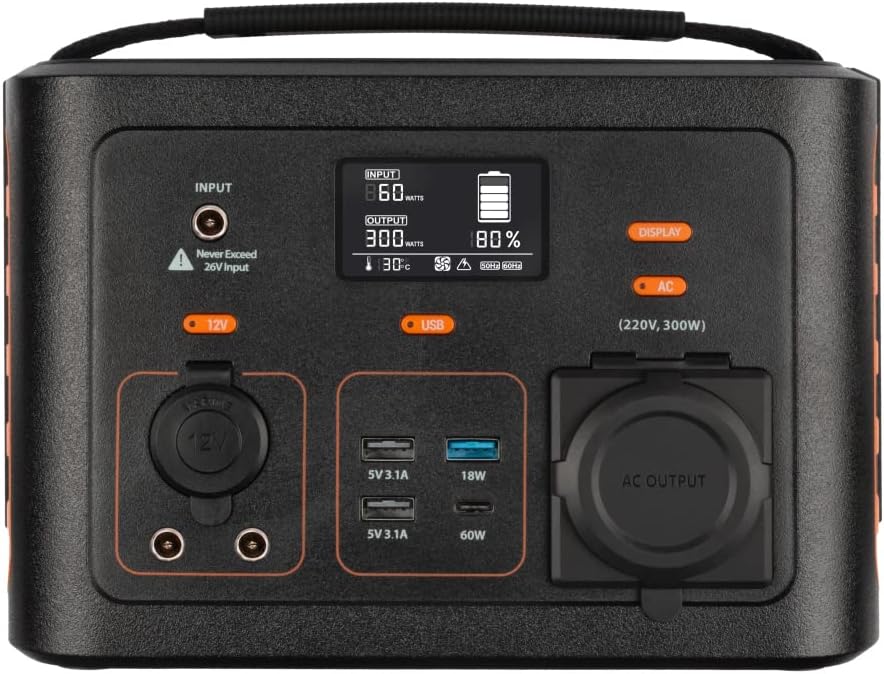
Зображення: Крупний план view of the Xtorm XP300U's front panel, showing the digital display, input port, 12V DC output, USB-A and USB-C ports, and AC output socket.
Характеристики передньої панелі:
- РК-дисплей: Відображає рівень заряду батареї, вхідну/вихідну потужність та індикатори стану.
- Вхідний порт: Для заряджання електростанції через адаптер змінного струму, автомобільний зарядний пристрій або сонячну панель.
- Вихід 12 В постійного струму: Для живлення пристроїв на 12 В.
- Порти USB-A: Multiple USB-A outputs for charging various devices (e.g., 5V 3.1A, 18W Quick Charge).
- Порт USB-C PD: High-speed USB-C Power Delivery output (up to 60W).
- Вихідна розетка змінного струму: Standard AC outlet for powering household appliances (220V, 300W).
- Кнопки управління: Buttons for turning on/off specific outputs (e.g., AC, DC, USB).

Зображення: Верх view of the Xtorm XP300U, highlighting its integrated carrying handle for portability.

Зображення: Задня частина view of the Xtorm XP300U, featuring the Xtorm brand logo and "Portable Power Station 300" text.
Налаштування
Before first use, it is recommended to fully charge your Xtorm XP300U Power Station.
- Розпакувати: Обережно вийміть електростанцію та всі аксесуари з упаковки.
- Initial Charge (AC Wall Charger):
- Connect the AC wall charger to the input port on the power station.
- Підключіть зарядний пристрій змінного струму до стандартної розетки.
- The LCD display will show the charging status. Charge until the battery indicator shows 100%.
- Розміщення: Place the power station on a stable, flat surface in a well-ventilated area, away from direct sunlight or heat sources.
Інструкція з експлуатації
The Xtorm XP300U offers multiple ways to charge and power your devices.
Зарядка електростанції:
The XP300U can be recharged using four different methods:
Image: Visual representation of the four charging methods for the Xtorm XP300U: via wall socket, USB-C PD, solar panel (not included), and 12V car charger.
- Via Wall Socket (AC Charger): Connect the included AC wall charger to the input port and a wall outlet.
- Via USB-C PD: Use a compatible USB-C Power Delivery charger (not included) to charge the unit via its USB-C port.
- Через сонячну панель: Connect a compatible solar panel (not included) to the input port using the provided MC4 to DC cable. Ensure the solar panel is placed in direct sunlight for optimal charging.
- Via 12V Car Charger: Connect the included car charger cable to the input port and your vehicle's 12V cigarette lighter socket.
The LCD display will show the input wattage and battery charge status during charging. You can use the outputs even while the power station is charging (pass-through charging).
Using the Outputs:
The XP300U provides various output ports to power different types of devices.

Image: The Xtorm XP300U demonstrating its universal compatibility with icons representing various devices and output types: 1x AC 300W/220V, 1x USB-C PD 60W, 2x DC 5.5mm 60W, 2x USB QC3.0 18W, 1x USB 18W, and 1x 12V Car 120W.
- AC Output (220V, 300W):
- Press the "AC" button to activate the AC output. The AC indicator on the display will light up.
- Plug your device's power cord into the AC outlet.
- Ensure your device's power consumption does not exceed 300W.
- Press the "AC" button again to turn off the AC output when not in use.
- Вихід постійного струму (12 В):
- Press the "12V" button to activate the DC output. The DC indicator will light up.
- Connect your 12V device to the DC port.
- Press the "12V" button again to turn off the DC output.
- USB Outputs (USB-A, USB-C PD):
- The USB outputs are typically always active when the unit is on.
- Connect your USB-powered devices to the appropriate USB-A or USB-C PD ports.
- На дисплеї відобразиться вихідна потужністьtage for connected devices.
The power station can provide power for extended periods, depending on the connected devices' power consumption.

Зображення: Прamples of device runtimes with the Xtorm XP300U: 17.5 hours for a 10W LED light, 5.5 hours for a 30W small TV, 4 hours for a 40W small coolbox, and 6 hours for a 40W small coolbox (via 12V carplug output).
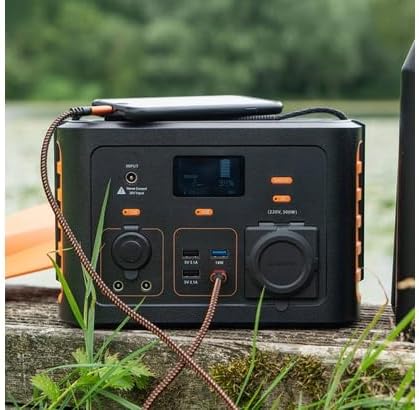
Image: The Xtorm XP300U Portable Power Station being used outdoors on a wooden surface, charging a smartphone, demonstrating its portability and utility in various environments.
Технічне обслуговування
Правильне технічне обслуговування забезпечує довговічність та оптимальну роботу вашої електростанції.
- Прибирання: Використовуйте м’яку суху тканину для очищення зовнішньої частини пристрою. Не використовуйте абразивні засоби для чищення або розчинники.
- Зберігання:
- Зберігайте електростанцію в прохолодному, сухому місці, подалі від прямих сонячних променів та екстремальних температур.
- Для тривалого зберігання заряджайте пристрій приблизно до 50-80% кожні 3-6 місяців, щоб підтримувати справність акумулятора.
- Уникайте зберігання в середовищах з високою вологістю.
- Догляд за акумулятором: Do not fully discharge the battery frequently, as this can reduce its lifespan. Recharge promptly when the battery level is low.
Усунення несправностей
If you encounter issues with your Xtorm XP300U, refer to the following common problems and solutions.
| проблема | Можлива причина | Рішення |
|---|---|---|
| Блок не вмикається. | Акумулятор повністю розряджений. | Connect the power station to an AC wall outlet and charge it for at least 30 minutes. |
| Вихід змінного струму не працює. | AC output not activated; device exceeds 300W; overheating. | Натисніть кнопку «AC» для активації. Перевірте стан пристрою.tage. Allow unit to cool down if overheated. |
| USB-порти не заряджаються. | Device not compatible; cable faulty. | Ensure device is compatible. Try a different USB cable. |
| Повільна зарядка. | Using a low-power charger; environmental factors (e.g., cloudy for solar). | Use the original AC charger or a higher wattage USB-C PD charger. Optimize solar panel placement. |
If the problem persists, please contact Xtorm customer support.
Технічні характеристики
Detailed technical specifications for the Xtorm XP300U Portable Power Station.
| Особливість | Деталь |
|---|---|
| Назва моделі | XP300U |
| Бренд | Xtorm |
| Вихідна потужність | 300 Watts (AC) |
| Вхідний об'ємtage | 12 вольт (постійний струм) |
| Джерело живлення | AC Wall, USB-C PD, Solar, Car Charger |
| Рекомендоване використання | Home, Campінж |
| вага | 3300 грамів (3.3 кг) |
| Колір | Помаранчевий |
| Включені компоненти | 1 package (Power Station, AC Charger, Car Charger, MC4 to DC Cable) |

Image: Dimensions of the Xtorm XP300U Portable Power Station (240mm x 154mm x 142mm) and its weight (3.3 kg), highlighting its convenient travel size.
Гарантія та підтримка
Xtorm products come with a standard warranty. Please refer to the warranty card included in your package or visit the official Xtorm webсайт для отримання детальних гарантійних умов.
For technical support, troubleshooting assistance, or warranty claims, please contact Xtorm customer service:
- Webсайт: www.xtorm.eu (Перевірте контактну інформацію служби підтримки)
- Електронна пошта: Refer to the Xtorm webсайт для отримання конкретних адрес електронної пошти служби підтримки.
- телефон: Refer to the Xtorm webсайт із номерами телефонів регіональної підтримки.
When contacting support, please have your product model (XP300U) and purchase details ready.


