вступ
The TOUCARE T9S is a high-performance Bluetooth intercom system designed for motorcycle riders. It enables clear communication between up to four riders, offers music sharing, and integrates with your mobile phone for calls and GPS navigation. With advanced noise cancellation and a robust waterproof design, the T9S ensures a reliable and enjoyable riding experience in various conditions.
Ключові характеристики
- 1200M Maximum Distance: Equipped with Bluetooth 5.0 for high compatibility and stability, allowing group communication within a 1200m intercom range.
- Support 4-Riders Intercom: Full-duplex communication for up to 4 riders simultaneously. Universal pairing function ensures compatibility with most Bluetooth headsets and mobile phones.
- Обмін музикою: Share music with another rider, enjoy Hi-Fi stereo music, FM radio, or GPS voice guidance.
- Noise Reduction and IP67 Waterproof: DSP and CVC advanced noise reduction technology for clear communication up to 120km/h. IP67 waterproof rating for all-weather use.
- Ultra-Long Standby Battery: 800mAh rechargeable battery provides up to a week of standby time and 15 hours of working time.

Image: The T9S system supports communication for up to four riders over a distance of 1200 meters.

Image: CVC & DSP Noise Cancellation Technology ensures clear and smooth communication even at high speeds.

Image: The IP67 waterproof rating makes the T9S suitable for use in all weather conditions, including water sports.

Image: The T9S offers extended endurance times for talking, music playback, and standby, supporting long-distance travel.
Вміст упаковки
Each TOUCARE T9S package includes the following components:
- 1 x Bluetooth-домофон
- 1 x Hi-Fi Speaker Set
- 1 x Boom Microphone
- 1 x Button Microphone
- 1 x USB кабель
- 1 х монтажний кронштейн
- 1 х Clamp Тарілка
- 1 х шестигранний ключ

Image: All components included in the TOUCARE T9S package, ensuring you have everything needed for installation and use.
Продукт закінченийview і функції кнопок
Familiarize yourself with the buttons and indicators on your T9S intercom unit:
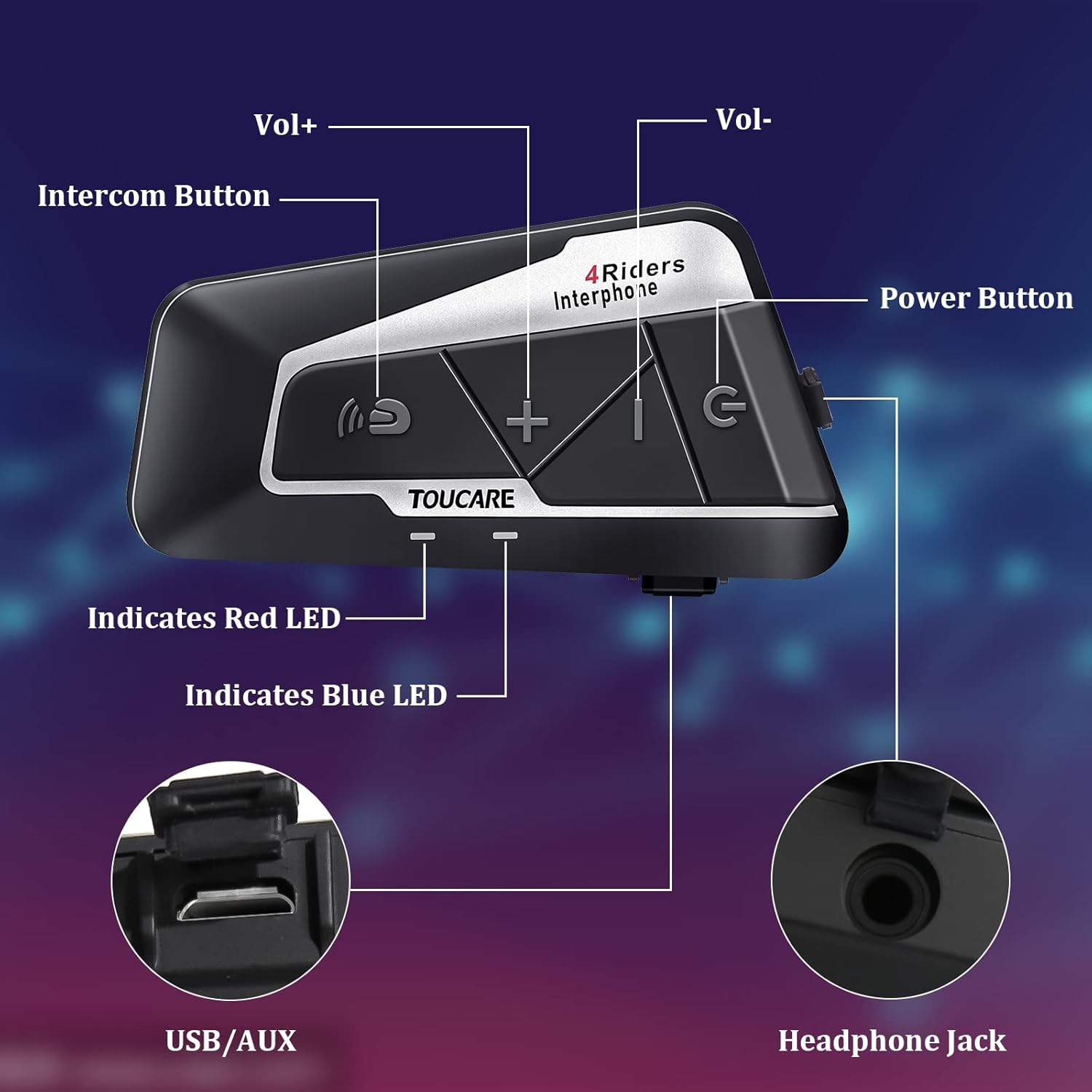
Image: Detailed diagram of the T9S unit, highlighting the location and labels of each button and port.
Power On/Off Button (G)
- Увімкнення/вимкнення живлення: Натисніть і утримуйте, щоб увімкнути або вимкнути пристрій.
- Paired Mobile Phone: Short press to connect/disconnect with a paired mobile phone.
- Підказка живлення: Short press to hear battery level prompt.
- Hang up Bluetooth Intercom: Short press during an intercom call to end it.
- Відтворення музики/пауза: Коротке натискання для відтворення або призупинення музики.
- Call Answering/Third Party Answer/End/Reject: Керування телефонними дзвінками.
Bluetooth Intercom Button (Intercom Icon)
- Гучність +: Коротке натискання для збільшення гучності.
- Остання пісня: Тривале натискання для переходу до попередньої пісні.
- FM Turn Up: Short press during FM mode to tune up.
- FM Turn On/Off: Long press to turn FM radio on or off.
- Повторний набір останнього номера: Double press to redial the last dialed number.
Volume - Button (-)
- Об'єм -: Коротко натисніть, щоб зменшити гучність.
- Наступна пісня: Натисніть і утримуйте, щоб перейти до наступної пісні.
- FM Turn Down: Short press during FM mode to tune down.
- FM Turn On/Off: Long press to turn FM radio on or off.
- Голосовий набір: Double press to activate voice dialing (if supported by your phone).

Image: The T9S features ultra-large buttons, designed for easy operation even while wearing gloves.
Керівництво по установці
Фіксований спосіб встановлення
Follow these steps to securely install the T9S intercom unit on your helmet:
- Знайдіть та очистіть: Identify a suitable flat area on the left side of your helmet for mounting. Ensure the surface is clean and dry.
- Підготуйте клей: Peel off the protective film from the 3M adhesive on the back of the mounting bracket.
- Застосуйте тиск: Firmly press the mounting bracket onto the chosen location on your helmet. Apply consistent pressure for several seconds to ensure a strong bond.
- Безпечний підрозділ: Slide the T9S intercom unit onto the mounted bracket until it clicks securely into place.
- Встановлення динаміків та мікрофона: Route the speaker and microphone wires inside the helmet lining. Position the speakers inside the ear pockets and the microphone near your mouth for optimal audio.
Інструкція з експлуатації
Створення пари з мобільним телефоном
- Ensure the T9S is powered off.
- Press and hold the Power On/Off button until the LED indicator flashes red and blue alternately, indicating pairing mode.
- On your mobile phone, enable Bluetooth and search for new devices. Select "TOUCARE T9S" from the list.
- Once paired, the LED will flash blue slowly.
Initiating Intercom Communication
- Ensure all T9S units are powered on and within range.
- To initiate a group intercom, short press the Bluetooth Intercom Button on your unit. The units will attempt to connect.
- To end an intercom call, short press the Power On/Off button.
Відтворення музики
- Відтворення/пауза: Коротко натисніть кнопку увімкнення/вимкнення живлення.
- Наступна пісня: Тривале натискання кнопки гучності -.
- Попередня пісня: Long press the Bluetooth Intercom button.
- Регулювання гучності: Короткочасно натисніть кнопки «Гучність +» або «Гучність -».
FM-радіо
- Увімкнути/вимкнути: Long press either the Bluetooth Intercom button or the Volume - button.
- Налаштуй: Short press the Bluetooth Intercom button.
- Налаштувати: Коротко натисніть кнопку гучності -.
Відповідь/завершення дзвінків
- Відповісти на дзвінок: Short press the Power On/Off button when a call comes in.
- Завершити виклик: Короткочасно натисніть кнопку ввімкнення/вимкнення живлення під час розмови.
- Відхилити виклик: Long press the Power On/Off button when a call comes in.
- Голосовий набір: Double press the Volume - button (requires phone support).
- Повторний набір останнього номера: Double press the Bluetooth Intercom button.
Технічні характеристики
| Особливість | Специфікація |
|---|---|
| Версія Bluetooth | 5.0 |
| Bluetooth Profiles Підтримується | HSP, HFP, A2DP, AVRCP, AGHSP |
| Години роботи | 15 години |
| Час очікування | 350 години |
| Час зарядки | 3 години |
| Тип батареї | Rechargeable Lithium Battery, 800mAh, 3.7V |
| Розміри | 89 x 46 x 30 мм |
| вага | 85г |
| Контроль шуму | Active Noise Cancellation (DSP & CVC) |
| Рівень водонепроникності | IP67 |
| Технологія підключення | Бездротовий |
| матеріал | гумовий |
| Тип управління | Voice Control (via phone), Button Control |
Технічне обслуговування
To ensure the longevity and optimal performance of your TOUCARE T9S intercom, follow these maintenance guidelines:
- Прибирання: Протріть пристрій м'якою гумкою, damp тканина. Не використовуйте агресивні хімікати, розчинники для чищення або сильні миючі засоби.
- Зберігання: Зберігайте пристрій у прохолодному, сухому місці, подалі від прямих сонячних променів та екстремальних температур, коли він не використовується.
- Догляд за акумулятором: For long-term storage, charge the battery to about 50% every three months to prevent deep discharge and extend battery life.
- Вплив води: Although IP67 rated, avoid prolonged submersion. Ensure charging port is dry before charging.
- Управління кабелем: Обережно поводьтеся з кабелями та роз'ємами, щоб запобігти пошкодженню.
Усунення несправностей
If you encounter issues with your T9S intercom, try the following solutions:
Немає живлення
- Перевірте батарею: Ensure the unit is fully charged. Connect it to a power source and check if the charging indicator lights up.
- Скинути: If unresponsive, try holding the Power On/Off button for an extended period (e.g., 10-15 seconds) to force a reset.
Cannot Pair with Mobile Phone/Other Intercoms
- Режим сполучення: Ensure the T9S is in pairing mode (LED flashing red and blue alternately).
- Видимість пристрою: Make sure Bluetooth is enabled on your phone/other intercoms and they are discoverable.
- Очистити історію сполучення: On your phone, forget the T9S device and try pairing again. For intercoms, consult the manual for clearing pairing history if available.
- Відстань: Ensure devices are within close proximity (e.g., 1 meter) during pairing.
Poor Audio Quality/No Sound
- обсяг: Check if the volume is turned up on both the T9S and the connected device (phone/intercom).
- Розташування мікрофона: Ensure the microphone is correctly positioned near your mouth and not obstructed.
- Підключення динаміка: Verify that the speakers are securely plugged into the headphone jack.
- Перешкоди: Відійдіть подалі від джерел сильних електромагнітних перешкод.
- Прошивка: Перевірте виробника website for any available firmware updates that might improve audio performance.
Гарантія та підтримка
For warranty information, technical support, or service inquiries, please refer to the warranty card included with your product or visit the official TOUCARE webсайт. Зберігайте чек про покупку як підтвердження покупки для гарантійних претензій.
For further assistance, you may also contact TOUCARE customer service through the contact information provided on their official channels.


