1. Вступ
The Sony Airpeak S1 is a professional drone designed for advanced aerial photography and videography. It supports Sony Alpha series mirrorless cameras and the FX3 full-frame cinema camera, enabling high-quality content creation. This manual provides essential information for the safe and effective operation, setup, maintenance, and troubleshooting of your Airpeak S1 drone.
2. Вміст упаковки
Перевірте, чи всі перелічені нижче предмети входять до вашої упаковки:
- Sony Airpeak S1 Professional Drone
- RCRVH1 Remote Controller
- 4 x PPL1785 Propellers (2x CW, 2x CCW)
- 2 x LBPHS1 Flight Batteries
- LBGH1 Battery Charger
- Шасі
- Калібрувальна дошка
- Power Cable for Aircraft to Gimbal
- Control Cable for Aircraft to Gimbal
- 2 x USB Type-C Cables (one for Aircraft to Gimbal, one for general use)
- Micro-USB Cable (for Gimbal to Camera)

Image: The Sony Airpeak S1 drone with its remote controller, batteries, charger, propellers, landing gear, calibration board, and various cables, as included in the package.
3. Продукт закінчивсяview
The Airpeak S1 features a robust design with a lightweight frame and 17-inch propellers, powered by high-performance brushless motors. Its advanced flight control system integrates multiple sensors for precise navigation and stability.

Image: The Sony Airpeak S1 drone fully assembled with its landing gear extended, ready for flight.

Зображення: Нижня сторона view of the Sony Airpeak S1 drone, showing its central body and folded arms.

Зображення: Крупний план view of the drone's vision sensing system, highlighting the integrated cameras and sensors.
4. Налаштування
4.1 Заряджання акумуляторів
Use the provided LBGH1 Battery Charger to charge the LBPHS1 Flight Batteries. Connect the charger to a power outlet and insert the batteries. The charging indicator will show the battery status. Ensure batteries are fully charged before each flight.

Image: The LBPHS1 flight battery and LBGH1 battery charger, along with their power cables.
4.2 Кріплення пропелерів
Attach the PPL1785 propellers to the motor mounts. The Airpeak S1 uses a quick-release mechanism for easy installation and removal. Ensure each propeller is securely locked into place before flight. Match CW (clockwise) and CCW (counter-clockwise) propellers to their respective motors as indicated on the drone.

Image: Four PPL1785 propellers, individually packaged, ready for installation on the drone.
4.3 Installing Landing Gear
Attach the retractable landing gear to the designated slots on the drone's frame. Ensure they are firmly secured. The retractable design allows for an unobstructed camera field of view під час польоту.

Image: The two components of the retractable landing gear and the calibration board.
4.4 Gimbal and Camera Installation
The Airpeak S1 requires an S1 gimbal (not included) to mount compatible cameras such as Sony Alpha series mirrorless cameras or the FX3 full-frame cinema camera. Follow the gimbal manufacturer's instructions for installation. Use the provided Power Cable, Control Cable, USB Type-C Cable, and Micro-USB Cable to connect the aircraft to the gimbal and the gimbal to the camera as appropriate.
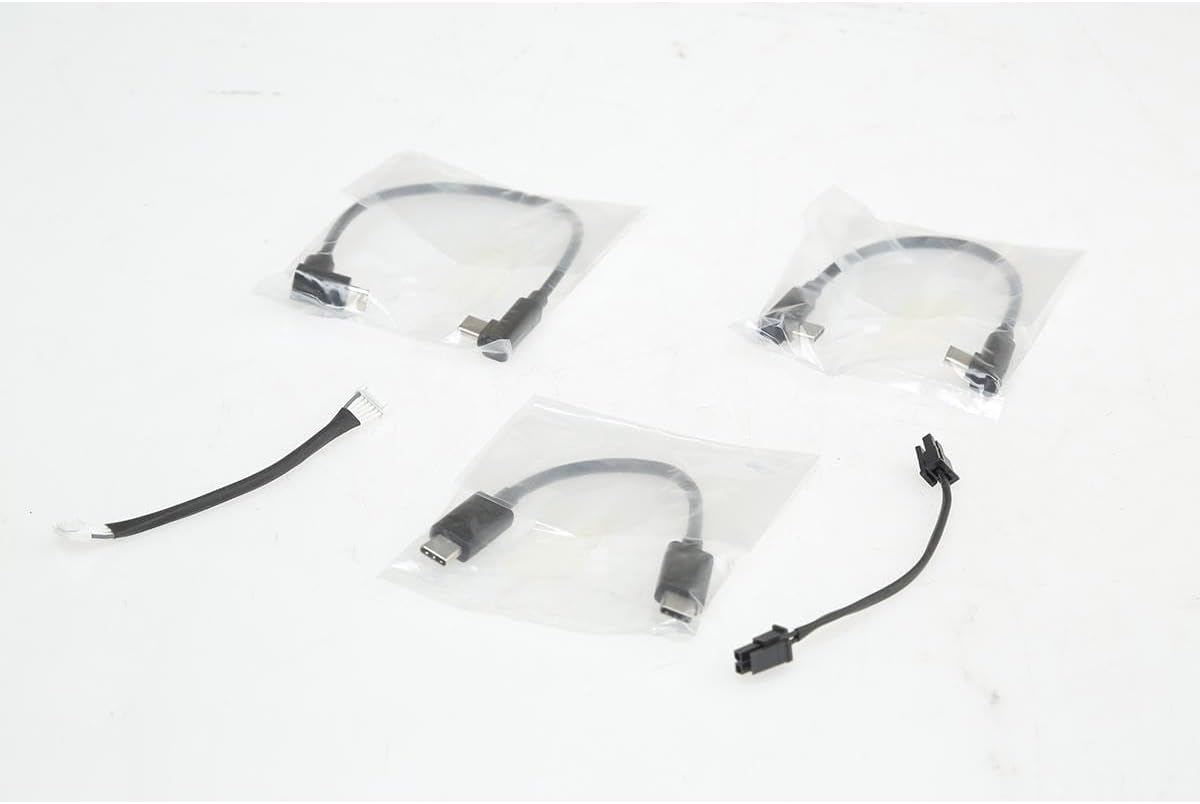
Image: A selection of connection cables, including USB Type-C and Micro-USB, used for connecting the drone, gimbal, and camera.
4.5 Налаштування пульта дистанційного керування
The RCRVH1 Remote Controller provides real-time control. Insert your mobile device (up to 7 inches) into the holder. The controller features twin Futaba-designed control sticks and customizable buttons. An HDMI port is available for external video output to an optional monitor.

Image: The RCRVH1 remote controller with its mobile device holder extended, alongside a flight battery.
5. Операція
5.1 Pre-Flight Checks (Self-Diagnostics)
Before motor startup, the Airpeak S1 automatically performs a full system check. This self-diagnostic process identifies potential issues and may restrict takeoff if severe problems are detected. Monitor any alerts displayed.
5.2 Режими польоту
- Стандартний режим: Ensures all sensors and obstacle detection systems are active for general flight.
- Velocity Mode: Reduces the effects of wind on hovering, turning, and maneuvering, providing smoother control in challenging conditions.
- On Course Function: Enables pilots to accurately recreate circular flight paths for consistent shots.
- Налаштування: Maximum speed, angles, acceleration rates, and other parameters can be adjusted in all flight modes to suit specific operational needs.
5.3 Flight Control Systems
The Airpeak S1's flight control system and Electronic Speed Control (ESC) integrate propulsion with various sensing metrics, including Inertial Measurement Unit (IMU), direction, barometric pressure, and infrared ranging. This ensures stable and precise flight performance.
5.4 Obstacle Avoidance (Vision Sensing System)
Equipped with five stereo cameras (front, back, left, right, bottom) and two IR range sensors, the S1 accurately determines its spatial position and orientation. This system facilitates automatic obstacle avoidance, allowing the drone to decelerate or stop if an obstacle is detected. Obstacle braking can also be manually triggered.
5.5 Automated Flight Planning (Airpeak Base)
Airpeak Base is a web-based application for comprehensive drone project management. It allows for automated flight planning and flight log storage. Key features include:
- Mission Flight Mode: Create automated flight plans by setting the drone's speed, position (latitude, longitude, altitude), gimbal direction, and timing for image/video capture along a timeline. These plans can be saved and repeated.
- Repeat Flight Mode: Recreates past flight paths from flight logs, including gimbal and camera movements, for consistent shot replication.
- Review equipment status, usage logs, download flight logs, and set up error warnings and maintenance reminders.
5.6 Mobile App Control (Airpeak Flight)
The Airpeak Flight mobile app (for Apple iPhone or iPad with iOS/iPad OS14 or higher) provides aircraft, remote, camera, and gimbal control. During flight, it displays telemetry such as flight distance and battery usage. It also allows for the execution of automated flight plans created in Airpeak Base's Mission Flight mode, while retaining manual control over the gimbal and camera.
6. Функції безпеки
6.1 Automatic Return to Home (RTH)
The Return to Home (RTH) feature automatically guides the drone back to its takeoff point if the battery level becomes critically low or the remote controller signal is lost. The aircraft intelligently calculates an alternate route if obstacles are detected in a direct path. RTH can also be manually activated by the pilot.
7. Технічне обслуговування
Regular maintenance ensures the longevity and safe operation of your Airpeak S1 drone.
- Вібратори: Inspect propellers for cracks, bends, or damage before each flight. Replace damaged propellers immediately.
- Акумулятори: Store batteries in a cool, dry place. Avoid overcharging or fully discharging. Follow battery safety guidelines.
- Прибирання: Gently clean the drone's body, motors, and vision sensors with a soft, dry cloth. Avoid using harsh chemicals.
- Оновлення прошивки: Regularly check for and install firmware updates for the drone and remote controller to ensure optimal performance and access to new features.
8. Вирішення проблем
If you encounter issues with your Airpeak S1, refer to the following common troubleshooting steps:
- Дрон не вмикається: Ensure batteries are fully charged and correctly inserted. Check for any visible damage to the battery or drone power contacts.
- Втрата сигналу: Ensure the remote controller is fully charged and within operational range. Avoid areas with strong electromagnetic interference.
- Obstacle detection warnings: If warnings persist in clear environments, ensure vision sensors are clean and unobstructed. Perform a calibration if necessary using the provided calibration board.
- Нестабільний політ: Check propellers for damage or incorrect installation. Ensure all pre-flight self-diagnostics pass without error.
- Проблеми з підключенням до додатків: Verify your mobile device's operating system is compatible (iOS/iPad OS14 or higher) and that the Airpeak Flight app is updated to the latest version.
For persistent issues, consult the official Sony Airpeak support resources or contact customer service.
9. Технічні характеристики
| Особливість | Специфікація |
|---|---|
| Бренд | Pixel (Manufactured by Sony) |
| Назва моделі | ARSS1 |
| Max Speed (without payload) | 55.9 миль/год (25 м/с) |
| Прискорення (0-50 миль/год) | 3.5 секунди |
| Опір вітру | Up to 44.7 mph (20 m/s) |
| Максимальна кутова швидкість | 180°/с |
| Кут ставлення | До 55° |
| Flight Time (without payload) | До 22 хвилин |
| Flight Time (with payload) | Приблизно 12 хвилин |
| Vision Sensing System | 5 Stereo Cameras, 2 IR Range Sensors |
| Сумісність з камерою | Sony Alpha series mirrorless cameras, FX3 full-frame cinema camera (gimbal required, not included) |
| Тип батареї | Lithium Ion (LBP-HS1) |
| Remote Control Connectivity | Bluetooth |
| Сумісність мобільних додатків | Airpeak Flight (iOS/iPad OS14 or higher) |
| Включені компоненти | Drone, Remote Controller, 4 Propellers, 2 Batteries, Battery Charger, Landing Gear, Calibration Board, Various Cables |
10. Гарантія та підтримка
The Sony Airpeak S1 Professional Drone comes with a Limited 1-Year Warranty. Please retain your proof of purchase for warranty claims.
Additional support and functionality are available through subscription services:
- Airpeak Plus: A paid subscription required to unlock full Airpeak Base functionality, including AirMap and Geofencing features.
- Airpeak Protect Plan: An optional plan (additional charges apply) that provides coverage for drone replacement in the event of accidental damage or malfunction.
For technical assistance, product information, or warranty service, please refer to the official Sony Airpeak support webсайту або зв’яжіться зі своїм відділом обслуговування клієнтів.


