1. Продукт закінчивсяview
The AIYIMA DAC-A5pro is an upgraded Digital-to-Analog Converter (DAC) and headphone amplifier designed to enhance your audio experience. It features multiple input options including Optical, Coaxial, and USB, allowing connection to various digital audio sources. Equipped with high-quality components like the CM6642, ESS9018K2M, OPA2134, NE5532, and TPA6120 chips, it supports high-resolution audio up to 24Bit/192kHz. This device is suitable for desktop audio setups, providing both line-out for external amplifiers/speakers and a dedicated headphone output.
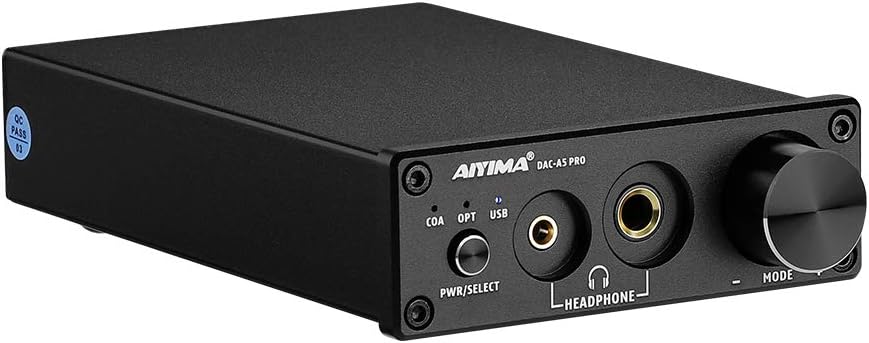
Зображення: спереду view of the AIYIMA DAC-A5pro, showcasing its compact black chassis, front panel controls, and headphone outputs.
2. Вміст упаковки
Будь ласка, перевірте упаковку на наявність наступних предметів:
- AIYIMA DAC-A5pro Decoder x 1
- Посібник користувача x 1
- Кабель ПК-USB x 1
- DC 12V Power Cable x 1

Image: Contents of the AIYIMA DAC-A5pro package, including the DAC unit, user manual, USB cable, and power adapter.
3. Елементи керування та інтерфейси
3.1 Передня панель

Зображення: Детальне view of the DAC-A5pro front panel, highlighting the power/select button, input indicators (COA, OPT, USB), 3.5mm and 6.35mm headphone outputs, and the volume/mode knob.
- PWR/SELECT Button: Long press to power on/off the device. Short press to cycle through input modes (Coaxial, Optical, USB).
- Input Indicators (COA, OPT, USB): Світлодіоди засвічуються, показуючи поточне вибране джерело вхідного сигналу.
- 3.5 мм вихід для навушників: For connecting headphones with a 3.5mm jack.
- 6.35 мм вихід для навушників: For connecting headphones with a 6.35mm (1/4 inch) jack.
- Ручка MODE: Rotate to adjust volume. Click to mute/unmute audio output.
3.2 Задня панель

Зображення: Детальне view of the DAC-A5pro rear panel, showing the PC-USB, Optical, Coaxial audio inputs, RCA L/R audio outputs, and DC 12V power input.
- Вхід ПК-USB: Connects to a computer via USB cable for digital audio transmission.
- ОПТИЧНИЙ Вхід: Connects to devices with an optical (Toslink) digital audio output.
- Коаксіальний вхід: Connects to devices with a coaxial digital audio output.
- RCA L/R Audio Output: Підключається до зовнішнього ampпідсилювач або активні динаміки за допомогою кабелів RCA.
- Вхідна потужність 12 В постійного струму: Connects to the provided 12V DC power adapter.
4. Інструкції з налаштування
Follow these steps to set up your AIYIMA DAC-A5pro:
- Підключення джерела аудіо: Choose your desired digital audio input (PC-USB, Optical, or Coaxial) and connect it to the corresponding input port on the rear panel of the DAC-A5pro. For PC-USB, use the provided USB cable to connect to your computer.
- Підключіть аудіовихід:
- Для зовнішнього AmpАктивні динаміки/динаміки: Connect RCA cables from the RCA L/R Audio Output on the rear panel of the DAC-A5pro to the audio input of your amplifier або активні колонки.
- Для навушників: Plug your headphones into either the 3.5mm or 6.35mm headphone output jack on the front panel. Note that connecting headphones will automatically mute the RCA line-out.
- Підключіть живлення: Connect the provided DC 12V power adapter to the DC 12V Power Input on the rear panel, then plug the adapter into a power outlet.
- Увімкнення: Long press the PWR/SELECT button on the front panel to turn on the DAC-A5pro.
- Виберіть вхід: Short press the PWR/SELECT button to cycle through the input modes (COA, OPT, USB) until the LED for your connected source illuminates.
- Computer Setup (for PC-USB input): Your computer should automatically recognize the DAC-A5pro as an audio device. If not, you may need to select it as the default playback device in your operating system's sound settings.
- TV Setup (for Optical/Coaxial input): If connecting to a TV, ensure the TV's audio output is set to Optical or Coaxial output in its system settings. Adjust the TV's internal volume to 0 if you experience no sound or distorted sound, as some TVs may not output audio if their internal speakers are active.

Image: The DAC-A5pro connected to a laptop via USB and to an external amplifier, demonstrating a typical setup for audio playback through speakers.

Image: A visual guide on how to configure TV settings for optical or coaxial audio output to ensure proper sound transmission to the DAC-A5pro.
Демонстраційне відео з налаштування
Video: A demonstration showing the AIYIMA DAC-A5pro connected to an AIYIMA A07 amplifier and speakers, illustrating the connection process and audio playback. The video also shows switching between PC-USB input and the priority of headphone output.
5. Інструкція з експлуатації
- Увімкнення/вимкнення живлення: Long press the PWR/SELECT button to turn the unit on or off.
- Вибір входу: Short press the PWR/SELECT button to switch between the available digital inputs: Coaxial (COA), Optical (OPT), and USB. The corresponding LED indicator will light up to show the active input.
- Регулювання гучності: Rotate the MODE knob clockwise to increase volume and counter-clockwise to decrease volume.
- Функція відключення звуку: Click the MODE knob to mute or unmute the audio output.
- Headphone Output Priority: When headphones are plugged into either the 3.5mm or 6.35mm jack, the RCA line-out will automatically be muted. Unplugging the headphones will restore audio to the RCA outputs.
6. Технічне обслуговування
- Зберігайте пристрій у сухому, добре провітрюваному місці, подалі від прямих сонячних променів, джерел тепла та вологи.
- Clean the exterior of the unit with a soft, dry cloth. Do not use liquid cleaners or abrasive materials.
- Уникайте блокування вентиляційних отворів, щоб запобігти перегріву.
- Не намагайтеся розбирати або ремонтувати пристрій самостійно. Зверніться до кваліфікованого сервісного персоналу для будь-якого ремонту.
7. Вирішення проблем
- Немає вихідного звуку:
- Ensure the DAC-A5pro is powered on and the correct input source is selected (COA, OPT, or USB indicator lit).
- Check all cable connections (input source, RCA to amplifier/speakers, power).
- Verify that the volume is not muted (click the MODE knob) and is turned up sufficiently.
- If using headphones, ensure they are fully plugged in. Remember that RCA outputs are muted when headphones are connected.
- For TV connections, confirm the TV's audio output settings are configured for optical or coaxial output and that the TV's internal volume is set to zero.
- For PC-USB, ensure the DAC-A5pro is selected as the default playback device in your computer's sound settings.
- Спотворений звук:
- Перевірте, чи не закріплені кабелі.
- Ensure the input source volume is not excessively high, causing clipping.
- Переконайтеся, що sample rate and bit depth settings on your source device match the capabilities of the DAC-A5pro (up to 24Bit/192kHz).
- Переривчастий звук:
- Перевірте кабелі на наявність пошкоджень.
- Ensure the power adapter is securely connected and providing stable power.
8. Технічні характеристики

Image: The DAC-A5pro with dimensions labeled, showing a length of 147mm (5.79in), width of 95mm (3.74in), and height of 30mm (1.18in).
- Бренд: АЙІМА
- модель: DAC A5 PRO
- Тип інтерфейсу: Коаксіальний, USB, Оптичний
- Максимальний об'єм подачіtage: 12 вольт (постійний струм)
- Кількість каналів: 1
- Розміри продукту: 5.85"L x 3.86"W (approximately 14.86cm L x 9.80cm W)
- Вага товару: 1.58 фунти (приблизно 0.72 кг)
- матеріал: Copper (referring to internal components or casing)
- Виробник: YIMA TECH
- ASIN: B09PMDN86V
- UPC: 782846056327
- Дата першої доступності: 12 січня 2022 р

Зображення: Крупний план views of the internal circuitry and components of the AIYIMA DAC-A5pro, highlighting the quality of the build and chips used.
9. Гарантія та підтримка
AIYIMA надає 2-year worry-free after-sales service for this product. For technical support, troubleshooting assistance, or warranty claims, please contact AIYIMA customer service through your purchase platform or the official AIYIMA webсайт. Будь ласка, збережіть підтвердження покупки для підтвердження гарантії.


