вступ
The AOLION Stereo Headset Adapter is designed to enhance your gaming experience on Xbox One controllers. This adapter allows you to connect most wired stereo gaming headsets with a 3.5mm audio jack (CTIA plug standard) directly to your Xbox controller, providing convenient control over game sound and voice chat.
Вміст упаковки
- 1 × AOLION Stereo Headset Adapter
- 1 × User's Manual
Продукт закінченийview
The adapter features intuitive controls for managing your audio experience during gameplay.

Малюнок 1: Спереду view of the headset adapter showing control buttons.
- Game Balance Button: Adjusts the balance towards game audio.
- Chat Balance Button: Adjusts the balance towards voice chat audio.
- Кнопка вимкнення мікрофона: Вмикає/вимикає мікрофон.
- Кнопка збільшення гучності: Increases overall volume.
- Кнопка зменшення гучності: Decreases overall volume.
- 3.5 мм аудіороз’єм: For connecting your stereo gaming headset.
- USB-роз'єм: For connecting to the Xbox controller.
Сумісність
This headset adapter is compatible with a wide range of Xbox One controllers and stereo gaming headsets:
- Xbox Controllers: Xbox One, Xbox One S, Xbox One X, Xbox Elite Wireless Controller Series 1, Xbox Elite Wireless Controller Series 2, Xbox Series S, and Xbox Series X Controllers.
- Гарнітури: Most wired stereo gaming headsets featuring a 3.5mm audio jack (using the CTIA plug standard).

Figure 2: The adapter is compatible with multiple Xbox controller models.

Figure 3: The adapter supports standard 3.5mm CTIA headsets.
Налаштування
Setting up your AOLION Stereo Headset Adapter is a simple plug-and-play process.
- Connect the Adapter to the Controller: Align the USB connector of the headset adapter with the expansion port at the bottom of your Xbox controller. Gently push until it clicks securely into place.
- Підключіть гарнітуру: Plug your wired stereo gaming headset's 3.5mm audio jack into the corresponding port on the bottom of the headset adapter.
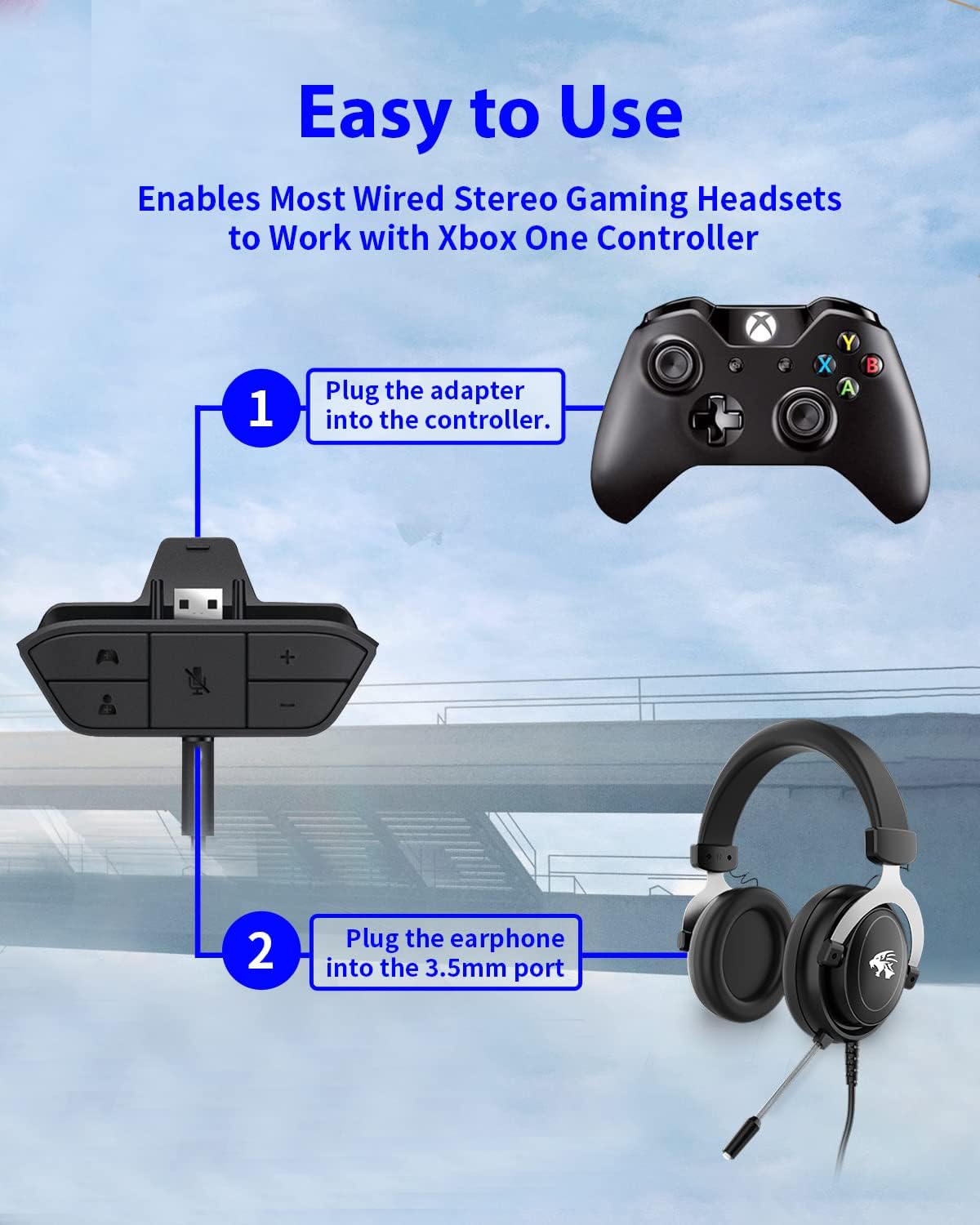
Figure 4: Step-by-step connection guide for the headset adapter.
Video 1: Demonstration of connecting the headset adapter to an Xbox controller.
Важлива примітка: For optimal performance and to resolve potential audio issues, it is recommended to update your Xbox controller's firmware after connecting the adapter. This can typically be done through your Xbox console's settings (Settings > Devices & connections > Accessories > Select your controller > ... > Controller settings > Update firmware).
Інструкція з експлуатації
Once connected, use the buttons on the adapter to control your audio:
- Збільшення/зменшення гучності (+/-): Press the '+' button to increase the overall volume of both game and chat audio. Press the '-' button to decrease it.
- Microphone Mute (Microphone Icon): Press this button to mute or unmute your microphone. An indicator light (if present) or on-screen notification may confirm the mute status.
- Game/Chat Balance (Controller Icon / Person Icon):
- Натисніть Значок контролера button to increase game audio volume and decrease chat audio volume.
- Натисніть Значок особи button to increase chat audio volume and decrease game audio volume.
Малюнок 5: Детально view of the adapter's control buttons.
Технічне обслуговування
To ensure the longevity and optimal performance of your headset adapter, follow these simple maintenance guidelines:
- Тримайте адаптер чистим та без пилу й сміття. Використовуйте м’яку суху тканину для очищення.
- Уникайте впливу екстремальних температур, вологості або прямих сонячних променів на адаптер.
- Не намагайтеся розбирати або ремонтувати адаптер самостійно, оскільки це призведе до анулювання гарантії.
- Зберігайте адаптер у безпечному місці, коли він не використовується, щоб запобігти фізичним пошкодженням.
Усунення несправностей
If you encounter issues with your AOLION Stereo Headset Adapter, please refer to the following common solutions:
| проблема | Можлива причина / рішення |
|---|---|
| No audio or poor audio quality (buzzing, peaking) |
|
| Мікрофон не працює |
|
| Game/Chat balance not working |
|
Якщо проблема не зникає після виконання цих кроків, зверніться до служби підтримки клієнтів.
Технічні характеристики
| Особливість | Деталь |
|---|---|
| Номер моделі | WGXB004005 |
| Бренд | AOLION |
| Розміри продукту (Д x Ш x В) | 3.15 x 1.57 x 0.79 дюйми (8 x 4 x 2 см) |
| Колір | чорний |
| Тип роз'єму | Auxiliary (3.5mm CTIA standard) |
| Сумісні пристрої | Xbox One, One S, One X, Elite 1, Elite 2, Series S, Series X Controllers; 3.5mm CTIA Stereo Headsets |
Гарантія та підтримка
AOLION stands behind the quality of its products. This Stereo Headset Adapter comes with:
- 60-денна гарантія повернення грошей: If you are not entirely satisfied with your purchase within 60 days, you may be eligible for a full refund.
- 24-місяць Гарантія: We provide a 24-month warranty against manufacturing defects from the date of purchase.
For any questions, concerns, or warranty claims, please contact us through Amazon. We are committed to responding to your inquiries within 12 hours to ensure your complete satisfaction.


