1. Вступ
This manual provides comprehensive instructions for the installation, operation, and maintenance of your COUGAR Archon 2 RGB Mid Tower Case. Please read this manual carefully before beginning installation to ensure proper setup and to maximize the performance and longevity of your product.

Рисунок 1.1: Кутовий view of the COUGAR Archon 2 RGB Mid Tower Case, showcasing the tempered glass side panel and front RGB fans.
2. Особливості продукту
The COUGAR Archon 2 RGB Mid Tower Case is designed for PC enthusiasts seeking a balance of aesthetics, airflow, and functionality. Key features include:
- Elegant Design with Tempered Glass: A sleek black finish combined with a tempered glass side panel allows for a clear view внутрішніх компонентів та RGB-підсвічування.
- Оптимізований потік повітря: Supports multiple fan configurations and includes three pre-installed 120mm ARGB fans at the front for efficient cooling.
- Широка сумісність: Accommodates Mini ITX, Micro ATX, and ATX motherboards.
- AmpВаріанти зберігання: Provides bays for both 3.5" HDDs and 2.5" SSDs.
- Зручний фронтальний вхід/вихід: Features USB 3.0 and USB 2.0 ports for easy peripheral connectivity.
- Керування освітленням RGB: Integrated ARGB fans offer customizable lighting effects.

Малюнок 2.1: Спереду view of the COUGAR Archon 2 RGB case, highlighting the three pre-installed ARGB fans.
3. Посібник із налаштування
Follow these steps to properly install your components into the COUGAR Archon 2 RGB case.
3.1. Контрольний список перед інсталяцією
- Ensure you have all necessary components: motherboard, CPU, RAM, GPU, power supply, storage drives, and appropriate tools (screwdriver, zip ties).
- Працюйте на чистій поверхні, вільній від статичної електрики. Розгляньте можливість використання антистатичного браслета.
3.2. Відкриття справи
- Carefully remove the tempered glass side panel by unscrewing the thumbscrews located at the rear of the case. Set the panel aside on a soft, flat surface to prevent scratches.
- Remove the opposite metal side panel by unscrewing its thumbscrews and sliding it backward.
3.3. Встановлення материнської плати
- Встановіть панель вводу/виводу (якщо вона не попередньо прикріплена до материнської плати) у задній отвір корпусу.
- Align your motherboard with the standoffs inside the case. Ensure all standoffs match the screw holes on your motherboard.
- Закріпіть материнську плату за допомогою наданих гвинтів. Не перетягуйте.
3.4. Встановлення блоку живлення (БЖ)
- Знайдіть місце для кріплення блоку живлення в нижній задній частині корпусу.
- Slide your PSU into the designated bay from the rear of the case, ensuring the fan faces downwards for optimal cooling (if the case has a bottom vent).
- Закріпіть блок живлення гвинтами ззаду корпусу.
3.5. Встановлення накопичувача
The Archon 2 RGB supports both 3.5" HDDs and 2.5" SSDs.
- For 3.5" HDDs: Locate the drive cage usually beneath the PSU shroud. Slide the HDD into the drive bay and secure it with screws.
- For 2.5" SSDs: Mount SSDs to the designated mounting points on the back of the motherboard tray or within the drive cage, securing them with screws.
3.6. Встановлення плати розширення (графічного процесора)
- Зніміть необхідні кришки слотів PCIe із задньої частини корпусу.
- Insert your graphics card or other expansion cards into the appropriate PCIe slot on the motherboard.
- Secure the card with screws to the case.
3.7. Cable Management and Front Panel Connections
Route all power and data cables neatly behind the motherboard tray. Connect the front panel I/O cables (USB, audio, power switch, reset switch, LED indicators) to their respective headers on the motherboard according to your motherboard manual.

Figure 3.1: Dimensions of the COUGAR Archon 2 RGB case, useful for planning component fit and space.
4. Інструкція з експлуатації
4.1. Увімкнення
Once all components are installed and cables are connected, replace both side panels. Connect your monitor, keyboard, mouse, and power cable to the PSU. Press the power button on the top panel of the case to start your system.
4.2. Керування RGB-підсвічуванням
The pre-installed ARGB fans are typically controlled via a dedicated button on the case's front I/O panel or through your motherboard's RGB software (if connected to an ARGB header). Refer to your motherboard manual for software-based control options.
5. Технічне обслуговування
Регулярне технічне обслуговування допомагає забезпечити оптимальну продуктивність та довговічність компонентів вашого ПК.
- Очищення від пилу: Періодично очищуйте пилові фільтри (якщо є) та внутрішні компоненти за допомогою стисненого повітря. Перед очищенням переконайтеся, що система вимкнена та відключена від мережі.
- Управління кабелем: Ensure cables are neatly routed to avoid obstructing airflow.
- Перевірка вентилятора: Check fans for dust buildup or obstructions that could impede their operation.
6. Вирішення проблем
Якщо у вас виникли проблеми, зверніться до наступних поширених кроків усунення несправностей:
- Система не вмикається:
- Check all power connections, including the PSU to the wall outlet, PSU to motherboard (24-pin and CPU 8-pin), and front panel power switch header.
- Переконайтеся, що перемикач блоку живлення знаходиться в положенні «УВІМК.».
- Вентилятори не обертаються / RGB не працює:
- Переконайтеся, що кабелі живлення вентиляторів надійно підключені до материнської плати або контролера вентиляторів.
- Check ARGB headers for proper connection to the motherboard or RGB controller.
- Ensure RGB software or case button is correctly configured.
- Немає виводу на дисплей:
- Confirm the monitor cable is connected to the graphics card (not the motherboard integrated graphics, unless no dedicated GPU is present).
- Перевстановіть відеокарту та модулі оперативної пам'яті.
7. Технічні характеристики
Detailed specifications for the COUGAR Archon 2 RGB Mid Tower Case:
| Особливість | Деталь |
|---|---|
| Назва моделі | ARCHON 2 RGB |
| Тип корпусу | Середній вежі |
| Сумісність материнської плати | Міні-ITX, мікро-ATX, ATX |
| Розміри (ДxШxВ) | 14.96 x 8.27 x 18.5 дюйма (380 x 210 x 470 мм) |
| Вага товару | 11.37 фунта (5.17 кг) |
| матеріал | Метал, Загартоване скло |
| Колір | чорний |
| Попередньо встановлені вентилятори | 3 x 120mm ARGB fans (Front) |
| Опора вентилятора (передня) | 3 х 120 мм або 2 х 140 мм |
| Порти введення/виведення | 1 x USB 2.0, 2 x USB 3.0, Audio In/Out |
| Тип кріплення блоку живлення | Нижнє кріплення |
| Спосіб охолодження | повітря |
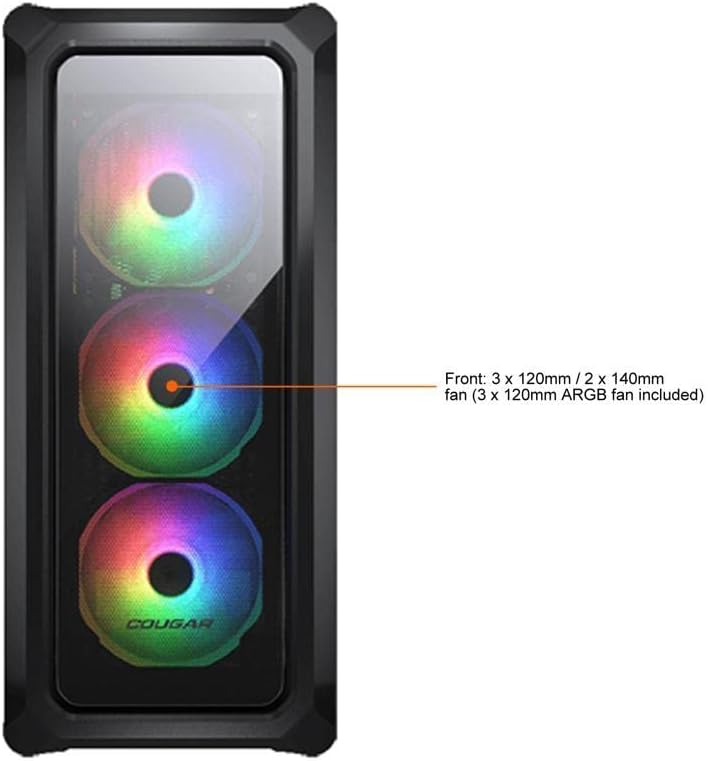
Figure 7.1: Front panel fan configuration and size options for the COUGAR Archon 2 RGB case.
8. Гарантія та підтримка
For warranty information and technical support, please refer to the official COUGAR webсайт або зверніться до їхнього відділу обслуговування клієнтів. Зберігайте чек про покупку для гарантійних випадків.
COUGAR Official Webсайт: cougargaming.com


