вступ
The MIFA WildBox is a portable Bluetooth speaker designed for robust outdoor and indoor use. It features powerful audio output, dynamic LED lighting, and a durable waterproof and dustproof design. This manual provides essential information for setting up, operating, maintaining, and troubleshooting your MIFA WildBox speaker to ensure optimal performance and longevity.

Figure 1: MIFA WildBox Bluetooth Speaker showcasing its waterproof design and power bank feature.
Що в коробці
Upon unboxing your MIFA WildBox, please ensure all the following items are present:
- 1 x MIFA WildBox Bluetooth Speaker
- 1 x USB-C зарядний кабель
- 1 x User Guide Manual
особливості
- Потужний аудіовихід: 60W total output with 2x20W RMS woofers and 2x10W RMS tweeters for loud sound and deep bass.
- Водонепроникність і пилонепроникність IP67: Designed to withstand immersion in water up to 1 meter for 30 minutes and fully protected against dust ingress. The speaker is also floatable.
- Динамічні світлодіодні ліхтарі: Features 16 million dynamic LED lights with multiple modes to enhance your listening experience.
- TWS & Partyadd Function: Allows pairing of two MIFA WildBox speakers for true stereo sound, or connecting over 100 MIFA WildBox speakers for a synchronized party experience.
- Універсальний підключення: Supports Bluetooth 5.3 for stable wireless connection up to 197ft, Aux input, and Micro SD card slot for various audio sources.
- Вбудований Power Bank: Equipped with a 10000mAh battery that can charge external devices via its USB-A output port.
- Тривалий час відтворення: До 24 годин безперервного відтворення музики на одному заряді.
- Портативний дизайн: Integrated carrying handle for easy transport.

Малюнок 2: Закінченоview of MIFA WildBox key features.
Налаштування
1. Початкове заряджання
Before first use, fully charge your MIFA WildBox speaker. Connect the provided USB-C cable to the speaker's USB-C input port (labeled 'IN') and the other end to a compatible USB power adapter (not included). The charging indicator will show the charging status. A full charge takes approximately 4 hours.
2. Увімкнення/вимкнення живлення
- Щоб увімкнути: Натисніть і утримуйте Кнопка живлення (
 ) for 2-3 seconds until you hear an audible prompt and the LED lights activate.
 - Щоб вимкнути: Натисніть і утримуйте Кнопка живлення again for 2-3 seconds.
3. Підключення Bluetooth
- Power on the MIFA WildBox speaker. It will automatically enter Bluetooth pairing mode, indicated by a flashing blue LED.
- На мобільному пристрої (смартфоні, планшеті тощо) увімкніть Bluetooth та виконайте пошук доступних пристроїв.
- Select "MIFA WildBox" from the list of devices.
- Once successfully paired, the blue LED will remain solid, and you will hear a confirmation tone.
4. Сполучення TWS (справжнє бездротове стерео)
To pair two MIFA WildBox speakers for a stereo experience:
- Ensure both MIFA WildBox speakers are powered on and not connected to any Bluetooth device.
- На одному динаміку натисніть Кнопка TWS (
 ). It will search for the second speaker.
 - The speakers will automatically connect to each other. Once connected, the main speaker's LED will flash blue (ready to pair with a device), and the secondary speaker's LED will be solid blue.
- Connect your mobile device to the main speaker via Bluetooth as described in step 3. Audio will now play in stereo through both speakers.

Figure 3: Multiple speakers connected via Partyadd for an immersive audio experience.
5. Aux Input & Micro SD Card Usage
The MIFA WildBox supports audio playback via a 3.5mm AUX cable and a Micro SD card.
- Aux Input: Connect a 3.5mm audio cable (not included) from your audio source to the AUX-in port on the speaker. The speaker will automatically switch to AUX mode.
- Micro SD Card: Insert a Micro SD card (up to 32GB, not included) with your music fileу гніздо для карти Micro SD. Динамік автоматично перейде в режим Micro SD та розпочне відтворення.

Figure 4: Connectivity options including Bluetooth, Micro SD, and AUX.
Інструкція з експлуатації
1. Функції кнопок
The control panel on top of the speaker provides easy access to various functions:
- Кнопка живлення (): Натисніть і утримуйте, щоб увімкнути/вимкнути живлення.
- Кнопка режиму (M): Short press to switch between Bluetooth, AUX, and Micro SD card modes.
- Зменшення гучності (-): Коротко натисніть, щоб зменшити гучність.
- Кнопка відтворення/паузи (
 ): Short press to play or pause music. Long press for next track.
 - Збільшення гучності (+): Коротке натискання для збільшення гучності.
- Кнопка світла (
 ): Short press to cycle through different LED light modes. Long press to turn lights off/on.
 - Басова кнопка: Press to activate or deactivate the extra bass effect.
- TWS Button (): Press to initiate TWS or Partyadd pairing.
2. Режими світлодіодного освітлення
The MIFA WildBox features 6 distinct RGB light modes. Use the Light button to switch between them or turn the lights off completely.
3. Функція зовнішнього зарядного пристрою
To use the speaker as a power bank:
- Open the rubber flap on the back of the speaker to access the ports.
- Connect your device's charging cable to the USB-A output port (labeled 'OUT') on the MIFA WildBox.
- Зарядка почнеться автоматично.

Figure 5: The MIFA WildBox functioning as a power bank.
Технічне обслуговування
- Waterproof & Dustproof Care: Ensure the rubber flap covering the ports is securely closed before exposing the speaker to water or dust. While IP67 rated, avoid prolonged submersion or exposure to high-pressure water jets.
- Прибирання: Використовуйте м'який, damp тканиною для очищення зовнішньої поверхні динаміка. Не використовуйте агресивні хімікати або абразивні засоби для чищення.
- Зберігання: Зберігайте динамік у прохолодному, сухому місці, подалі від прямих сонячних променів та екстремальних температур, якщо він не використовується протягом тривалого часу.
- Догляд за акумулятором: Щоб продовжити термін служби акумулятора, уникайте частого повного розряджання динаміка. Регулярно заряджайте його, навіть якщо він не використовується постійно.

Figure 6: The MIFA WildBox is designed to be waterproof and floatable.
Усунення несправностей
| проблема | Можлива причина | Рішення |
|---|---|---|
| Динамік не вмикається. | Низький заряд батареї. | Charge the speaker fully (approx. 4 hours). |
| Не вдається підключитися через Bluetooth. | Speaker is already connected to another device or out of range. | Ensure the speaker is in pairing mode (flashing blue LED). Disconnect from other devices. Move speaker closer to your device. |
| Немає звуку з динаміка. | Volume too low, incorrect mode, or audio source issue. | Increase speaker and device volume. Check if the correct input mode (Bluetooth, AUX, SD card) is selected. Ensure audio source is playing. |
| Не вдалося підключити TWS. | Гучномовці розташовані занадто далеко один від одного або вже підключені до інших пристроїв. | Ensure both speakers are disconnected from other devices. Place them close to each other during TWS pairing. |
| Світлодіодні лампи не працюють. | Світло вимкнено або працює у статичному режимі. | Short press the Light button to cycle modes. Long press to turn lights on/off. |
Технічні характеристики
| Особливість | Деталь |
|---|---|
| Назва моделі | MIFA WildBox |
| Тип динаміка | Outdoor / Portable Bluetooth Speaker |
| Максимальна вихідна потужність динаміка | 60 Вт |
| Діаметр НЧ-динаміка | 2.75 Inches (70mm) x 2 |
| Діаметр твітера | 0.79 Inches (20mm) x 2 |
| Пасивні радіатори | 85mm x 2 |
| Технологія підключення | Bluetooth 5.3, Auxiliary (3.5mm), USB (for power bank) |
| Дальність бездротового зв'язку | До 197 футів (60 метрів) |
| Рівень водонепроникності | IP67 (водонепроникний та пилонепроникний) |
| Ємність акумулятора | 10000 мАг |
| Час відтворення | До 24 годин |
| Час зарядки | прибл. 4 годин |
| Розміри продукту (Д x Ш x В) | 12 см x 7 см x 5 см |
| Вага товару | 4 фунта |
| матеріал | пластик |
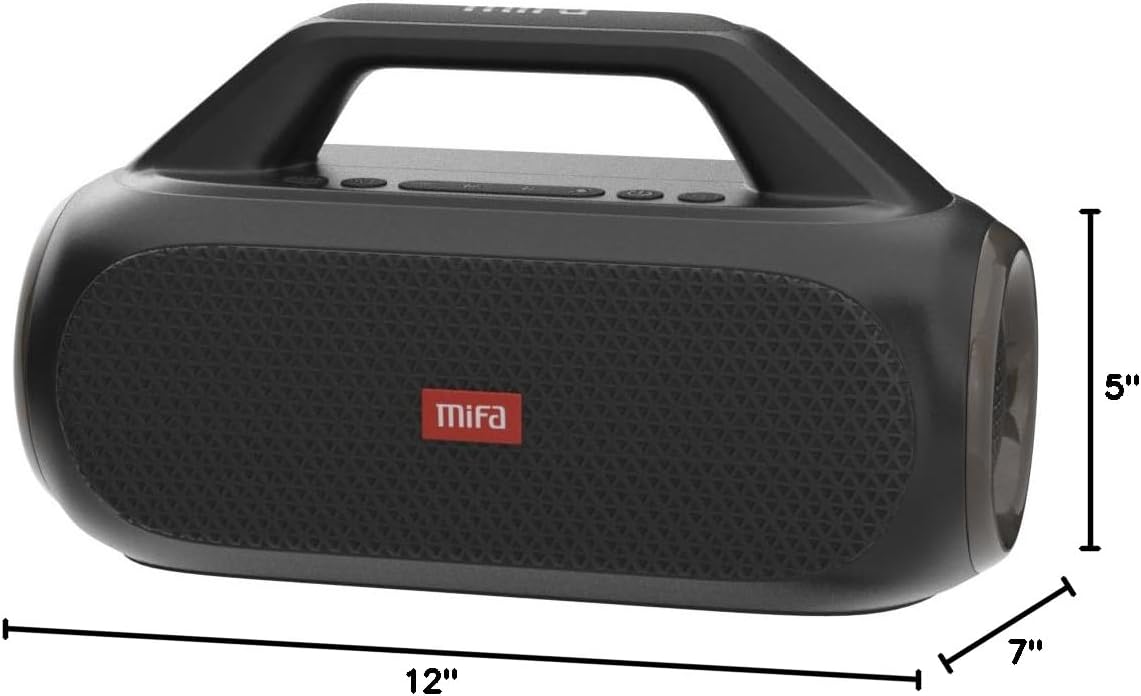
Figure 7: MIFA WildBox dimensions.
Гарантія та підтримка
The MIFA WildBox Bluetooth Speaker comes with a limited warranty. For specific details regarding warranty coverage, duration, and terms, please refer to the warranty information provided in the packaging or contact MIFA customer support directly.
For technical assistance, troubleshooting beyond this manual, or warranty claims, please visit the official MIFA website or contact their customer service team. Contact information can typically be found on the product packaging or the MIFA brand store on Amazon.


