Продукт закінченийview
The One For All URC 3661 is a universal remote control designed to consolidate multiple remote controls into a single, easy-to-use device. It is compatible with a wide range of electronic devices, including televisions, set-top boxes, audio systems, DVD players, and Blu-ray players. This remote features backlit keys for improved visibility in low-light conditions and includes a learning function to copy commands from original remotes.

Рисунок 1: Кутовий view of the URC 3661 Universal Remote Control.
Налаштування
1. Встановлення батареї
The URC 3661 remote control requires two (2) AA batteries for operation. Follow these steps to install them:
- Знайдіть батарейний відсік на задній панелі пульта дистанційного керування.
- Посуньте кришку батарейного відсіку вниз і зніміть її.
- Вставте дві батарейки типу АА, переконавшись, що позитивний (+) та негативний (-) полюси батарейок збігаються з позначками всередині відсіку.
- Встановіть кришку батарейного блоку, зсунувши її на місце до клацання.
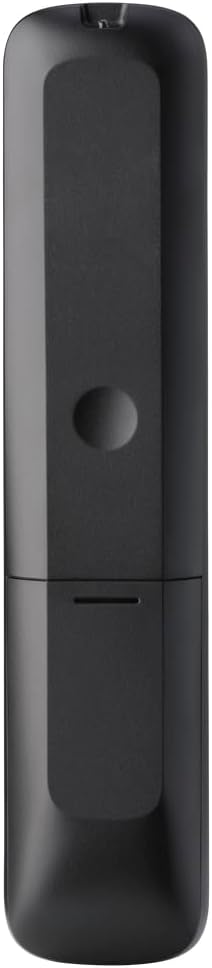
Малюнок 2: Задня частина view of the remote, highlighting the battery compartment.
2. Програмування пульта дистанційного керування
The URC 3661 can be programmed using direct code entry, auto code search, or the learning function. It is recommended to try direct code entry first.
Прямий введення коду:
- Увімкніть пристрій, яким ви хочете керувати (наприклад, телевізор, DVD-програвач).
- Натисніть і утримуйте НАЛАШТУВАННЯ button until the LED light under the device key (e.g., TV, DVD) blinks twice and stays lit.
- Press the device key you want to program (e.g., TV). The LED will remain lit.
- Enter the 4-digit or 5-digit setup code for your brand and device. Refer to the code list provided with your remote or visit the One For All website for the most up-to-date codes.
- After entering the code, the LED will blink twice and turn off if the code is valid. If it blinks once and stays lit, the code is invalid; re-enter the code.
- Перевірте пульт дистанційного керування, натиснувши кнопку ПОТУЖНІСТЬ button. If the device turns off, try other functions like volume or channel. If it works, programming is complete. If not, try the next code for your brand or use the Auto Code Search.
Пошук автоматичного коду:
- Увімкніть пристрій, яким ви хочете керувати.
- Натисніть і утримуйте НАЛАШТУВАННЯ button until the LED blinks twice and stays lit.
- Press the device key you want to program.
- Направте пульт дистанційного керування на пристрій і натисніть ПОТУЖНІСТЬ кілька разів (приблизно кожні 3 секунди), доки пристрій не вимкнеться.
- Як тільки пристрій вимкнеться, негайно натисніть кнопку НАЛАШТУВАННЯ button to save the code. The LED will blink twice and turn off.
- Test the remote. If it doesn't work correctly, repeat the process.
Функція навчання:
The learning function allows the URC 3661 to copy functions directly from your original remote control, which is useful for commands not available via direct code entry or auto search.
- Place the URC 3661 and your original remote on a flat surface, facing each other, about 1-2 inches apart.
- Натисніть і утримуйте НАЛАШТУВАННЯ button until the LED blinks twice and stays lit.
- Press the button on the URC 3661 that you want to teach a function to (e.g., a specific input button). The LED will blink rapidly.
- Press and hold the corresponding button on your original remote control until the LED on the URC 3661 blinks twice, indicating successful learning.
- Повторіть для всіх потрібних кнопок.
- Щоб вийти з режиму навчання, натисніть кнопку НАЛАШТУВАННЯ button. The LED will blink twice and turn off.
Керування пультом дистанційного керування
The URC 3661 is designed for intuitive operation. Familiarize yourself with the button layout and their primary functions.

Малюнок 3: Спереду view of the URC 3661 with button layout.
Ключові функції:
- Device Keys (TV, STB, AUDIO, BLURAY, DVD, STREAM): Select the device you wish to control. The LED under the selected device key will illuminate.
- ПОТУЖНІСТЬ: Вмикає або вимикає вибраний пристрій.
- ГУЧНІСТЬ +/-: Регулює гучність.
- CH +/-: Змінює канали.
- Navigation Pad (UP, DOWN, LEFT, RIGHT, OK): Використовується для навігації та вибору елементів у меню.
- МЕНЮ: Opens the device's main menu.
- ПОСІБНИК: Відображає електронний телегід (якщо підтримується пристроєм).
- ІНФО: Відображає інформацію про поточну програму або вхідний сигнал.
- ГОЛОВНА: Returns to the device's home screen.
- ВИХІД: Exits menus or applications.
- Playback Controls (PLAY, PAUSE, STOP, REWIND, FAST FORWARD, SKIP): Керуйте відтворенням медіа.
- Цифрові клавіші (0-9): Для прямого введення каналу або числового введення.
- App Shortcut Keys (Netflix, Prime Video, YouTube): Прямий доступ до популярних потокових сервісів.
- Підсвічування: The keys are backlit for easy use in dark environments. The backlight activates automatically when a button is pressed.
Технічне обслуговування
Очищення пульта дистанційного керування:
To maintain the remote's appearance and functionality, clean it regularly:
- Використовуйте м’яку, суху тканину для протирання поверхні пульта дистанційного керування.
- Для стійкого бруду злегкаampПротріть тканину водою або м’яким неабразивним засобом для чищення. Уникайте надмірного зволоження.
- Do not use harsh chemicals, solvents, or abrasive cleaning agents, as these can damage the remote's finish or internal components.
Заміна батареї:
Replace batteries when the remote's performance degrades or the LED indicator blinks unusually. Refer to the "Battery Installation" section under Setup for detailed instructions.
Усунення несправностей
If you encounter issues with your URC 3661 remote control, try the following troubleshooting steps:
| проблема | Можлива причина | Рішення |
|---|---|---|
| Remote does not operate the device. | Вибрано неправильний пристрій. Батарейки низький заряд або неправильно вставлені. Incorrect code programmed. | Ensure the correct device key (TV, DVD, etc.) is pressed. Check battery orientation and replace if necessary. Re-program the remote using a different code or the Auto Code Search/Learning function. |
| Деякі кнопки не працюють. | Incomplete programming. Device does not support the function. | Use the Learning function to copy specific commands from your original remote. Verify if the original remote has that function. |
| LED blinks once and stays lit during code entry. | Invalid code entered. | Ensure you are entering the correct 4 or 5-digit code. Try another code from the list or use Auto Code Search. |
| Remote LED does not light up. | Розряджені батареї. | Замініть батарейки новими батарейками типу АА. |
For further assistance, visit the official One For All support webсайт або зверніться до вичерпного онлайн-посібника.
Технічні характеристики
| Особливість | Деталь |
|---|---|
| Номер моделі | УРК 3661 року |
| Бренд | Один за всіх |
| Розміри продукту | 0.39 x 0.39 x 0.39 дюймів |
| Вага товару | 6.7 унції |
| Потрібні батареї | 2 батарейки АА |
| Максимальна кількість підтримуваних пристроїв | До 6 XNUMX пристроїв |
| Сумісні пристрої | Television, Set-top Box, Audio, Blu-ray, DVD, Streaming devices |
| Особливість | Universal, Learning Function, Backlit Keys |

Figure 4: Product packaging indicating compatibility with up to 6 devices.
Гарантія та підтримка
Warranty information for the One For All URC 3661 Universal Remote Control is typically provided with your purchase documentation. Please refer to the warranty card or leaflet included in the product packaging for details regarding coverage, terms, and conditions.
For technical support, frequently asked questions, or to find the latest programming codes, please visit the official One For All webсайті. Контактну інформацію служби підтримки клієнтів також можна знайти на сайті виробника webсайті або в документації до вашого продукту.
One For All Official Webсайт: www.oneforall.com


