1. Вступ
This manual provides detailed instructions for the installation, configuration, operation, and maintenance of your Ruijie Reyee Wi-Fi 6 Ceiling Access Point, model RG-RAP2260(G). Please read this manual thoroughly before using the device to ensure proper setup and optimal performance.
2. Інформація про безпеку
- Джерело живлення: Use only the specified power adapter (DC 12V/1.5A) or a Power over Ethernet (PoE) source that complies with IEEE 802.3at/af standards.
- Середовище встановлення: Install the device in a dry, well-ventilated area, away from direct sunlight, heat sources, and strong electromagnetic fields.
- Монтаж: Ensure the device is securely mounted to a stable surface (ceiling or wall) to prevent accidental falls.
- Технічне обслуговування: Не відкривайте пристрій casing. Звертайтеся до кваліфікованого персоналу з усіх питань технічного обслуговування.
3. Вміст упаковки
Перевірте наявність усіх елементів в упаковці:
- 1 x Ruijie Reyee Wi-Fi 6 Ceiling Access Point (RG-RAP2260(G))
- Монтажний кронштейн
- Гвинти та настінні заглушки
- Короткий посібник (може бути включений окремо)
4. Продукт закінчивсяview
The Ruijie Reyee RG-RAP2260(G) is a high-performance Wi-Fi 6 (802.11ax) ceiling-mounted access point designed for robust wireless connectivity.
4.1 Спереду View
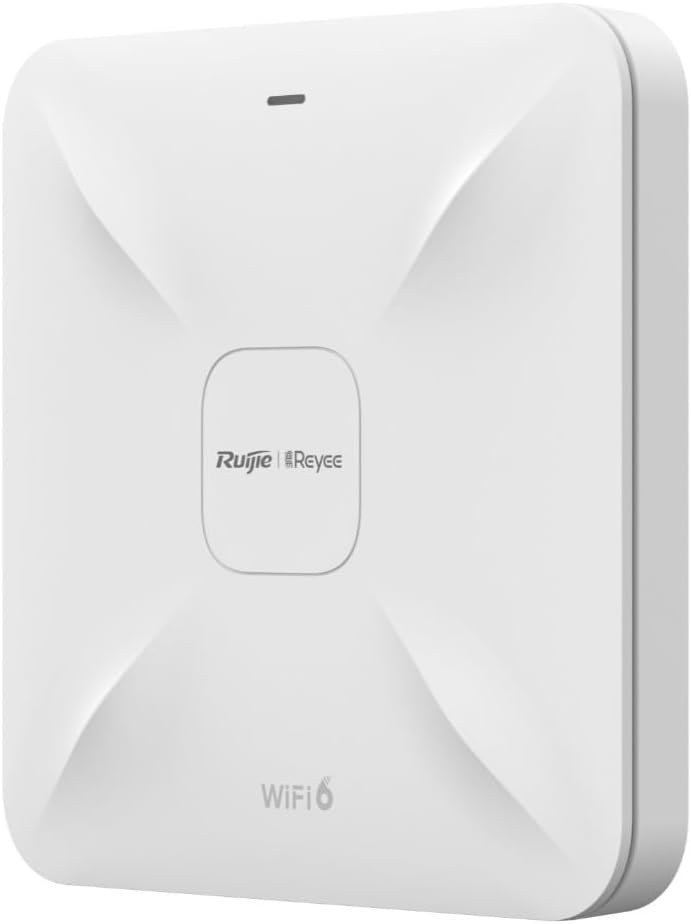
Опис зображення: На цьому зображенні зображено передню частину view of the Ruijie Reyee RG-RAP2260(G) access point. It is a square-shaped white device with a subtle X-pattern on its surface, featuring the 'Ruijie | Reyee' logo centrally and 'WiFi 6' text at the bottom. A small LED indicator is visible at the top edge.
4.2 Задня частина View і порти

Опис зображення: This image shows the rear panel of the Ruijie Reyee RG-RAP2260(G) access point. It features several ports and a reset button. From left to right, the ports are labeled 'RESET', 'LAN2', 'LAN1/PoE', and 'DC=12V'. There are also mounting points visible around the perimeter.
4.3 світлодіодні індикатори
The LED indicator on the front of the device provides status information:
- Світло -синій: Пристрій працює нормально.
- Блимає синім: Пристрій завантажується або виконує оновлення прошивки.
- Суцільний червоний: Device error or failure.
- Вимкнено: Пристрій вимкнено.
5. Налаштування
5.1 Монтаж точки доступу
- Виберіть місце розташування: Select a central location on a ceiling or wall for optimal Wi-Fi coverage. Avoid obstructions.
- Встановіть монтажний кронштейн: Use the provided screws and wall plugs to securely attach the mounting bracket to the chosen surface.
- Підключити точку доступу: Вирівняйте точку доступу з монтажним кронштейном і поверніть її за годинниковою стрілкою, доки вона не зафіксується на місці.
5.2 Живлення пристрою
The RG-RAP2260(G) can be powered in two ways:
- Живлення через Ethernet (PoE): Connect an Ethernet cable from a PoE-enabled switch or injector to the LAN1/PoE port on the access point. This provides both power and data connectivity.
- Адаптер живлення постійного струму: Connect a 12V/1.5A DC power adapter (sold separately) to the DC = 12V port. Then, connect an Ethernet cable from your network to either the LAN1/PoE or LAN2 port for data.
5.3 Початкова конфігурація
You can configure the access point using the Reyee Cloud App or a web браузер.
5.3.1 Using the Reyee Cloud App
- Download the Reyee Cloud App from your mobile app store.
- Register or log in to your Reyee Cloud account.
- Tap '+' to add a new device and follow the on-screen instructions to scan the QR code on the device or manually add it.
- Configure your Wi-Fi network name (SSID) and password.
5.3.2 Використання a Web Браузер
- Connect your computer to the access point's network (either directly via Ethernet or to its default Wi-Fi SSID, if broadcast).
- Відкрийте a web browser and enter the default IP address (refer to the Quick Start Guide or device label for the specific IP, commonly 192.168.1.1 or 192.168.120.1).
- Enter the default username and password (e.g., admin/admin or as specified on the device label).
- Follow the setup wizard to configure your network settings, including SSID, security type, and password.
6. Операційна
6.1 Підключення пристроїв до Wi-Fi
Once configured, your Wi-Fi network will be broadcast. On your wireless devices (smartphones, laptops, tablets):
- Go to Wi-Fi settings.
- Select your configured Wi-Fi network name (SSID).
- Введіть пароль Wi-Fi.
- Підключитися.
6.2 Гостьова мережа
The RG-RAP2260(G) supports a guest network feature. This allows you to provide internet access to guests without giving them access to your main network resources. This feature can be enabled and configured through the Reyee Cloud App or the web інтерфейс управління.
- Enable Guest Mode.
- Set a separate SSID and password for the guest network.
- Configure bandwidth limits or access restrictions if desired.
7. Технічне обслуговування
7.1 оновлень мікропрограми
Regularly updating the firmware ensures optimal performance, security, and access to new features. Firmware updates can typically be managed via the Reyee Cloud App or the web management interface. It is recommended to perform updates during off-peak hours.
7.2 Очищення
To clean the device, gently wipe the exterior with a soft, dry cloth. Do not use liquid cleaners or abrasive materials, as they may damage the casing або внутрішні компоненти.
7.3 Скидання до заводських налаштувань
To restore the access point to its factory default settings:
- Переконайтеся, що пристрій увімкнено.
- Знайдіть СКИДАННЯ button on the rear panel (refer to Section 4.2).
- Using a paperclip or a similar pointed object, press and hold the RESET button for approximately 5-10 seconds until the LED indicator changes.
- Відпустіть кнопку. Пристрій перезавантажиться із заводськими налаштуваннями.
8. Вирішення проблем
8.1 Немає живлення
- Check if the power adapter is securely connected to the DC=12V port and a power outlet, or if the PoE source is active and connected to the LAN1/PoE port.
- Перевірте справність розетки.
8.2 No Wi-Fi Signal
- Ensure the device is powered on and the LED indicator is solid blue.
- Check if the Ethernet cable is properly connected to the LAN1/PoE or LAN2 port and to your network.
- Verify Wi-Fi settings (SSID, password) in the configuration interface.
- Перезапустіть точку доступу.
8.3 Низька швидкість Wi-Fi
- Перевірте наявність перешкод від інших бездротових пристроїв або мереж.
- Ensure the access point is placed in an optimal location, free from obstructions.
- Перевірте швидкість вашого інтернет-провайдера.
- Update the access point's firmware to the latest version.
9. Технічні характеристики
| Особливість | Специфікація |
|---|---|
| Бренд | RUIJIE |
| Назва моделі | RG-RAP2260(G) |
| Стандартний Wi-Fi | 802.11ac, 802.11ax (Wi-Fi 6) |
| Клас діапазону частот | Подвійний діапазон |
| Технологія підключення | Wi-Fi |
| Особливість | Гостьовий режим |
| Тип антени | внутрішній |
| Колір | Білий |
| Сумісні пристрої | All compatible devices |
| Компоненти в комплекті | 1 Reyee WiFi 6 Dual Band 1775 Mbps Ceiling Access Point - White |
10. Гарантія та підтримка
10.1 Інформація про гарантію
This product comes with a standard manufacturer's warranty. Please refer to the warranty card included in your product packaging or visit the official Ruijie webсайт для отримання детальних гарантійних умов, що стосуються вашого регіону.
10.2 Технічна підтримка
For technical assistance, troubleshooting, or further inquiries, please contact Ruijie Networks customer support. Support resources, including FAQs and contact details, are available on the official Ruijie webсайт:
- Webсайт: www.ruijienetworks.com
- Електронна пошта/Телефон: Зверніться до webсайт для регіональної контактної інформації.