вступ
Welcome to the VTech Bluey Ring Ring Phone user manual. This guide provides essential information for setting up, operating, and maintaining your new electronic learning toy. Designed for children aged 3-6 years, this interactive phone allows kids to engage in pretend play with characters from the popular Bluey series, fostering imaginative and educational experiences.

Зображення: спереду view of the VTech Bluey Ring Ring Phone, displaying Bluey on the screen and various character buttons.
Налаштування
1. Що в коробці
- Телефон Bluey Ring Ring
- Короткий посібник
2. Встановлення батареї
The VTech Bluey Ring Ring Phone requires 2 AAA batteries. Batteries are included for demonstration purposes only. For regular use, new batteries are recommended.
- Locate the battery compartment on the back of the phone.
- За допомогою викрутки відкрийте кришку батарейного відсіку.
- Вставте 2 нові батарейки типу AAA, дотримуючись правильної полярності (+/-).
- Встановіть на місце кришку батарейного відсіку та закріпіть її гвинтом.
Інструкція з експлуатації
1. Увімкнення/вимкнення живлення
Press the power button (usually located on the top or side) to turn the phone on or off.
2. Основні функції
- Кнопки персонажів: Press the buttons featuring pictures of Bluey, her family, and friends to hear phrases about each character.
- Цифрові кнопки: Use the number buttons for various activities, including playing music.
- Голосова активація: Engage in interactive pretend play with Bluey and Bingo using the voice-activated chat-and-reply feature.
- Налаштування: Adjust the ringtone, brightness, and other phone-like features to customize the play experience.
3. Games and Activities
The phone includes four interactive games based on themes from different Bluey episodes:
- Cheer Up Bingo: If Bingo is in a bad mood, press the number buttons to play music she can dance to.
- Bingo's Handstand: Use the arrow buttons to help Bingo do a handstand.
- Bluey the Fruit Bat: When Bluey pretends to be a fruit bat, press the arrows to help her catch fruit to eat.
- Bluey's Bubbles: Help Bluey blow bubbles by blowing into the microphone.
Explore these games to watch character animations and listen to popular phrases from the show.
Video: Official VTech Bluey Ring Ring Phone Demo, showcasing various interactive features and games.
особливості
- Four interactive games featuring Bluey and Bingo.
- Animations of characters and popular phrases from the show.
- Buttons with character images for specific phrases.
- Voice-activated chat-and-reply for interactive conversations.
- Adjustable ringtone and brightness settings.
- Durable design for children aged 3-6 years.
Технічне обслуговування
- Clean the phone with a soft, damp тканина. Не занурюйте у воду.
- Уникайте впливу екстремальних температур або прямих сонячних променів на телефон.
- Вийміть батарейки, якщо іграшка не використовуватиметься протягом тривалого часу, щоб запобігти витоку.
Усунення несправностей
Немає живлення або переривчаста робота
- Переконайтеся, що батареї встановлено правильно з дотриманням полярності.
- Замініть старі батарейки новими батарейками типу AAA.
- If the issue persists, try turning the unit off and on again.
Проблеми зі звуком
- Check if the volume setting is too low. While there isn't an explicit volume control button, some modes might have varying sound levels.
- Переконайтеся, що динамік не загороджений.
Якщо проблеми не зникають, зверніться до розділу «Гарантія та підтримка», щоб отримати контактну інформацію.
Технічні характеристики
- Розміри продукту: 0.98 x 3.27 x 6.69 дюймів
- Вага товару: 4.8 унції
- Номер моделі товару: 80-554600
- Рекомендований виробником вік: 36 місяці - 6 років
- Акумулятори: 2 AAA batteries required (included for demo purposes)
- Виробник: VTech
- Дата виходу: 1 грудня 2021 р
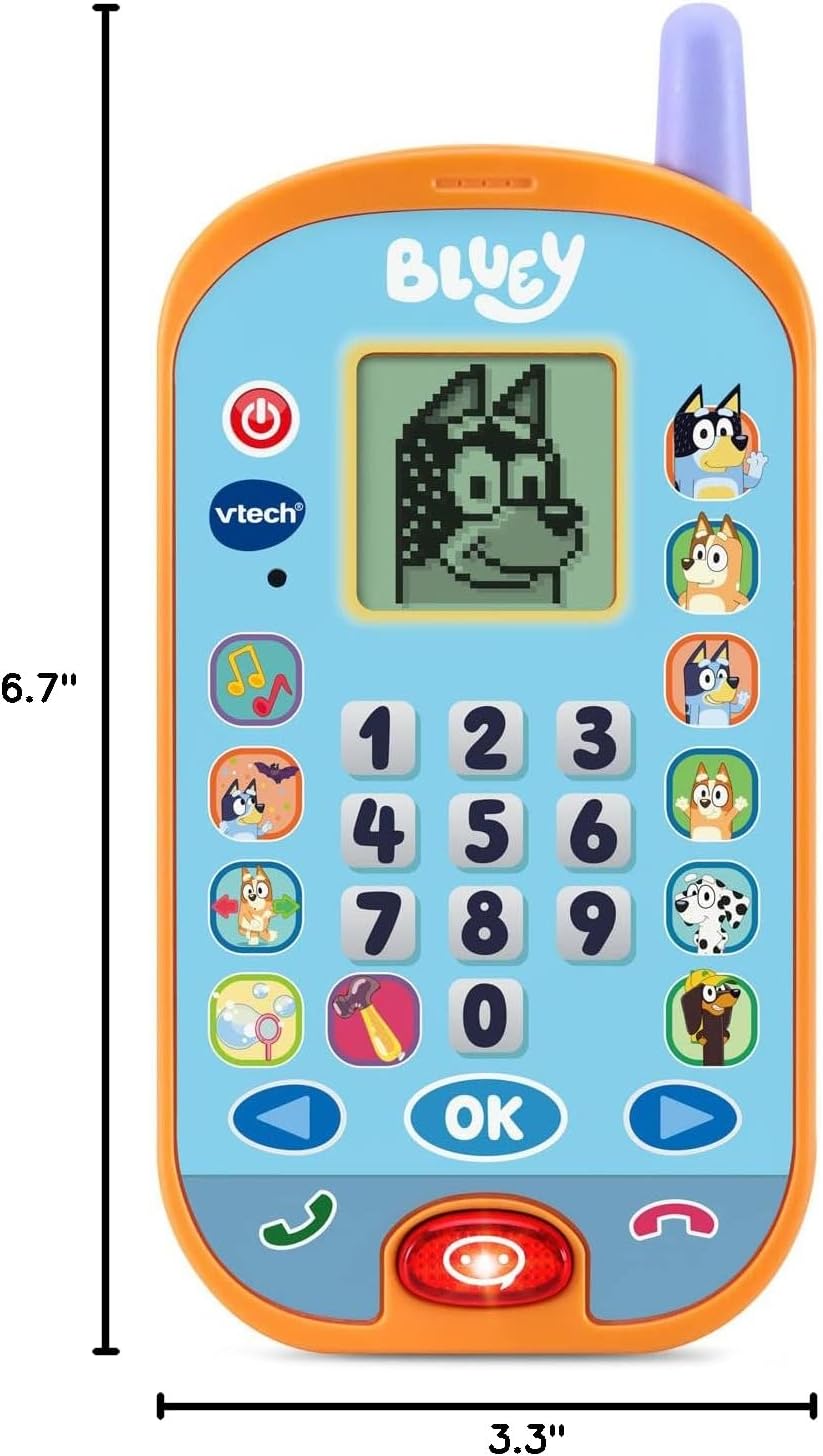
Image: VTech Bluey Ring Ring Phone with labeled dimensions.
Гарантія та підтримка
This VTech product is covered by the manufacturer's standard warranty. For detailed warranty information, product support, or to inquire about replacement parts, please visit the official VTech website or contact their customer service department. Contact details can typically be found in the Quick Start Guide included with your product or on the VTech brand store page.
VTech Store: Відвідайте магазин VTech на Amazon


