1. Вступ
Thank you for choosing the iPega PG-P4008 Wireless Game Controller. This manual provides detailed instructions on how to set up, operate, and maintain your controller. The PG-P4008 offers broad compatibility with PS4, PS3, Android (10.0+), iOS (13.0+), and Windows PC, connecting wirelessly via Bluetooth for an enhanced gaming experience.
2. Продукт закінчивсяview
The iPega PG-P4008 is designed for versatile gaming across multiple platforms. It features a comfortable ergonomic design, responsive controls, and several advanced functionalities to immerse you in your games.
Ключові характеристики:
- Wireless Bluetooth connectivity (BT2.1+EDR) with up to 8 meters range.
- No driver installation required for connection.
- Integrated colored LED light indicator for operational status.
- Dual motors for realistic vibration feedback during gameplay.
- Built-in three-dimensional acceleration sensor and gyroscope sensor with six-axis induction.
- Integrated speaker and 3.5mm earphone jack for game audio.
- Dual-point capacitive touchpad for enhanced control.
- Compatible with PS4, PS3, Android (10.0+), iOS (13.0+), and Windows PC.
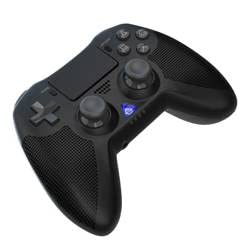
Зображення 1: Фронт view of the iPega PG-P4008 Wireless Game Controller. This image displays the controller's ergonomic design, dual analog sticks, D-pad, action buttons, touchpad, and the central LED indicator.
3. Налаштування та підключення
The PG-P4008 controller connects wirelessly via Bluetooth. Follow these steps to pair your controller with your device:
- Увімкнення: Ensure the controller is charged. Press and hold the Кнопка PS (or equivalent power button) to turn on the controller.
- Режим сполучення:
- For PS4/PS3: Connect the controller to the console using a USB cable. Once recognized, you can disconnect the cable for wireless play. The connection method is similar to the official P4 controller.
- For Android/iOS: Activate Bluetooth on your mobile device. On the controller, press and hold the SHARE button + PS button simultaneously until the LED indicator flashes rapidly, indicating pairing mode. Select "PG-P4008" (or similar) from your device's Bluetooth list to connect.
- For Windows PC: Ensure your PC has Bluetooth capability. On the controller, press and hold the PS button + OPTIONS button simultaneously until the LED indicator flashes rapidly. On your PC, go to Bluetooth settings, add a new device, and select "PG-P4008" (or similar) to pair.
- Успішне підключення: Once connected, the LED indicator on the controller will change to a solid color, indicating a successful pairing.
Примітка: No additional driver software is required for operation. The controller supports a stable connection up to 8 meters.
4. Інструкція з експлуатації
Світлодіодний індикатор:
The built-in colored LED light indicates the controller's operational status and player assignment, similar to the official PS4 controller. Different colors will signify different stages or player numbers.
Вібрація:
The controller features dual motors embedded in the handles, providing tactile vibration feedback to enhance your gaming immersion. This feedback will vary based on in-game events.
Сенсорна панель:
The dual-point capacitive touchpad allows for intuitive control in games that support touch input, offering an additional layer of interaction.
Функціональність аудіо:
Connect your 3.5mm earphones to the integrated jack on the controller to experience game audio directly, providing a private and immersive sound experience.
5. Технічне обслуговування
- Keep the controller dry and away from moisture to prevent damage to internal components.
- Clean the controller regularly with a soft, dry cloth. Avoid using harsh chemicals or abrasive materials.
- Зберігайте контролер у прохолодному сухому місці, коли він не використовується.
- Уникайте впливу екстремальних температур або прямих сонячних променів на контролер.
- Do not attempt to disassemble or modify the controller, as this will void any potential warranty and may cause damage.
6. Вирішення проблем
- Контролер не підключається:
- Переконайтеся, що контролер повністю заряджений.
- Перевірте, чи Bluetooth увімкнено на вашому пристрої.
- Make sure the controller is in the correct pairing mode for your device (refer to Section 3).
- Спробуйте перезавантажити і контролер, і пристрій.
- Видаліть попередні сполучення зі списку Bluetooth вашого пристрою та спробуйте знову.
- Затримка вхідного сигналу або відключення:
- Ensure you are within the 8-meter operating range.
- Мінімізуйте перешкоди від інших бездротових пристроїв.
- Check for any physical obstructions between the controller and the device.
- Вібрація не працює:
- Переконайтеся, що гра, в яку ви граєте, підтримує вібраційний зворотний зв'язок.
- Перевірте налаштування гри, щоб переконатися, що вібрація ввімкнена.
- Audio not working via 3.5mm jack:
- Ensure your earphones are properly plugged in.
- Check the volume settings on your device and in-game.
- Test with another pair of earphones to rule out earphone issues.
7. Технічні характеристики
| Номер моделі | PG-P4008 |
| Бренд | iPega |
| Підключення | Bluetooth (BT2.1+EDR) |
| Дальність бездротового зв'язку | До 8 метрів |
| Сумісні пристрої | PS4, PS3, Android (10.0+), iOS (13.0+), Windows PC |
| Особливості | Wireless, Touchpad, Vibration, 6-axis Gyroscope, Built-in Speaker, 3.5mm Audio Jack |
| Кількість кнопок | 17 |
| Джерело живлення | Працює від батареї |
8. Гарантія та підтримка
Інформація щодо гарантії на продукт та підтримки клієнтів не міститься в цьому посібнику. Будь ласка, зверніться до упаковки продукту або до інструкцій продавця. webсайт для отримання детальної інформації про гарантійне покриття та про те, як звернутися до служби підтримки клієнтів.


