1. Вступ
This manual provides detailed instructions for the proper setup, operation, and maintenance of your Bower 12-inch RGB LED Selfie Ring Light Studio Kit. Please read this manual thoroughly before using the product to ensure optimal performance and longevity.
2. Що в коробці
- 1 х кільцева лампа
- 1 х штатив
- 1 x Remote (Wireless)
3. особливості
- Premium 12-inch RGB LED Ring Light: Offers 9 dynamic RGB colors, 3 white light modes (White, Natural, Warm), and 7 special effects for diverse lighting needs.
- Adjustable 62-Inch Tripod: Customizable height from 16 inches (fully collapsed) to 62 inches (fully extended) for various shooting angles and setups.
- In-line & Wireless Remote Controls: Manage lighting modes, effects, and brightness instantly with the attached in-line remote and a convenient wireless remote for maximum flexibility.
- 360-Degree Ball Head Adapter & Smartphone Mount: Provides versatile setup options for professional photography and videography, securely holding your smartphone.
- Регульована яскравість: Features 12 levels of brightness, suitable for capturing quality photos and videos in any lighting condition.
- Живлення від USB: Conveniently powered via USB, enhancing portability for content creators.
4. Інструкції з налаштування
- Зберіть штатив:
Unfold the tripod legs to create a stable base. Extend the tripod to your desired height by loosening the locking knobs on the center column and then tightening them once the desired height is reached. The tripod can extend from 16 inches to 62 inches.
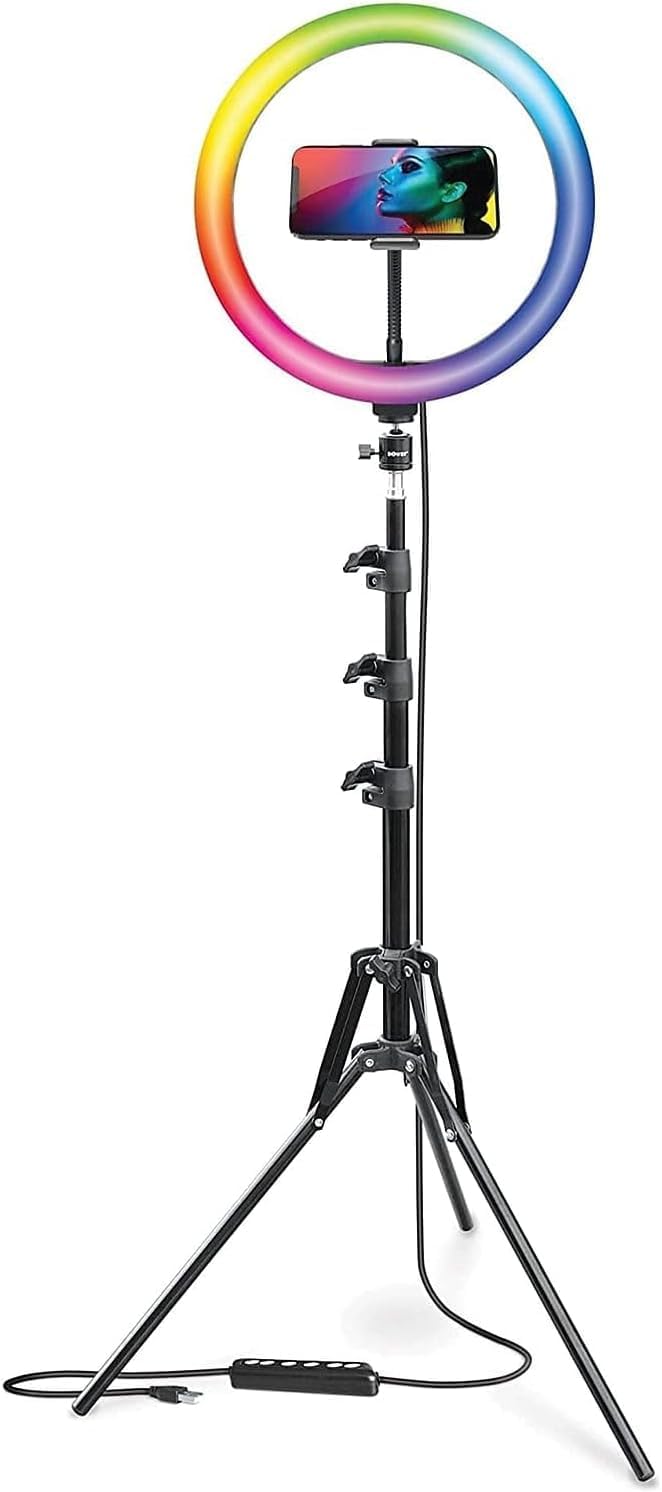
Figure 4.1: Fully assembled ring light kit on its adjustable tripod.
- Прикріпіть кільцеве світло:
Securely screw the 12-inch RGB LED ring light onto the top of the tripod stand. Ensure it is firmly attached to prevent wobbling.

Малюнок 4.2: Спереду view of the ring light and tripod.
- Install the Smartphone Mount:
Attach the 360-degree ball head adapter and smartphone mount to the center of the ring light. Adjust the mount to securely hold your smartphone in either vertical or horizontal orientation.

Малюнок 4.3: Детально view of the adjustable smartphone mount.
- Підключення живлення:
Connect the USB cable from the ring light to a compatible USB power source (e.g., computer, wall charger, power bank). The in-line remote is integrated into this cable.

Figure 4.4: USB power cable with in-line remote.
5. Інструкція з експлуатації
- Увімкнення/вимкнення живлення:
Press the power button on the in-line remote or the wireless remote to turn the ring light on or off.
- Регулювання яскравості:
Use the '+' and '-' buttons on the in-line remote or the wireless remote to cycle through 12 levels of brightness.
- Changing White Light Modes:
Press the mode button on the in-line remote or the wireless remote to switch between the 3 white light modes: White, Natural, and Warm.

Figure 5.1: Ring light displaying various white light modes.
- Changing RGB Colors and Special Effects:
Press the RGB/Effect button on the in-line remote or the wireless remote to cycle through 9 RGB colors and 7 special effects (Spectrum, Cycle, Cycle 2, Strobe, Transition, Transition 2, Swirl).

Малюнок 5.2: Закінченоview of RGB colors and special effects.
- Використання бездротового пульта дистанційного керування:
The wireless remote connects via Bluetooth to your smartphone. Pair the remote with your device to control photo and video capture remotely, in addition to light settings.
6. Технічне обслуговування
- Прибирання: Use a soft, dry cloth to clean the ring light and tripod. Avoid abrasive cleaners or solvents.
- Зберігання: When not in use, collapse the tripod and store the kit in a dry, cool place away from direct sunlight and moisture.
- Обробка: Handle the ring light and tripod with care to prevent damage to the LED bulbs or mechanical components.
7. Вирішення проблем
- Світло не вмикається: Ensure the USB cable is securely connected to a working power source. Check if the power button on the in-line remote has been pressed.
- Wireless remote not connecting: Ensure Bluetooth is enabled on your smartphone and the remote is in pairing mode. Refer to your smartphone's manual for Bluetooth pairing instructions.
- Unstable tripod: Ensure the tripod legs are fully extended and the locking knobs are tightened. Place the tripod on a flat, stable surface.
- Smartphone not fitting in mount: The mount is designed to fit most smartphones up to 3.6 inches wide. Ensure your phone is within this size range and remove any bulky cases if necessary.
8. Технічні характеристики
| Особливість | Деталь |
|---|---|
| Розміри продукту | 62 x 12 x 62 дюймів |
| Вага товару | 3.09 фунта |
| ASIN | B09MMG4DZ7 |
| Номер моделі товару | WA-RLSRGB12 |
| Технологія підключення | Bluetooth |
| Апаратний інтерфейс | USB |
| UPC | 636980879468 |
| Виробник | Бауер |
| Дата першої доступності | 26 листопада 2021 р |
9. Гарантія та підтримка
For warranty information and customer support, please refer to the official Bower webсайт або зверніться безпосередньо до служби підтримки клієнтів. Зберігайте чек про покупку для будь-яких гарантійних претензій.
10. Офіційні відео про продукт
No official product videos from the seller were available in the provided data. Please refer to the manufacturer's webсайт для будь-яких доступних відеоресурсів.


