1. Продукт закінчивсяview
The AWOW AiBook 10 is a versatile 10.1-inch 2-in-1 device designed to function as both a tablet and a laptop. It features a detachable keyboard, a responsive touchscreen, and an integrated kickstand for multiple viewing modes. Powered by an Intel Celeron N4120 processor, it includes 8GB RAM and 128GB SSD storage, making it suitable for everyday computing tasks, web browsing, and media consumption.

Image: The AWOW AiBook 10 tablet shown with its detachable keyboard, illustrating its 2-in-1 functionality.
Ключові характеристики:
- Дисплей: 10.1-inch IPS HD (1280x800) Touchscreen
- Процесор: Intel Celeron N4120 (up to 2.6GHz)
- Пам'ять: 8 ГБ оперативної пам'яті LPDDR4
- Зберігання: 128GB eMMC SSD, expandable via TF card slot (up to 512GB)
- Операційна система: Windows 10 Домашня
- Підключення: 2.4G+5G WiFi, Bluetooth 4.2
- Порти: USB 3.0, Micro HDMI, DC-in, 3.5mm Earphone Jack, TF Card Slot
- Камери: 2 МП спереду, 5 МП ззаду
- Батарея: 6500 мАг
2. Компоненти та порти
Familiarize yourself with the physical components and available ports on your AWOW AiBook 10 tablet.
Вміст упаковки:
- AWOW AiBook 10 Tablet
- Знімна клавіатура
- Адаптер живлення
- Посібник користувача
- Stylus Pen (may be included with some models)
Device Layout and Ports:

Image: A detailed diagram highlighting the various ports and features of the AWOW AiBook 10, including the kickstand and removable keyboard.
- Роз'єм для навушників 3.5 мм: Для підключення навушників або зовнішніх динаміків.
- Слот для картки TF: Insert a microSD card for expanded storage (up to 512GB).
- Фронтальна камера (2.0 МП): Located above the screen for video calls and selfies.
- Задня камера (5.0 МП): Located on the back of the tablet for taking photos and videos.
- DC-in (12V/3A): Power input port for charging the device.
- Мікро HDMI: Connect to an external display or TV.
- USB 3.0: Connect USB devices such as flash drives, mice, or external hard drives.
- Removable Keyboard Connector: Magnetic connector for attaching the keyboard.
- Підніжка на 150°: Integrated stand for adjustable viewкути.
3. Налаштування
3.1 Початкове заряджання
Before first use, fully charge your AWOW AiBook 10. Connect the provided power adapter to the DC-in port on the tablet and plug it into a power outlet. The charging indicator light will illuminate. Allow several hours for a full charge.
3.2 Увімкнення/вимкнення живлення
- Щоб увімкнути: Натисніть і утримуйте кнопку живлення, розташовану збоку планшета, доки екран не засвітиться.
- Щоб вимкнути: Press the Power button briefly to put the device to sleep. To fully shut down, navigate to the Start Menu in Windows, select the Power icon, and choose 'Shut down'.
3.3 Attaching and Detaching the Keyboard
The keyboard connects magnetically to the bottom edge of the tablet. Align the magnetic connector on the keyboard with the corresponding port on the tablet until it snaps into place. To detach, gently pull the tablet away from the keyboard.
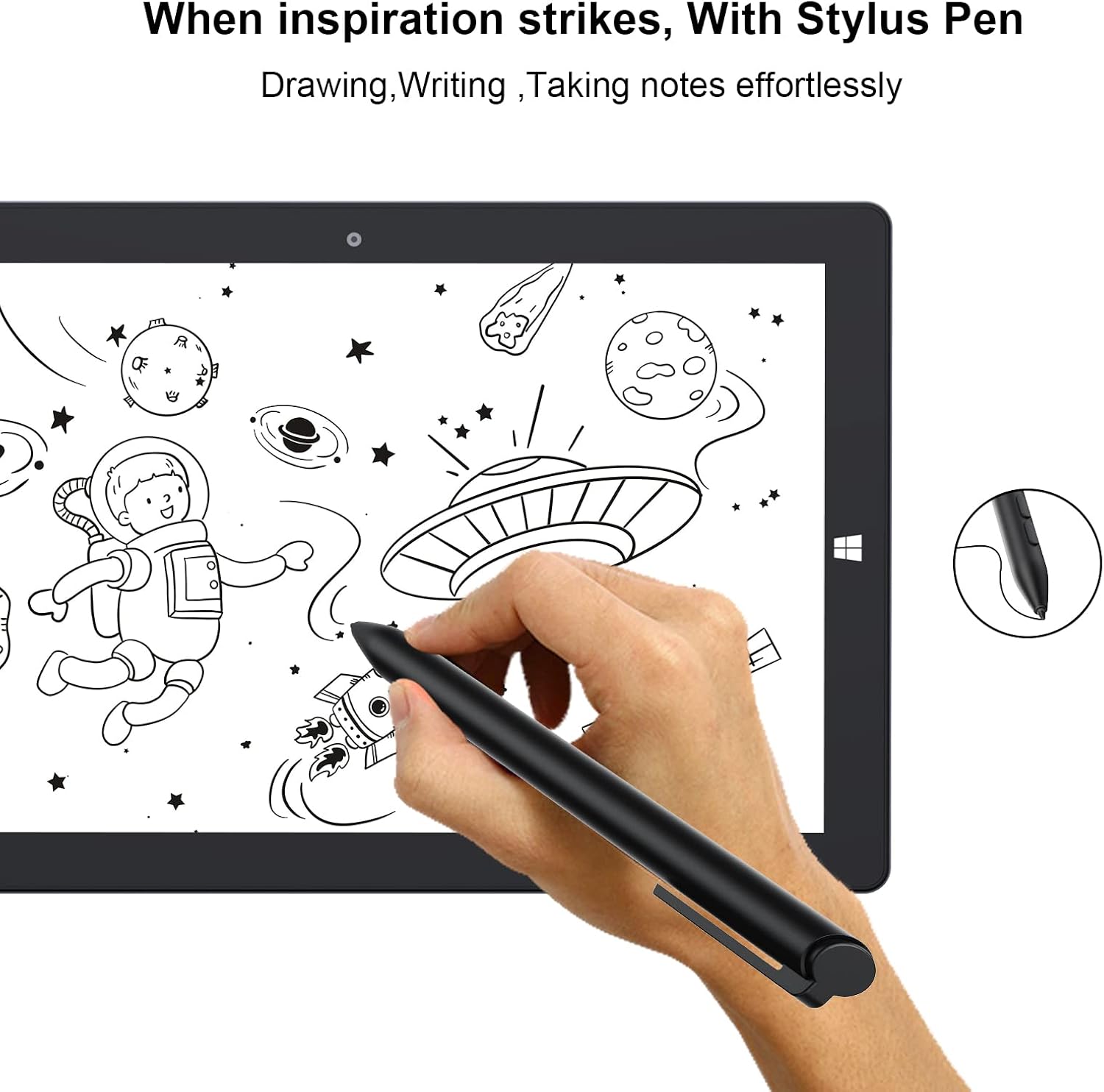
Image: The AWOW AiBook 10 tablet with its detachable keyboard securely attached, ready for use in laptop mode.
3.4 Початкове налаштування Windows
Upon first power-on, you will be guided through the Windows 10 Home setup process. Follow the on-screen prompts to select your region, language, connect to a Wi-Fi network, create a user account, and configure privacy settings.
4. Інструкція з експлуатації
4.1 Перемикання між режимами планшета та ноутбука
The AiBook 10 automatically detects when the keyboard is attached or detached and prompts you to switch between tablet and desktop modes in Windows. You can also manually switch via the Action Center (swipe in from the right edge of the screen or click the icon in the taskbar).

Image: The AWOW AiBook 10 configured in laptop mode, demonstrating its functionality with the keyboard and kickstand.
4.2 Touchscreen and Stylus Usage
The 10.1-inch IPS display supports multi-touch gestures. Use your fingers for navigation, tapping, pinching to zoom, and swiping. If your model includes a stylus, it can be used for precise input, drawing, and note-taking.

Image: A hand using the stylus pen on the AWOW AiBook 10 tablet screen for drawing or writing.
4.3 Підключення до Wi-Fi та Bluetooth
- Wi-Fi: Перейти до Налаштування > Мережа й Інтернет > Wi-Fi. Turn Wi-Fi on and select your desired network, then enter the password if required.
- Bluetooth: Перейти до Налаштування > Пристрої > Bluetooth та інші пристрої. Turn Bluetooth on and select 'Add Bluetooth or other device' to pair with compatible accessories.
4.4 Використання підставки
The integrated kickstand allows you to prop up the tablet at various angles (up to 150 degrees) for comfortable viewing, typing, or drawing. Gently pull out the kickstand from the back of the tablet to adjust its position.
Video: This video demonstrates the AWOW AiBook 10's versatility, showcasing its tablet, studio, stand, and laptop modes, along with its adjustable kickstand, internal components, and various ports.
5. Технічне обслуговування
5.1 Очищення пристрою
- екран: Використовуйте м’яку тканину без ворсу, спеціально призначену для електроніки. Для стійких плям злегкаampпротріть тканину водою або засобом для чищення екранів. Уникайте агресивних хімікатів.
- Тіло: Wipe the tablet and keyboard surfaces with a soft, dry cloth. Keep liquids away from ports and openings.
5.2 Догляд за акумулятором
- Уникайте екстремальних температур, оскільки вони можуть знизити термін служби акумулятора.
- Для оптимального терміну служби акумулятора намагайтеся підтримувати рівень заряду в межах від 20% до 80%.
- Якщо ви зберігаєте пристрій протягом тривалого часу, зарядіть його приблизно до 50%, перш ніж вимикати.
5.3 Оновлення програмного забезпечення
Regularly check for and install Windows updates to ensure your device has the latest security patches and performance improvements. Go to Налаштування > Оновлення та безпека > Центр оновлення Windows.
5.4 Керування сховищем
The AiBook 10 comes with 128GB of eMMC storage. To manage space, regularly delete unnecessary files, uninstall unused applications, and utilize the TF card slot for additional storage of documents, photos, and videos.
6. Вирішення проблем
This section addresses common issues you might encounter with your AWOW AiBook 10.
6.1 Пристрій не вмикається
- Переконайтеся, що пристрій повністю заряджений. Підключіть адаптер живлення та зачекайте кілька хвилин, перш ніж спробувати знову ввімкнути його.
- Try holding the Power button for 10-15 seconds to perform a hard reset.
6.2 Проблеми з підключенням Wi-Fi або Bluetooth
- Toggle Wi-Fi/Bluetooth off and on in Windows settings.
- Перезапустіть планшет.
- Ensure your router or Bluetooth device is functioning correctly and within range.
- Оновіть драйвери мережевого адаптера через диспетчер пристроїв.
6.3 Сенсорний екран не реагує
- Перезапустіть планшет.
- Переконайтеся, що екран чистий і не містить сміття.
- Check for Windows updates that might include touchscreen driver fixes.
6.4 Клавіатура не реагує
- Ensure the keyboard is securely attached to the tablet's magnetic connector.
- Від’єднайте та знову приєднайте клавіатуру.
- Перезапустіть планшет.
6.5 Повільна продуктивність
- Закрийте непотрібні програми, що працюють у фоновому режимі.
- Перевірте та встановіть оновлення Windows.
- Виконайте очищення та дефрагментацію диска (для жорсткого диска, а не для SSD).
- Забезпечте достатній вільний простір для зберігання.
6.6 Скидання до заводських налаштувань
If persistent issues occur, you may consider a factory reset. This will erase all data and reinstall Windows. Back up all important files before proceeding. Go to Settings > Update & Security > Recovery > Reset this PC.
7. Технічні характеристики
Detailed technical specifications for the AWOW AiBook 10.

Image: A graphic detailing the core specifications of the AWOW AiBook 10, including CPU, GPU, RAM, SSD, battery life, and camera resolution.
| Особливість | Специфікація |
|---|---|
| Розмір екрана | 10.1 дюймів |
| Роздільна здатність екрана | 1280 x 800 пікселів (IPS HD) |
| Процесор | Intel Celeron N4120 (1.1 GHz, 4 Cores, up to 2.6 GHz Boost) |
| Графіка | Графіка Intel UHD 600 (інтегрована) |
| ОЗУ | 8 ГБ LPDDR4 |
| Зберігання | 128GB eMMC SSD |
| Розширюване сховище | TF Card Slot (up to 512GB) |
| Операційна система | Windows 10 Домашня |
| Бездротове підключення | 2.4G+5G WiFi, Bluetooth 4.2 |
| Порти | 1x USB 3.0, 1x Micro HDMI, 1x DC-in (12V/3A), 1x 3.5mm Earphone Jack, 1x TF Card Slot |
| Фотоапарати | Передня 2MP, задня 5MP |
| Акумулятор | 6500mAh (Approx. 7-8 hours average use) |
| Розміри (ДxШxВ) | 10.1 x 6.8 x 0.38 дюймів |
| Вага товару | 2.97 pounds (with keyboard) |
8. Гарантія та підтримка
8.1 Гарантія на виріб
The AWOW AiBook 10 typically comes with a 1-year limited warranty from the date of purchase. This warranty covers manufacturing defects and hardware malfunctions under normal use. Please retain your proof of purchase for warranty claims.

Image: A feature overview highlighting key aspects of the AiBook 10, including the 1-year support period, expandable storage, and battery capacity.
8.2 Підтримка клієнтів
For technical assistance, warranty inquiries, or any questions regarding your AWOW AiBook 10, please contact AWOW customer support. Refer to the contact information provided in your product packaging or visit the official AWOW webсайт для ресурсів підтримки.
Ви також можете відвідати Магазин AWOW на Amazon щоб отримати додаткову інформацію про продукт і варіанти підтримки.


