1. Продукт закінчивсяview
The emotal Dual-Mic AI Noise Cancelling Bluetooth Headset is designed for clear communication and extended use, ideal for cell phone calls, driving, and business environments. It features advanced AI noise-cancelling technology, dual HD microphones, and a lightweight, ergonomic design for comfort.
Ключові особливості:
- AI Noise-Cancelling: Isolates your voice from background noise for crystal-clear conversations.
- Подовжений час розмови: Up to 30 hours of HD talk time and 240 hours of standby on a 1.5-hour charge. Includes a quick charge feature for 3 hours of playtime with a 10-minute charge.
- Ultralight & Ergonomic: Weighing only 0.5oz, designed for comfortable, secure fit during long periods of use.
- IPX6 водонепроникний: Забезпечує захист від бризок та поту.
- Подвійна система батарей: Comes with an extra battery for continuous use.

Image: The emotal Dual-Mic AI Noise Cancelling Bluetooth Headset, showcasing its sleek black design and over-ear hook.
2. Вміст упаковки
Переконайтеся, що всі предмети присутні в упаковці:
- 1x emotal Bluetooth Headset
- 1x зарядний кабель USB-C
- 6x Eartips (one pair pre-installed)
- 1x Посібник користувача
- 1x додатковий акумулятор
3. Посібник із налаштування
3.1 Початкове заряджання
Before first use, fully charge the headset. The headset needs to be detached from the ear hook for charging.
- Detach the main headset unit from the ear hook.
- Connect the USB-C cable to the charging port on the headset unit.
- Підключіть інший кінець кабелю USB-C до сумісного джерела живлення USB (наприклад, адаптера живлення, USB-порту комп’ютера).
- Індикатор показуватиме стан заряджання (докладніше див. розділ про світлодіодні індикатори). Повне заряджання триває приблизно 1.5 години.
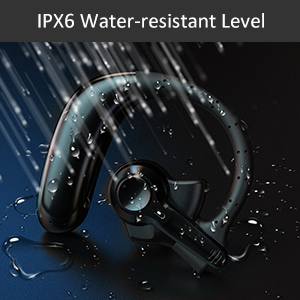
Image: Correct USB-C charging method for the headset, showing the detachable unit being charged.
3.2 Eartip Selection
For optimal sound quality and comfort, select the eartip size that best fits your ear canal. Three sizes are provided.

Image: Illustration of different eartip sizes and how to achieve a secure and comfortable fit in the ear.
3.3 Носіння гарнітури
The headset is designed for use in either the left or right ear. The main unit can be rotated and the microphone adjusted for optimal positioning.
- Помістіть вушну скобу на вухо.
- Вставте вушну насадку у слуховий прохід.
- Adjust the main unit by rotating it 180 degrees to switch between left and right ear wear.
- Adjust the microphone boom to point towards your mouth for clear voice pickup.
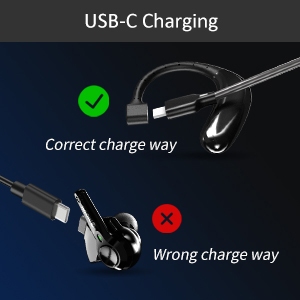
Image: Step-by-step guide on how to switch the headset for left or right ear use by rotating the main unit and adjusting the microphone.
3.4 Створення пари Bluetooth
Щоб підключити гарнітуру до пристрою:
- Переконайтеся, що гарнітура заряджена та вимкнена.
- Press and hold the multi-function button on the headset for 3-5 seconds until the indicator light flashes blue and red, indicating pairing mode.
- На вашому пристрої (смартфоні, планшеті, ноутбуці) увімкніть Bluetooth.
- шукати "emotal UFO4-01" (or similar name) in the list of available Bluetooth devices.
- Select the headset to connect. Once connected, the indicator light will turn solid blue or flash slowly.
Примітка: The headset cannot connect with two devices simultaneously.
4. Інструкція з експлуатації
4.1 Основні елементи керування
The headset features a single multi-function button for various operations:
- Увімкнення/вимкнення живлення: Long touch for 3 seconds to power on, 5 seconds to power off.
- Наступна пісня: Double touch the button.
- Відповісти/покласти трубку: Double touch the button.
- Збільшення гучності: Long touch the button. (Note: There is no dedicated volume down or mute button on the headset itself. Volume down must be controlled via the connected device.)
- Активуйте голосовий помічник (Siri/Google Assistant): Triple touch the button.

Image: Visual representation of the single button controls for power, music playback, call management, volume, and voice assistant activation.
4.2 Керування викликами
The dual-mic AI noise-cancelling technology ensures clear conversations even in noisy environments.

Image: Diagram illustrating how dual-mic and AI noise cancelling technology reduce background noise for clearer calls, showing "Before" and "After" sound wave comparisons.
For business professionals and truckers, the headset provides a hands-free solution for reliable communication on the go.
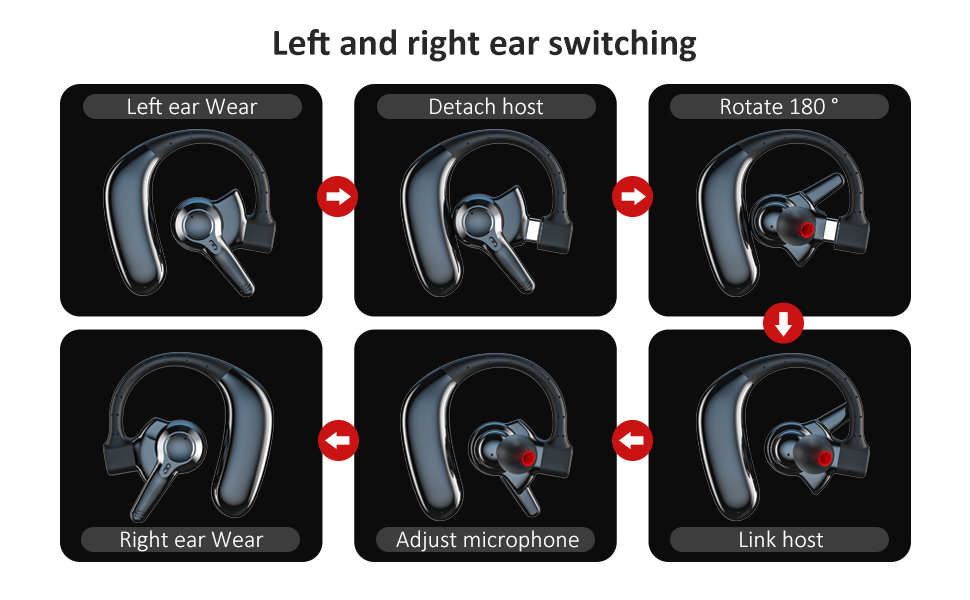
Image: A man driving a car while wearing the headset, emphasizing its hands-free functionality for calls on the road.
4.3 Керування батареєю
The headset offers significant battery life and comes with an extra battery for extended use.

Image: Visual representation of the headset's battery life, highlighting 30 hours of HD talk time and 240 hours of standby time.
To swap batteries:
- Gently detach the current battery unit from the headset.
- Attach the fully charged spare battery to the headset.
- Charge the depleted battery using the USB-C cable for future use.
5. Технічне обслуговування та догляд
To ensure the longevity and optimal performance of your emotal Bluetooth Headset, follow these care instructions:
- Прибирання: Протирайте гарнітуру м’якою сухою тканиною. Не використовуйте абразивні засоби для чищення або розчинники.
- Водонепроникність: The headset is IPX6 waterproof, meaning it is protected against powerful water jets. It can withstand sweat and light rain, but it is not designed for submersion in water.
- Зберігання: Зберігайте гарнітуру в прохолодному, сухому місці, подалі від екстремальних температур та прямих сонячних променів.
- Догляд за акумулятором: Avoid fully depleting the battery frequently. Charge it regularly to maintain battery health.
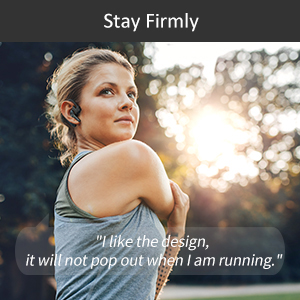
Image: Visual depicting the headset's IPX6 water resistance, showing water splashing on the device.
6. Вирішення проблем
Якщо у вас виникли проблеми з гарнітурою, спробуйте такі рішення:
| проблема | Можливе рішення |
|---|---|
| Гарнітура не вмикається. | Ensure the headset is fully charged. Press and hold the multi-function button for 3 seconds. |
| Не вдається з’єднати пристрій. | Ensure Bluetooth is enabled on your device and the headset is in pairing mode (flashing blue/red light). Make sure the headset is not already connected to another device. Restart both devices and try again. |
| Погана якість звуку під час дзвінків. | Ensure the microphone is adjusted to point towards your mouth. Check for obstructions. Move closer to your connected device to avoid interference. |
| Гучність занадто низька/висока. | Adjust volume using the long touch on the multi-function button (volume up only) or directly from your connected device. |
| Гарнітура часто відключається. | Ensure you are within the Bluetooth range (approx. 33 feet/10 meters). Avoid strong electromagnetic interference. Re-pair the headset if necessary. |
7. Технічні характеристики
| Особливість | Деталь |
|---|---|
| Назва моделі | UFO4-01 |
| Технологія підключення | Бездротовий зв'язок (Bluetooth 5.0) |
| Контроль шуму | Active Noise Cancellation (AI Noise Cancelling) |
| Час розмови | Up to 30 Hours HD Talk Time |
| Час очікування | До 240 годин |
| Час зарядки | прибл. 1.5 годин |
| Рівень водонепроникності | Водонепроникність IPX6 |
| Вага товару | 0.48 унції (приблизно 0.03 фунта) |
| Розміри продукту | 2.36 x 1.96 x 1.1 дюймів |
| Сумісні пристрої | Cellphones (iOS/Android), Windows |
| Тип управління | Voice Control (Siri, Google Assistant) |
| Форма навушника | Circle (In Ear with Over-Ear Hook) |
| матеріал | Композитний |
| UPC | 850040753158 |
8. Гарантія та підтримка
emotal offers comprehensive customer support for your headset:
- Гарантія: Replacement within 18 months of purchase.
- Обслуговування клієнтів: 24-hour customer service is available for any concerns or inquiries. Please contact us via message through your purchase platform.
- Додаткові ресурси: For further details, you may refer to the official User Guide and Safety Information PDFs available online.
For the most up-to-date support information, please visit the official emotal store or contact customer service directly.


