1. Вступ
The FreedConn R1 Plus is an advanced motorcycle intercom system integrating Bluetooth communication, a 1080P HD camera, and WiFi connectivity. Designed for motorcyclists, it offers real-time group intercom, high-definition video recording, and seamless smartphone integration for music, calls, and navigation. This manual provides detailed instructions for setup, operation, and maintenance to ensure optimal performance and safety.
2. Особливості продукту
- Bluetooth 5.1 Intercom: Supports real-time group communication for up to 6 riders with a range of 100-1000m.
- 1080P HD камера: Features a 120° wide-angle lens with automatic light adjustment and zoom for clear video recording.
- Loop Recording & Snapshot: Records video in a loop, automatically overwriting old files when the memory is full. Supports snapshots during recording.
- Up to 64GB Memory Card Support: Compatible with Class 10 or higher microSD cards for ampле сховище.
- Тривалий термін служби батареї: Built-in 1500mAh battery provides 4.5 hours of continuous recording, 30 hours of talk time, 30 hours of intercom, and 12 days of standby time. Supports charging while in use.
- Функціональність WiFi: Connects to a smartphone app for convenient viewing and downloading of videos and photos.
- Водонепроникний дизайн: IP65 waterproof rating ensures reliable performance in various weather conditions.
3. Вміст упаковки
The FreedConn R1 Plus package includes the following items:
- FreedConn R1 Plus Main Unit
- Headset with Microphone (Hard Slot and Soft Wire options)
- USB-кабель для зарядки
- Mounting Bracket (Velcro and Screw-type clips)
- Посібник користувача
- Липучки для динаміків
- Шестигранний ключ

Зображення: Детальне view of the FreedConn R1 Plus package contents, showing the main unit, various cables, microphones, mounting clips, and the user manual.
4. Продукт закінчивсяview
Familiarize yourself with the main components and controls of the FreedConn R1 Plus unit:
Image: Diagram illustrating the various parts of the FreedConn R1 Plus, including the speaker, microphone, card slot, charging port, multi-function button, WiFi button, Bluetooth indicator, and recorder indicator.
- Recorder Indicator: Shows the status of video recording.
- Індикатор Bluetooth: Показує стан з’єднання Bluetooth.
- Кнопка WiFi: Активує/деактивує Wi-Fi для підключення додатків.
- Антена: Для покращення прийому сигналу.
- Jog Wheel: Used for volume adjustment and track selection.
- Multi-function Bluetooth Button: Керує живленням, сполученням, дзвінками та відтворенням музики.
- Recorder On/Off/Pause Button: Керує записом відео.
- Мікрофон із шумозаглушенням: Забезпечує чітку передачу голосу.
- Hard Slot Microphone: Suitable for half-face and open-face helmets.
- Гнучкий мікрофон: Підходить для шоломів із повним захистом обличчя.
- Слот для картки: Для вставлення картки microSD.
- Кнопка скидання: Щоб скинути налаштування пристрою.
- Charging Port/Intercom Connection Socket: For charging and connecting to other devices.
5. Монтаж
The FreedConn R1 Plus is designed to be compatible with various helmet types. Choose the appropriate microphone and mounting clip for your helmet.
5.1 Microphone Selection
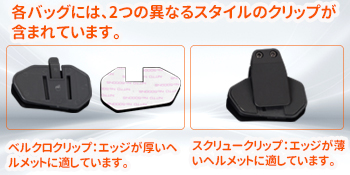
Image: Illustration showing the hard tube microphone suitable for half-face and open-face helmets, and the hose microphone for full-face helmets. Note to attach the microphone to the helmet lining.
- Hard Tube Microphone: Ideal for half-face and open-face helmets.
- Hose Microphone: Recommended for full-face helmets. Ensure the microphone is securely attached to the helmet's inner lining.
5.2 кріпильних затискачів

Image: Two different styles of mounting clips. The Velcro clip is suitable for helmets with thicker edges, while the screw clip is for helmets with thinner edges.
- Velcro Clip: Best for helmets with thicker edges.
- Screw Clip: Best for helmets with thinner edges.
6. Основні операції
6.1 Увімкнення/вимкнення живлення та сполучення Bluetooth
To clear Bluetooth pairing history:
- With the power on, press and hold the On/Off button for 10 seconds.
- The red light will flash 3 times quickly, indicating that the pairing history has been cleared.
Щоб з’єднати пристрій зі смартфоном:
- Press and hold the multi-function button for 6 seconds until the LED flashes red and blue alternately, indicating pairing mode.
- Open your smartphone's Bluetooth settings, select "R1 Plus" from the list, and pair.
Video: Demonstrates clearing Bluetooth pairing history, pairing with a smartphone, music playback controls (play/pause, next/previous track, volume adjustment), automatic call answering, ending/rejecting calls, activating voice assistant, and FM radio functions.
6.2 Відтворення музики та керування дзвінками
- Відтворення/пауза музики: Натисніть багатофункціональну кнопку один раз.
- Наступний трек: Rotate the jog wheel clockwise.
- Попередній трек: Rotate the jog wheel counter-clockwise.
- Регулювання гучності: Rotate and hold the jog wheel clockwise to increase volume, counter-clockwise to decrease volume.
- Автоматична відповідь на дзвінок: Incoming calls will be automatically answered after 10 seconds if no action is taken.
- Завершити виклик: Натисніть багатофункціональну кнопку один раз під час дзвінка.
- Відхилити виклик: Натисніть і утримуйте багатофункціональну кнопку протягом 2 секунд, коли надходить дзвінок.
- Активувати голосового помічника: With the headset paired to your smartphone, press and hold the multi-function button for 2 seconds.
6.3 FM-радіо
- Увімкнення/вимкнення FM-радіо: With the headset powered on, double-press the multi-function button.
- Налаштуйте станції: Rotate the jog wheel clockwise or counter-clockwise to change stations.
- Adjust FM Volume: Rotate and hold the jog wheel clockwise to increase volume, counter-clockwise to decrease volume.
6.4 Recording and Photography
Щоб вставити картку пам’яті:
- Open the TF card slot.
- Вставте карту пам'яті.
- Close the TF card slot.
Щоб почати/зупинити запис:
- Press and hold the recording/camera power button for 3 seconds until the LED flashes green slowly.
- Press the recording/camera power button once. Video recording will start with a voice prompt "WiFi is on".
- Press the recording/camera power button again to stop recording.
To take a snapshot during recording:
- During video recording, press the WiFi button once to take a still photo.

Image: The FreedConn R1 Plus unit highlighting its WiFi feature, showing a smartphone connected to the device via the RoadCam app to view жити footage.

Image: Visual representation of the FreedConn R1 Plus camera features, including Bluetooth 5.0, HD 1080P recording, 120° wide-angle lens, and snapshot capability, with a motorcycle rider in the background.
7. Intercom Pairing (Group Intercom)
The R1 Plus supports group intercom for up to 6 units. Follow these steps to pair multiple headsets:
- Переконайтеся, що всі гарнітури вимкнені.
- Press and hold the On/Off button of two headsets (e.g., A and B) for 8 seconds until the red and blue lights flash alternately.
- Once paired, the lights on both units will flash blue only.
- Power off headset B.
- Repeat the pairing process with headset A and C (press and hold On/Off for 8 seconds on A and C).
- Once A and C are paired, power off C.
- Continue this process for all desired headsets (D, E, F).
- After all pairings are complete, power on all headsets. Press the multi-function button once on each unit (A, B, C, D, E, F) to connect them in sequence.
- Once all units are successfully paired and connected, the lights will flash blue, and group intercom will be active.
Video: Demonstrates the step-by-step process of pairing multiple FreedConn R1 Plus headsets for group intercom communication.

Зображення: Повітряна куля view showing six motorcycle riders on a snowy road, illustrating the 1000m range for group intercom communication between FreedConn R1 Plus units.
8. Використання програми
8.1 Завантаження програми
- Для Apple iOS: шукати "Goplus Cam" in the App Store and download.
- Для Android: Open your browser, scan the QR code provided in the manual, and download/install the app. HUAWEI HarmonyOS users should exit pure mode, then open the browser, scan the QR code, download, and install the app.
Video: Instructions on how to download the companion app for both iOS and Android devices, including scanning a QR code for Android users.
8.2 WiFi Activation and Connection
- Press and hold the recording/camera power button for 3 seconds to activate WiFi. A voice prompt "WiFi is on" will sound.
- On your smartphone, open the WiFi settings, select "FreedConn" from the list of available networks.
- Enter the password "12345678" to connect.
8.3 ViewЗаписано Files and Syncing Time
- Open the app and click the icon on the top page or the file icon on the top left.
- Click and download the desired video to view it, or view фотографії.
- To synchronize the time between the device and your smartphone, open the app, click the version number bar at the bottom left, then click "WiFi sport Cam time" and "Enable" to complete the time setting.
8.4 Formatting Memory Card
- Open the app, click "Settings" at the top right.
- Click "Format" at the bottom.
- Click "Confirm" to complete the formatting.
9. Технічні характеристики
| Особливість | Специфікація |
|---|---|
| Розмір екрана | 2 дюймів |
| Сумісні пристрої | Смартфони |
| Батарея в комплекті | так |
| Використання батареї | так |
| Виробник | FreedConn |
| Аксесуари в комплекті | Посібник користувача |
| Інші функції | Вбудований WiFi |
| Технологія підключення | Bluetooth |
| Тип дисплея | ЖК |
| Спосіб монтажу | Клей |
| Розміри упаковки | 14.6 х 11.4 х 6.7 см |
| Вага товару | 420 г |
| Довідка виробника | JPR164 |
| Роздільна здатність захоплення відео | 1080p |
| Спосіб контролю | Додаток, дотик, голос |
10. Вирішення проблем
- Складнощі зі сполученням через Bluetooth: Ensure the device is in pairing mode (red and blue flashing LED). Clear previous pairing history if necessary (refer to section 6.1). Check your smartphone's Bluetooth settings.
- Проблеми з підключенням домофону: Verify that all headsets are powered on and have been paired correctly in sequence (refer to section 7). Ensure no other Bluetooth devices are interfering.
- Проблеми запису: Check if a Class 10 or higher microSD card is inserted correctly and has sufficient free space. Format the memory card via the app if issues persist (refer to section 8.4).
- WiFi Connection Failure: Ensure WiFi is activated on the R1 Plus (refer to section 8.2). Double-check the WiFi password "12345678".
- Короткий термін служби батареї: Ensure the device is fully charged before use. Continuous recording and intercom use will consume battery faster. The device supports charging while in use.
- Погана якість звуку: Check microphone and speaker connections. Ensure the microphone is positioned correctly to minimize wind noise.
11. Гарантія та підтримка
FreedConn R1 Plus comes with a 1-year warranty and lifetime after-sales service. If you have any questions about the product or service, please contact us. We will respond promptly within 24 hours.


