Rapoo Multi-Device Silent Wireless Mouse User Manual
Модель: M300G
Продукт закінченийview
This manual provides detailed instructions for the Rapoo Multi-Device Silent Wireless Mouse. This mouse is designed for versatile use across multiple devices, offering silent clicks, adjustable DPI, and an ergonomic design for comfortable, extended use.
Ключові особливості:
- Multi-device connectivity (USB receiver or Bluetooth) for up to 3 devices.
- Silent click design for a quiet working environment.
- 4 adjustable DPI levels (600/1000/1300/1600) for precise control.
- Ergonomic design for right-hand comfort.
- High precision optical engine for use on various surfaces.
- Extended battery life with low-power technology.
Демонстраційне відео продукту
Video: An official product video demonstrating the features and usage of the Rapoo Multi-Device Bluetooth Mouse, including its silent clicks and multi-mode connectivity.
Посібник із налаштування
1. Вміст упаковки
Переконайтеся, що всі предмети присутні в упаковці:
- Rapoo Multi-Device Silent Wireless Mouse
- USB Receiver (usually stored inside the mouse)
- Посібник користувача
2. Встановлення батареї
The mouse uses one AA battery (not included). Open the battery compartment on the bottom of the mouse and insert the battery, ensuring correct polarity.
3. Підключення миші
The Rapoo Multi-Device Mouse supports three connection modes: Bluetooth 3.0, Bluetooth 4.0, and 2.4G Wireless (via USB receiver). You can switch between these modes using the button on the bottom of the mouse.
3.1. 2.4G Wireless Connection (USB Receiver)
- Locate the USB receiver, typically stored in a slot on the bottom of the mouse.
- Підключіть USB-приймач у вільний USB-порт на комп’ютері.
- Увімкніть мишу за допомогою перемикача живлення внизу.
- The mouse should automatically connect. No driver installation is usually required.

Image: The Rapoo mouse connected to a laptop via its 2.4G USB receiver, illustrating the wireless connection.
3.2. Bluetooth Connection (Bluetooth 3.0 / Bluetooth 4.0)
- Увімкніть живлення миші.
- Press the Bluetooth connection switch button on the bottom of the mouse to select either Bluetooth 1 or Bluetooth 2 channel. The corresponding indicator light (blue or green) will flash slowly.
- Long press the Bluetooth button for more than 3 seconds to start pairing. The indicator light will flash rapidly.
- На своєму пристрої (ноутбуці, планшеті чи смартфоні) перейдіть до налаштувань Bluetooth та здійсніть пошук нових пристроїв.
- Select "RAPOO BT3.0 Mouse" or "RAPOO BleMouse" (Bluetooth 4.0) from the list of available devices to pair.
- Після підключення індикатор перестане блимати.

Image: A diagram illustrating the steps to connect the Rapoo mouse via Bluetooth 3.0 or 4.0, showing the pairing process with indicator lights.
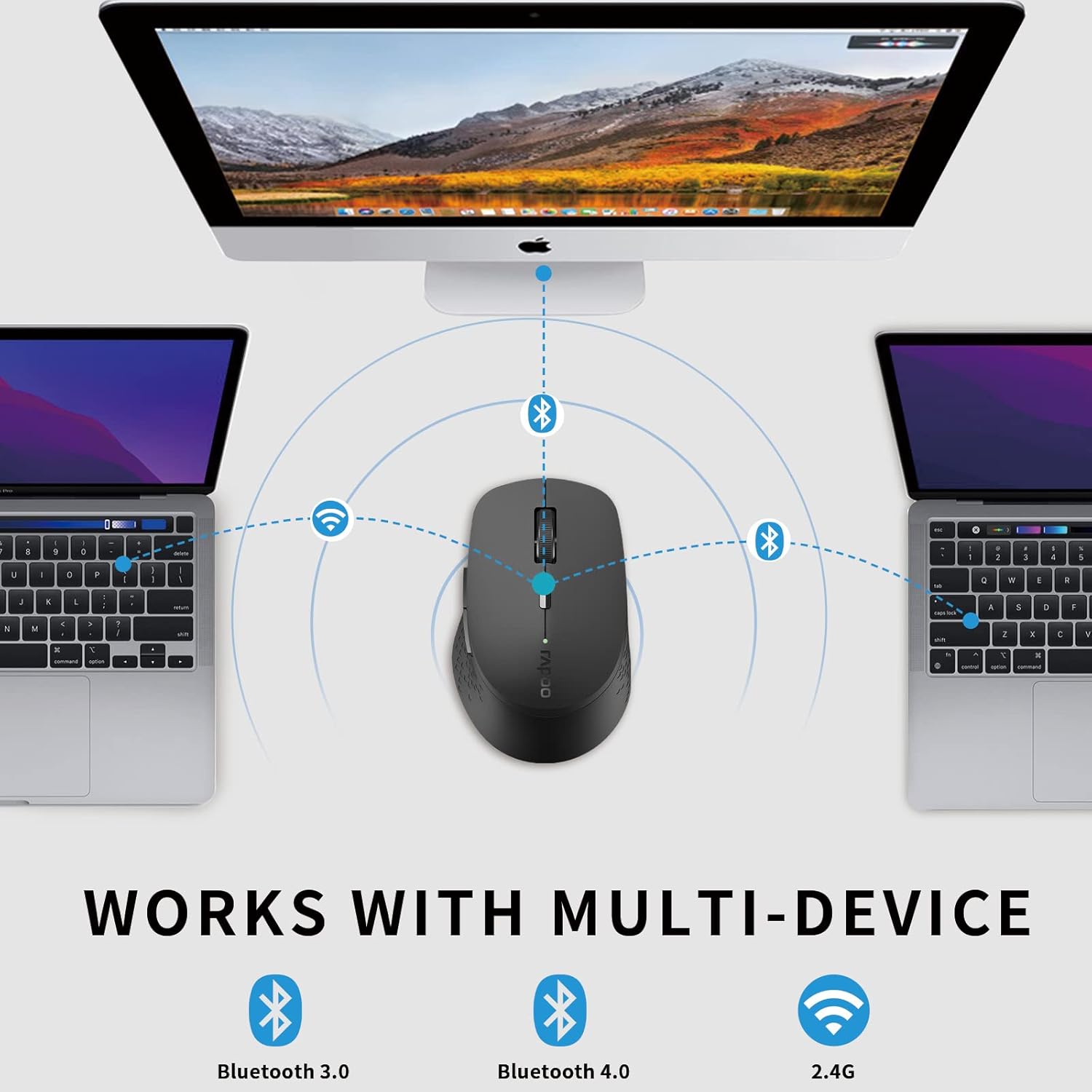
Image: An illustration demonstrating the multi-device capability of the Rapoo mouse, connecting to two laptops via Bluetooth and a desktop via 2.4G wireless.
Інструкція з експлуатації
1. Функції кнопок

Image: A labeled diagram showing the functions of each button on the Rapoo mouse, including left/right click, scroll wheel, DPI switch, multi-device indicator, and forward/backward buttons.
- Ліва кнопка миші: Стандартний вибір та активація.
- Клацніть правою кнопкою миші: Відкриває контекстні меню.
- Колесо прокрутки: Прокручує документи та web сторінки. Також можна натиснути для функції клацання середньою кнопкою миші.
- Кнопка перемикання DPI: Перемикає налаштування DPI (600/1000/1300/1600).
- Multi-device Conversion Indicator: Shows the currently active device channel.
- Кнопка вперед: Переміщується вперед web браузери або file дослідники.
- Кнопка "Назад": Переміщується назад web браузери або file дослідники.
2. Перемикання між пристроями
To switch between connected devices (up to 3), short press the Bluetooth connection switch button on the bottom of the mouse. The indicator light will change to reflect the active channel (Bluetooth 1, Bluetooth 2, or 2.4G wireless).
3. Налаштування чутливості (DPI)
Press the DPI switch button located behind the scroll wheel to cycle through the four available DPI settings: 600, 1000, 1300, and 1600. Choose the sensitivity that best suits your task and screen resolution.

Image: A visual representation of the adjustable DPI settings (600, 1000, 1300, 1600) for the Rapoo mouse, indicating how cursor sensitivity can be changed.
4. Функція безшумного клацання
The mouse features a silent click design, reducing click noise by 90%. This allows for a quiet working environment, ideal for offices, libraries, or late-night use.

Image: The Rapoo mouse highlighting its noiseless and durable click feature, with a sleeping baby in the background to emphasize the quiet operation.
5. Ергономічний дизайн
The mouse is ergonomically designed for right-hand users, with a flat radian that fits the curve of the hand, reducing fatigue during prolonged use.

Зображення: Зверху вниз view of the black Rapoo Bluetooth mouse, showcasing its ergonomic shape.
Технічне обслуговування
1. прибирання
Для очищення миші використовуйте м’яку суху тканину. Для стійкого бруду злегкаampПротріть тканину водою або м’яким миючим розчином. Уникайте використання агресивних хімікатів або абразивних матеріалів.
2. Заміна батареї
When the mouse's performance degrades or the low battery indicator (if present) activates, replace the AA battery. Ensure the power switch is off before replacing the battery.

Image: The Rapoo mouse illustrating its low power consumption, indicating an extended battery life of up to 12 months.
3. Зберігання
When not in use for extended periods, turn off the mouse to conserve battery life. Store the USB receiver inside the mouse's dedicated slot to prevent loss.
Усунення несправностей
| проблема | Можлива причина | Рішення |
|---|---|---|
| Миша не відповідає | Low battery; Power switch off; USB receiver disconnected; Bluetooth not paired. | Replace battery; Turn on power switch; Re-insert USB receiver; Re-pair Bluetooth. |
| Затримка або нестабільний рух курсора | Interference; Dirty optical sensor; Mouse used on unsuitable surface. | Move closer to receiver/device; Clean optical sensor; Use on a flat, non-reflective surface or mouse pad. |
| Неможливо перемикатися між пристроями | Incorrect button press; Device not properly paired. | Ensure short press of the multi-device switch button; Verify all devices are paired correctly. |
| Помилка з’єднання Bluetooth | Миша не в режимі сполучення; Bluetooth пристрою вимкнено; Перешкоди. | Long press Bluetooth button for 3 seconds; Enable Bluetooth on device; Move away from other wireless devices. |
Технічні характеристики
- Бренд: Rapoo
- модель: M300G
- Технологія підключення: Bluetooth (3.0/4.0), 2.4G Wireless (USB)
- Технологія виявлення руху: Оптичний
- DPI: 600/1000/1300/1600 adjustable
- Тихе клацання: Yes (90% noise reduction)
- Ергономічний дизайн: Right-hand specific
- Термін служби батареї: Up to 9-12 months (depending on usage)
- Розміри продукту: 3.94 x 2.76 x 1.57 дюйма (приблизно 10.0 x 7.0 x 4.0 см)
- Вага товару: 3.84 унції (приблизно 108.87 грамів)
- колір: чорний
- Виробник: РАПОО
- Перші доступні: 15 квітня 2021 р

Image: The underside of the Rapoo mouse, detailing its dimensions (10.39 cm / 4.09 in length, 6.54 cm / 2.57 in width), weight (83.2g), power switch, Bluetooth connection switch, and invisible optical sensor.
Гарантія та підтримка
Rapoo provides a one-year warranty for this product. In case of any issues, please contact Rapoo customer support for assistance. The product also comes with a hassle-free 30-day return and refund or replacement policy.
For further support, visit the official Rapoo webсайт або зверніться до їхніх каналів служби підтримки клієнтів.


