1. Вступ
This manual provides detailed instructions for the VTech AM18447 4-Line Corded Base Phone System, including the AM18447 main console and up to three AM18247 corded desksets. This system is designed to manage calls across 1 to 4 telephone lines simultaneously, offering advanced features for efficient communication. Please read this manual thoroughly to ensure proper installation, operation, and maintenance of your phone system.

Image 1: The VTech AM18447 4-Line Corded Base Phone System, showing the main console and three additional corded desksets.
2. Налаштування
2.1 Розпакування системи
Обережно розпакуйте всі предмети з коробки. Переконайтеся, що є такі компоненти:
- VTech AM18447 Main Console (Base Unit)
- Up to three VTech AM18247 Corded Desksets
- Адаптери живлення для кожного пристрою
- Телефонні шнури
- Corded Handsets and Coiled Cords
2.2 Connecting the Main Console (AM18447)
- Connect one end of the coiled handset cord to the handset jack on the main console and the other end to the handset.
- Plug one end of the telephone line cord into the LINE 1 jack on the back of the main console and the other end into a telephone wall jack. Repeat for LINE 2, LINE 3, and LINE 4 if you have multiple lines.
- Connect the power adapter to the POWER jack on the main console and plug the other end into an electrical outlet.
- If using DSL service, ensure you use a DSL filter (not included) for each telephone line to prevent interference.
2.3 Connecting Additional Corded Desksets (AM18247)
Each AM18247 deskset connects to the main console wirelessly. Follow these steps for each deskset:
- Connect one end of the coiled handset cord to the handset jack on the deskset and the other end to the handset.
- Connect the power adapter to the POWER jack on the deskset and plug the other end into an electrical outlet.
- The deskset will automatically register with the main console upon power-up. If registration fails, refer to the troubleshooting section.
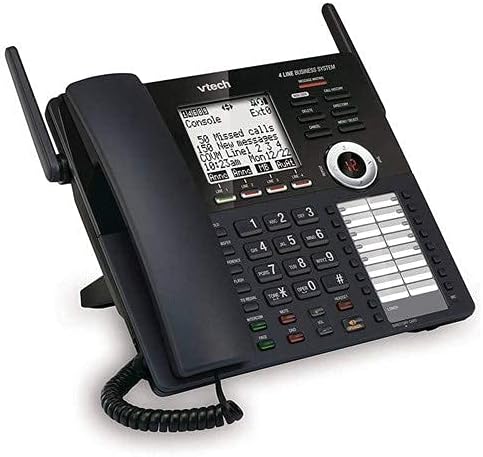
Зображення 2: Детальний view of the VTech AM18447 main console, highlighting the display, keypad, and line indicators.
2.4 Battery Installation for Power Failure Operation
The main console requires 4 AAA batteries (not included) for power failure operation, allowing basic functionality during a power outage. Locate the battery compartment on the underside of the main console, insert the batteries according to the polarity markings, and replace the cover.
3. Інструкція з експлуатації
3.1 Основні функції викликів
- Здійснення дзвінка: Підніміть слухавку або натисніть СПІКЕР button. Select an available line (LINE 1-4) if not automatically selected. Dial the number.
- Відповідь на дзвінок: Підніміть слухавку або натисніть СПІКЕР кнопку, коли дзвонить телефон.
- Завершення дзвінка: Поставте слухавку назад у тримач або натисніть СПІКЕР кнопку знову.
- Тримайте: Під час дзвінка натисніть ТРИМАТИ button to place the call on hold. Press the flashing line button to retrieve the call.
- Повторний набір: Натисніть ПОВТОРЕНИЙ button to redial the last 10 numbers called.
3.2 спікерфон
The system features a full-duplex speakerphone, allowing both parties to speak and be heard simultaneously. To use, press the СПІКЕР button during a call or to initiate a call without lifting the handset.
3.3 Цифрова система автовідповідача
The integrated digital answering system records up to 180 minutes of messages, announcements, and memos.
- Recording an Outgoing Announcement: Access the answering system menu and follow voice prompts to record your personalized message.
- Відтворення повідомлень: Натисніть ГРАТИ/СТОП кнопку. Використовуйте ПРОПУСТИТИ to advance, ПОВТОР to replay, and ВИДАЛИТИ to remove messages. Variable speed playback is available through menu options.
- Memo Recording: Record personal memos for later playback.
- Віддалений доступ: Access your messages from an outside line by dialing your phone number and entering your remote access code.
- Private Mailbox: Configure private mailboxes for individual users.
3.4 Caller ID / Call Waiting
The system stores up to 50 names and numbers in the Caller ID history.
- ViewІдентифікатор абонента: Use the navigation buttons to scroll through the Caller ID log.
- Очікування виклику: When on a call, a tone indicates an incoming call. Press the СПАЛАХ кнопку для перемикання між дзвінками.
3.5 Phonebook Directory
Store up to 100 names and numbers in the phonebook directory.
- Додавання запису: Access the phonebook menu, select 'Add New Entry', and enter the name and number.
- Швидкий набір: Assign frequently called numbers to speed dial locations (up to 32).
3.6 Intercom, Call Transfer, and Conferencing
- Домофон: Натисніть ІНТЕРКОМ button and select the desired station to initiate an internal call.
- Переадресація виклику: Під час зовнішнього дзвінка натисніть ПЕРЕДАЧА, select the internal station, and then hang up to complete the transfer.
- 4-стороння конференція: Connect up to four parties (internal and external) on a single call. Refer to the menu for specific steps.
3.7 Налаштування системи
Access the setup menu to customize various settings.
- мова: Select English, Spanish, or French for the display menu.
- Ringers: Choose from 10 polyphonic ringers, assignable per line.
- Автосекретар: Enable or disable the auto attendant feature for each line.
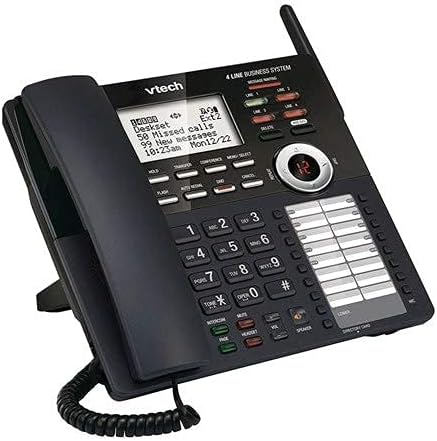
Зображення 3: Кутовий view of the VTech AM18447 main console, providing a clear perspective of its ergonomic design and button layout.
4. Технічне обслуговування
To ensure the longevity and optimal performance of your VTech phone system, follow these maintenance guidelines:
- Прибирання: Wipe the phone surfaces with a soft, slightly damp тканина. Не використовуйте агресивні хімікати або абразивні засоби для чищення.
- Розташування: Place the phone system in a dry area, away from direct sunlight, heat sources, and excessive moisture.
- Потужність: Ensure all power adapters are securely plugged into working electrical outlets.
5. Вирішення проблем
If you encounter issues with your VTech phone system, try the following solutions:
- Немає тонального сигналу:
- Check all telephone line cord connections.
- Переконайтеся, що адаптер живлення надійно підключено.
- Test the telephone line with another phone.
- Немає живлення пристрою:
- Verify the power adapter is correctly connected to the unit and a working electrical outlet.
- Check the electrical outlet with another device.
- Автовідповідач не записує:
- Ensure the answering system is turned ON.
- Check if the memory is full; delete old messages.
- Ідентифікатор абонента не відображається:
- Ensure you have subscribed to Caller ID service from your telephone provider.
- Verify the phone line connection.
- Deskset Not Registering:
- Ensure the deskset is powered on.
- Refer to the main console's menu for manual registration options if automatic registration fails.
6. Технічні характеристики
| Особливість | Деталь |
|---|---|
| Розміри продукту | 9 x 5.7 x 8.8 дюймів |
| Вага товару | 2 фунта |
| Потрібні батареї | 4 AAA batteries (for power failure operation) |
| Виробник | Vtech |
| Бренд | VTech |
| Колір | чорний |
| Тип телефону | Проводиться |
| матеріал | пластик |
| Джерело живлення | Провідний електричний |
| Тип дозвону | Одна клавіатура |
| Тип автовідповідача | цифровий |
7. Гарантія та підтримка
VTech products are manufactured with high-quality components and are designed for reliable performance. For specific warranty information, please refer to the warranty card included with your product packaging or visit the official VTech webсайт.
For technical support, troubleshooting assistance, or to inquire about replacement parts, please contact VTech Customer Service. Contact details can typically be found on the VTech webсайті або в упаковці вашого продукту.


