1. Техніка безпеки
Please read these safety instructions carefully before using the product. Keep this manual for future reference.
- Цей виріб призначений лише для використання всередині приміщень. Не піддавайте впливу вологи або екстремальних температур.
- Do not attempt to open or modify the device. This may void the warranty and pose a safety risk.
- Тримайте пристрій подалі від дітей.
- Use only the provided micro-USB cable for charging.
- Не дивіться прямо на світлодіодне джерело світла.
2. Вміст упаковки
Переконайтеся, що всі предмети присутні в упаковці:
- ANSMANN Under-Cabinet Light M
- Кабель для зарядки Micro-USB
- Інструкція з експлуатації
3. Продукт закінчивсяview
The ANSMANN Under-Cabinet Light M is a versatile, rechargeable LED lamp designed for various indoor applications. It features a motion sensor, adjustable color temperatures, and a slim design for discreet placement.

Image 1: The ANSMANN Under-Cabinet Light M, showcasing its sleek, white design and integrated motion sensor.
Ключові характеристики:
- Датчик руху PIR: Automatically activates the light when motion is detected in low-light conditions.
- Датчик сутінків: Ensures the light only activates in dark environments, conserving battery life.
- Регульована колірна температура: Choose between 3 color temperatures (cool white, neutral white, warm white) or activate all LEDs for maximum brightness.
- Плавне затемнення: Adjust brightness by holding down the control button.
- Акумуляторна батарея: Integrated battery for cordless operation, charged via micro-USB.
- Магнітне кріплення: Easy installation and removal with a magnetic strip.

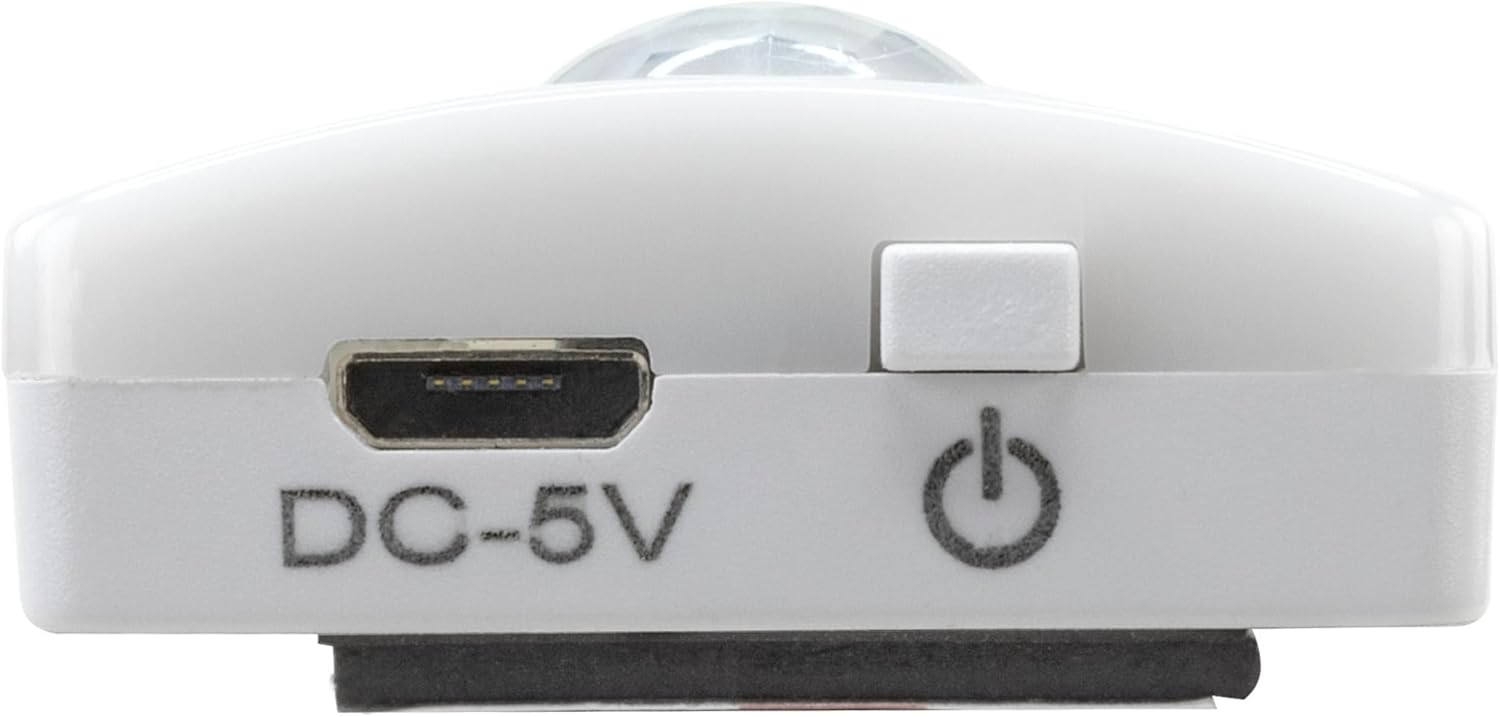
Image 2: Diagram illustrating the Micro-USB Port, On/Off button, and PIR motion sensor on the device.
4. Налаштування та встановлення
The Under-Cabinet Light M offers flexible installation options using its integrated magnetic strip.
Магнітне кріплення:
- Identify a suitable, clean, and dry surface for installation (e.g., inside a cabinet, under a shelf).
- The light comes with a fixed magnetic strip on its back. For non-metallic surfaces, use the included adhesive strip.
- Peel off the protective film from the adhesive strip and firmly press it onto the desired surface.
- Attach the Under-Cabinet Light M to the adhesive strip. The magnetic connection will hold it in place.
Зображення 3: Крупний план view of the magnetic strip and the removable adhesive strip, demonstrating the mounting mechanism.

Зображення 4: Наприкладample of the under-cabinet light installed in a modern kitchen setting, providing illumination over a countertop.
5. Операція
The Under-Cabinet Light M offers intuitive control for its lighting functions.
Увімкнення/вимкнення живлення:
- Locate the On/Off button (refer to Image 2).
- Press the button once to turn the light on or off.
Регулювання колірної температури:
- With the light on, short press the control button repeatedly to cycle through the 3 available color temperatures: cool white, neutral white, and warm white.
- A fourth press will activate all LEDs for maximum brightness.
Функція затемнення:
- To adjust the brightness, press and hold the control button. The light will gradually dim or brighten. Release the button when the desired brightness level is reached.
Motion and Twilight Sensor:
- When the light is in motion sensor mode, it will automatically turn on when movement is detected within its range.
- The integrated twilight sensor ensures that the motion sensor only activates the light in dark environments, preventing unnecessary illumination during daylight hours.
6. Зарядка
The Under-Cabinet Light M is equipped with a rechargeable battery for convenient cordless use.
- When the battery is low, the light output may decrease or the light may not turn on.
- Gently detach the light from its magnetic mounting surface.
- Connect the provided micro-USB cable to the micro-USB port on the light (refer to Image 2).
- Connect the other end of the micro-USB cable to a suitable USB power source (e.g., USB wall adapter, computer USB port).
- An indicator light will show the charging status (e.g., red for charging, green for fully charged).
- Once fully charged, disconnect the cable and reattach the light to its mounting surface.

Зображення 5: Детальний опис view of the Micro-USB charging port and the On/Off button, essential for charging and operation.
7. Технічне обслуговування
To ensure the longevity and optimal performance of your Under-Cabinet Light M, follow these simple maintenance guidelines:
- Clean the light regularly with a soft, dry cloth. Do not use abrasive cleaners or solvents.
- Ensure the motion sensor lens is kept clean and free from obstructions for proper function.
- Store the light in a cool, dry place if not in use for extended periods.
8. Вирішення проблем
If you encounter issues with your Under-Cabinet Light M, refer to the following common problems and solutions:
| проблема | Можлива причина | Рішення |
|---|---|---|
| Світло не вмикається. | Акумулятор розрядився. | Charge the light using the micro-USB cable. |
| Датчик руху не виявляє рух. | Ensure the sensor is clean and unobstructed. Check if the environment is dark enough for the twilight sensor to activate. | |
| Світло не заряджає. | Несправний кабель або джерело живлення. | Try a different micro-USB cable or USB power adapter. |
| Порт зарядки брудний. | Gently clean the micro-USB port with a dry, soft brush. | |
| Світло мерехтить або тьмяне. | Низький заряд батареї. | Перезарядіть пристрій. |
Якщо проблема не зникає після спроби цих рішень, зверніться до служби підтримки клієнтів.
9. Технічні характеристики
| Особливість | Деталь |
|---|---|
| Номер моделі | 1600-0438 |
| Розміри продукту | 25Д x 3.5Ш x 1.3В см (9.84Д x 1.38Ш x 0.51В дюймів) |
| Вага товару | 112 грамів (0.25 фунта) |
| Джерело живлення | Працює від батареї |
| Порт зарядки | Micro-USB (DC-5V) |
| матеріал | пластик |
| Колір | Білий |
| Тип установки | Wall Mount (Magnetic) |
| Тип кімнати | Dining Room, Kitchen, Wardrobe, Hallway, etc. |
10. Гарантія та підтримка
ANSMANN products are manufactured with high-quality standards. For information regarding warranty terms and conditions, please refer to the documentation provided with your purchase or visit the official ANSMANN webсайт.
For technical support or inquiries, please contact ANSMANN customer service through their official channels.


