вступ
The TOTU 18-in-1 Thunderbolt 3 USB C Docking Station is designed to expand the connectivity of your laptop, transforming it into a powerful workstation. This docking station provides a wide array of ports, including multiple USB ports, DisplayPort, Thunderbolt 3, Gigabit Ethernet, SD/Micro SD card readers, and audio output, enabling seamless connection to various peripherals and external displays. It is compatible with laptops featuring Thunderbolt 3 or 4 ports, offering high-speed data transfer, versatile display options, and power delivery.
Ключові характеристики
- Універсальна сумісність: Compatible with laptops equipped with Thunderbolt 3 or 4 ports, including MacBook Pro (2016 and later), MacBook Air (2018 and later), and Windows laptops (Dell, Lenovo, HP, Asus, Acer, etc.). Note: MacBook Pro with M1 chip supports only one monitor.
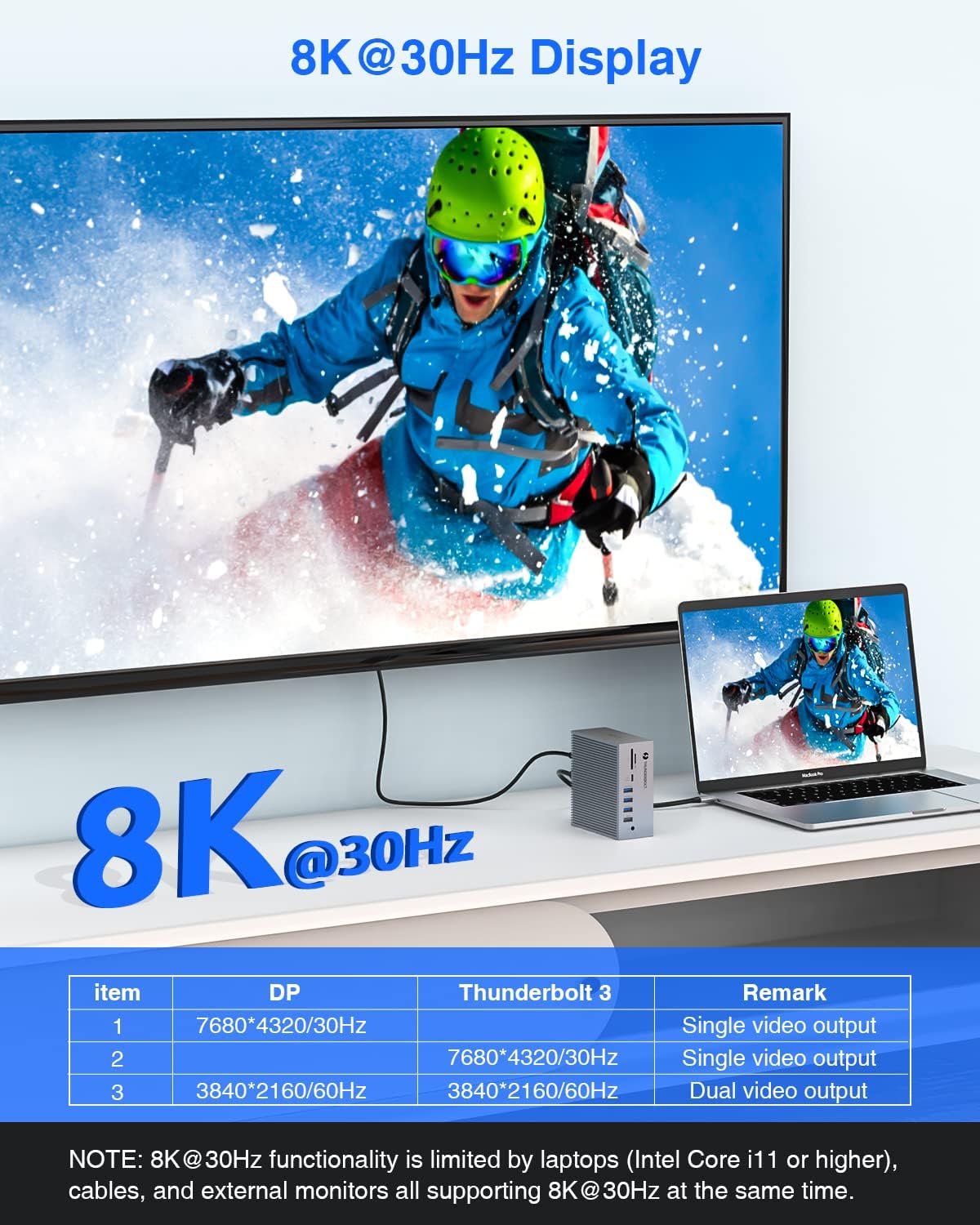
- Вихідний сигнал високої роздільної здатності: Supports single 8K@30Hz or dual 4K@60Hz extended displays via Thunderbolt 3 and DisplayPort.
- Високошвидкісна передача даних: Features 2x USB 3.1 (10Gbps), 1x USB 3.0 (5Gbps), 1x USB-C (10Gbps), and 1x USB-C (5Gbps) for rapid file transfers. Includes 4x USB 2.0 ports for connecting wireless peripherals.
- Вбудований зчитувач карток: Built-in SD/Micro SD card reader for convenient photo and video transfer.
- Гігабітний Ethernet: Provides a stable and fast wired network connection via the RJ-45 LAN port.
- Потужність: The Thunderbolt 3 host port delivers up to 60W to charge your laptop, while the secondary Thunderbolt 3 port provides 15W for downstream devices.
- Комплексні можливості підключення: Equipped with 18 ports including 2x Thunderbolt 3, 1x DisplayPort, 2x USB 3.1, 1x USB 3.0, 2x USB-C, 4x USB 2.0, Gigabit Ethernet, SD/Micro SD, 3.5mm Audio/Microphone, and S/PDIF (Audio output).
Вміст упаковки
Будь ласка, перевірте наявність усіх предметів у упаковці:
- TOTU Thunderbolt 3 Docking Station (Model: TT-DC006C)
- Адаптер живлення 60 Вт
- Thunderbolt 3 Cable (1.6 ft)
- Посібник користувача
Посібник із налаштування
1. Підключення док-станції
Follow these steps to set up your TOTU Thunderbolt 3 Docking Station:
- Підключення живлення: Connect the included 60W power adapter to the DC-IN port on the back of the docking station and then to a power outlet.
- Підключення хоста: Use the provided Thunderbolt 3 cable to connect the "Thunderbolt 3 Host" port on the docking station to a Thunderbolt 3 or Thunderbolt 4 port on your laptop. This connection also provides up to 60W of power delivery to your laptop.
- Display Connection (DisplayPort): For a single external display, connect a DisplayPort cable from your monitor to the DisplayPort on the docking station. For dual displays, use this port for one monitor.
- Display Connection (Thunderbolt 3 Port): For a second external display (in a dual monitor setup), connect a Thunderbolt 3 compatible display or an adapter (e.g., Thunderbolt 3 to DisplayPort/HDMI) to the secondary Thunderbolt 3 port on the docking station.
- Периферійні підключення: Connect your USB devices (keyboards, mice, external drives), Ethernet cable, SD/Micro SD cards, and audio devices to the corresponding ports on the docking station.
Малюнок 1: Задня та передня сторони view of the TOTU Thunderbolt 3 Docking Station with all 18 ports clearly labeled, including USB 2.0, Optical Out, DisplayPort, USB-C, Thunderbolt 3, LAN, DC-IN, SD/Micro SD card reader, and 3.5mm Audio/Mic jack.
Інструкція з експлуатації
Конфігурація дисплея
The TOTU Thunderbolt 3 Dock supports various display configurations:
- Single 8K@30Hz Display: Connect a single 8K-capable monitor to either the DisplayPort or the secondary Thunderbolt 3 port. Ensure your laptop (Intel Core i11 or higher), DP cables, and external monitor support 8K@30Hz.
- Dual 4K@60Hz Extended Displays: Connect two 4K-capable monitors, one to the DisplayPort and one to the secondary Thunderbolt 3 port. This allows for an extended desktop experience.
- Дзеркальний режим: Duplicate your laptop's display on external monitors. For macOS, do not click "Mirror Displays" in settings when you desire an extended display.
- Розширений режим: Extend your desktop across multiple screens, providing more workspace. For Windows, press the hotkey Клавіша Windows + P to choose your display mode.
Note: MacBook Pro with M1 chip can only support ONE monitor (does not support dual monitors) due to the limitations of the M1 chipset.

Figure 2: Illustration of a laptop connected to a single 8K@30Hz display through the TOTU Thunderbolt 3 Dock, demonstrating high-resolution video output.
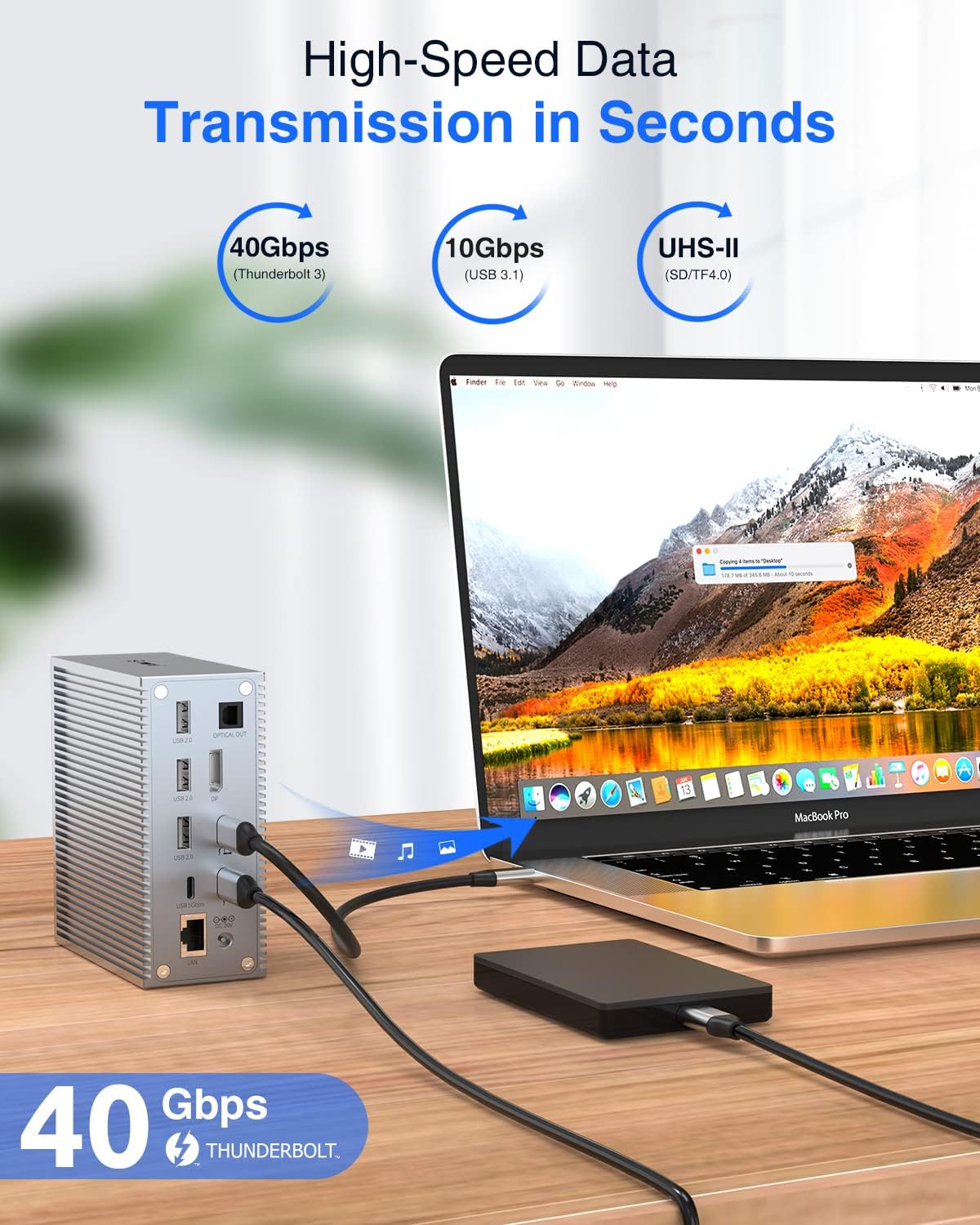
Figure 3: A user working with a laptop connected to two external 4K displays in extended mode, showcasing the multi-monitor capabilities of the docking station for enhanced productivity.

Figure 4: Visual representation of Mirror Mode and Extend Mode display configurations, illustrating how the docking station supports different multi-display setups for both macOS and Windows operating systems.
Передача даних
Utilize the various USB ports for high-speed data transfer:
- USB 3.1 (10Gbps) & USB-C (10Gbps): Ідеально підходить для перенесення великих files quickly, such as videos, photos, and documents.
- USB 3.0 (5Gbps) & USB-C (5Gbps): Suitable for general data transfer and connecting moderately fast peripherals.
- USB 2.0 (480 Мбіт/с): Best for connecting wireless keyboard/mouse receivers, printers, and other low-bandwidth devices to avoid lag.
- SD/Micro SD Card Reader: Insert your memory cards directly into the dedicated slots to access and transfer files.

Figure 5: A laptop connected to the TOTU Thunderbolt 3 Dock, demonstrating the high-speed 40Gbps data transfer capability when connecting an external hard drive, allowing for rapid file синхронізація.
Підключення до мережі
Connect to a stable wired network using the Gigabit Ethernet port:
- Plug an Ethernet cable into the RJ-45 LAN port on the docking station and connect the other end to your router or network switch.
- This provides a reliable 1 Gbps wired connection, which is often faster and more stable than Wi-Fi, especially for large downloads, online gaming, or video conferencing.

Figure 6: The TOTU Thunderbolt 3 Dock connected to a laptop and an Ethernet cable, illustrating the 1Gbps wired network expansion capability for stable and fast internet access.
Електропостачання
The docking station provides power to your connected devices:
- The Thunderbolt 3 host port delivers up to 60W of power to charge your connected laptop.
- The secondary Thunderbolt 3 port provides 15W for charging downstream devices, such as smartphones or other accessories.
Відео 1: Коротка демонстраційна демонстраціяasing the key features of the TOTU Thunderbolt 3 Dock, including 8K single display, dual 4K display, 40Gbps data transfer, and power delivery to connected devices and the host laptop.
Технічне обслуговування
- Keep the docking station in a dry environment and away from extreme temperatures.
- Уникайте падіння та сильних ударів пристрою.
- Протирайте зовнішню частину м’якою сухою тканиною. Не використовуйте рідкі засоби для чищення або аерозолі.
- Забезпечте належну вентиляцію навколо док-станції, щоб запобігти перегріву.
- Від’єднайте всі кабелі перед чищенням або якщо пристрій не використовується протягом тривалого часу.
Усунення несправностей
| проблема | Можливе рішення |
|---|---|
| Немає виводу на дисплей або екран мерехтить. |
|
| USB-пристрої не розпізнаються або передача даних повільна. |
|
| Проблеми з підключенням до Ethernet. |
|
| Laptop not charging via the dock. |
|
Технічні характеристики
| Особливість | Деталь |
|---|---|
| Номер моделі | TT-DC006C |
| Розміри продукту | 4.33 x 4.33 x 0.2 дюйми (11 x 11 x 0.5 см) |
| Вага товару | 1.1 фунта (0.5 кілограма) |
| Колір | Сірий |
| Загальна кількість портів USB | 11 (2x USB 3.1 10Gbps, 1x USB 3.0 5Gbps, 2x USB-C 10Gbps/5Gbps, 4x USB 2.0) |
| Кількість портів | 18-в-1 |
| Апаратний інтерфейс | MicroSD, DisplayPort, Ethernet, USB 3.0, Thunderbolt 3, USB 2.0, USB 3.2 Gen 2 |
| Вихід на дисплей | Single 8K@30Hz (DP/Thunderbolt 3), Dual 4K@60Hz (DP + Thunderbolt 3) |
| Ethernet | 1 Gbps (RJ-45) |
| Доставка живлення (хост) | Up to 60W via Thunderbolt 3 host port |
| Power Delivery (Downstream) | 15W via secondary Thunderbolt 3 port |
| Виробник | TOTU |
| Країна походження | Китай |
| UPC | 760701381364 |
Гарантія та підтримка
The TOTU Thunderbolt 3 Docking Station comes with lifetime technical support. For any issues, questions, or technical assistance, please contact TOTU customer support through the official channels provided with your product or on the manufacturer's webсайт.
Зберігайте підтвердження покупки для гарантійних претензій.


