вступ
The iRobot Roomba i4 Vacuum Cleaning Robot is designed to provide efficient and intelligent floor cleaning for your home. This manual provides essential information for setting up, operating, maintaining, and troubleshooting your Roomba i4, ensuring you get the best performance from your device.

Image: The iRobot Roomba i4 robot vacuum, showcasing its sleek design and connectivity with the iRobot mobile application.
Інформація про безпеку
Before using your Roomba i4, please read all safety instructions carefully. Failure to follow these instructions may result in electric shock, fire, or serious injury.
- Keep the robot and charging base away from water or damp середовищ.
- Do not allow children or pets to play with the robot. Supervise children when the robot is in operation.
- Use only the manufacturer-specified power supply and charging base.
- Перевіряйте шнур живлення на наявність пошкоджень перед кожним використанням. Не використовуйте, якщо він пошкоджений.
- Do not operate the robot in areas with exposed electrical outlets or standing water.
Що в коробці
Your iRobot Roomba i4 package typically includes the following components:
- Робот-пилосос iRobot Roomba i4
- Домашня зарядна станція
- Лінійний шнур
- Додатковий фільтр
- Extra Edge-Sweeping Brush
- Посібник користувача (цей посібник)
Налаштування
- Розмістіть домашню базу: Choose a clear, open area for the Home Base, ensuring at least 1.5 feet (0.5 meters) of clear space on each side and 4 feet (1.2 meters) in front. Plug the line cord into the Home Base and then into a wall outlet.
- Початкова оплата: Place your Roomba i4 onto the Home Base. The light ring around the CLEAN button will pulse white to indicate charging. Allow at least 3 hours for the initial charge to ensure optimal battery performance.
- Завантажте програму iRobot Home: шукати 'iRobot Home' in your device's app store (App Store for iOS, Google Play Store for Android). Follow the in-app instructions to connect your Roomba to your Wi-Fi network and complete the setup process. This app is essential for accessing all smart features.
Інструкція з експлуатації
Once set up, operating your Roomba i4 is straightforward.
Початок роботи з прибирання
Натисніть ЧИСТИЙ button on the robot or use the iRobot Home App to start a cleaning cycle. The robot will automatically return to its Home Base when the cleaning is complete or the battery is low.

Image: The Roomba i4 efficiently cleaning dust and debris from under kitchen cabinets.
Using the iRobot Home App
The app provides advanced features such as scheduling cleaning jobs, customizing cleaning preferences, viewing cleaning history, and receiving maintenance alerts. You can also define specific cleaning zones or keep-out zones.
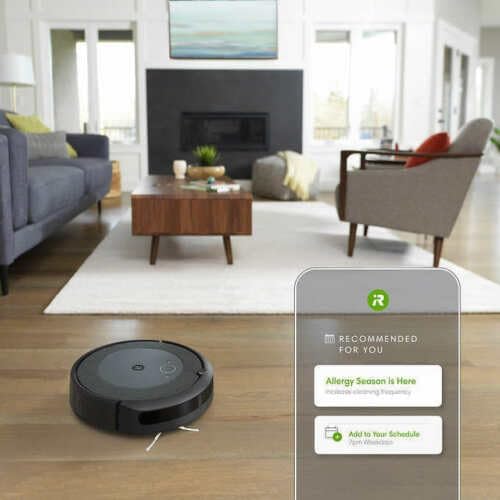
Image: The Roomba i4 navigating a living room, demonstrating its smart mapping capabilities accessible via the iRobot app.
Пляма чиста
For concentrated cleaning of a small area, place the robot on top of the debris and press the Пляма чиста button (target icon) on the robot. The robot will clean in a spiral pattern approximately 3 feet (1 meter) in diameter and then return to its starting point.
Технічне обслуговування
Regular maintenance ensures optimal performance and extends the lifespan of your Roomba i4.
| компонент | Частота | Інструкції |
|---|---|---|
| Відро для пилу | Після кожного використання | Press the bin release tab and pull out the bin. Open the bin door and empty debris. |
| фільтр | Once a week (replace every 2-3 months) | Remove the filter from the dust bin. Tap the filter against a trash can to remove debris. Не мийте фільтр. |
| Multi-Surface Rubber Brushes | Раз на тиждень | Remove the brush frame. Remove any hair or debris wrapped around the brushes and brush caps. |
| Щітка для підмітання країв | Раз на місяць | Use a small screwdriver to remove the screw. Remove any hair or debris and reinstall. |
| Датчики та зарядні контакти | Раз на місяць | Wipe the charging contacts on the robot and Home Base, and the cliff sensors on the bottom of the robot with a clean, dry cloth. |
Усунення несправностей
If your Roomba i4 encounters an issue, refer to the following common solutions.
- Робот не заряджається: Ensure the Home Base is plugged in and the robot is properly seated on the charging contacts. Clean the charging contacts on both the robot and Home Base with a dry cloth.
- Robot Not Cleaning Effectively: Check if the dust bin is full or if the brushes are tangled with hair or debris. Ensure the robot is not stuck or on an uneven surface. Clean all components as per the Maintenance section.
- Повідомлення про помилки: The light ring on the robot will indicate an error with a specific color and pattern. Consult the iRobot Home App for detailed error explanations and solutions. The app will often provide step-by-step guidance.
- Проблеми з підключенням: Ensure your Wi-Fi network is active and the robot is within range of your router. Restart your router and the robot if necessary. Verify your Wi-Fi password in the app.
- Robot Stuck or Bumping Excessively: Clear obstacles from the cleaning path. Ensure cliff sensors are clean. If the robot frequently gets stuck under furniture, consider using Virtual Wall Barriers (sold separately) or adjusting furniture.
Технічні характеристики
- Бренд: iRobot
- Назва моделі: CRT2IROBOI4RB
- Розміри продукту: 13.34 см (Д) x 13.26 см (Ш) x 3.63 см (В)
- Вага товару: 7.44 фунта
- колір: чорний
- Термін служби батареї: Приблизно 60 хвилин (на одному заряді)
- Метод контролю: Voice (via compatible smart assistants), Smartphone App
- Особливості: Customize with iRobot OS and voice assistant integration, Delivers 10x power-lifting suction, Focuses on dirtier areas with Dirt Detect™ Technology, Wi-Fi Built-in
Гарантія та підтримка
Гарантія: This iRobot Roomba i4 product comes with a 90-day limited warranty. Please retain your proof of purchase for all warranty claims. The warranty covers defects in materials and workmanship under normal use.
Підтримка клієнтів: For further assistance, technical support, or to purchase replacement parts, visit the official iRobot support website or contact their customer service directly. Support resources and contact information can typically be found within the iRobot Home App or on the iRobot official webсайт.
Примітка: For refurbished units, warranty terms may vary. Please refer to your specific purchase agreement or the seller's terms for detailed warranty information applicable to your purchase.