1. Вступ
Дякуємо за покупкуasing the CAME-TV Boltzen Perseus RGBDT 55W Lighting Screen. This professional-grade LED light is designed for various photography and videography applications, offering versatile color control and powerful illumination. Please read this manual thoroughly before operating the device to ensure proper use and maintenance.
This manual provides essential information on setting up, operating, maintaining, and troubleshooting your lighting screen. Keep this manual for future reference.
2. Заходи безпеки
- Do not expose the device to rain or moisture to prevent electric shock or fire.
- Do not disassemble or modify the device. Repairs should only be performed by qualified personnel.
- Ensure the power source matches the device's requirements (Electric, 55W).
- Уникайте прямого потрапляння світла на очі, оскільки це може спричинити їх пошкодження.
- Keep the device away from flammable materials and ensure proper ventilation during operation.
- Поводьтеся з пристроєм обережно, щоб запобігти фізичному пошкодженню.
3. Вміст упаковки
Після відкриття упаковки, будь ласка, перевірте наявність та стан усіх компонентів:
- CAME-TV Boltzen Perseus RGBDT 55W Lighting Screen (Model: P-1200R)
- Адаптер/кабель живлення
- Сумка для перенесення
- Посібник користувача (цей документ)

Image: The CAME-TV Boltzen Perseus RGBDT 55W Lighting Screen (displaying blue light) shown alongside its dedicated carrying bag, illustrating the main product and its portable storage solution.
4. Посібник із налаштування
4.1 Монтаж світильника
The Boltzen Perseus P-1200R is designed to be mounted on a standard light stand. Locate the mounting bracket on the light and attach it securely to your light stand's spigot.
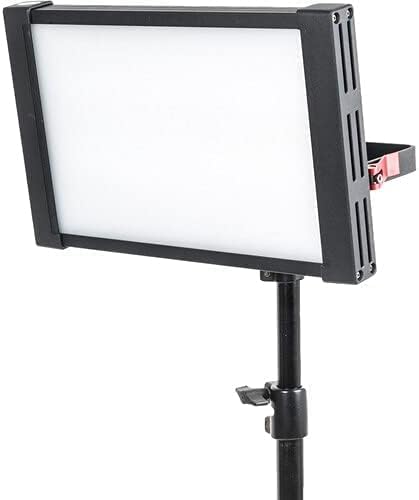
Image: The CAME-TV Boltzen Perseus RGBDT 55W Lighting Screen, emitting a white light, securely mounted on a professional light stand, demonstrating its typical setup for studio or location use.
4.2 Підключення живлення
- Connect the power adapter to the DC input port on the back of the light panel.
- Підключіть адаптер живлення до відповідної електричної розетки.
- Alternatively, if using a compatible battery (not included), attach it to the battery plate on the rear of the unit.

Зображення: Детальний view of the rear panel of the CAME-TV Boltzen Perseus RGBDT 55W Lighting Screen, highlighting the control knobs, buttons, and the battery mounting plate, essential for operation and power management.
5. Інструкція з експлуатації
5.1 Увімкнення/вимкнення
Locate the power switch on the rear panel of the light. Flip the switch to the 'ON' position to power on the device. Flip it to the 'OFF' position to power off.
5.2 Adjusting Brightness (Dimmer)
Використовуйте ДИММЕР knob on the control panel to adjust the light's intensity. Rotate clockwise to increase brightness and counter-clockwise to decrease it.
5.3 Color Temperature and Hue Control
The Boltzen Perseus P-1200R features RGBDT color space control, allowing for a wide range of color temperatures and hues.
- Режим CCT: Використовуйте CCT knob to adjust the color temperature from 2000K to 10000K.
- Режим RGB: Натисніть КОЛІР button to switch to RGB mode. Use the corresponding knobs or buttons to adjust Red, Green, and Blue values to achieve desired colors.
- спеціальні ефекти: The light may include pre-programmed special effects. Refer to the on-screen display and control buttons for navigation and selection of these effects.
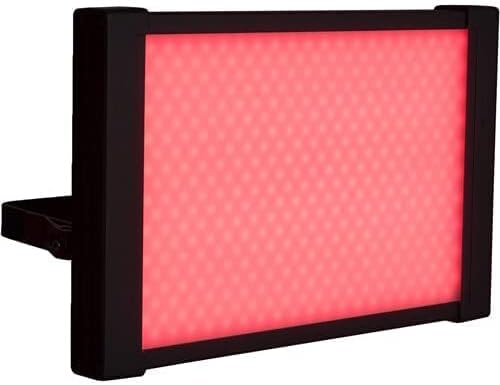
Image: The CAME-TV Boltzen Perseus RGBDT 55W Lighting Screen illuminated with a vibrant red light, showcasing its ability to produce various colors for creative lighting setups.
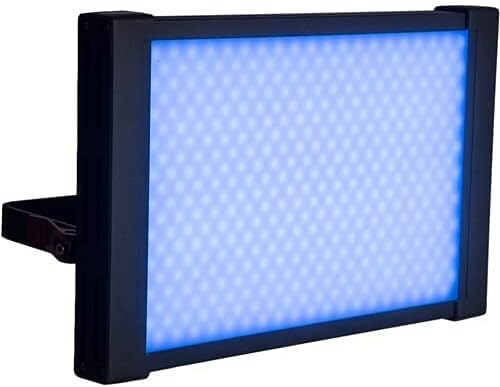
Image: The CAME-TV Boltzen Perseus RGBDT 55W Lighting Screen illuminated with a bright blue light, demonstrating another color option available through its RGBDT color control system.

Image: The CAME-TV Boltzen Perseus RGBDT 55W Lighting Screen illuminated with a rich purple light, further illustrating the extensive color palette achievable with this versatile lighting unit.
6. Технічне обслуговування
- Прибирання: Використовуйте м’яку суху тканину для очищення світлової панелі та корпусу. Не використовуйте абразивні засоби для чищення або розчинники.
- Зберігання: Коли ліхтарик не використовується, зберігайте його в сумці для перенесення в прохолодному, сухому місці, подалі від прямих сонячних променів та екстремальних температур.
- Огляд: Regularly inspect the power cable and connections for any signs of damage. If damage is found, discontinue use and contact customer support.
7. Вирішення проблем
| проблема | Можлива причина | Рішення |
|---|---|---|
| Світло не вмикається. | Немає живлення; нещільне з'єднання; несправний адаптер живлення. | Check power cable connection; ensure outlet is working; try a different power adapter if available. |
| Світло несподівано мерехтить або тьмяніє. | Unstable power supply; overheating; faulty internal component. | Ensure stable power source; allow light to cool down; contact customer support if problem persists. |
| Color or brightness controls are unresponsive. | Software glitch; control panel issue. | Power cycle the device (turn off, wait 10 seconds, turn on); contact customer support. |
8. Технічні характеристики
| Особливість | Деталь |
|---|---|
| Модель | П-1200Р |
| Бренд | CAME-TV |
| Вихідна потужність | 55W (Note: Some specifications may list 9W, but the primary output is 55W) |
| Діапазон колірних температур | 2000K - 10000K (RGBDT) |
| Джерело живлення | Електричний |
| Розміри (доставка) | 37.2 х 31.2 х 9.6 см |
| Вага (доставка) | 1 кг |
| Включені компоненти | Lighting Screen, Power Adapter, Carrying Bag |
| Перша доступна дата | 14 вересня 2021 р |
9. Гарантія та підтримка
For warranty information and technical support, please refer to the official CAME-TV webсайт або зверніться до місцевого дистриб'ютора. Зберігайте чек про покупку як підтвердження покупки для гарантійних претензій.
Manufacturer: CAME-TV Boltzen Perseus RGBDT 55W - P-1200R-1
ASIN: B09G3JLCSQ


