1. Вступ
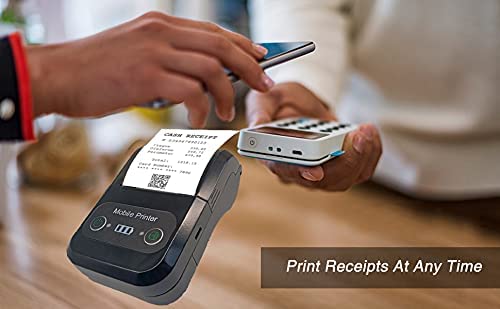
The Milestone MPT-II is a compact and portable 58mm thermal printer designed for various business applications, including retail, restaurants, and mobile logistics. It offers high-speed, clear printing and features Bluetooth connectivity for seamless integration with Android and iOS devices. Its lightweight design and long-lasting battery make it ideal for on-the-go printing needs.

2. Ключові характеристики
- Друк Bluetooth: Supports Android and iOS devices for wireless printing.
- Портативність: Light and compact design allows for printing anywhere, anytime.
- Low Operating Cost: Direct thermal printing eliminates the need for ink ribbons or cartridges, requiring only thermal paper.
- Тривалий термін служби батареї: Built-in 7.4V/2500mAh rechargeable lithium battery provides up to 4 hours of continuous printing.
- Versatile Interface: Equipped with both USB and Bluetooth connectivity.
- ESC/POS Compatible: Supports standard ESC/POS print commands for broad software compatibility.

3. Початкове налаштування
3.1 Розпакування та вміст
Carefully unpack the printer and verify all components are present:
- 1 x Milestone MPT-II Thermal Printer
- 1 x USB кабель
- 1 x USB Adaptor
- 1 х рулонів паперу
- 1 x Посібник користувача (цей документ)
3.2 Заряджання принтера
- Connect the USB cable to the printer's charging port.
- Підключіть USB-адаптер до стандартної розетки.
- The charging indicator light will illuminate. Charge the printer fully before first use (approximately 2.5-3 hours for continuous printing).
3.3 Завантаження термопаперу
- Open the paper compartment cover by gently pushing the latch.
- Insert the thermal paper roll with the printing side facing outwards (as shown in Figure 2). Ensure the roll is seated correctly.
- Витягніть невеликий шматок паперу за межі ріжучого краю.
- Close the paper compartment cover firmly until it clicks into place.
4. Інструкція з експлуатації
4.1 Увімкнення/вимкнення
- Щоб увімкнути живлення: натисніть і утримуйте кнопку живлення, доки не засвітиться індикатор.
- Щоб вимкнути живлення: натисніть і утримуйте кнопку живлення, доки індикатор не згасне.
4.2 Підключення Bluetooth
The MPT-II printer supports Bluetooth connectivity for mobile devices.
- Переконайтеся, що принтер увімкнено та знаходиться в зоні дії вашого мобільного пристрою.
- On your mobile device (Android/iOS), go to Bluetooth settings and turn Bluetooth on.
- шукати available devices. The printer will appear as "MPT-II".
- Select "MPT-II" to pair. If prompted for a password, enter 1234 or 0000.
- Once paired, the printer is ready for use with compatible applications.
4.3 Використання з програмами
For mobile printing, you will need a compatible application. Milestone recommends downloading RAWBT Printer App or MYXPrint App from the Google Play Store. For iOS, search for compatible thermal printer apps in the App Store.
- Open your chosen printing application.
- Navigate to the printer settings within the app.
- Select the "MPT-II" printer from the list of available Bluetooth devices.
- You can now send print commands from the application.

4.4 USB-підключення (для ПК)
The printer can also be connected to a PC via USB. You may need to install a printer driver, which is typically available from the manufacturer's website or included on a CD with the product (if applicable).
5. Технічне обслуговування
5.1 Очищення принтера
To ensure optimal performance and print quality, regularly clean the printer:
- Друкувальна головка: Використовуйте ватний тампон, злегка промокнітьampened with isopropyl alcohol to gently wipe the thermal print head. Allow it to dry completely before use.
- Шлях паперу: Use a soft, dry cloth or a small brush to remove any paper dust or debris from the paper path.
- Зовні: Протріть зовнішню частину принтера м’якою,amp тканина. Уникайте використання агресивних хімікатів або абразивних засобів для чищення.
5.2 Догляд за акумулятором
- Перед першим використанням повністю зарядіть акумулятор.
- Уникайте частої повної розрядки акумулятора.
- If storing the printer for an extended period, charge it to about 50% and recharge every few months to prevent battery degradation.
6. Вирішення проблем
| проблема | Можлива причина | Рішення |
|---|---|---|
| Принтер не вмикається. | Батарея низького заряду або розряджена. | Charge the printer using the provided USB cable and adaptor. |
| Не вдається підключитися через Bluetooth. | Bluetooth is off on device; incorrect pairing password; printer not discoverable. | Ensure Bluetooth is enabled on your device. Re-attempt pairing with password 1234 or 0000. Restart both printer and device. |
| No print output or blank paper. | Paper loaded incorrectly; out of paper; print head dirty. | Check paper orientation (printing side out). Replace paper roll if empty. Clean the thermal print head (refer to Maintenance section). |
| Poor print quality (faded, lines). | Print head dirty; low battery; poor quality thermal paper. | Clean the print head. Charge the printer fully. Use high-quality thermal paper. |
| Printer beeps continuously. | Paper alarm (out of paper or paper jam); low battery reminder. | Check and replace paper roll or clear jam. Charge the printer. |
7. Технічні характеристики
| Особливість | Специфікація |
|---|---|
| Метод друку | Терморядковий друк |
| Ширина друку | Paper width 58mm, effective width 58mm |
| Щільність друку | 576 точки/рядок |
| роздільна здатність | 8 dots/mm, 203 DPI |
| Швидкість друку | 70mm/s (Max Print speed Monochrome: 50 ppm) |
| Printer Core Life | 50KM (25% print density or less than 100 million pulses) |
| Printable Content | English, numbers, symbols, characters, pictures, 1D/2D barcode, multi-languages |
| Інтерфейс передачі даних | USB / Bluetooth |
| Джерело живлення | Machine charging 9V-1.5A |
| Акумулятор | Built-in rechargeable 2600mAh lithium-ion battery (7.4V/2500mAh) |
| Час безперервного друку | 2.5-3 годин |
| Набір інструкцій | Сумісність з ESC / POS |
| Різання з паперу | Manually tear |
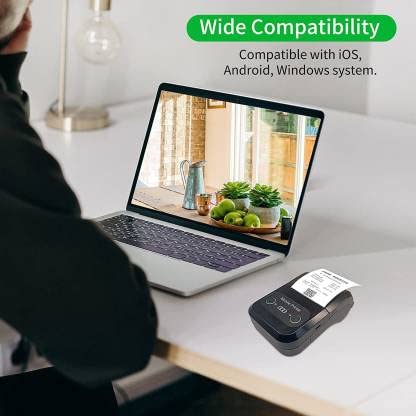
| Сумісність операційної системи | Android, iOS, Windows |
| Розміри продукту | 15 Г x 12 Ш x 6 В сантиметрів |
| Вага товару | 310 грамів |
| Включені компоненти | 1 x Thermal Printer, 1 x USB Cable, 1 x USB Adaptor, 1 x Paper Roll, 1 x User Manual |
8. Гарантія та підтримка
This product comes with a 10-day warranty as per the purchase terms. For any technical assistance, troubleshooting beyond this manual, or warranty claims, please contact your retailer or the manufacturer's customer support. Refer to your purchase documentation for specific contact details.
Виробник: Віха
Імпортер: SB RETAILS, SECTOR 28, PRADHIKARAN, PUNE-44, +918888881631


