вступ
This manual provides essential information for the installation, operation, and maintenance of your Intel® Core™ i7-12700KF Desktop Processor. Designed for high performance, this processor is built with Intel's performance hybrid architecture, offering exceptional capabilities for gaming, content creation, and demanding applications.

Figure 1: Intel Core i7-12700KF Processor Retail Packaging. This image shows the blue and white retail box for the Intel Core i7 processor, indicating it is a 12th Gen unlocked model.
Продукт закінченийview
The Intel® Core™ i7-12700KF is a 12th Generation Intel Core processor featuring 12 cores (8 Performance-cores and 4 Efficient-cores) and a maximum turbo frequency of up to 5.0 GHz. It is designed for the LGA1700 socket and is compatible with Intel 600 and 700 series chipset-based motherboards. This 'KF' variant requires a discrete graphics card as it does not include integrated graphics.
- Гібридна архітектура продуктивності: Combines Performance-cores and Efficient-cores to optimize performance for gaming, productivity, and content creation.
- Розблокований множник: Дозволяє розганяти систему для досягнення вищої продуктивності (потрібна сумісна материнська плата та система охолодження).
- LGA1700 Socket: Designed for the latest Intel motherboards.
- Discrete Graphics Required: This processor does not have integrated graphics.
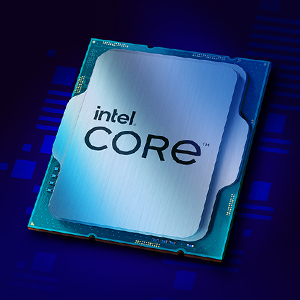
Figure 2: Close-up of the Intel Core i7 Processor Chip. This image displays the metallic surface of the Intel Core processor, highlighting its intricate design.
Налаштування та встановлення
Proper installation is crucial for optimal performance and longevity of your processor. Always handle the processor by its edges to avoid touching the gold contacts or the top surface.
Перш ніж почати:
- Ensure your motherboard has an LGA1700 socket and is compatible with 12th Gen Intel Core processors (600 or 700 series chipset).
- Acquire a compatible CPU cooler (not included with KF series processors).
- Gather necessary tools: Phillips head screwdriver, thermal paste (if not pre-applied to cooler).
- Work in a static-free environment. Use an anti-static wrist strap.
Кроки встановлення:
- Підготуйте материнську плату: Відкрийте важіль фіксації роз'єму процесора на материнській платі.
- Встановлення процесора: Carefully align the triangular marker on the processor with the corresponding marker on the socket. Gently place the processor into the socket without forcing it.
- Безпечний процесор: Close the retention lever to secure the processor in place.
- Нанесіть термопасту: Apply a small amount of thermal paste to the center of the processor's integrated heat spreader (IHS) if your cooler does not have it pre-applied.
- Встановлення кулера процесора: Встановіть обраний вами кулер для процесора відповідно до інструкцій виробника, забезпечуючи рівномірний розподіл тиску.
- Підключення вентилятора охолодження: Connect the CPU cooler fan cable to the designated CPU_FAN header on the motherboard.
For detailed visual instructions, refer to your motherboard's user manual or Intel's official installation guides available on their support webсайт.
Експлуатаційні міркування
Once installed, the Intel Core i7-12700KF processor will operate automatically with your system's operating system. Key operating considerations include:
- Налаштування BIOS/UEFI: Ensure your motherboard's BIOS/UEFI is updated to the latest version for optimal compatibility and performance. Verify that XMP (Extreme Memory Profile) is enabled for your RAM if applicable.
- Встановлення драйвера: Встановіть найновіші драйвери чіпсета від виробника материнської плати. webсайт або офіційну сторінку підтримки Intel.
- Охолодження: Monitor CPU temperatures, especially during heavy loads (gaming, video editing). Adequate cooling is essential to prevent thermal throttling and ensure stable performance.
- Overclocking (Optional): The 'KF' designation indicates an unlocked multiplier, allowing for overclocking. This should only be attempted by experienced users with robust cooling solutions. Refer to Intel's official guidelines and third-party resources for safe overclocking practices.

Малюнок 3: Впрample of a high-performance desktop setup utilizing an Intel Core processor. This image illustrates a multi-monitor workstation configured for gaming, streaming, and content creation, demonstrating the processor's capability to handle demanding tasks.
Технічне обслуговування
Processors generally require minimal maintenance. However, periodic checks can help ensure long-term stability and performance.
- Видалення пилу: Regularly clean dust from your CPU cooler and case fans to maintain optimal airflow and cooling efficiency. Use compressed air for best results.
- Повторне нанесення термопасти: If you notice consistently high temperatures, consider reapplying thermal paste every few years or if you remove and reinstall your CPU cooler.
- Оновлення програмного забезпечення: Keep your operating system, motherboard BIOS/UEFI, and chipset drivers updated to benefit from performance improvements and security patches.
Усунення несправностей
If you encounter issues with your processor, consider the following troubleshooting steps:
- Немає проблем із дисплеєм/завантаженням:
- Ensure your discrete graphics card is properly seated and powered.
- Перевірте, чи всі кабелі живлення (24-контактний ATX, 8-контактний процесор) надійно підключені до материнської плати.
- Перевстановіть модулі оперативної пам'яті.
- Clear CMOS (refer to motherboard manual).
- Нестабільність/збої системи:
- Check CPU temperatures using monitoring software. High temperatures can cause instability.
- Запустіть інструменти діагностики пам'яті, щоб перевірити наявність проблем з оперативною пам'яттю.
- Переконайтеся, що ваш блок живлення (БЖ) має достатню потужністьtagе для всіх компонентів.
- If overclocked, revert to default settings to rule out instability from overclocks.
- Низька продуктивність:
- Verify CPU is running at expected clock speeds (check with CPU-Z or similar tools).
- Ensure background applications are not consuming excessive resources.
- Check for thermal throttling (CPU reducing speed due to high temperatures).
For further assistance, consult Intel's official support resources or your motherboard manufacturer's support.
Технічні характеристики
| Особливість | Деталь |
|---|---|
| Модель процесора | Intel Core i7-12700KF |
| Загальна кількість ядер | 12 (8 продуктивних ядер + 4 ефективних ядра) |
| Загальна кількість тем | 20 |
| Максимальна турбо частота | До 5.0 ГГц |
| Базова частота процесора | 3.6 ГГц |
| Кеш | 25 МБ Intel® Smart Cache |
| Кеш L2 | 12 Мб |
| TDP | 125 Вт |
| Підтримуваний сокет | LGA1700 |
| Chipset Compatibility | Intel 600 Series, Intel 700 Series |
| Інтегрована графіка | None (Discrete Graphics Required) |
| Підтримка пам'яті | DDR5 до 4800 МТ/с, DDR4 до 3200 МТ/с |
| Версія PCI Express | 5.0 і 4.0 |
| Розміри продукту | 4.57 x 1.73 x 3.98 дюймів |
| Вага товару | 1.76 унції |
Гарантія та підтримка
Intel processors typically come with a limited warranty. For specific warranty terms and conditions, please refer to the official Intel website or the documentation included with your processor. Warranty coverage usually applies to defects in materials and workmanship under normal use.
Технічна підтримка:
For technical assistance, driver downloads, and compatibility information, visit the official Intel Support webсайт:
You can also find compatible motherboards and other related information using the Intel Product Compatibility Tool: Інструмент сумісності продуктів Intel


