Посібник користувача Ethernet-маршрутизатора DrayTek Vigor 2865ax
Модель: V2865AX-K
вступ
Welcome to the user manual for your DrayTek Vigor 2865ax Ethernet Router. This document provides detailed instructions for setting up, operating, maintaining, and troubleshooting your device to ensure optimal performance and connectivity. The Vigor 2865ax is a high-performance router designed for Small to Medium Businesses (SMBs) and advanced home users, offering robust features like VDSL2/ADSL2+ and Ethernet WAN load balancing, Wi-Fi 6 (AX3000), VPN capabilities, and extensive LAN port options.
Інформація про безпеку
Please read these safety instructions carefully before using the device.
- Place the router on a stable, flat surface away from direct sunlight, heat sources, and moisture.
- Забезпечте належну вентиляцію навколо пристрою, щоб запобігти перегріву.
- Use only the power adapter supplied with the router.
- Do not open the router casing; звертайтеся до кваліфікованого персоналу з усіма видами обслуговування.
- Тримайте пристрій подалі від дітей і домашніх тварин.
- Disconnect power during electrical storms or when unused for long periods.
Вміст упаковки
Перевірте, чи всі перелічені нижче предмети входять до вашої упаковки:
- Vigor 2865 Series Router
- Блок живлення постійного струму 12 В з вилкою Великобританії
- Короткий посібник
- Screws & wall plugs for wall mounting
- 2m Cat-5e RJ-45 Network Cable
- 2 знімні антени бездротової локальної мережі
Продукт закінченийview
Familiarize yourself with the physical components and ports of your DrayTek Vigor 2865ax router.
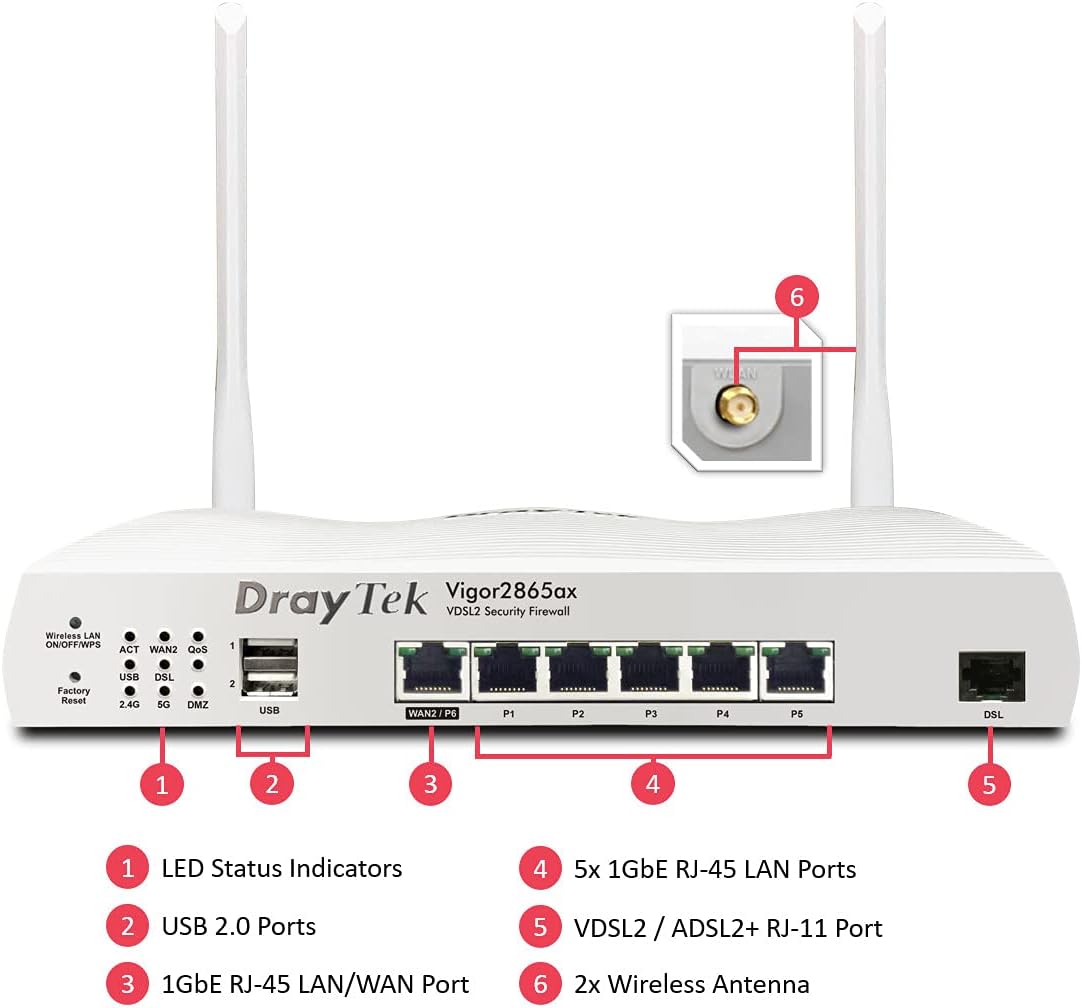
This image displays the front panel of the DrayTek Vigor 2865ax router, highlighting key components. Label 1 points to the LED Status Indicators, Label 2 to the USB 2.0 Ports, Label 3 to the 1GbE RJ-45 LAN/WAN Port (WAN2/P6), Label 4 to the 5x 1GbE RJ-45 LAN Ports (P1-P5), Label 5 to the VDSL2 / ADSL2+ RJ-11 Port (DSL), and Label 6 to the 2x Wireless Antenna connectors.
Передня панель
- Світлодіодні індикатори стану: Provide visual feedback on the router's operational status, including power, internet connectivity, Wi-Fi activity, and LAN port status.
- Порти USB 2.0: For connecting external devices such as 3G/4G USB modems for backup WAN or USB storage for network-attached storage (NAS) functionality.
- WAN2/P6 (1GbE RJ-45 LAN/WAN Port): Configurable as either a Gigabit Ethernet WAN port for connecting to a fiber modem or another internet source, or as an additional LAN port.
- P1-P5 (5x 1GbE RJ-45 LAN Ports): Gigabit Ethernet ports for connecting wired devices such as computers, servers, and network switches.
- DSL (VDSL2 / ADSL2+ RJ-11 Port): For connecting directly to your VDSL or ADSL broadband line.
Задня панель
- Споживана потужність: Connects to the supplied DC 12V power adapter.
- Кнопка живлення: Щоб увімкнути або вимкнути маршрутизатор.
- Антенні роз'єми: For attaching the two detachable wireless LAN antennas.
Налаштування
Крок 1: підключіть обладнання
- Підключіть антени: Screw the two detachable wireless LAN antennas onto the connectors at the rear of the router.
- Підключення до Інтернету (WAN):
- For VDSL/ADSL: Connect an RJ-11 cable from your telephone line's DSL filter/socket to the DSL port on the router.
- For Ethernet WAN (e.g., Fibre/Cable Modem): Connect an Ethernet cable from your fiber/cable modem to the WAN2/P6 port on the router.
- Підключення до локальної мережі (LAN): Підключіть кабель Ethernet від одного з портів LAN (P1-P5) на маршрутизаторі до комп’ютера або мережевого комутатора.
- Підключіть живлення: Connect the supplied DC 12V power adapter to the router's power input and then plug it into a power outlet. Press the power button to turn on the router.
Крок 2: початкова конфігурація
- Доступ Web Інтерфейс: Відкрийте a web browser on a connected computer and enter the default IP address: 192.168.1.1.
- Логін: Введіть ім'я користувача за замовчуванням (адмін) та пароль (адмін). It is highly recommended to change the default password immediately after logging in for the first time.
- Run Quick Start Wizard: Follow the on-screen instructions of the Quick Start Wizard to configure your internet connection (WAN settings), Wi-Fi network name (SSID), and password.
- Оновлення мікропрограми: After initial setup, navigate to Обслуговування системи > Оновлення прошивки to check for and install the latest firmware. This ensures optimal performance and security.
Інструкція з експлуатації
Multi-WAN Load Balancing and Failover
The Vigor 2865ax supports multiple WAN connections, allowing for load balancing to increase bandwidth or failover for connection redundancy.

This diagram shows the DrayTek Vigor 2865ax router connected to various internet sources: WiFi WAN, 1Gb Ethernet & FTTP, ADSL2+ & VDSL2 FTTC, and G.Fast FTTC. This illustrates the router's capability to utilize multiple WAN connections simultaneously for load balancing or failover.
Configure WAN settings under WAN > Загальні налаштування. You can enable load balancing policies or set up failover rules to ensure continuous internet access.
Wi-Fi 6 (AX3000) Configuration
The router provides high-speed Wi-Fi 6 connectivity across dual bands (2.4GHz and 5GHz).

This image depicts the Wi-Fi coverage provided by the DrayTek Vigor 2865ax router, showing distinct coverage areas for the 2.4GHz (AX600) and 5GHz (AX2400) bands, with various devices connected within these zones.
Access Wi-Fi settings via Бездротова локальна мережа menu. Here you can:
- Change SSID (Wi-Fi network name) and password.
- Configure security settings (WPA2/WPA3).
- Set up multiple SSIDs for different networks (e.g., guest network).
- Adjust channel and bandwidth settings for optimal performance.
VPN (віртуальна приватна мережа)
The Vigor 2865ax supports up to 32 VPN tunnels, including SSL VPN and OpenVPN, for secure remote access and site-to-site connectivity.
Перейдіть до VPN та віддалений доступ to configure VPN profiles. Detailed guides for various VPN types are available on the DrayTek support webсайт.
LAN Management and VLANs
The router features 5+1 Gigabit LAN ports and supports VLANs for network segmentation.
Manage LAN settings under LAN > General Setup. Ти можеш:
- Configure IP addresses and DHCP server settings.
- Create VLANs (Virtual LANs) to isolate network segments for enhanced security and management (e.g., separating guest Wi-Fi from internal network).
- Set up port mirroring or link aggregation if supported.
Технічне обслуговування
Оновлення мікропрограми
Regularly check for and install firmware updates to ensure your router has the latest features, security patches, and performance improvements.
- Відвідайте офіційний сайт DrayTek website and navigate to the support section for the Vigor 2865ax.
- Завантажте останню прошивку file.
- Доступ до маршрутизатора web interface and go to Обслуговування системи > Оновлення прошивки.
- Follow the on-screen instructions to upload and install the firmware. Do not power off the router during this process.
Конфігурація резервного копіювання
Рекомендується створити резервну копію налаштувань конфігурації вашого маршрутизатора перед внесенням значних змін або оновленням прошивки.
Перейти до Обслуговування системи > Резервне копіювання конфігурації to save your settings to a file.
Скидання до заводських налаштувань
If you encounter persistent issues or wish to revert all settings to default, you can perform a factory reset.
УВАГА: A factory reset will erase all your custom configurations.
Щоб скинути заводські налаштування:
- Коли маршрутизатор увімкнено, натисніть і утримуйте кнопку за допомогою скріпки або тонкого предмета Скидання до заводських налаштувань button (located on the front panel, often recessed) for about 5-10 seconds until the LEDs flash.
- Release the button and wait for the router to restart with default settings.
Усунення несправностей
Немає підключення до Інтернету
- Перевірте кабелі: Ensure all Ethernet and DSL cables are securely connected to the correct ports.
- Перевірте світлодіод WAN: Verify that the WAN LED (DSL or WAN2) is lit and stable, indicating a connection to your ISP.
- Налаштування інтернет-провайдера: Confirm that your WAN settings (e.g., PPPoE username/password, static IP, DHCP) are correctly configured in the router's web interface, matching your ISP's requirements.
- Статус модему: If using an external modem, check its status lights to ensure it's online.
- Перезавантаження: Power cycle both your modem (if applicable) and the DrayTek router.
Wi-Fi Not Working or Slow
- Check Wireless LAN LED: Ensure the Wireless LAN LED is active.
- Трансляція SSID: Verify that your Wi-Fi network (SSID) is being broadcast.
- Пароль: Двічі перевірте пароль від Wi-Fi.
- Перешкоди каналу: Спробуйте змінити канал Wi-Fi в налаштуваннях роутера, щоб уникнути перешкод від сусідніх мереж.
- Потужність сигналу: Переконайтеся, що маршрутизатор розташований по центру та подалі від перешкод.
Немає доступу Web Інтерфейс
- IP-адреса: Confirm your computer's IP address is in the same subnet as the router (e.g., 192.168.1.x).
- Кабельне підключення: Переконайтеся, що ваш комп'ютер підключено безпосередньо до LAN-порту на маршрутизаторі.
- Кеш браузера: Очистіть кеш браузера або спробуйте інший браузер.
- Брандмауер/Антивірус: Тимчасово вимкніть усі програмні брандмауери або антивірусні програми на вашому комп’ютері, які можуть блокувати доступ.
- Заводські налаштування: As a last resort, perform a factory reset (see Maintenance section).
Технічні характеристики
| Особливість | Деталь |
|---|---|
| Розміри продукту | 34.5 х 28.6 х 7.5 см; 1.6 кг |
| Номер моделі товару | V2865AX-K |
| Бренд | DrayTek |
| Назва моделі | Vigor 2865ax |
| Особливість | Віддалений доступ |
| Клас діапазону частот | Дводіапазонний |
| Стандарт бездротового зв'язку | 802.11a (Wi-Fi 6 AX3000) |
| Сумісні пристрої | Ноутбук, персональний комп'ютер, планшет, смартфон |
| Частота | 2.4 ГГц, 5 ГГц |
| Рекомендоване використання | Ігри, дім, бізнес |
| Технологія підключення | Wi-Fi, Ethernet, VDSL2/ADSL2+ |
Гарантія та підтримка
DrayTek products typically come with a standard manufacturer's warranty. Please refer to the warranty card included in your product packaging or visit the official DrayTek webсайт для отримання детальних гарантійних умов, що стосуються вашого регіону.
For technical support, firmware downloads, and additional documentation, please visit the official DrayTek support webсайт: www.draytek.co.uk/support. You may also contact DrayTek customer service directly for assistance.
When contacting support, please have your router's model number (Vigor 2865ax) and serial number ready.


