1. Вступ
Thank you for choosing the Hama Digital Radio DR7 USB. This manual provides essential information for the safe and efficient operation of your new radio. Please read it thoroughly before use and keep it for future reference. This portable radio supports DAB/DAB+ digital radio and conventional FM reception, offering clear sound quality and portability.
2. Техніка безпеки
- Protect the product from dirt, moisture, and overheating. Use it only in dry environments.
- Не кидайте виріб та не піддавайте його сильним ударам.
- Не відкривайте виріб і не продовжуйте його експлуатувати, якщо він пошкоджений.
- Не намагайтеся самостійно обслуговувати або ремонтувати виріб. Залиште будь-які сервісні роботи кваліфікованим фахівцям.
- Тримайте цей виріб, як і всі електричні вироби, в недоступному для дітей місці.
- Негайно утилізуйте пакувальний матеріал відповідно до місцевих норм.
- Батареї слід вставляти з дотриманням правильної полярності.
- Вийміть батарейки з виробу, якщо він не використовуватиметься протягом тривалого часу.
3. Вміст упаковки
- Hama Digital Radio DR7 USB
- 4 х АА батарейки
- Інструкція з експлуатації
4. Налаштування
4.1 Джерело живлення
The Hama Digital Radio DR7 USB can be powered by either batteries or an external USB power source.
4.1.1 Встановлення батареї
To use the radio with batteries, open the battery compartment cover located on the back of the device. Insert 4 AA alkaline batteries, ensuring correct polarity (+/-). Close the battery compartment cover securely.

Зображення: Спина view of the radio with the battery compartment open, showing battery insertion.
4.1.2 Підключення зовнішнього живлення
For continuous operation, connect the radio to a USB power source using a compatible USB 2.0 cable. The DC IN port requires 5.0V-0.5A. The USB port is located on the back of the radio.
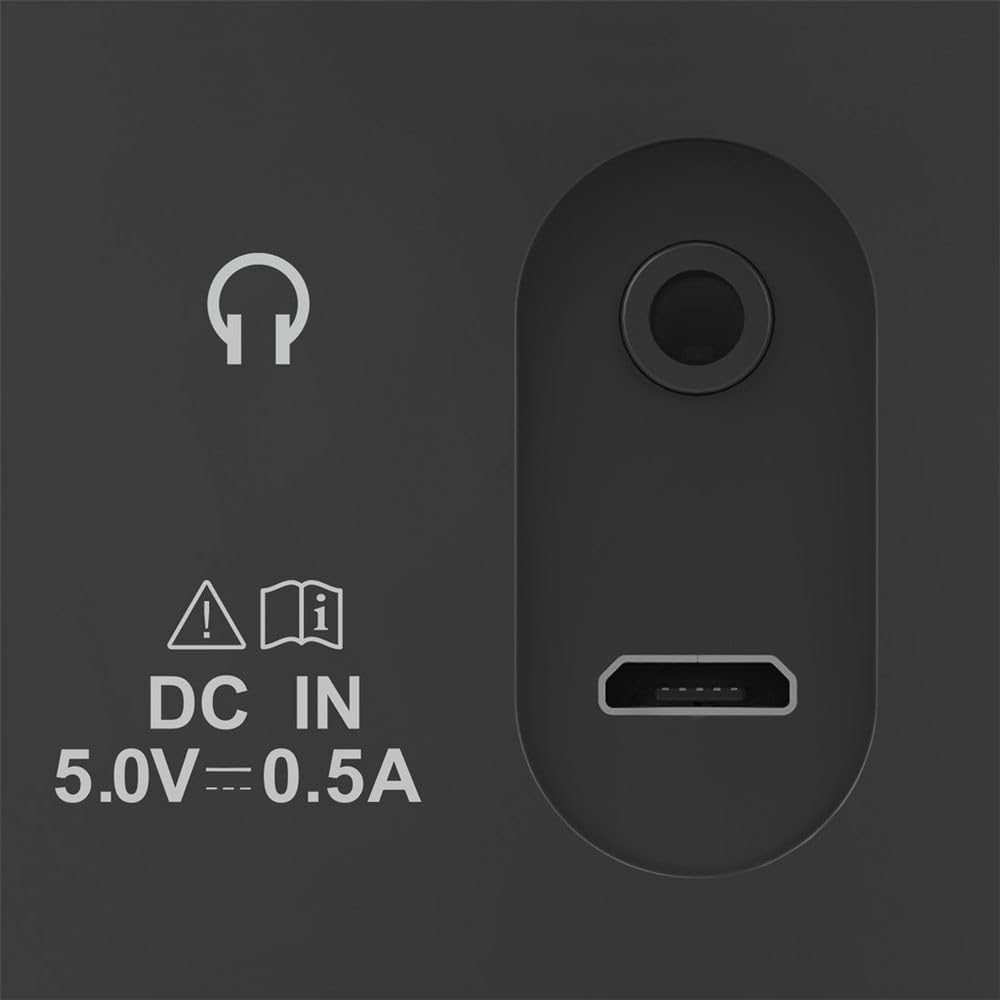
Image: Close-up of the radio's rear ports, including DC IN and USB.
4.2 Антена
Повністю розгорніть телескопічну антену для оптимального радіоприйому. За потреби відрегулюйте її положення для покращення сили сигналу.

Зображення: Спина view of the radio with the antenna extended.
5. Інструкція з експлуатації
5.1 Увімкнення/вимкнення
Натисніть потужність кнопка (зазвичай позначена колом і вертикальною лінією), щоб увімкнути або вимкнути радіо.
5.2 Вибір режиму (DAB/DAB+ та FM)
Використовуйте Режим or Джерело button to switch between DAB/DAB+ digital radio and FM radio modes.
5.3 Station Tuning
5.3.1 Automatic Scan (DAB/DAB+)
In DAB/DAB+ mode, press the Сканувати button to automatically search for available digital radio stations. The radio will store all found stations.
5.3.2 Manual Tuning (FM)
У режимі FM використовуйте Налаштування +/- buttons or the rotary knob (if available) to manually adjust the frequency. Press and hold the Налаштування +/- buttons for automatic station seeking.

Зображення: спереду view of the radio, highlighting the display and controls.
5.4 попередньо встановлених станцій
The radio features two direct selection buttons and allows for storing up to 10 preset stations.
- Зберегти: Tune to the desired station. Press and hold a preset button (e.g., 1 or 2) or the Попереднє налаштування button until the display confirms the station is saved.
- Щоб згадати: Briefly press the corresponding preset button to quickly switch to a saved station.
5.5 Регулювання гучності
Відрегулюйте гучність за допомогою Обсяг rotary knob or dedicated volume buttons.
5.6 Функція будильника
The radio includes an alarm clock feature. Refer to the detailed instructions in the printed manual for setting and managing alarms.
5.7 Використання навушників
Connect standard 3.5mm headphones to the headphone jack on the back of the radio for private listening. The internal speaker will mute automatically.
6. Технічне обслуговування
- Очищуйте цей виріб лише злегка damp, тканиною без ворсу та не використовуйте агресивні засоби для чищення.
- Переконайтеся, що вода не потрапляє всередину виробу.
- When replacing batteries, always replace all batteries at once.
- Зберігайте радіоприймач у прохолодному, сухому місці, якщо він не використовується протягом тривалого часу.
7. Вирішення проблем
| проблема | Можлива причина | Рішення |
|---|---|---|
| Немає живлення | Batteries are depleted or incorrectly inserted; power cable is disconnected. | Replace batteries, check polarity; ensure power cable is securely connected. |
| Поганий або відсутній прийом | Антена не висунута; слабкий сигнал; перешкоди. | Fully extend and adjust the telescopic antenna; try moving the radio to a different location; perform a new station scan. |
| Ні звуку | Гучність занадто низька; підключено навушники. | Increase volume; disconnect headphones if you want to use the speaker. |
8. Технічні характеристики
- модель: 00054242
- Розміри (Д x Ш x В): 16.5 х 5.5 х 10.5 см
- вага: 448.54 г
- Технологія тюнера: DAB, DAB+, FM
- Frequency (FM): 87.5 МГц
- Джерело живлення: 4 x AA Alkaline Batteries, USB 2.0 (DC IN 5.0V-0.5A)
- матеріал: пластик
- Особливості: Alarm clock, 2 direct selection buttons, 10 preset stations
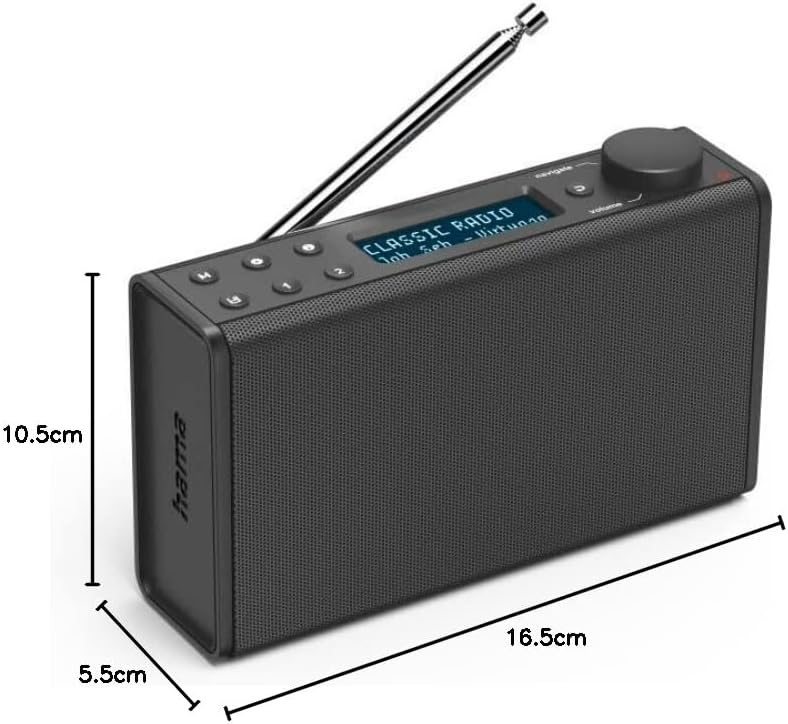
Image: Dimensions of the Hama Digital Radio DR7 USB.
9. Гарантія та підтримка
Hama GmbH & Co KG assumes no liability and provides no warranty for damage resulting from improper installation/mounting, improper use of the product, or from failure to observe the operating instructions and/or safety notes. For further support, please visit the official Hama webсайту або зв’яжіться з їхньою службою обслуговування клієнтів.