1. Важливі інструкції з техніки безпеки
Please read these instructions carefully before using the product and retain them for future reference. Failure to follow these instructions may result in electric shock, fire, or other hazards.
- Не піддавайте цей прилад впливу дощу або вологи.
- Не блокуйте вентиляційні отвори. Встановлюйте відповідно до інструкцій виробника.
- Не встановлюйте поблизу будь-яких джерел тепла, таких як радіатори, обігрівачі, печі або інші пристрої (включаючи ampліфікатори), які виробляють тепло.
- Захистіть шнур живлення від натягування або защемлення, особливо біля вилок, розетки та місця, де вони виходять з приладу.
- Використовуйте лише насадки/аксесуари, зазначені виробником.
- Відключайте цей прилад від мережі під час грози або якщо він не використовується протягом тривалого часу.
- Звертайтеся до кваліфікованого сервісного персоналу. Обслуговування потрібне, якщо пристрій було пошкоджено будь-яким чином, наприклад, пошкоджено шнур живлення або вилка, була пролита рідина або всередину пристрою потрапили предмети, пристрій піддався впливу дощу або вологи, не працює належним чином , або було видалено.
- The stylus is delicate; handle with care to avoid damage.
2. Продукт закінчивсяview
The Udreamer UD001 is a belt-driven vinyl record player featuring built-in speakers, Bluetooth connectivity, USB playback, AUX-IN, and RCA line-out. It supports 3 speeds for various record types.

Зображення: спереду view of the Udreamer UD001 Vinyl Record Player with a record on the platter and the dust cover open.
2.1 Компоненти та елементи керування
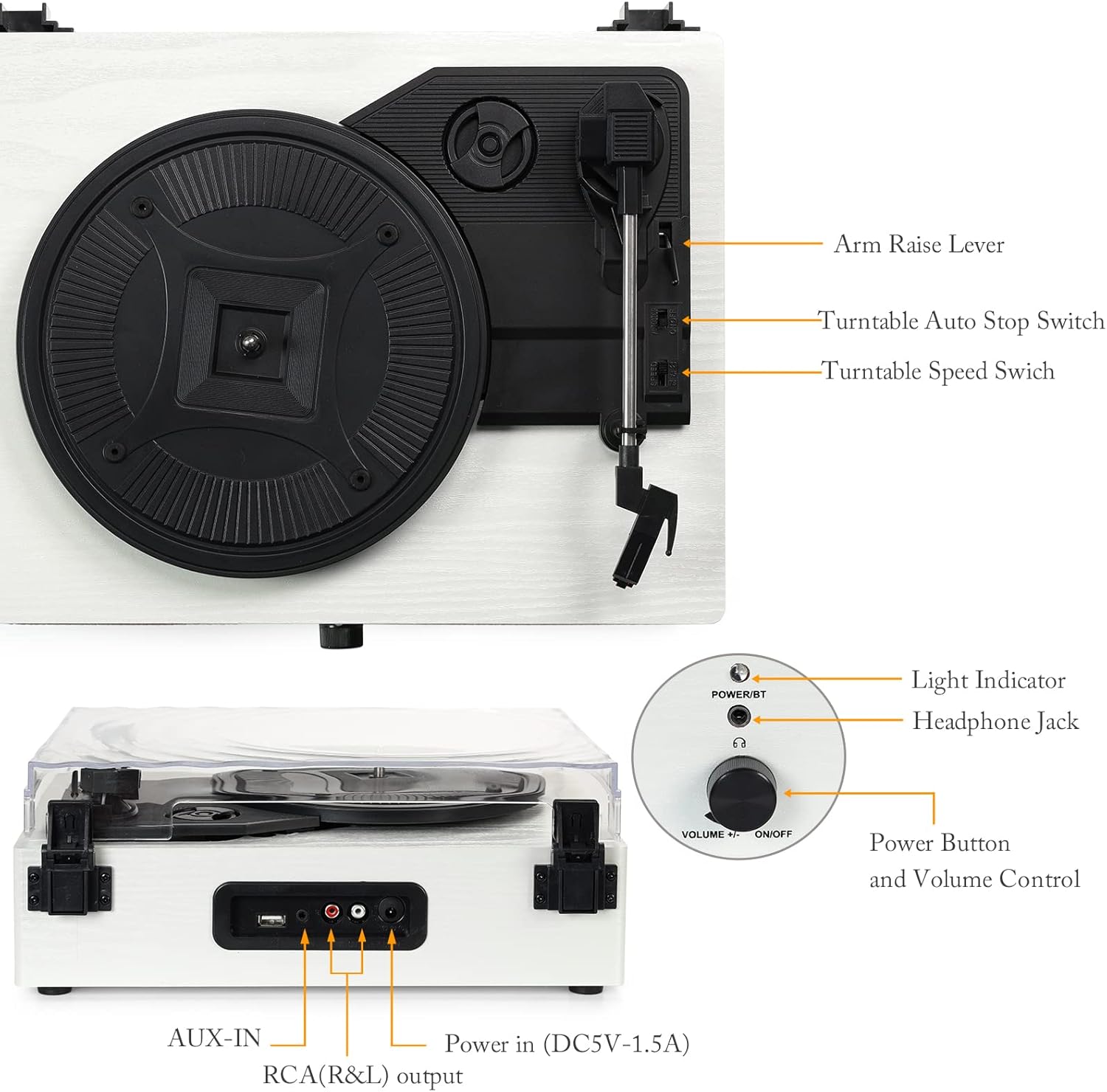
Зображення: Детальне view of the turntable with labels pointing to key components including the arm raise lever, auto stop switch, speed switch, light indicator, headphone jack, power button, volume control, AUX-IN, RCA(R&L) output, and power input.
- Блюдо: Підтримує запис під час відтворення.
- Пилозахисний чохол: Захищає програвач від пилу.
- Тонеарм: Holds the stylus and cartridge.
- Стилус: Голка, яка зчитує канавки платівки.
- Arm Raise Lever: Піднімає та опускає тонарм.
- Turntable Auto Stop Switch: Enables or disables automatic stopping of the platter at the end of a record.
- Turntable Speed Switch: Вибір швидкості відтворення (33, 45 або 78 об/хв).
- Power Button/Volume Control: Вмикає/вимикає пристрій та регулює гучність.
- Світловий індикатор: Показує стан живлення та Bluetooth.
- Роз'єм для навушників: Для приватного прослуховування.
- Порт USB: Для відтворення аудіо з USB-флеш-накопичувача.
- ВХІД: Для підключення зовнішніх аудіопристроїв.
- RCA (R&L) Output: Для підключення до зовнішніх ampпідсилювачі або потужні динаміки.
- Power In (DC5V-1.5A): Підключається до адаптера живлення.

Зображення: Крупний план views illustrating the stylus, the belt-driven platter mechanism, and the three supported record speeds (33, 45, 78 RPM) for 7-inch, 10-inch, and 12-inch records.
3. Налаштування
3.1 Розпакування
Carefully remove the turntable from its packaging. Ensure all components are present and undamaged. The package should include the UD001 turntable unit and an operation manual.

Image: The Udreamer UD001 turntable, its packaging box, power adapter, and instruction manual.
3.2 Підключення живлення
- Connect the power adapter to the 'Power In (DC5V-1.5A)' port on the rear of the turntable.
- Підключіть адаптер живлення до відповідної розетки.
3.3 Initial Platter and Belt Setup
The turntable platter and drive belt may require minor setup. Ensure the drive belt is correctly positioned around the motor pulley and the inner rim of the platter. Refer to the diagram in the 'Product Overview' section for visual guidance.
4. Інструкція з експлуатації
4.1 Відтворення вінілової платівки
- Покладіть платівку на тарілку вертушки.
- Select the appropriate speed (33, 45, or 78 RPM) using the Turntable Speed Switch, matching the record's speed.
- If playing a 45 RPM single, place the included 45 RPM adapter on the center spindle.
- Turn the Power Button/Volume Control knob clockwise to power on the unit. The light indicator will illuminate.
- Lift the tonearm using the Arm Raise Lever.
- Обережно перемістіть тонарм над потрібною початковою канавкою платівки.
- Gently lower the tonearm onto the record using the Arm Raise Lever. The record will begin to play.
- Відрегулюйте гучність за допомогою кнопки живлення/ручки регулювання гучності.
- To stop playback, lift the tonearm using the Arm Raise Lever and return it to its rest. Turn the Power Button/Volume Control knob counter-clockwise to power off.

Image: Close-up of the Turntable Auto Stop Switch and Turntable Speed Switch, located near the tonearm base.
Функція автоматичної зупинки: The Turntable Auto Stop Switch controls whether the platter stops automatically at the end of a record. Set to 'ON' for automatic stop, 'OFF' for continuous rotation.
4.2 Створення пари Bluetooth
The UD001 can connect wirelessly to Bluetooth-enabled devices for audio playback through its built-in speakers.
- Turn on the turntable by rotating the Power Button/Volume Control knob clockwise. The light indicator will flash blue, indicating Bluetooth pairing mode.
- Увімкніть Bluetooth на зовнішньому пристрої (наприклад, смартфоні, планшеті).
- шукати 'Turntable' in your device's Bluetooth settings and select it to pair.
- Once paired, the light indicator will turn solid blue. You can now play audio from your device through the turntable's speakers.
- Adjust volume using the turntable's volume knob or your external device.

Image: A smartphone displaying a Bluetooth pairing menu with 'Turntable' selected, next to the Udreamer UD001 turntable, indicating a successful wireless connection.
4.3 Відтворення з USB
The USB port allows playback of digital audio files з флешки.
- Insert a USB flash drive into the USB port on the rear of the turntable.
- The unit will automatically switch to USB mode and begin playing compatible audio files.
- Use the turntable's volume control to adjust the audio output.

Image: Close-up of the rear panel connections, clearly labeling the USB port, AUX-IN port, RCA (R&L) output ports, and DC power input.
4.4 Підключення AUX-IN
Connect external audio sources (e.g., MP3 players, CD players) using the AUX-IN port.
- Connect a 3.5mm audio cable (not included) from your external audio device's headphone or line-out jack to the AUX-IN port on the rear of the turntable.
- Програвач автоматично перемкнеться в режим AUX-IN.
- Play audio from your external device. Adjust volume using both the external device and the turntable's volume control.
Лінійний вихід 4.5 RCA
Для покращеного звуку підключіть програвач до зовнішніх активних динаміків або amplifier using the RCA output ports.
- Connect an RCA cable (not included) from the RCA (R&L) output ports on the rear of the turntable to the corresponding input jacks on your external amplifier або активні колонки.
- Переконайтеся, що зовнішня аудіосистема увімкнена та налаштована на правильний вхід.
- Audio will now play through your external system. Adjust volume using the external system's controls.
4.6 Використання навушників
For private listening, connect headphones to the headphone jack on the front panel.
- Plug your headphones into the 3.5mm Headphone Jack on the front of the turntable.
- Audio will automatically be routed to the headphones, muting the built-in speakers.
- Adjust volume using the turntable's volume control.

Image: A woman wearing red headphones, holding a vinyl record, and listening to music, illustrating the use of the headphone jack for private listening.
5. Технічне обслуговування
5.1 Очищення пристрою
- Wipe the exterior of the turntable with a soft, dry cloth. Do not use abrasive cleaners or solvents.
- Тримайте пилозахисну кришку закритою, коли вона не використовується, щоб запобігти накопиченню пилу.
5.2 Догляд за стилусом
- Gently clean the stylus periodically using a soft brush, brushing from back to front.
- Уникайте дотику до стилуса пальцями.
- Replace the stylus when sound quality deteriorates or if the stylus is visibly damaged. Consult the manufacturer for compatible replacement styli.
6. Вирішення проблем
- Немає живлення:
- Ensure the power adapter is securely connected to the turntable and a working power outlet.
- Confirm the Power Button/Volume Control knob is turned clockwise to the 'ON' position.
- Немає звуку:
- Adjust the volume control on the turntable and any connected external devices.
- If using headphones, ensure they are fully plugged in.
- If using RCA output, verify the external amplifier/speakers are on and set to the correct input.
- Check that the stylus is properly seated and not damaged.
- Record Skipping:
- Переконайтеся, що запис чистий і не містить пилу чи сміття.
- Place the turntable on a stable, level surface to minimize vibrations.
- Check the stylus for damage or excessive wear.
- Проблеми з підключенням Bluetooth:
- Ensure the turntable is in Bluetooth pairing mode (flashing blue light).
- Make sure your external device's Bluetooth is enabled and within range.
- Спробуйте розірвати пару та знову підключити пристрій.
7. Технічні характеристики
| Особливість | Деталь |
|---|---|
| Номер моделі | UD001 |
| Розміри продукту | 12.8 x 9.8 x 4.7 дюймів |
| Вага товару | 5.02 фунта |
| Швидкість відтворення | 33 1/3, 45, 78 об/хв |
| Тип диска | Приводний на поясі |
| Підключення | Bluetooth, USB, AUX-IN, RCA Line Out, Headphone Jack |
| Вбудовані динаміки | так |
| Джерело живлення | Провідний електричний |
| томtage | 2.4E+2 вольта (240 В) |
| Сумісні пристрої | Навушники, динамік |
8. Гарантія та підтримка
For warranty information or technical support, please refer to the contact details provided with your purchase documentation or visit the official Udreamer webсайт. Зберігайте чек про покупку для гарантійних претензій.


