1. Вступ
The EZVIZ C3W Pro is a high-performance wired outdoor smart Wi-Fi security camera designed to provide reliable surveillance for your property. Featuring 1080p Full HD video, advanced color night vision, and AI-powered human shape detection, this camera offers comprehensive monitoring day and night. Its IP67 weather-resistant design ensures durability in various outdoor conditions. The camera also supports two-way talk, local storage via MicroSD card, and seamless integration with smart home ecosystems like Amazon Alexa and Google Assistant.

Figure 1: EZVIZ C3W Pro Outdoor Smart Wi-Fi Security Camera.
2. Що в коробці
Upon unboxing your EZVIZ C3W Pro camera, verify that all the following items are included:
- EZVIZ C3W Pro Camera
- Адаптер живлення
- Монтажна основа
- Монтажні гвинти та дюбелі
- Свердло шаблон
- Водонепроникний комплект для мережевого кабелю
- Короткий посібник

Figure 2: Included items in the EZVIZ C3W Pro package.
3. Налаштування
3.1. Фізичне встановлення
- Виберіть місце монтажу: Виберіть місце на відкритому повітрі з чітким view of the area you wish to monitor. Ensure the camera is within Wi-Fi range and has access to a power outlet. The camera is IP67 rated for dust and water resistance.
- Use the Drill Template: Place the provided drill template on the desired mounting surface and mark the screw holes.
- Свердлити отвори: Drill pilot holes at the marked positions. Insert the wall plugs if mounting on masonry or concrete.
- Встановіть основу: Закріпіть монтажну основу камери на поверхні за допомогою наданих гвинтів.
- Приєднайте камеру: Прикріпіть камеру до монтажної основи та відрегулюйте її кут для оптимального покриття.
Figure 3: EZVIZ C3W Pro camera mounted for outdoor use.
3.2. Встановлення карти MicroSD (додатково)
For local video storage, you can install a MicroSD card (up to 256GB). Locate the MicroSD card slot on the camera, typically protected by a cover secured with screws. Carefully open the cover, insert the MicroSD card, and then re-secure the cover to maintain the camera's weather resistance.
3.3. Увімкнення
Connect the camera to the power adapter and plug it into a suitable outdoor power outlet. The camera will power on and its indicator light will begin to flash blue, indicating it's ready for network configuration.
3.4. EZVIZ App Configuration
- Завантажте застосунок EZVIZ: Download and install the EZVIZ app from the App Store (iOS) or Google Play Store (Android).
- Створити обліковий запис: Launch the app and register for a new EZVIZ account if you don't already have one.
- Додати пристрій: Log in to your EZVIZ account. Tap the '+' icon in the upper right corner of the home screen to add a new device. Select 'Cameras'.
- Сканувати QR-код: Scan the QR code located on the camera body or on the Quick Start Guide.
- Підключіться до Wi-Fi: Follow the in-app prompts to connect your camera to your 2.4GHz Wi-Fi network. Ensure your phone is connected to the same 2.4GHz Wi-Fi network during this process.
- Повне налаштування: Після підключення ви можете назвати свою камеру та налаштувати початкові параметри.
Video 1: EZVIZ C3W Pro Setup Guide. This video demonstrates the step-by-step setup process for the camera.
4. Робота з камерою
4.1. Жити View & Basic Controls
Access the live video feed from your camera through the EZVIZ app. From the live view інтерфейс, ви можете:
- Take Snapshots: Знімайте нерухомі зображення з прямої трансляції.
- Записати відео: Вручну записуйте відеокліпи.
- Цифрове збільшення: Zoom in up to 8x to view деталі.
4.2. Двостороння розмова
The C3W Pro features a built-in microphone and speaker, allowing for two-way communication. Tap the 'Talk' button in the app to speak through the camera and hear responses from the monitored area.
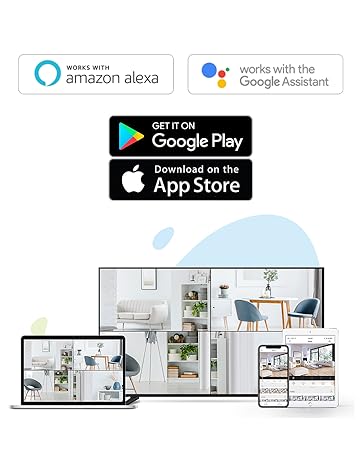
Figure 4: Using the two-way talk feature via the EZVIZ app.
4.3. Режими нічного бачення
Камера пропонує три режими нічного бачення:
- IR Mode (Black & White): Standard infrared night vision for clear black and white images in low light.
- Колірний режим: Utilizes built-in spotlights to provide full-color night vision, even in complete darkness.
- Розумне нічне бачення: By default, the camera operates in black and white mode. When motion is detected, it automatically switches to color night vision and activates the spotlights.

Figure 5: Night vision modes: Color Night Vision and Black & White Vision.
4.4. Виявлення руху та сповіщення
The C3W Pro uses AI-powered human shape detection to minimize false alarms. You can customize detection settings:
- Human Shape Detection: Enable this feature to only receive alerts when a human shape is detected.
- Зона виявлення руху: Define specific zones within the camera's view where motion detection will be active. This helps to ignore irrelevant movements (e.g., trees swaying).
- Чутливість виявлення руху: Adjust the sensitivity level to fine-tune how easily motion triggers an alert.
- Активний захист: When motion is detected, the camera can trigger a loud siren and flash its spotlights to deter intruders.

Figure 6: AI-Powered Person Detection in action.
4.5. Інтеграція «Розумний дім».
The EZVIZ C3W Pro is compatible with popular smart home platforms:
- Amazon Alexa: Використовуйте голосові команди для view your camera feed on compatible Alexa devices.
- Google Assistant: Integrate with Google Assistant for voice control and viewing on Google Home devices.

Figure 7: EZVIZ C3W Pro working with Amazon Alexa.
Відео 2: Офіційне завершенняview of the EZVIZ C3W Pro's key features, including color night vision, AI detection, and two-way talk.
5. Технічне обслуговування
- Регулярне прибирання: Періодично очищуйте об'єктив і корпус камери м'якою губкоюamp cloth to ensure clear image quality. Avoid harsh chemicals.
- Оновлення прошивки: Keep your camera's firmware updated through the EZVIZ app to ensure optimal performance, security, and access to new features.
- Перевірте підключення: Regularly inspect power and network cable connections for any signs of wear or damage, especially in outdoor environments.
6. Вирішення проблем
6.1. No Power / Offline
- Переконайтеся, що адаптер живлення надійно підключено як до камери, так і до справної розетки.
- Перевірте справність розетки, підключивши інший пристрій.
- Переконайтеся, що ваша мережа Wi-Fi активна, а камера знаходиться в межах досяжності.
6.2. Погана якість зображення
- Очистіть об’єктив камери, щоб видалити будь-який бруд або плями.
- Переконайтеся, що перед об'єктивом немає перешкод.
- Check your Wi-Fi signal strength in the EZVIZ app; a weak signal can affect video quality.
- Adjust the video resolution settings in the app if your network bandwidth is limited.
6.3. Excessive False Alarms
- Enable AI-powered Human Shape Detection in the app settings.
- Adjust the Motion Detection Area to exclude areas with frequent irrelevant motion (e.g., trees, busy roads).
- Lower the Motion Detection Sensitivity in the app.
7. Технічні характеристики
| Номер моделі | EZC3W3H2L28 |
| Роздільна здатність захоплення відео | 1080p |
| Технологія підключення | Wireless (Wi-Fi 2.4GHz with Dual External Antennas) |
| Міжнародний захист рейтингу | IP67 (захищений від атмосферних впливів і пилу) |
| Діапазон нічного бачення | 98 футів |
| Особливості | Motion Sensor, Night Vision (Color, Black & White, Smart), AI-Powered Human Detection, Two-Way Talk, Active Defense (Siren & Strobe Light) |
| Зберігання | MicroSD Slot (up to 256GB), Secure Cloud Storage (Optional) |
| Сумісні пристрої | iOS, Android, Amazon Alexa, Google Assistant |
| Джерело живлення | Wired (Power Adapter Included) |
| Розміри (Д x Ш x В) | 9 x 4.1 x 3.7 дюймів |
| Вага товару | 1.28 фунта |
8. Гарантія та підтримка
For warranty information, technical support, or service inquiries, please refer to the official EZVIZ website or contact their customer support directly. Details can typically be found in the Quick Start Guide or on the product packaging.


