вступ
This user manual provides comprehensive instructions for the PHILIPS 43PUS7556/12 4K UHD LED Smart TV. Please read this manual carefully before using your television to ensure proper setup, operation, and maintenance. Keep this manual for future reference.
Важлива інформація з безпеки
Завжди дотримуйтесь основних запобіжних заходів під час використання цього телевізора, щоб зменшити ризик пожежі, ураження електричним струмом та травмування.
- Не піддавайте телевізор впливу дощу або вологи.
- Не перекривайте вентиляційні отвори.
- Забезпечте належне заземлення.
- Від’єднуйте телевізор від мережі під час грози або якщо він не використовується протягом тривалого часу.
- Звертайтеся до кваліфікованого сервісного персоналу.
Вміст упаковки
Перевірте наявність усіх елементів в упаковці:
- PHILIPS 43PUS7556/12 4K UHD LED Smart TV
- Пульт дистанційного керування
- Шнур живлення
- Настільна підставка (якщо є)
- Короткий посібник
- Інформаційний буклет з безпеки та юридичної інформації
- Акумулятори для дистанційного керування
Налаштування
1. Кріплення підставки
If you are not wall-mounting the television, attach the tabletop stand as follows:
- Carefully place the television face down on a soft, flat surface to prevent screen damage.
- Вирівняйте підставку з монтажними отворами на нижній панелі телевізора.
- Закріпіть підставку за допомогою наданих гвинтів. Переконайтеся, що підставка надійно закріплена.

Зображення: Задня частина view of the television, illustrating the stand attachment points and various input/output ports. This image helps in identifying where to connect the stand and external devices.
2. Підключення зовнішніх пристроїв
The PHILIPS 43PUS7556/12 TV offers multiple connectivity options. Refer to the image below for port locations.
- HDMI: Connect Blu-ray players, game consoles, or set-top boxes. This model features 3 HDMI ports.
- USB: Connect USB storage devices for media playback. This model features 2 USB ports.
- Антена/кабель: Підключіть антену або вхід кабельного телебачення.
- Ethernet: Для дротового підключення до Інтернету. Також доступний Wi-Fi.

Зображення: Детальне view of the television's rear panel, highlighting the HDMI, USB, and other connectivity ports. This visual aid assists users in correctly identifying and connecting their external devices.
3. Увімкнення
- Connect the power cord to the television and then to a wall outlet.
- Press the power button on the remote control or on the television itself.
- Дотримуйтесь інструкцій на екрані для початкового налаштування, включаючи вибір мови, мережеве підключення (Wi-Fi або Ethernet) та сканування каналів.
Інструкція з експлуатації
Функції дистанційного керування
Familiarize yourself with the remote control buttons for easy navigation.
- Потужність: Вмикає або вимикає телевізор.
- Джерело: Вибір джерел вхідного сигналу (HDMI 1, HDMI 2, телевізор тощо).
- Кнопки навігації (Вгору/Вниз/Вліво/Вправо): Навігація по меню та параметрам.
- ОК: Підтверджує вибір.
- Назад/Вихід: Повернення до попереднього меню або вихід з поточного меню.
- Гучність +/-: Регулює рівень гучності.
- Канал +/-: Змінює телеканали.
- Розумний телевізор/Дім: Accesses the Smart TV interface (SAPHI OS).
Smart TV Features (SAPHI OS)
The PHILIPS 43PUS7556/12 runs on the SAPHI operating system, providing access to various apps and streaming services.

Image: Screenshot of the Philips Smart TV home screen, displaying the SAPHI OS interface with icons for popular streaming applications such as YouTube, Netflix, and Prime Video. This illustrates the user interface for accessing smart features.
- Натисніть Smart TV or додому на пульті.
- Use the navigation buttons to browse through available applications.
- Select an app (e.g., Netflix, YouTube, Amazon Prime Video) and press OK щоб запустити його.
- Ensure your TV is connected to the internet for optimal Smart TV functionality.

Зображення: Ще одне view of the Philips Smart TV interface, specifically highlighting the logos of popular streaming services like Netflix, Rakuten TV, YouTube, and Amazon Prime Video. This confirms the availability of these services on the TV.
Налаштування зображення та звуку
Налаштуйте свій viewдосвід звучання та прослуховування:
- Режими зображення: Access settings to adjust brightness, contrast, color, and sharpness. Pre-set modes like Standard, Vivid, Movie, and Game are available.
- Режими звуку: Adjust audio settings, including bass, treble, and balance. This TV supports Dolby Atmos for immersive sound.
- Dolby Vision: The TV supports Dolby Vision for enhanced HDR content. Ensure your content source also supports Dolby Vision for the best experience.

Image: The Philips 43PUS7556/12 television screen displaying a dynamic, colorful image, accompanied by icons indicating key features such as LED display technology, Dolby Vision Atmos, and UltraHD HDR. This visually represents the TV's display capabilities.
Технічне обслуговування
Чищення телевізора
- Завжди відключайте телевізор від мережі перед чищенням.
- Використовуйте м’яку тканину без ворсу, щоб обережно протерти екран і корпус.
- Для стійких слідів, dampen the cloth with a small amount of water or a mild, non-abrasive screen cleaner. Do not spray cleaner directly onto the screen.
- Avoid using alcohol, solvents, or ammonia-based cleaners, as these can damage the screen.
Заміна батареї пульта дистанційного керування
When the remote control's performance decreases, replace the batteries:
- Відкрийте кришку відсіку для батарей на задній панелі пульта дистанційного керування.
- Вийміть старі батареї.
- Insert new batteries, ensuring correct polarity (+ and -).
- Закрийте кришку батарейного відсіку.
Усунення несправностей
Якщо у вас виникли проблеми з телевізором, зверніться до наступних поширених рішень:
Немає живлення
- Переконайтеся, що шнур живлення надійно підключено як до телевізора, так і до розетки.
- Перевірте, чи розетка працює, підключивши інший пристрій.
- Спробуйте натиснути кнопку живлення на самому телевізорі, а не лише на пульті дистанційного керування.
Немає зображення, але звук є
- Перевірте, чи вибрано правильне джерело вхідного сигналу (наприклад, HDMI 1, TV).
- Перевірте кабельні з’єднання між телевізором та зовнішніми пристроями.
- Adjust picture settings (brightness, contrast).
Немає звуку, але зображення є
- Переконайтеся, що гучність не вимкнена або не встановлена на нуль.
- Перевірте підключення аудіокабелю.
- Verify sound output settings on the TV (e.g., internal speakers, external audio system).
Пульт дистанційного керування не працює
- Замініть батарейки в пульті дистанційного керування.
- Переконайтеся, що між пультом дистанційного керування та ІЧ-датчиком телевізора немає перешкод.
- Направте пульт безпосередньо на телевізор.
Smart TV Apps Not Loading or Slow
- Перевірте підключення до Інтернету (Wi-Fi або Ethernet).
- Перезавантажте телевізор, від’єднавши його від розетки на кілька хвилин, а потім знову підключивши.
- Переконайтеся, що програмне забезпечення телевізора оновлене.
Технічні характеристики
The following table outlines the key technical specifications for the PHILIPS 43PUS7556/12 TV.
| Особливість | Специфікація |
|---|---|
| Бренд | PHILIPS |
| Номер моделі | 43PUS7556/12 |
| Розмір екрана | 43 дюймів |
| Технологія дисплея | LED |
| роздільна здатність | 4K (3840 x 2160) |
| Частота оновлення | 60 Гц |
| Операційна система | САФІ |
| Підключення | Bluetooth, WiFi |
| Порти HDMI | 3 |
| USB порти | 2 |
| Аудіовихід | 20 Вт |
| Особливості | Dolby Vision, Dolby Atmos, Freeview HD |
| Колір | чорний |
| Розміри (без підставки) | 82.1 мм (глибина) |
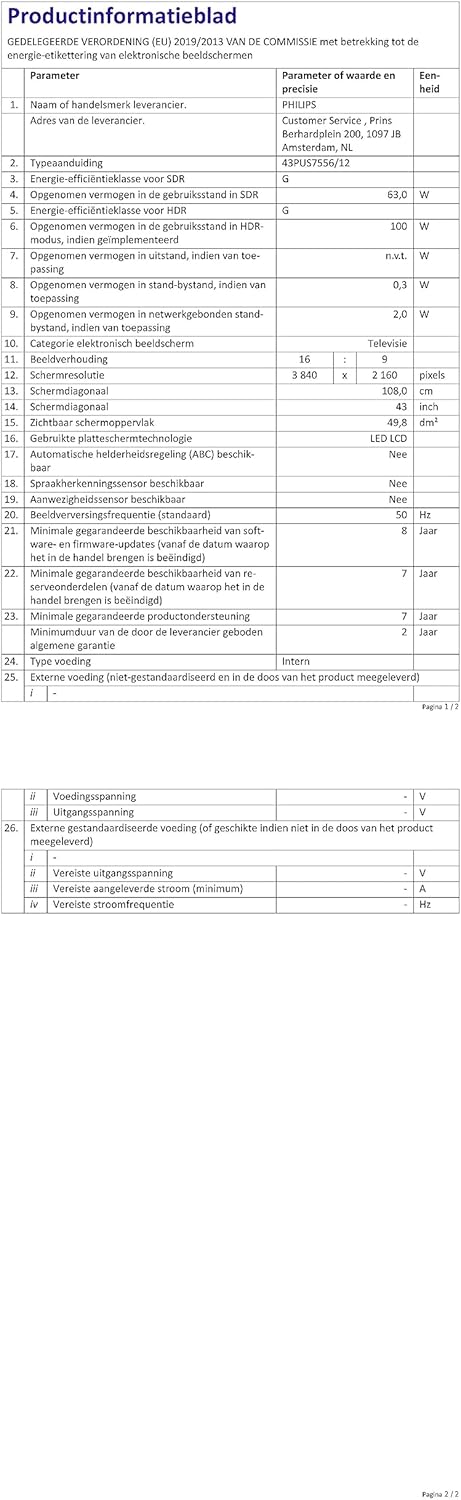
Image: A technical specification sheet for the Philips 43PUS7556/12 television, detailing various parameters and values. This document provides comprehensive technical data for the product.

Image: Another technical specification sheet for the Philips 43PUS7556/12 television, presented in Dutch, listing detailed product information and performance metrics. This provides additional technical context.

Image: A diagram illustrating the physical dimensions of the 43-inch Philips 43PUS7556/12 television, including width, height, and depth measurements. This helps users understand the TV's physical footprint.
Гарантія та підтримка
Інформація про гарантію
This product comes with a manufacturer's warranty. Please refer to the warranty card included in your package for specific terms and conditions. The typical warranty period for consumer electronics is 2 years from the date of purchase.
- Мінімальна гарантована наявність запасних частин: 7 роки
- Мінімальна гарантована підтримка продукту: 7 роки
Підтримка клієнтів
For further assistance, technical support, or service inquiries, please contact PHILIPS customer support. You can find contact details on the official PHILIPS webсайті або в документації, що додається до вашого телевізора.
When contacting support, please have your model number (43PUS7556/12) and serial number ready.


