вступ
This manual provides comprehensive instructions for the FANTECH GP12 Revolver USB Gaming Controller. Please read this manual carefully before using the product to ensure proper operation and to maximize your gaming experience.
Продукт закінченийview
The FANTECH GP12 Revolver is a wired gaming controller designed for an immersive gaming experience on PC and PS3. It features a familiar console-like layout and dual vibration feedback motors.
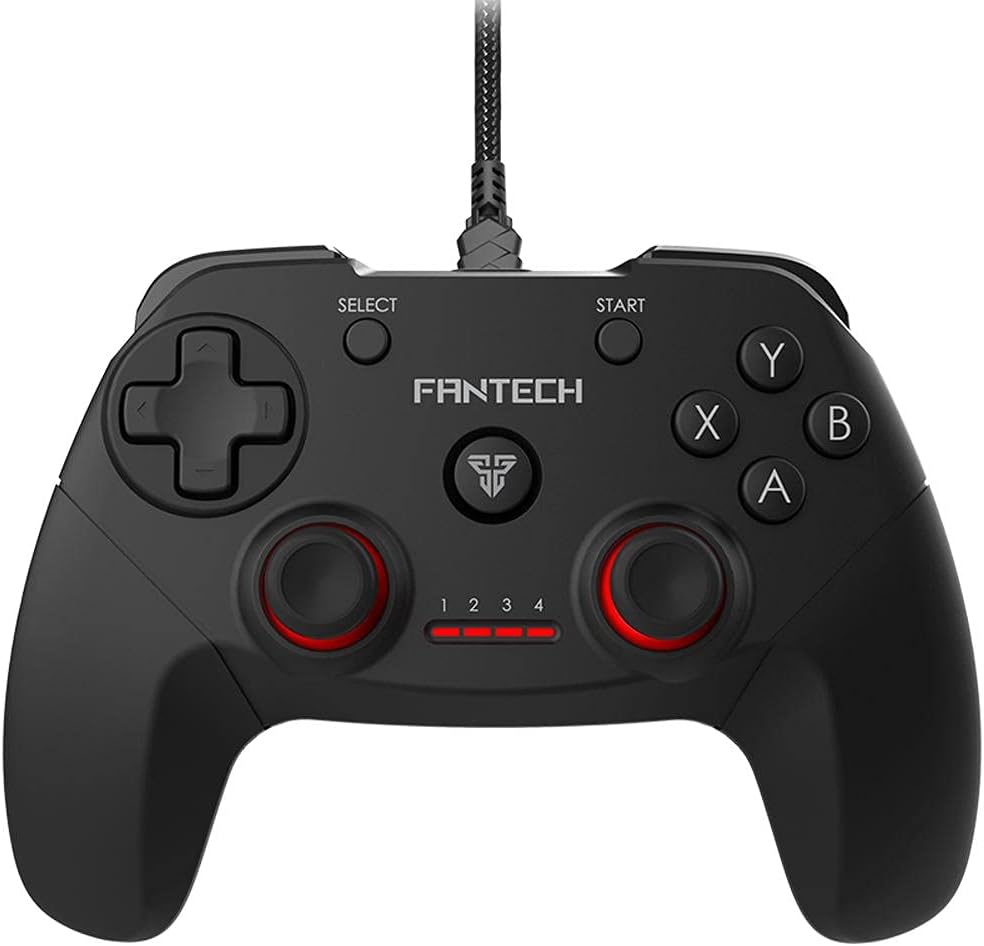
Зображення: спереду view of the FANTECH GP12 Revolver USB Gaming Controller, showcasinйого ергономічний дизайн та розташування кнопок.
Ключові характеристики:
- Familiar Console-Like Layout: Designed for intuitive control, allowing users to pick up and play without a steep learning curve. The controller's shape and button placement mimic traditional console gamepads.
- Dual Vibration Feedback Motors: Provides tactile feedback for in-game actions, enhancing immersion with every hit, crash, and explosion. The motors are strategically placed to deliver realistic sensations.
- Широка сумісність з іграми: Compatible with thousands of games on PC and PS3, offering full control across various genres. Simply plug and play to enjoy your favorite titles.
- Ергономічна ручка: Crafted for comfortable long-term gaming sessions, reducing hand fatigue.
- 17 Кнопки: Comprehensive button layout for versatile control, including action buttons, directional pad, analog sticks, and shoulder buttons.
- Дротове підключення: Reliable USB connection with a 1.8-meter cable, ensuring stable and lag-free gameplay.

Image: A user's hands comfortably gripping the FANTECH GP12 Revolver controller, demonstrating its ergonomic design for extended gameplay.

Image: The FANTECH GP12 Revolver controller with visual representations of vibration waves emanating from its sides, illustrating the dual vibration feedback feature.

Image: A person using the FANTECH GP12 Revolver controller while gaming on a PC setup, highlighting its compatibility with various gaming platforms.
Налаштування
Підключення контролера:
- Locate an available USB port on your PC or PlayStation 3 console.
- Insert the USB connector of the FANTECH GP12 Revolver controller firmly into the USB port.
- The system will automatically detect and install the necessary drivers. This process may take a few moments.
- Once installed, the controller's indicator lights will illuminate, signifying it is ready for use.
Note: For optimal performance, ensure your operating system (Windows 7, Windows 10, or PS3) is up to date.
Інструкція з експлуатації
Основні елементи керування:
The GP12 Revolver features a standard gamepad layout. Familiarize yourself with the button assignments for your specific game.
- Спрямований джойстик (D-Pad): Використовується для точного введення напрямку, зазвичай для руху або навігації по меню.
- Аналогові стіки: Provide 360-degree movement and camera control. Pressing them down often activates additional functions (L3/R3).
- Кнопки дій (A, B, X, Y): Primary interaction buttons for in-game actions such as jumping, attacking, or confirming selections.
- Плечові кнопки (L1, R1) та тригери (L2, R2): Located on the top of the controller, used for various actions like aiming, firing, or special abilities.
- Кнопка ПУСК: Зазвичай використовується для паузи в іграх або доступу до ігрових меню.
- Кнопка ВИБІР: Часто використовується для доступу до карти, інвентаризації або інших другорядних функцій.
Вібрація:
The dual vibration motors provide immersive feedback during gameplay. This feature is automatically activated in games that support vibration. You will feel vibrations during impacts, explosions, and other significant in-game events.
Технічне обслуговування
- Тримайте контролер у чистоті, протираючи його м’якою сухою тканиною.
- Уникайте впливу екстремальних температур, вологості або прямих сонячних променів на контролер.
- Do not use abrasive cleaners or solvents on the controller.
- Зберігайте контролер у безпечному місці, коли він не використовується, щоб запобігти пошкодженню кабелю або кнопок.
Усунення несправностей
Контролер не відповідає:
- Ensure the USB cable is securely connected to both the controller and the device (PC/PS3).
- Try connecting the controller to a different USB port.
- Перезавантажте ПК або PS3.
- Verify that the game you are playing supports gamepad input.
Вібрація не працює:
- Переконайтеся, що гра, в яку ви граєте, підтримує вібраційний зворотний зв'язок.
- Перевірте налаштування гри, щоб переконатися, що вібрація ввімкнена.
- Переконайтеся, що контролер правильно підключено.
Кнопки працюють неправильно:
- Переконайтеся, що під кнопками немає сміття.
- Test the controller with another game or on a different device to isolate the issue.
Технічні характеристики
Detailed technical specifications for the FANTECH GP12 Revolver USB Gaming Controller:

Image: Diagram showing the dimensions (154mm x 113mm x 58mm) and key technical specifications of the FANTECH GP12 Revolver controller.
| Особливість | Деталь |
|---|---|
| Бренд | Fantech |
| Модель | GP12 Revolver |
| Тип | Провідний геймпад |
| Підключення | USB |
| кнопки | 17 шт |
| Відгук про вібрацію | Yes (Dual Motors) |
| Довжина кабелю | 1.8 метрів |
| Розміри (Д x Ш x В) | 154 x 113 x 58 мм (прибл.) |
| вага | 170 грами (приблизно) |
| Колір | Чорний / сірий |
| Сумісні платформи | PC, PlayStation 3 (PS3) |
| Операційні системи | Windows 7, Windows 10, PS3 |
Гарантія та підтримка
For warranty information and technical support, please refer to the warranty card included with your product or visit the official Fantech webсайт. Зберігайте чек про покупку для гарантійних претензій.
If you encounter any issues not covered in this manual, please contact Fantech customer support for assistance.


