1. Вступ
Thank you for choosing the BenQ DVD-2019 DVD Player. This manual provides essential information for the safe and efficient use of your new device. Please read it thoroughly before operating the player and retain it for future reference.
Важлива інформація з безпеки:
- Не піддавайте пристрій впливу дощу або вологи.
- Не відкривайте casing; звертайтеся до кваліфікованого персоналу з усіма видами обслуговування.
- Забезпечте належну вентиляцію навколо пристрою.
- Використовуйте лише блок живлення, зазначений для цього пристрою.
2. Вміст упаковки
Будь ласка, перевірте наявність усіх предметів у упаковці:
- BenQ DVD-2019 DVD Player
- Пульт дистанційного керування
- AV Cable (RCA)
- Кабель живлення
- Інструкція з експлуатації (цей документ)
3. Продукт закінчивсяview
3.1 Передня панель

Figure 1: Front Panel of the DVD-2019 Player
The front panel features the disc tray, power button, play/pause, stop, and skip buttons. It also includes a USB port and an SD card slot for playing media from external storage devices.
3.2 Задня панель

Figure 2: Rear Panel of the DVD-2019 Player
The rear panel provides various connection ports for audio and video output, including HDMI, RCA (composite video and stereo audio), and component video outputs. The power input is also located here.
3.3 Пульт дистанційного керування
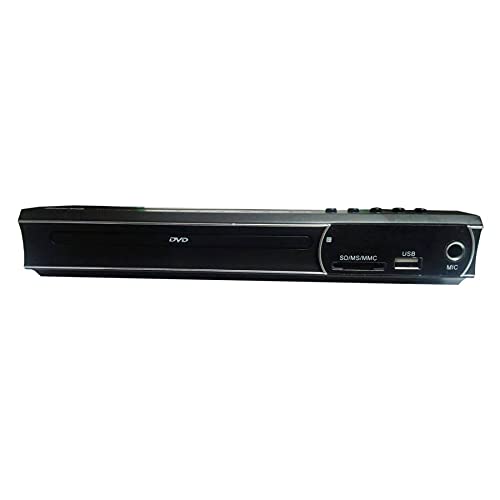
Figure 3: Remote Control for the DVD-2019 Player
The remote control allows you to operate all functions of the DVD player from a distance. It requires two AAA batteries (not included).
4. Налаштування
4.1 Підключення до телевізора
Виберіть один із наступних способів підключення:
- Підключення HDMI (рекомендовано для найкращої якості):
Connect one end of an HDMI cable (not included) to the HDMI OUT port on the DVD player and the other end to an HDMI IN port on your television. Select the corresponding HDMI input on your TV. - З'єднання RCA:
Connect the yellow video cable to the VIDEO OUT port on the DVD player and the yellow video input on your TV. Connect the red and white audio cables to the AUDIO OUT (R/L) ports on the DVD player and the corresponding red and white audio input ports on your TV. Select the AV input on your TV.
4.2 Підключення живлення
After connecting the video and audio cables, plug the power cable into the AC IN port on the rear of the DVD player and then into a wall outlet.
5. Інструкція з експлуатації
5.1 Основи відтворення DVD
- Turn on your TV and the DVD player.
- Select the correct input source on your TV (e.g., HDMI 1, AV).
- Press the OPEN/CLOSE button on the front panel or remote to open the disc tray.
- Place a DVD disc gently into the tray with the label side facing up.
- Press the OPEN/CLOSE button again to close the tray. The disc will load automatically.
- Playback should begin automatically. If a menu appears, use the arrow keys and OK button on the remote to navigate.
5.2 Відтворення з USB/SD-карти
- Вставте USB-флеш-накопичувач у USB-порт або SD-карту у гніздо для SD-картки на передній панелі.
- The player should automatically detect the device and display a media browser. If not, press the SOURCE or USB/CARD button on the remote.
- Use the arrow keys and OK button to navigate through your file(відео, музика, фотографії).
- Виберіть a file і натисніть OK, щоб почати відтворення.
5.3 Налаштування аудіо та відео
Access the player's setup menu by pressing the SETUP button on the remote control. Here you can adjust settings such as:
- Налаштування відео: Aspect ratio (4:3, 16:9), video output resolution.
- Параметри звуку: Audio output mode (Stereo, Dolby Digital, DTS), dynamic range control.
- Налаштування мови: OSD language, audio language, subtitle language.
6. Технічне обслуговування
6.1 Очищення пристрою
- Протріть зовнішню частину програвача м’якою сухою тканиною.
- Не використовуйте рідкі засоби для чищення або аерозольні спреї.
- For the disc tray, use a soft, lint-free cloth to gently remove dust.
6.2 Поводження з дисками
- Завжди тримайте диски за краї.
- Keep discs clean and free from scratches. Use a soft cloth to wipe from the center outwards.
- Зберігайте диски у футлярах, коли вони не використовуються.
7. Вирішення проблем
| проблема | Можлива причина | Рішення |
|---|---|---|
| Немає живлення | Кабель живлення не підключено; розетка несправна. | Переконайтеся, що кабель живлення надійно підключено. Спробуйте іншу розетку. |
| Немає зображення | Incorrect TV input selected; video cable loose or faulty. | Виберіть правильний вхід HDMI/AV на телевізорі. Перевірте підключення відеокабелю. |
| Ні звуку | Audio cables loose or faulty; TV volume muted. | Check audio cable connections. Increase TV volume and ensure it's not muted. |
| Диск не відтворюється | Диск брудний, подряпаний або несумісний з форматом. | Clean the disc. Try a different disc. Ensure the disc format is supported (DVD). |
| Пульт не працює | Батарейки розряджені або неправильно вставлені; між пультом дистанційного керування та програвачем є перешкода. | Замініть батарейки. Переконайтеся в правильній полярності. Видаліть будь-які перешкоди. |
8. Технічні характеристики
| Особливість | Деталь |
|---|---|
| Номер моделі | DVD-2019 |
| Бренд | BenQ |
| Тип носія | DVD |
| Тип роз'єму | HDMI, RCA |
| Технологія підключення | HDMI, RCA, USB |
| Підтримувані аудіоформати | Dolby Digital, DTS, PCM |
| Сумісні пристрої | телебачення |
9. Гарантія та підтримка
This BenQ DVD-2019 DVD Player comes with a standard manufacturer's warranty. Please refer to the warranty card included in your package for specific terms and conditions, including the warranty period and coverage details.
For technical support, service inquiries, or to obtain replacement parts, please contact BenQ customer service through their official website or the contact information provided on your warranty documentation. Keep your purchase receipt as proof of purchase for warranty claims.


