1. Вступ
This manual provides instructions for the installation, operation, and troubleshooting of your ARRIS Touchstone TM804G DOCSIS 3.0 Telephone Modem. The TM804G is designed to provide high-speed data access and up to four lines of Voice over IP (VoIP) telephone service over your cable network. It features DOCSIS 3.0 technology for enhanced internet speeds and reliability.
2. Ключові характеристики
- DOCSIS 3.0 compliant for high-speed internet.
- Four (4) dedicated VoIP telephone ports.
- Supports download speeds up to 343 Mbps.
- Two independent 96MHz RF tuners.
- Ethernet connectivity for network devices.
3. Вміст упаковки
Переконайтеся, що ваш пакет містить такі елементи:
- ARRIS Touchstone TM804G Telephone Modem
- Адаптер живлення
- Кабель Ethernet
- Документація (Короткий посібник, Інформація з безпеки)
Note: A backup battery is sold separately and is not included in the standard package.
4. Фізичні характеристики
4.1 Індикатори на передній панелі
The front panel of the TM804G modem features several LED indicators that provide status information.

малюнок 1: Фронт view of the ARRIS Touchstone TM804G Telephone Modem. This image shows the modem's black casing with ventilation holes on top and a row of green LED indicator lights on the right side of the front panel.
| Індикатор | Статус | опис |
|---|---|---|
| ПОТУЖНІСТЬ | Світиться зеленим | Модем увімкнено. |
| DS (за потоком) | Світиться зеленим | Downstream channel is connected. |
| США (вгору) | Світиться зеленим | Upstream channel is connected. |
| ОНЛАЙН | Світиться зеленим | The modem is registered and online. |
| ПОСИЛАННЯ | Світиться зеленим | An Ethernet device is connected. |
| ТЕЛ1-4 | Світиться зеленим | Telephone line is active. |
4.2 Порти задньої панелі
The rear panel provides all necessary connection ports for the modem.
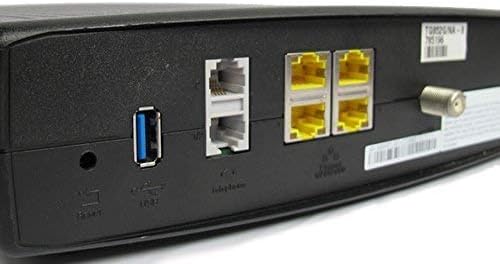
малюнок 2: Задня view of the ARRIS Touchstone TM804G Telephone Modem. This image displays the back of the modem, featuring a coaxial cable connector, four yellow Ethernet ports, two grey telephone ports (RJ-11), a USB port, a reset button, and the power input.
- КОАКСІАЛЬНИЙ: Connects to the cable wall outlet.
- ETHERNET (LAN): Four (4) RJ-45 ports for connecting to a computer or router.
- TEL1-4 (RJ-11): Four (4) telephone ports for connecting to telephones or a home telephone wiring system.
- USB: (Functionality may vary or be disabled by your service provider).
- СКИДАТИ: Recessed button to reset the modem to factory defaults (use with caution).
- ПОТУЖНІСТЬ: Підключається до адаптера живлення.
5. Налаштування та встановлення
Follow these steps to install your ARRIS Touchstone TM804G modem.
- Підключіть коаксіальний кабель: Connect one end of a coaxial cable to the COAXIAL port on the modem and the other end to a cable wall outlet. Ensure the connection is finger-tight.
- Підключення кабелю Ethernet: Connect one end of the Ethernet cable to one of the ETHERNET ports on the modem and the other end to your computer's network port or your wireless router's WAN/Internet port.
- Підключення телефонних ліній: If using telephone service, connect your telephone(s) or home telephone wiring to the TEL1, TEL2, TEL3, or TEL4 ports on the modem using standard RJ-11 telephone cables.
- Підключіть адаптер живлення: Connect the power adapter to the POWER port on the modem and then plug the adapter into an electrical outlet.
- Увімкнення: The modem will automatically power on. Observe the front panel indicator lights. The POWER, DS, US, and ONLINE lights should eventually turn solid green, indicating a successful connection to the cable network and internet. The TEL lights will illuminate when telephone lines are active.
- Активувати послугу: Contact your Internet Service Provider (ISP) to activate the modem. You will need to provide them with the MAC address and serial number, typically found on a label on the bottom or back of the modem.
Important: Do not connect the modem to a power outlet until all other connections are made.
6. Інструкція з експлуатації
Once the modem is successfully installed and activated, it operates automatically.
- Доступ в інтернет: Any device connected via Ethernet to the modem (or through a connected router) should have internet access once the ONLINE light is solid green.
- Телефонна служба: If your service plan includes VoIP, connected telephones will have dial tone and function once the corresponding TEL lights are solid green.
- Статус моніторингу: Refer to the front panel LED indicators (Section 4.1) to monitor the modem's operational status.
7. Технічне обслуговування
- Прибирання: Keep the modem clean and free of dust. Use a soft, dry cloth to wipe the exterior. Do not use liquid cleaners or aerosols.
- Вентиляція: Переконайтеся, що модем розміщено в добре провітрюваному приміщенні, щоб запобігти перегріву. Не блокуйте вентиляційні отвори.
- Оновлення прошивки: Firmware updates are typically managed automatically by your Internet Service Provider. Do not attempt to manually update the firmware unless instructed by your ISP.
- Restarting the Modem: If you experience connectivity issues, try restarting the modem by unplugging the power adapter for 10-15 seconds and then plugging it back in.
- Заводські налаштування: The recessed RESET button on the rear panel can be used to restore factory default settings. This should only be done if instructed by your ISP, as it will erase all custom configurations. To perform a factory reset, use a paperclip to press and hold the RESET button for at least 10 seconds.
8. Вирішення проблем
If you encounter problems with your modem, refer to the following common issues and solutions.
| проблема | Можлива причина | Рішення |
|---|---|---|
| Немає живлення | Адаптер живлення не підключений або несправна розетка. | Ensure power adapter is securely connected to the modem and a working electrical outlet. Check the POWER LED. |
| Немає доступу до Інтернету | Coaxial cable loose, modem not activated, or ISP outage. |
|
| Немає гудка на телефоні | Telephone cable loose, TEL light off, or service issue. |
|
| Низька швидкість Інтернету | Network congestion, old router, or ISP issue. |
|
For further assistance, contact your Internet Service Provider's technical support.
9. Технічні характеристики
| Номер моделі | TM804G |
| Стандарт DOCSIS | DOCSIS 3.0 |
| Internet Download Speed | До 343 Мбіт/с (залежно від інтернет-провайдера) |
| Порти VoIP | 4 (RJ-11) |
| Порти Ethernet | 4 (RJ-45) |
| Технологія підключення | Ethernet |
| Розміри (Д x Ш x В) | Приблизно 11.81 x 9.13 x 2.56 дюйма |
| вага | Приблизно 2.16 фунта |
| Сумісні інтернет-провайдери | Optimum, Mediacom (and others, check with your provider) |
10. Гарантія та підтримка
Цей товар пропонується як товар Amazon Renewed. Товари Amazon Renewed професійно перевіряються та тестуються на роботу та виглядають як нові. Вони мають право на заміну або повернення коштів згідно з гарантією Amazon Renewed, якщо ви не задоволені своєю покупкою.
For technical support, troubleshooting, or service-related inquiries, please contact your Internet Service Provider (ISP) directly. Your ISP is responsible for the activation, configuration, and ongoing support of the modem on their network.


