1. Вступ
The BirdDog PF120 is a high-performance Full HD NDI box camera designed for professional video production environments. It features an Exmor R back-illuminated sensor, 20x optical zoom, and a full color matrix, all housed within a durable all-metal chassis. This manual provides essential information for the proper setup, operation, and maintenance of your PF120 camera.
2. Вміст упаковки
Будь ласка, перевірте, чи всі перелічені нижче предмети входять до вашої упаковки. Якщо будь-які предмети відсутні або пошкоджені, негайно зверніться до продавця.
- BirdDog PF120 Full HD NDI 20x Box Camera
- Адаптер живлення (DC 12 В)
- Кришка об'єктива
- Документація (Короткий посібник, Інформація з безпеки)
3. Продукт закінчивсяview
The BirdDog PF120 is engineered for versatility and robust performance. Key features include:
- Full NDI support for seamless integration into IP workflows.
- 20x optical zoom for detailed close-ups.
- Exmor R back-illuminated sensor for superior low-light performance.
- Durable all-metal housing.
- Multiple connectivity options including HDMI, NDI/PoE, RS-232, and USB2.0.
3.1 Камера Viewта компоненти

малюнок 3.1: Лицьова сторона view of the BirdDog PF120 camera, showcasing the lens and the BirdDog logo on the side panel.
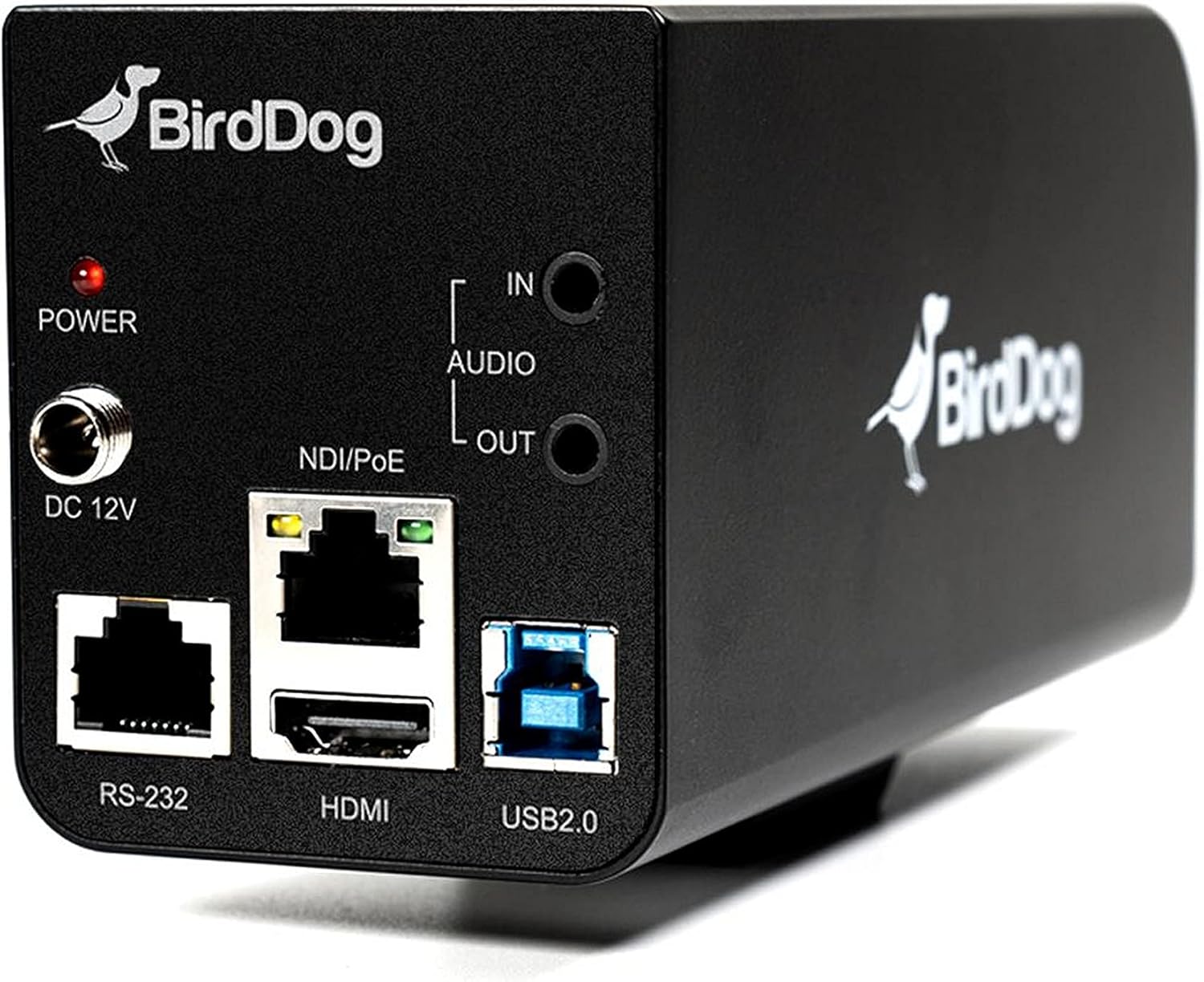
малюнок 3.2: Rear panel of the BirdDog PF120, displaying the power input (DC 12V), audio input/output, NDI/PoE port, HDMI output, RS-232 port, and USB2.0 port.
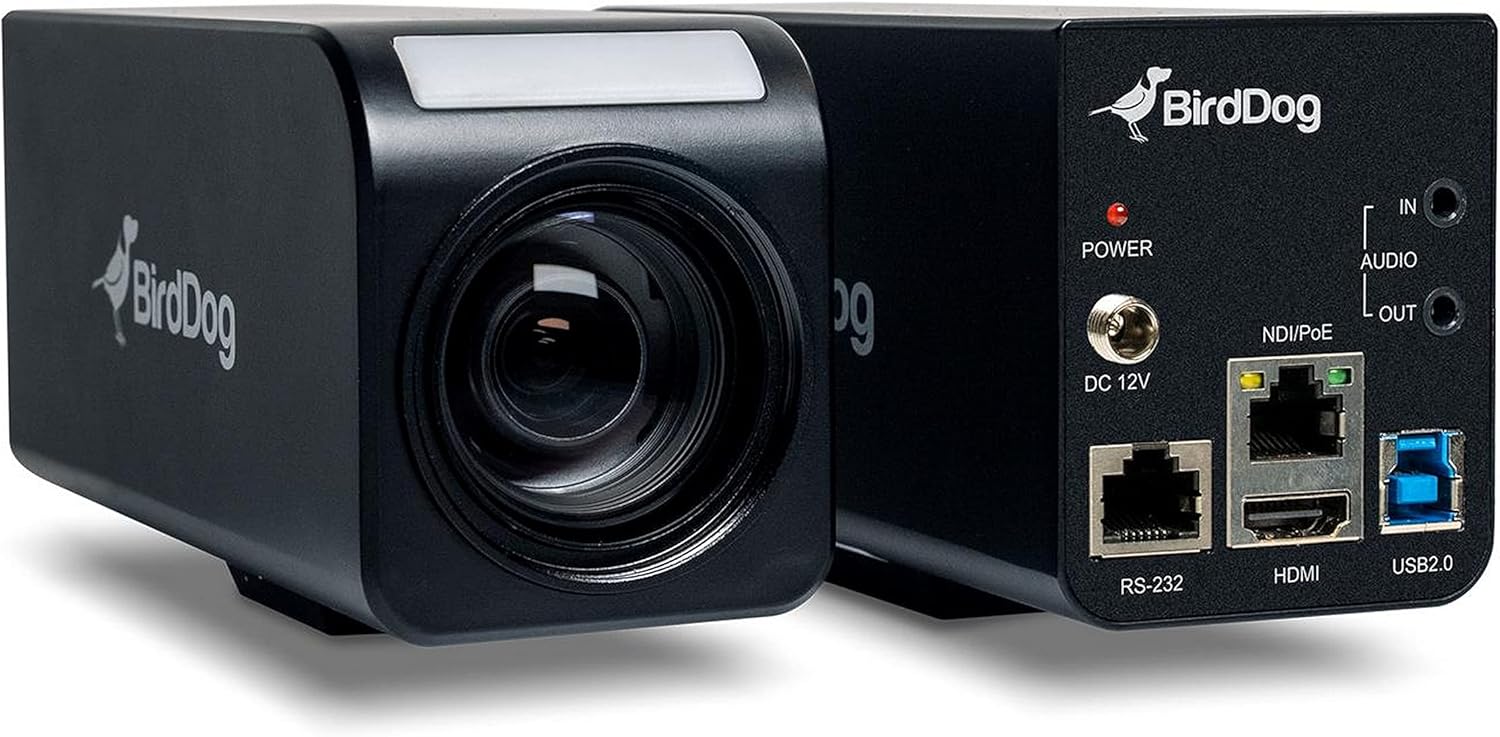
малюнок 3.3: Комбінована view of the BirdDog PF120, showing both the front lens assembly and the rear connectivity panel.

малюнок 3.4: Топ view of the BirdDog PF120 camera, highlighting the sleek design and BirdDog branding.
4. Налаштування
4.1 Увімкнення
- Connect the supplied DC 12V power adapter to the "DC 12V" port on the rear of the camera.
- Підключіть адаптер живлення до відповідної розетки.
- Alternatively, if using a PoE-enabled network switch, connect an Ethernet cable to the "NDI/PoE" port. The camera will power on via Power over Ethernet.
4.2 Network Connection (NDI)
- Connect an Ethernet cable from the "NDI/PoE" port on the camera to your network switch or router.
- Ensure your network is configured to support NDI protocols.
- The camera will obtain an IP address automatically via DHCP. For static IP configuration, refer to the BirdDog Central application or web інтерфейс.
4.3 Відео вихід
- NDI Output: The primary video output is via NDI over the Ethernet connection.
- Вихід HDMI: Connect an HDMI cable from the "HDMI" port on the camera to a monitor or video switcher for direct video monitoring.
5. Робота з камерою
5.1 Доступ до Web Інтерфейс
- Once connected to the network, use the BirdDog Central application or an IP scanner to discover the camera's IP address.
- Відкрийте a web браузер і введіть IP-адресу камери, щоб отримати доступ до неї web інтерфейс.
- Від web interface, you can configure video settings, network parameters, and control camera functions.
5.2 Керування камерою
The PF120 can be controlled via:
- NDI Tools: Utilize NewTek NDI Tools (e.g., NDI Studio Monitor) for basic control.
- BirdDog Central / Cam Control: BirdDog's dedicated software provides comprehensive control over camera settings, including zoom, focus, iris, and color matrix.
- RS-232: Connect a compatible serial controller to the RS-232 port for hardware control.
- Пульт дистанційного керування: The camera supports remote control methods as specified in the product documentation.
5.3 Масштаб і фокус
The PF120 features a 20x optical zoom lens. Zoom and focus adjustments are typically made through the web інтерфейс або сумісне програмне забезпечення керування.
6. Технічне обслуговування
- Прибирання: Use a soft, dry cloth to clean the camera body. For the lens, use a specialized lens cleaning solution and microfiber cloth. Avoid abrasive cleaners.
- Оновлення прошивки: Periodically check the BirdDog webсайт для оновлень прошивки. Оновлення прошивки забезпечує оптимальну продуктивність і доступ до нових функцій.
- Зберігання: Якщо камера не використовується протягом тривалого часу, зберігайте її в прохолодному, сухому місці, подалі від прямих сонячних променів та екстремальних температур.
7. Вирішення проблем
7.1 Немає живлення
- Переконайтеся, що адаптер живлення надійно підключено як до камери, так і до справної розетки.
- If using PoE, verify that the Ethernet cable is connected to a PoE-enabled port on your switch and that the switch is providing power.
7.2 No NDI Signal
- Перевірте підключення кабелю Ethernet.
- Verify that the camera has obtained an IP address (check your router's DHCP client list or use BirdDog Central).
- Ensure your network firewall is not blocking NDI traffic.
- Confirm that NDI tools or software on your receiving device are correctly configured to discover NDI sources.
7.3 Проблеми з якістю зображення
- Check lens for smudges or dust and clean if necessary.
- Adjust focus settings via the web інтерфейс або програмне забезпечення для керування.
- Review exposure, white balance, and color matrix settings in the camera's web інтерфейс.
8. Технічні характеристики
| Особливість | Деталь |
|---|---|
| Номер моделі | BD-BDPF120 |
| Роздільна здатність захоплення відео | 1080p |
| Ефективна роздільна здатність відео | 720 пікселів |
| Оптичний зум | 20x |
| Тип масштабування | Digital Zoom, Optical Zoom |
| Технологія підключення | Провідний |
| Протокол підключення | Wi-Fi (for control/management, NDI is primary video) |
| Спосіб контролю | Remote, Iris, RS-232 |
| Джерело живлення | AC/DC, PoE |
| Wattage | 5 Вт |
| матеріал | метал |
| Розміри предмета (Д x Ш x В) | 9.9 x 9 x 3.6 дюймів |
| Вага товару | 2.94 фунта |
| Тип монтажу | Wall Mount (as per spec, but typically box cameras are versatile) |
| Міжнародний захист рейтингу | IP65 |
| Технологія низького освітлення | Нічний колір |
9. Гарантія та підтримка
For warranty information and technical support, please refer to the official BirdDog website or contact your authorized BirdDog reseller. Keep your proof of purchase for warranty claims.
BirdDog Official Webсайт: www.bird-dog.tv


