1. Вступ
This user manual provides essential information for the safe and efficient operation of your Qoltec 51758 Mains & Inverter Adapter. This power adapter is designed to provide reliable power to compatible HP notebooks, featuring advanced protection mechanisms against overvoltage, overload, short circuit, and overheating. Please read this manual thoroughly before using the product to ensure proper functionality and longevity.
2. Техніка безпеки
To prevent injury or damage to your device, always follow these safety precautions:
- Не піддавайте адаптер впливу води, вологи або високої вологості.
- Не розбирайте, не модифікуйте та не намагайтеся ремонтувати адаптер. Звертайтеся до кваліфікованого персоналу для проведення будь-яких технічних робіт.
- Переконайтеся, що розетка має рівень напругиtage is compatible with the adapter's specifications.
- Уникайте розміщення адаптера під прямими сонячними променями або поблизу джерел тепла.
- Не використовуйте адаптер, якщо кабель або роз'єм пошкоджені.
- Зберігати в недоступному для дітей місці.
- Від’єднуйте адаптер від розетки, якщо він не використовується протягом тривалого часу.
3. Продукт закінчивсяview
The Qoltec 51758 adapter is a compact and efficient power solution. It includes the main adapter unit and various interchangeable tips to ensure compatibility with a range of HP notebooks.
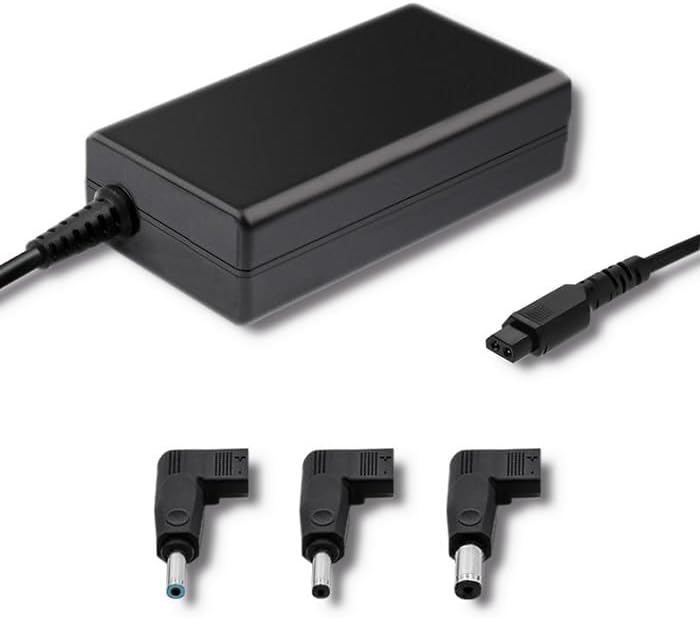
Малюнок 3.1: Спереду view of the Qoltec 51758 power adapter showing the main unit and three common interchangeable tips.

Малюнок 3.2: Задня частина view of the Qoltec 51758 power adapter, highlighting the AC input port and the three interchangeable tips.
The adapter features a robust design with a standard AC input port and a DC output cable that connects to the interchangeable tips. These tips ensure a secure and correct fit for various HP notebook models.
4. Налаштування
- Identify the Correct Tip: Select the interchangeable tip that matches the power input port of your HP notebook. Ensure it fits snugly and securely.
- Connect the Tip: Attach the selected tip to the DC output cable of the Qoltec 51758 adapter.
- Connect to Notebook: Insert the connected tip into the power input port of your HP notebook.
- Підключіть до розетки: Plug the AC input cable of the adapter into a standard wall power outlet.
- Перевірте підключення: Confirm that the power indicator light (if present on your notebook or adapter) illuminates, indicating a successful power connection.
5. Операційна
Once properly set up, the Qoltec 51758 adapter operates automatically to provide power to your connected HP notebook. It will charge the notebook's battery and/or power the notebook directly.
- Зарядка: When connected, the adapter will charge your notebook's battery until it reaches full capacity.
- Пряма потужність: The adapter can also power your notebook directly, even if the battery is fully charged or removed (if supported by the notebook).
- Особливості захисту: The adapter is equipped with built-in protections against overvoltage, overload, short circuit, and overheating. In case of an anomaly, the adapter may temporarily cease operation to protect itself and the connected device. Disconnect and reconnect to reset if this occurs.
6. Технічне обслуговування
Правильне обслуговування забезпечує довговічність та оптимальну роботу вашого адаптера.
- Прибирання: Disconnect the adapter from all power sources and devices before cleaning. Use a soft, dry cloth to wipe the surface. Do not use liquid cleaners or aerosols.
- Зберігання: When not in use, store the adapter in a cool, dry place away from direct sunlight and extreme temperatures. Avoid tightly winding the cables to prevent damage.
- Догляд за кабелем: Regularly inspect the power cables and connectors for any signs of wear, cuts, or damage. Replace if necessary.
7. Вирішення проблем
| проблема | Можлива причина | Рішення |
|---|---|---|
| Адаптер не забезпечує живлення. | No power from outlet; loose connection; damaged cable/adapter. | Check outlet with another device. Ensure all connections are secure. Inspect cables for damage. |
| Notebook not charging. | Incorrect tip used; notebook power port issue; adapter fault. | Verify the correct tip is used and fully inserted. Test with another compatible adapter if possible. |
| Адаптер гарячий на дотик. | Normal operation under load; poor ventilation; overload. | Ensure adequate ventilation around the adapter. If excessively hot, disconnect and allow to cool. Reduce load if possible. |
If the problem persists after attempting these solutions, please contact Qoltec customer support.
8. Технічні характеристики
| Особливість | Деталь |
|---|---|
| Бренд | Qoltec |
| Модель | 51758 |
| Wattage | 65 Вт |
| Розміри продукту | 2.79 х 24.64 х 16.51 см |
| Вага товару | 214 грамів |
| Сумісні пристрої | HP Notebooks |
| Особливості захисту | Переволtage, Overload, Short Circuit, Overheat Protection |
| Тип роз'єму | Interchangeable DC Power Tips |
| Технологія підключення | Wired Power Adapter |
| Дата першої доступності | 29 квітня 2022 р |
Примітка: Технічні характеристики можуть бути змінені без попередження.
9. Гарантія та підтримка
Qoltec products are manufactured to high quality standards. For information regarding warranty coverage, terms, and conditions, please refer to the warranty card included with your product or visit the official Qoltec webсайт.
For technical support, troubleshooting assistance, or inquiries about replacement parts, please contact Qoltec customer service through their official channels. Have your product model number (51758) and purchase details ready when contacting support.
Qoltec Official Webсайт: www.qoltec.com (Примітка: Це тимчасовий фрагмент URL, please refer to actual Qoltec webсайт для підтримки.)