1. Вступ
The HUAWEI MateStation B515 is a compact and powerful desktop PC designed for various computing tasks, from office work to multimedia consumption. It features an AMD Ryzen 5 4600G processor with integrated Radeon Graphics, 8GB of RAM, and a fast 256GB NVMe SSD, providing efficient performance and quick responsiveness. This manual provides essential information for setting up, operating, maintaining, and troubleshooting your MateStation B515.
2. Інформація про безпеку
- Перед використанням пристрою уважно прочитайте всі інструкції.
- Не піддавайте пристрій дії екстремальних температур, вологості або прямих сонячних променів.
- Забезпечте належну вентиляцію, щоб запобігти перегріву. Не закривайте вентиляційні отвори.
- Use only the power adapter and cables provided or approved by HUAWEI.
- Уникайте розміщення важких предметів на пристрої.
- Не намагайтеся розбирати або ремонтувати пристрій самостійно. Зверніться за допомогою до уповноваженого сервісного персоналу.
- Тримайте пристрій подалі від рідин та агресивних речовин.
3. Вміст упаковки
Перевірте наявність усіх елементів в упаковці:
- HUAWEI MateStation B515 Desktop PC
- Адаптер живлення та кабель
- Wired Keyboard (may vary by region)
- Wired Mouse (may vary by region)
- Короткий посібник / Гарантійний талон
4. Продукт закінчивсяview
4.1 Передня панель

Figure 1: Front Panel of MateStation B515
Передня панель забезпечує зручний доступ до основних портів та елементів керування:
- Кнопка живлення: Press to turn the PC on or off.
- Порт USB-A: Для підключення USB-пристроїв.
- Порт USB-C: For connecting USB-C devices.
- Headphone/Microphone Jack: Для аудіовходу/виходу.
4.2 Задня панель

Рисунок 2: Підключення задньої панелі
The rear panel houses the main connectivity options:
- Порт HDMI: Для підключення до монітора або дисплея.
- Порт VGA: For connecting to older monitors or displays.
- USB-A Ports (Multiple): For connecting various USB peripherals.
- Порт Ethernet (RJ45): Для дротового мережевого підключення.
- Аудіороз'єми: Line-in, Line-out, Microphone.
- Serial (COM) Port: For legacy device connectivity.
- Споживана потужність: Для підключення кабелю живлення.
4.3 Сторона View і вентиляція

Figure 3: Side Ventilation
The side panel features ventilation grilles designed to ensure optimal airflow and heat dissipation, maintaining stable performance even under heavy loads.
4.4 Complete Setup Example
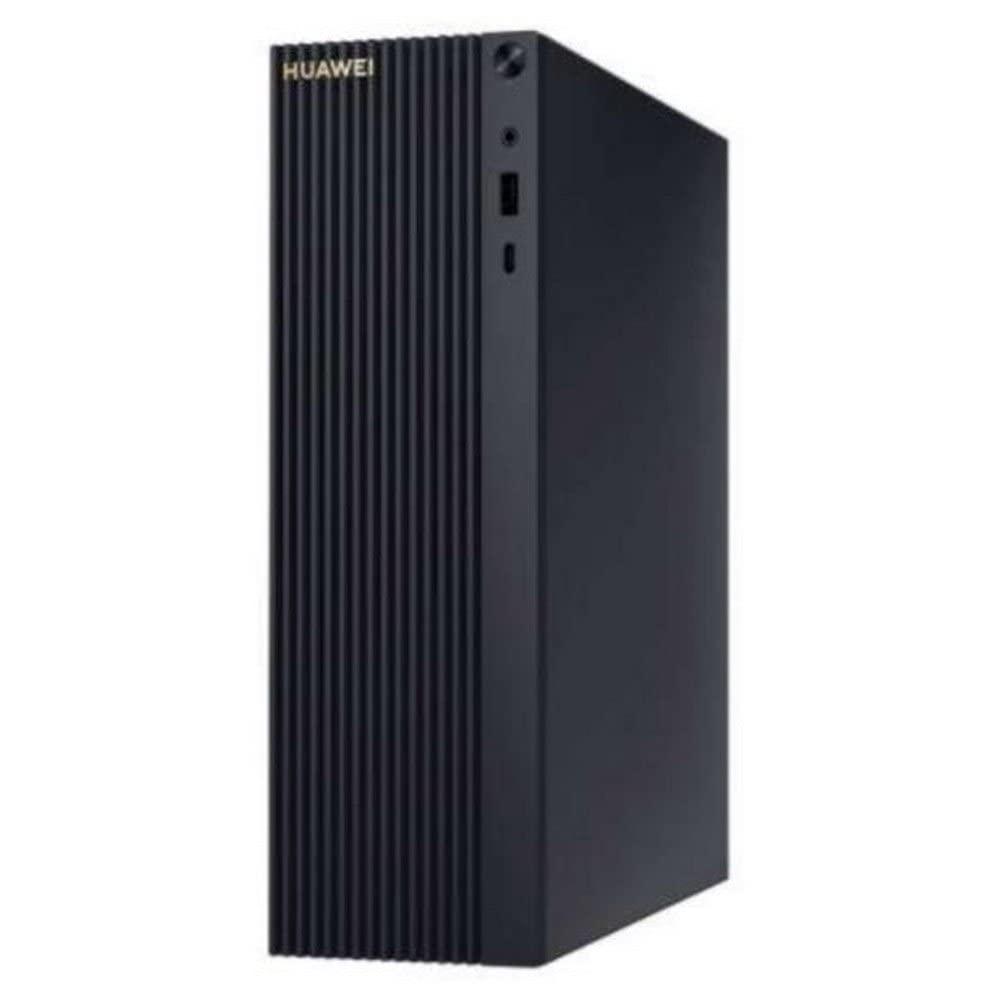
Figure 4: MateStation B515 in a typical desktop environment
This image illustrates a typical setup of the MateStation B515, connected to a monitor and peripherals, ready for use.
5. Інструкції з налаштування
5.1 Підключення периферійних пристроїв
- Підключення монітора: Use an HDMI or VGA cable to connect your monitor to the corresponding port on the rear panel of the MateStation B515.
- Підключення клавіатури та миші: Plug the USB cables of your keyboard and mouse into any available USB-A ports on the front or rear panel.
- Підключення до мережі (необов'язково): For a wired internet connection, connect an Ethernet cable from your router or modem to the RJ45 port on the rear panel. Alternatively, the device supports Wi-Fi.
- Підключіть аудіо (додатково): If using external speakers or a headset, connect them to the appropriate audio jacks on the front or rear panel.
5.2 Увімкнення
- Підключіть живлення: Plug the power cable into the power input on the rear panel of the MateStation B515, then plug the other end into a power outlet.
- Увімкнення: Press the power button located on the front panel of the PC. The power indicator light will illuminate.
5.3 Початкове налаштування Windows
Upon first boot, the system will guide you through the Windows 10 Pro setup process. Follow the on-screen instructions to configure language, region, network settings, user accounts, and other preferences. Ensure you have an active internet connection for updates and account synchronization.
6. Інструкція з експлуатації
6.1 Основна операція
- Starting the PC: Натисніть кнопку живлення.
- Закриття: Натисніть кнопку «Пуск» у Windows, а потім виберіть «Живлення» > «Завершити роботу».
- Перезапуск: Натисніть кнопку «Пуск» у Windows, а потім виберіть «Живлення» > «Перезавантажити».
- Режим сну: Натисніть кнопку «Пуск» у Windows, а потім виберіть «Живлення» > «Сон».
6.2 HUAWEI Share
The HUAWEI MateStation B515 supports HUAWEI Share, allowing seamless interaction with compatible HUAWEI smartphones. This feature enables you to:
- Multi-screen Collaboration: Project your phone screen onto the PC for easier file transfer, editing, and app usage.
- File Передача: Quickly transfer photos, videos, and documents between your phone and PC.
- Cross-device Editing: Редагувати files from your phone directly on the MateStation B515, with changes automatically saved to your phone.
To use HUAWEI Share, ensure your HUAWEI smartphone supports the feature and follow the on-screen instructions provided by the HUAWEI PC Manager software on your MateStation B515.
7. Технічне обслуговування
7.1 Система охолодження
The MateStation B515 features a specially designed cooling system with custom air circulation channels to efficiently dissipate heat from the processor and other components. This ensures stable performance and quiet operation.
- Ensure that the ventilation openings on the device are not obstructed.
- Place the PC on a flat, stable surface with adequate space around it for airflow.
7.2 Очищення
- Before cleaning, power off the PC and disconnect it from the power outlet.
- Use a soft, dry, lint-free cloth to wipe the exterior surfaces of the PC.
- Для стійких плям трохи dampuk тканину змочіть водою або м’яким неабразивним миючим засобом.
- Do not spray liquids directly onto the PC.
- Use compressed air to gently clear dust from ventilation grilles, holding the can upright to prevent liquid discharge.
8. Вирішення проблем
If you encounter issues with your MateStation B515, try the following basic troubleshooting steps:
- Немає живлення: Ensure the power cable is securely connected to both the PC and the power outlet. Try a different power outlet.
- Немає дисплея: Check that the monitor cable (HDMI/VGA) is securely connected to both the PC and the monitor. Ensure the monitor is powered on and set to the correct input source.
- Непрацюючі периферійні пристрої: Try connecting the keyboard or mouse to a different USB port. Ensure drivers are up to date (check Windows Device Manager).
- Повільна продуктивність: Close unnecessary applications. Check for background processes using Task Manager. Ensure Windows and drivers are updated. Consider running a disk cleanup.
- Проблеми з підключенням до мережі: For wired connections, check the Ethernet cable and router. For Wi-Fi, ensure the Wi-Fi adapter is enabled and you are connected to the correct network. Restart your router/modem.
If problems persist, consult the HUAWEI support webсайту або зв’яжіться зі службою підтримки клієнтів.
9. Технічні характеристики
| Особливість | Специфікація |
|---|---|
| Бренд | HUAWEI |
| Номер моделі | 53012CPF |
| Операційна система | Windows 10 Pro |
| Модель процесора | AMD Ryzen 5 4600G |
| Швидкість ЦП | 4.2 ГГц |
| Графічний співпроцесор | Radeon Graphics (Integrated) |
| ОЗУ | 8 ГБ |
| Зберігання | 256 ГБ NVMe SSD |
| Загальна кількість портів USB | 6 |
| Зв'язки | Bluetooth, WiFi |
| Особливості | Режим точки доступу |
| Тип продукту | Міні ПК |
| Колір | Multicolour (Chassis is typically black/dark grey) |
| Виробник | Huawei |
| Країна походження | Китай |
10. Гарантія та підтримка
10.1 Інформація про гарантію
The HUAWEI MateStation B515 typically comes with a manufacturer's warranty. Availability of spare parts is guaranteed for 2 years from the date of purchase. Please refer to your specific purchase documentation for detailed warranty terms and conditions.
10.2 Оновлення програмного забезпечення
Software updates for the device are guaranteed until April 13, 2030, ensuring continued security and feature enhancements for your Windows 10 Pro operating system.
10.3 Підтримка клієнтів
For technical assistance, warranty claims, or further inquiries, please visit the official HUAWEI support website or contact your local HUAWEI customer service center. Keep your product model number (B515 or 53012CPF) and proof of purchase handy when contacting support.


