вступ
This manual provides detailed instructions for the Google Pixel Buds A-Series wireless earbuds. These earbuds are designed to deliver high-quality audio and feature a comfortable, secure fit with multiple eartip sizes and a stabilizer arc. They are compatible with Android, iOS, and other Bluetooth 4.0+ devices.
Що в коробці
- Google Pixel Buds A-Series Earbuds
- Зарядний футляр
- Зарядний кабель USB-C
- Вушні насадки (малі, середні, великі)
- Короткий посібник користувача (не входить до цього цифрового посібника)

Image: Google Pixel Buds A-Series earbuds securely placed within their white charging case, which is open to reveal the earbuds.
Налаштування
1. Початкове створення пари
For Android Devices (One-Tap Pairing):
- Ensure your Android device is unlocked and has Bluetooth enabled.
- Open the charging case of your Pixel Buds A-Series next to your Android device.
- A pairing notification will appear on your device's screen. Tap to connect.
- Follow any on-screen prompts to complete the setup, including installing the Pixel Buds app for additional features.
For iOS and Other Bluetooth 4.0+ Devices:
- З навушниками в зарядному футлярі відкрийте кришку.
- Press and hold the pairing button on the back of the charging case until the status light begins to pulse white.
- On your device, navigate to Bluetooth settings and select "Pixel Buds A-Series" from the list of available devices.
- Confirm the pairing on your device.
2. Досягнення надійної фіксації
The Pixel Buds A-Series come with three sizes of eartips (small, medium, large) and a flexible stabilizer arc to ensure a comfortable and secure fit.
- Experiment with different eartip sizes to find the best seal for your ears. A good seal is crucial for optimal sound quality and bass response.
- Gently insert each earbud into your ear, rotating slightly until the stabilizer arc tucks comfortably into your ear's concha.

Зображення: Крупний план view of a single Google Pixel Bud A-Series earbud, highlighting its ergonomic design, eartip, and stabilizer arc.
Інструкція з експлуатації
1. Торкніться Елементи керування
The Pixel Buds A-Series feature touch controls on the outer surface of each earbud.
- Однократне натискання: Відтворення/пауза аудіо, відповідь/завершення дзвінка.
- Двічі натисніть: Skip forward a track, Decline call.
- Потрійний дотик: Skip backward a track.
- Натисніть і утримуйте: Activate Google Assistant (Android only), or hear notifications.
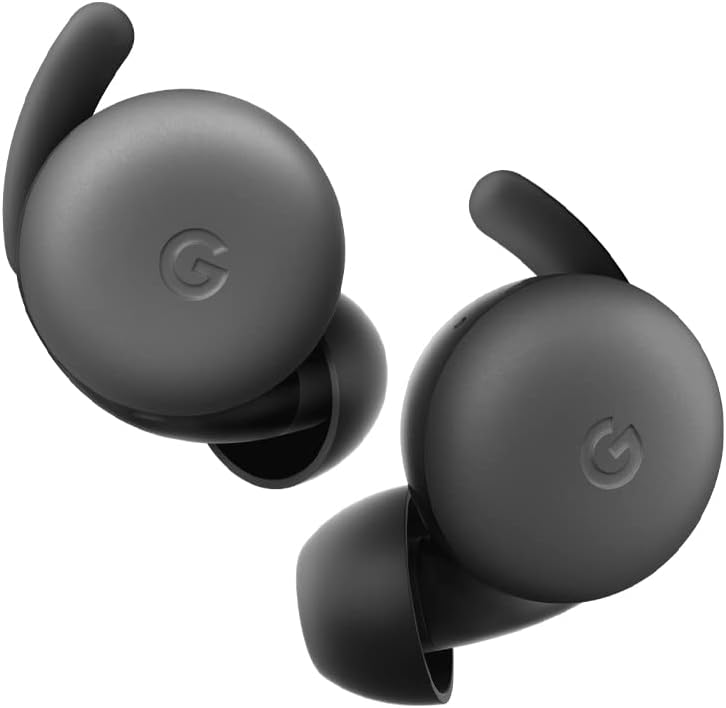
Image: A pair of Google Pixel Buds A-Series earbuds, showcasing their compact design and the 'G' logo on the touch-sensitive surface.
2. Інтеграція з Google Асистентом
With a compatible Android device, you can access Google Assistant directly from your Pixel Buds A-Series.
- Say "Hey Google" or "Ok Google" to activate the Assistant hands-free.
- Alternatively, press and hold either earbud to speak to Google Assistant.
- You can ask for directions, check weather, control music, or have notifications read aloud.
3. Зарядка
The Pixel Buds A-Series provide up to 5 hours of listening time or 2.5 hours of talk time on a single charge. The charging case extends this to up to 24 hours of total listening time.
- To charge the earbuds, place them inside the charging case. The indicator light on the case will show their charging status.
- To charge the case, connect it to a USB-C power source using the provided cable. The case's indicator light will show its charging status.
Технічне обслуговування
1. прибирання
- Регулярно чистіть навушники та зарядний футляр для підтримки їхньої продуктивності та гігієни.
- Use a soft, dry, lint-free cloth to wipe the exterior of the earbuds and case.
- For eartips, gently remove them and clean with a mild soap solution and water, then rinse and dry thoroughly before reattaching.
- Уникайте використання абразивних матеріалів або агресивних хімікатів.
2. Зберігання
- Always store the Pixel Buds A-Series in their charging case when not in use to protect them and keep them charged.
- Зберігати в прохолодному, сухому місці, подалі від екстремальних температур та прямих сонячних променів.
Усунення несправностей
If you encounter issues with your Pixel Buds A-Series, try the following steps:
- Немає звуку або з'єднання переривається:
- Переконайтеся, що обидва навушники заряджені.
- Check that Bluetooth is enabled on your device and the earbuds are connected.
- Try placing the earbuds back in the case, closing the lid for a few seconds, then reopening to reset the connection.
- Забудьте про пристрій у налаштуваннях Bluetooth вашого телефону та повторіть сполучення.
- Ensure your device is within the Bluetooth range (up to 10 meters).
- Навушники не заряджаються:
- Переконайтеся, що сам зарядний футляр заряджений.
- Переконайтеся, що навушники правильно вставлені в зарядний футляр.
- Очистіть зарядні контакти на обох навушниках та всередині футляра сухим ватним тампоном.
- Спробуйте інший кабель USB-C та адаптер живлення.
- Погана якість звуку:
- Ensure you have a secure fit with the correct eartip size.
- Очистіть сітчасту частину навушників та амбушури.
- Check your device's audio settings and equalizer.
Технічні характеристики
| Назва моделі | Pixel Buds A-Series |
| Технологія підключення | Бездротовий зв'язок (Bluetooth 5.0) |
| Сумісні пристрої | Android, iOS, and Bluetooth 4.0+ devices |
| Термін служби батареї (навушники) | Up to 5 hours listening, 2.5 hours talk time |
| Термін служби батареї (із зарядним футляром) | Up to 24 hours listening |
| Рівень водонепроникності | Water Resistant (IPx4 rating for earbuds) |
| Тип управління | Touch (Media Control, Google Assistant) |
| Вага товару | 1.9 унцій (загалом) |
| Розміри (навушник) | 0.81 x 1.15 x 0.69 дюймів |
| Діапазон частот | 20 Гц - 20 000 Гц |
| Діапазон Bluetooth | 10 метрів |
Гарантія та підтримка
For detailed warranty information and customer support, please refer to the official Google Pixel Buds support webсайт. Зазвичай ви можете знайти ресурси підтримки, відповіді на поширені запитання та варіанти зв’язку на g.co/pixelbuds/help.
The Pixel Buds A-Series are designed to be repairable, but any repair, disassembly, or damage may affect the water resistance rating.


