вступ
This manual provides essential instructions for setting up, operating, maintaining, and troubleshooting your Blackview Tab 10 Android Tablet. The Blackview Tab 10 features a 10.1-inch FHD+ display, an MTK8768 Octa-Core processor, 4GB RAM, 64GB internal storage, and runs on Android 11 (Doke OS_P 1.0). It supports dual SIM cards for 4G phone calls and data, Wi-Fi, and Bluetooth 5.0 connectivity.
Please read this manual thoroughly to ensure proper use and to maximize your tablet's performance and longevity.

Зображення: Чорнийview Tab 10 tablet shown from the rear in three color options: gray, golden, and silvery, highlighting its sleek design.
Налаштування
Вміст упаковки
Переконайтеся, що всі предмети присутні в упаковці:
- чорнийview Tab 10 Tablet PC
- Кабель USB (тип C)
- Адаптер живлення (9 В 2 А)
- Посібник користувача
Зарядка батареї
Before first use, fully charge the tablet. Connect the USB Type-C cable to the tablet's Type-C port and the other end to the provided power adapter. Plug the adapter into a power outlet. The charging indicator will show the charging status. The tablet supports 18W fast charging.
Inserting SIM and TF Cards
Чорнийview Tab 10 supports dual Nano SIM cards or one Nano SIM card and one TF (microSD) card for expandable storage up to 128GB.
- Знайдіть лоток для SIM-/TF-картки на бічній панелі планшета.
- Використайте наданий інструмент для викидання SIM-картки, щоб відкрити лоток.
- Carefully place the Nano SIM card(s) and/or TF card into the designated slots on the tray. Ensure the cards are correctly oriented.
- Обережно вставте лоток назад у планшет, доки він не зафіксується на місці з клацанням.
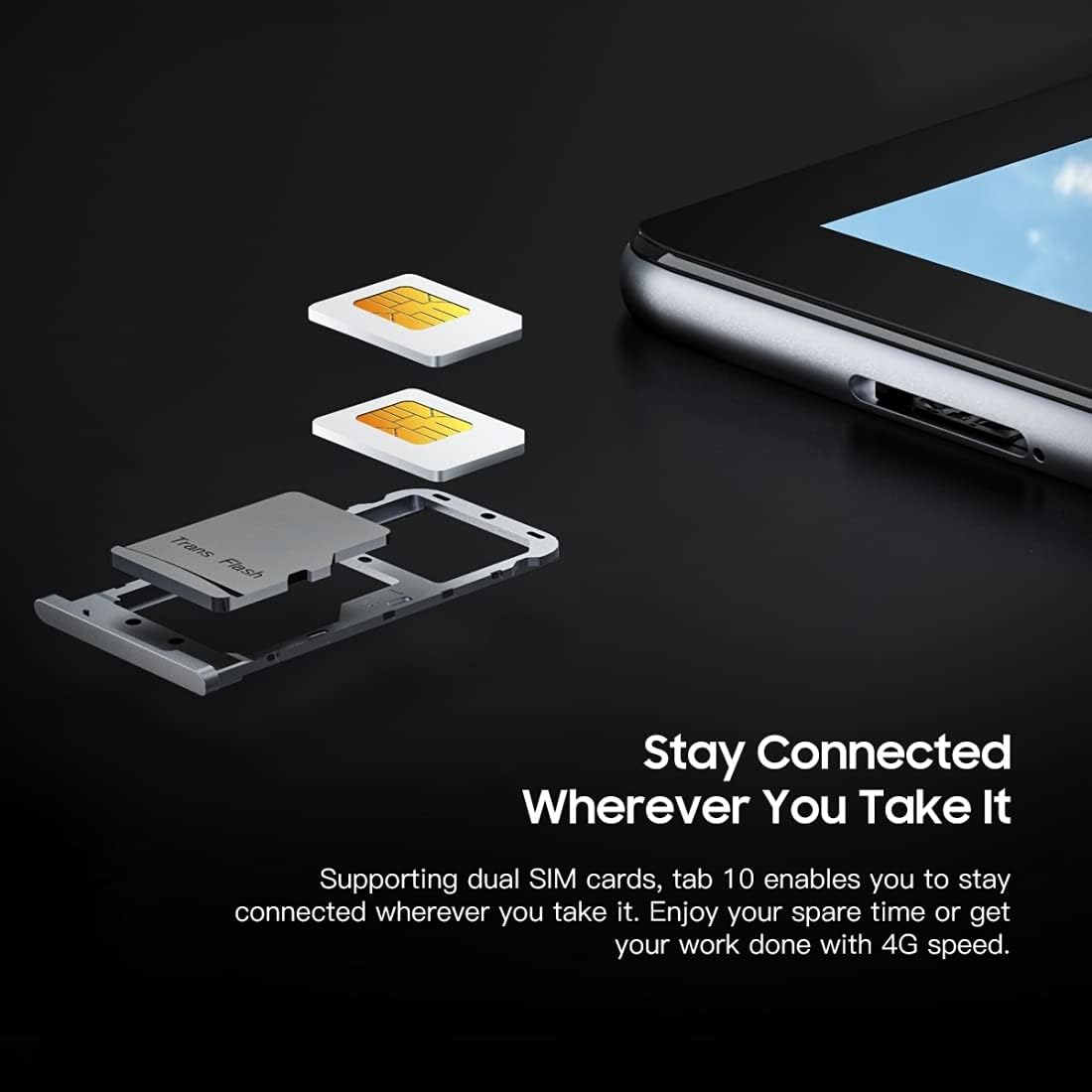
Зображення: Детальний view Чорногоview Tab 10's SIM card tray, showing how two Nano SIM cards are inserted, illustrating the dual SIM support.
Увімкнення/вимкнення
- Щоб увімкнути: Натисніть і утримуйте кнопку живлення, доки чорнийview з'являється логотип.
- Щоб вимкнути: Натисніть і утримуйте кнопку живлення, доки не з’явиться меню параметрів живлення, потім виберіть «Вимкнути живлення».
- Щоб перезапустити: Натисніть і утримуйте кнопку живлення, доки не з’явиться меню параметрів живлення, потім виберіть «Перезавантажити».
Початкове налаштування
Після першого ввімкнення дотримуйтесь підказок на екрані, щоб завершити початкове налаштування:
- Виберіть свою мову.
- Підключіться до мережі Wi-Fi.
- Увійдіть за допомогою свого облікового запису Google або створіть новий.
- Налаштуйте блокування екрана (PIN-код, графічний ключ, пароль).
- Review та прийняти умови та положення.
Інструкція з експлуатації
Основна навігація
- Торкніться: Торкніться екрана один раз, щоб відкрити програму, вибрати елемент або натиснути кнопку.
- Натисніть і утримуйте: Натисніть і утримуйте елемент, щоб отримати доступ до додаткових опцій або перемістити його.
- Проведіть пальцем: Проведіть пальцем по екрану, щоб прокручувати сторінки або вміст.
- Щіпка: Використовуйте два пальці, щоб збільшувати або зменшувати зображення та web сторінки.
Підключення до мереж
- Wi-Fi: Перейти до Налаштування > Мережа та Інтернет > Wi-FiУвімкніть Wi-Fi, виберіть потрібну мережу та введіть пароль, якщо потрібно.
- Bluetooth: Перейти до Налаштування > Підключені пристрої > Bluetooth. Turn Bluetooth on, then select a device from the list to pair.
- Мобільні дані (4G): If a SIM card is inserted, go to Налаштування > Мережа та Інтернет > Мобільна мережа to enable mobile data and configure settings.
Використання камери
Чорнийview Tab 10 features a 13.0MP rear camera and a 5.0MP front camera.
- Відкрийте Камера додаток
- Торкніться значка камери, щоб перемикатися між передньою та задньою камерами.
- Натисніть кнопку спуску затвора, щоб зробити фотографію або розпочати/зупинити відеозапис.
- Explore various camera modes and settings within the app.

Зображення: Чорнийview Tab 10 displaying its camera features, including an 8MP front camera and a 13MP rear camera, emphasizing its photographic capabilities.
Android 11 and Doke OS_P 1.0
Your tablet runs on Android 11 with Blackview's Doke OS_P 1.0 interface, offering enhanced privacy controls, improved notification management, and a more intuitive user experience. Explore the Налаштування menu to customize your device, manage apps, and optimize performance.

Зображення: Чорнийview Tab 10 screen showing the Doke OS_P 1.0 interface based on Android 11, with various settings and app screens visible.
Технічне обслуговування
Очищення пристрою
- Використовуйте м’яку тканину без ворсу для очищення екрана та корпусу планшета.
- Для стійких плям злегкаampпротріть тканину водою або засобом для чищення екранів, призначеним для електроніки.
- Уникайте використання агресивних хімікатів, абразивних матеріалів або аерозольних спреїв безпосередньо на планшеті.
Догляд за акумулятором
- Avoid exposing the tablet to extreme temperatures (hot or cold), as this can affect battery life.
- Не залишайте планшет заряджатися на тривалий час після його повної зарядки.
- Use only the original charger and cable provided with the tablet.
Оновлення програмного забезпечення
Регулярно перевіряйте наявність оновлень програмного забезпечення та встановлюйте їх, щоб ваш планшет мав найновіші функції, виправлення безпеки та покращення продуктивності. Перейдіть до Налаштування > система > Оновлення системи.
Усунення несправностей
Пристрій не вмикається
- Переконайтеся, що акумулятор заряджений. Підключіть планшет до зарядного пристрою щонайменше на 30 хвилин.
- Натисніть і утримуйте кнопку живлення протягом 10-15 секунд, щоб примусово перезавантажити пристрій.
Проблеми з підключенням Wi-Fi
- Перезавантажте Wi-Fi роутер і планшет.
- Забудьте про мережу в налаштуваннях Wi-Fi та підключіться знову.
- Переконайтеся, що ви перебуваєте в зоні дії сигналу Wi-Fi.
Повільна продуктивність
- Закрийте невикористовувані програми, що працюють у фоновому режимі.
- Очистіть кеш-дані для програм, які часто використовуються.
- Ensure sufficient storage space is available. Delete unnecessary files або програми.
- Розгляньте скидання до заводських налаштувань як крайній захід (спочатку зробіть резервну копію даних).
Додаток аварійно завершує роботу або зависає
- Примусове закриття програми: Перейдіть до Налаштування > Програми та сповіщення, select the app, then tap Примусова зупинка.
- Clear the app's cache and data (this will reset the app).
- Видаліть і перевстановіть додаток.
Технічні характеристики
| Модель | Вкладка 10 |
| Розмір екрана | 10.1 дюймів |
| Роздільна здатність дисплея | 1920 x 1200 (FHD+) |
| Процесор | MTK8768 Octa Core Cortex-A53 2.0GHz |
| ОЗУ | 4 ГБ |
| Внутрішня пам'ять | 64 ГБ |
| Розширюване сховище | TF-карта до 128 ГБ (не входить до комплекту) |
| Операційна система | Android 11 (Doke OS_P 1.0) |
| Задня камера | 13.0MP with AF, LED flash |
| Фронтальна камера | 5.0 МП |
| Ємність акумулятора | 7480 мАг |
| Зарядка | 9V 2A, 18W Fast Charging |
| Мережевий зв'язок | 4G LTE, Wi-Fi (802.11a/b/g/n/ac), Bluetooth V5.0 |
| Тип SIM | Дві Nano SIM-карти |
| Інтерфейси | 1 x 3.5mm Earphone Port, 1 x Type-C, 1 x Magnetic Port |
| Розміри (Д x Ш x В) | 243 x 162 x 8.4 мм (9.57 x 6.38 x 0.33 дюйми) |
| вага | 523 г (1.15 фунта) |

Зображення: Інфографікаasinчорнийview Tab 10's main features, including its 13MP rear camera, Octa-core processor, 7480mAh battery, 10.1-inch FHD display, 8.8mm slim body, and support for dual SIM cards.
Гарантія та підтримка
Чорнийview Tab 10 comes with a standard manufacturer's warranty. Please refer to the warranty card included in your package for specific terms and conditions, including warranty period and coverage details.
For technical support, service inquiries, or additional product information, please visit the official Blackview webсайт або зверніться до їхнього відділу обслуговування клієнтів. Тримайте чек про покупку та серійний номер продукту під рукою, коли звертаєтесь за допомогою.
Official Blackview Магазин: чорнийview Магазин на Amazon