вступ
The Poly Sync 60 is a smart speakerphone designed for small to medium conference rooms. It provides clear audio for all participants through powerful twin speakers and a six-microphone array that focuses on voices while reducing background noise. This device offers flexible connectivity options, including USB-A, USB-C, and Bluetooth, making it compatible with various devices and communication platforms like Teams and Zoom.
Вміст упаковки
Перевірте наявність усіх предметів у вашій упаковці:
- Poly Sync 60 Speakerphone
- Main power supply with global pin adapters
- USB cable with USB-A and USB-C connectors
Налаштування
1. Підключення живлення
Connect the provided main power supply to the Poly Sync 60 speakerphone and then to an electrical outlet. The device requires AC power for operation as it does not contain an internal battery.
2. Connecting to a Computer (USB)
Use the included USB cable to connect the Poly Sync 60 to your PC or Mac. The cable features both USB-A and USB-C connectors for broad compatibility. Once connected, the speakerphone should be recognized by your computer and ready for use with your communication applications.
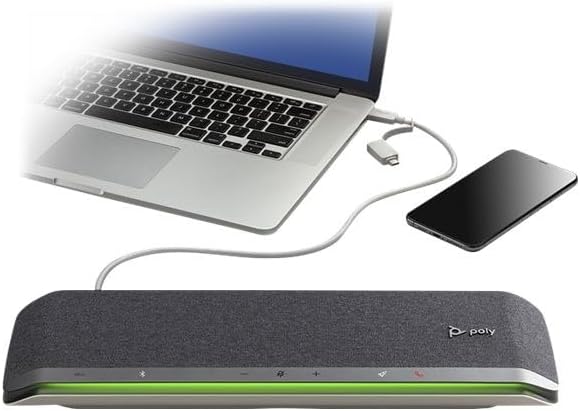
Image: The Poly Sync 60 speakerphone connected to a laptop and a smartphone, illustrating its wired connectivity options.
3. Connecting to a Smartphone (Bluetooth)
Щоб підключити смартфон через Bluetooth:
- Переконайтеся, що Bluetooth увімкнено на вашому смартфоні.
- On the Poly Sync 60, press and hold the Bluetooth button until the light bar flashes blue.
- On your smartphone, select "Poly Sync 60" from the list of available Bluetooth devices.
- The light bar will turn solid blue when connected.
4. Daisy Chaining Two Units
For larger rooms or extended audio coverage, two Poly Sync 60 units can be paired wirelessly. Refer to the official Poly documentation for detailed instructions on wirelessly linking two speakerphones.
5. USB Video Camera Connection
The Poly Sync 60 features a dedicated USB port to connect a USB video camera. This allows for a single cable connection to your computer for both audio and video during conference calls.
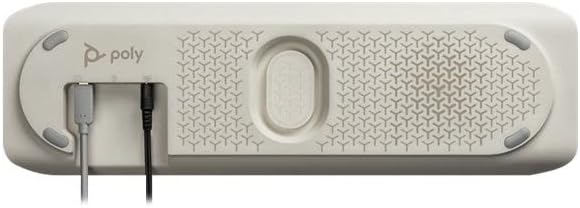
Image: The underside of the Poly Sync 60, highlighting the various connection ports for power, USB, and additional devices.
Інструкція з експлуатації
Основні елементи керування
The Poly Sync 60 features intuitive touch controls and a highly visible light bar to indicate call status and device activity.

Зображення: Верх view of the Poly Sync 60 speakerphone, showing the touch-sensitive control panel and the illuminated light bar, typically green during an active call.
- Збільшення/зменшення гучності: Use the '+' and '-' buttons to adjust the speaker volume.
- Вимкнути/увімкнути звук: Press the microphone icon button to mute or unmute your microphone. The light bar will change color to indicate mute status.
- Відповідь/завершення виклику: Use the phone icon button to answer or end calls.
- Bluetooth: Press the Bluetooth icon to manage Bluetooth connections.
Розширені функції
- Зарядка смартфона: The Poly Sync 60 includes two USB ports that can be used to charge up to two mobile phones simultaneously during a meeting.
- Програмована кнопка: A dedicated programmable button allows users to customize its function, such as manually clearing previously paired Bluetooth devices for easy disconnection.
- Мікрофонний масив: The six-microphone steerable array actively reduces echo and background noise, ensuring clear voice pickup from various positions in the room.
Технічне обслуговування
To ensure the longevity and optimal performance of your Poly Sync 60 speakerphone, follow these maintenance guidelines:
- Прибирання: Use a soft, dry, lint-free cloth to clean the exterior surfaces. Avoid using abrasive cleaners, solvents, or aerosol sprays.
- Зберігання: Зберігайте пристрій у прохолодному, сухому місці, подалі від прямих сонячних променів та екстремальних температур, коли він не використовується.
- Обробка: Handle the speakerphone with care to prevent physical damage. Avoid dropping the device or exposing it to liquids.
- Джерело живлення: Використовуйте лише джерело живлення, що постачається разом із пристроєм.
Усунення несправностей
If you encounter issues with your Poly Sync 60, refer to the following common troubleshooting steps:
- Немає живлення: Ensure the power supply is securely connected to both the speakerphone and a working electrical outlet.
- Немає звуку/Погана якість звуку:
- Check the volume levels on both the speakerphone and your connected computer/smartphone.
- Verify that the speakerphone is selected as the audio input and output device in your computer's sound settings or communication application.
- If using Bluetooth, ensure the device is properly paired and within range (up to 10 meters). Try re-pairing the device.
- Переконайтеся, що жодні інші аудіопристрої не створюють перешкод.
- Мікрофон не працює:
- Check if the microphone is muted on the speakerphone (indicated by the light bar).
- Verify the Poly Sync 60 is selected as the microphone input device in your computer's sound settings or communication application.
- Проблеми з підключенням:
- For USB connections, try a different USB port on your computer or a different USB cable.
- For Bluetooth, try disconnecting and re-connecting the device. If issues persist, clear previously paired Bluetooth devices using the programmable button or device settings.
Технічні характеристики
| Особливість | Деталь |
|---|---|
| Назва моделі | Poly Sync 60 |
| Номер моделі товару | 216872-01 |
| Бренд | Plantronics |
| Технологія підключення | Bluetooth, USB |
| Технологія бездротового зв'язку | Bluetooth |
| Діапазон Bluetooth | 10 метрів |
| Тип динаміка | Спікер конференції |
| Максимальна вихідна потужність динаміка | 25 Вт |
| Режим аудіовиходу | Стерео |
| Масив мікрофона | Six-microphone steerable array |
| Джерело живлення | Провідний електричний |
| Розміри продукту | 2" Г x 9.5" Ш x 18.25" В |
| Вага товару | 2.2 фунта (1000 грам) |
| матеріал | пластик |
| Колір | чорний |
| Спосіб контролю | Дотик |
| Сумісні пристрої | Персональний комп'ютер, смартфон |
| Особливості | Charge up to two mobile phones, Pair two units wirelessly for larger spaces, Six microphone array |
Інформація про гарантію
The Poly Sync 60 Smart Speakerphone comes with a limited warranty. For specific details regarding the warranty period, coverage, and terms, please refer to the warranty documentation included with your product or visit the official Plantronics (Poly) webсайт.
Підтримка
For further assistance, technical support, or to download the latest firmware and software for your Poly Sync 60, please visit the official Plantronics (Poly) support website. You can typically find FAQs, user guides, and contact information for customer service there.


