1. Продукт закінчивсяview
The Lexmark MX611DHE is a monochrome laser multifunction device designed for office environments, offering comprehensive capabilities including printing, copying, scanning, and faxing. This robust unit is engineered for high-volume output and efficient document handling.
- Багатофункціональність: Integrates print, copy, fax, and scan functions into a single device.
- Високошвидкісна продуктивність: Capable of printing and copying at speeds up to 50 pages per minute (ppm).
- Двосторонній друк: Supports automatic two-sided printing to conserve paper.
- Вхідна ємність: Features a standard input capacity of 650 sheets, expandable for larger tasks.
- Підключення: Equipped with USB and Ethernet interfaces for versatile network integration.
- Інтуїтивно зрозуміле керування: Features a touchscreen display for easy navigation and operation.
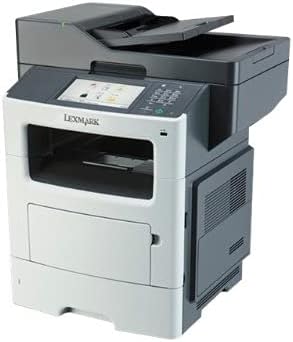
Малюнок 1: Спереду view of the Lexmark MX611DHE multifunction printer, showcasing its compact design and front-facing paper tray.
2. Посібник із налаштування
Follow these steps to set up your Lexmark MX611DHE printer for initial use.
- Розпакування: Carefully remove the printer from its packaging. Remove all protective tapes and packing materials from the exterior and interior of the device.
- Розміщення: Place the printer on a stable, level surface with adequate ventilation. Ensure there is enough space around the printer for proper operation and maintenance.
- Підключення живлення: Connect the power cord to the printer's power input and then to a grounded electrical outlet. Do not connect to a surge protector or extension cord initially.
- Завантаження паперу: Open the paper tray and load the appropriate paper size (up to 8.5 x 14 inches). Adjust the paper guides to fit the paper stack snugly.
- Network/USB Connection:
- For Network (Ethernet): Підключіть кабель Ethernet від порту Ethernet принтера до мережевого маршрутизатора або комутатора.
- Для USB: Підключіть USB-кабель від USB-порту принтера до комп’ютера.
- Початкове ввімкнення: Press the power button to turn on the printer. Follow the on-screen prompts on the touchscreen display to select language, region, and perform initial setup configurations.
- Встановлення драйвера: Install the necessary printer drivers on your computer. Drivers can typically be found on the Lexmark support website or on an included installation CD (if applicable).
3. Інструкція з експлуатації
This section provides basic instructions for using the Lexmark MX611DHE's primary functions.
3.1. Друк
- Переконайтеся, що принтер увімкнено та підключено до комп’ютера або мережі.
- Відкрийте на комп’ютері документ, який потрібно роздрукувати.
- Виберіть File > Друк (або еквівалентну команду у вашій програмі).
- Choose "Lexmark MX611DHE" from the list of available printers.
- Adjust print settings such as number of copies, paper size, and duplex options as needed.
- Натисніть Роздрукувати.
3.2. Копіювання
- Place the document face-down on the scanner glass or face-up in the automatic document feeder (ADF).
- На сенсорному екрані принтера виберіть Копія функція.
- Adjust settings such as number of copies, lightness/darkness, and paper size.
- Натисніть старт кнопку, щоб почати копіювання.
3.3. Сканування

Figure 2: The Lexmark MX611DHE with its scanner lid open, revealing the flatbed scanner glass and the automatic document feeder mechanism.
- Помістіть документ на скло сканера або в АПД.
- На сенсорному екрані принтера виберіть Сканувати функція.
- Choose your desired scan destination (e.g., Scan to Computer, Scan to Email, Scan to Network Folder).
- Налаштуйте параметри сканування, такі як роздільна здатність, колірний режим і file формат.
- Натисніть старт кнопку, щоб розпочати сканування.
3.4. Факс
- Переконайтеся, що принтер підключено до телефонної лінії.
- Помістіть документ на скло сканера або в АПД.
- На сенсорному екрані принтера виберіть Факс функція.
- Введіть номер факсу одержувача за допомогою клавіатури на панелі керування.
- Налаштуйте всі необхідні параметри факсу.
- Натисніть старт щоб надіслати факс.
4. Технічне обслуговування
Regular maintenance ensures optimal performance and extends the lifespan of your Lexmark MX611DHE.
- Очищення зовнішньої частини: Використовуйте м'який, damp, lint-free cloth to wipe the exterior surfaces of the printer. Avoid abrasive cleaners.
- Очищення скла сканера: For clear scans, regularly clean the scanner glass with a soft, lint-free cloth and a mild glass cleaner.
- Заміна тонер-картриджа: When the toner low message appears, order a new Lexmark toner cartridge. Follow the instructions provided with the new cartridge for proper installation.
- Очищення паперопроводу: If paper jams become frequent, consult the printer's internal guides or the Lexmark support website for instructions on cleaning the paper path rollers.
5. Вирішення проблем
This section addresses common issues you might encounter with your Lexmark MX611DHE.
| проблема | Можлива причина | Рішення |
|---|---|---|
| Принтер не відповідає | Відключено кабель живлення, проблеми з мережею, проблеми з драйвером. | Check power connections. Verify network cable or USB connection. Reinstall printer drivers. |
| Зминання паперу | Incorrectly loaded paper, foreign object in paper path. | Open access covers and carefully remove jammed paper. Ensure paper is loaded correctly. |
| Погана якість друку | Low toner, dirty print head/rollers, incorrect print settings. | Replace toner cartridge. Clean internal components as per maintenance guide. Adjust print quality settings in driver. |
| Сканер не працює | Scanner glass dirty, software issue, connectivity problem. | Clean scanner glass. Restart computer and printer. Check USB/network connection. |
6. Технічні характеристики
Detailed technical specifications for the Lexmark MX611DHE.
| Особливість | Деталь |
|---|---|
| Бренд | Lexmark |
| Назва моделі | MX611DHE |
| Тип дисплея | LCD (Touchscreen) |
| Технологія друку | Лазерний (монохромний) |
| Максимальна швидкість друку (монохромний) | 50 ppm |
| Максимальна швидкість копіювання (чорно-біла) | 50 ppm |
| роздільна здатність | 1200 x 1200 dpi |
| Ємність пам'яті | 1024 Мб |
| Підтримка розмірів аркушів | Up to 8.5 x 14 Inches |
| Апаратний інтерфейс | USB-Ethernet |
| Розміри продукту | 22.6 x 23.5 x 26.5 дюймів |
| Колір | Сірий/білий |
| UPC | 656942073611 |
7. Гарантія та підтримка
Your Lexmark MX611DHE (Renewed) product is covered by a limited warranty and support resources.
- Гарантія: Цей продукт поставляється з a 90-денна обмежена гарантія. Please refer to your purchase documentation for specific terms and conditions of the Amazon Renewed Guarantee.
- Технічна підтримка: For technical assistance, driver downloads, or further troubleshooting, please visit the official Lexmark support webсайту або зв’яжіться з їхньою службою обслуговування клієнтів.
- Інтернет-ресурси: Additional user guides, FAQs, and firmware updates may be available on the Lexmark support portal.


