вступ
This manual provides essential instructions for the safe and efficient operation of your Miroir M600 1080p Battery-Powered Projector. Please read this manual thoroughly before using the device and retain it for future reference.
Що в коробці
Перевірте, чи всі перелічені нижче предмети входять до вашої упаковки:
- Miroir M600 Projector
- Кабель HDMI
- AC Adapter and Charger

Image: Contents of the Miroir M600 Projector package.
Продукт закінченийview
The Miroir M600 is a compact, portable 1080p projector designed for various projection needs. Familiarize yourself with its components:
Фронт View

Зображення: спереду view of the Miroir M600 Projector, showing the projection lens and ventilation grille.
Задня View і порти

Зображення: Задня частина view of the Miroir M600 Projector, highlighting the various input/output ports.
- 3.5 мм аудіовихід: Для підключення зовнішніх динаміків або навушників.
- USB-C Video Port: For video input from compatible USB-C devices.
- Порт HDMI: For video input from HDMI-enabled devices.
- Порт зарядки USB: Для заряджання зовнішніх пристроїв.
- Вхідна потужність постійного струму: For connecting the AC adapter to power and charge the projector.
Налаштування
1. Увімкнення та зарядка
- Connect the AC adapter to the DC Power Input port on the projector and then to a power outlet. The projector can operate while charging.
- Press and hold the power button (location not specified in data, assume standard placement) for a few seconds until the projector powers on.
- The internal battery provides portable operation. Ensure it is sufficiently charged for use without the AC adapter.
2. Розміщення та проекція
Position the projector on a stable, flat surface or mount it on a compatible stand. Ensure the lens is unobstructed and pointed towards your desired projection surface (wall or screen).

Image: Miroir M600 Projector positioned on a stand for optimal projection.
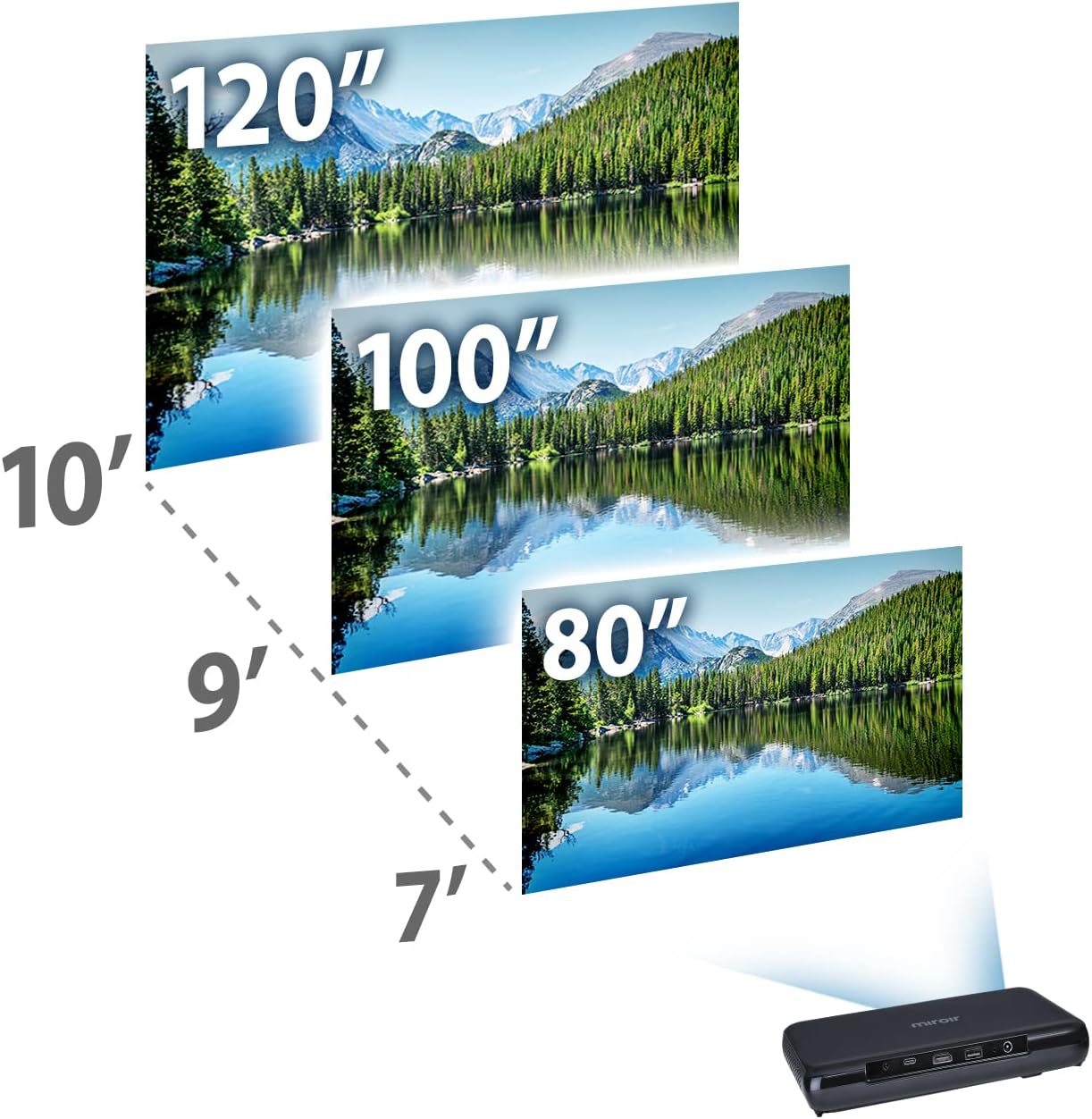
Image: Guide for projection distances to achieve various screen sizes (e.g., 7 feet for 80 inches, 10 feet for 120 inches).
Операційна
1. Підключення пристроїв введення
- HDMI: Connect an HDMI cable from your source device (laptop, streaming stick, game console) to the HDMI port on the projector.
- USB-C Video: For compatible devices, connect a USB-C cable from your source to the USB-C Video port on the projector.
2. Adjusting Image and Focus
The Miroir M600 features automatic keystone correction to adjust the image shape. For focus, manual adjustment may be required via a focus wheel (location not specified in data, assume standard placement near lens).
3. Аудіо вихід
The projector includes a built-in 5-watt speaker. For enhanced audio, connect external speakers or headphones to the 3.5mm Audio Out jack.
4. Лamp Режими
Світлодіод lamp offers two modes:
- Нормальний режим: Up to 20,000 hours of lamp життя.
- Режим ECO: Up to 30,000 hours of lamp life, providing extended usage and reduced power consumption.
Технічне обслуговування
1. Очищення проектора
- Об'єктив: Використовуйте м’яку тканину без ворсу, спеціально призначену для оптичних лінз. Не використовуйте абразивні засоби для чищення та не застосовуйте надмірних зусиль.
- Зовні: Wipe the projector's exterior with a soft, dry cloth. Avoid using liquid cleaners directly on the device.
- Вентиляція: Ensure the ventilation grilles are clear of dust and debris to prevent overheating.
2. Догляд за акумулятором
- Для оптимального терміну служби акумулятора уникайте частого повного розряджання акумулятора.
- Зберігайте проектор у прохолодному, сухому місці, якщо він не використовується протягом тривалого часу.
Усунення несправностей
If you encounter issues with your Miroir M600 projector, refer to the following common solutions:
- Без зображення: Ensure the input source is correctly connected and selected. Check all cable connections.
- Розмите зображення: Adjust the focus manually. Ensure the projection surface is flat and the projector is stable.
- Немає звуку: Verify that the volume is not muted on both the projector and the source device. If using external speakers, ensure they are properly connected and powered.
- Перегрів: Забезпечте належну вентиляцію навколо проектора. Не блокуйте вентиляційні отвори.
For more detailed troubleshooting steps, please consult the full user manual available for download (see Support section).
Технічні характеристики
| Особливість | Деталь |
|---|---|
| Розміри продукту | 9 x 5 x 1 дюймів |
| Вага товару | 1.6 фунта |
| Номер моделі товару | M600 |
| Акумулятори | 1 літій-полімерна батарея (у комплекті) |
| Виробник | Miroir |
| Бренд | Miroir |
| Рекомендоване використання | Бізнес |
| Особливість | Pico, Speakers |
| Технологія підключення | USB, HDMI |
| Роздільна здатність дисплея | 1920 x 1080 (1080p) |
| Lamp Life (Normal Mode) | До 20,000 годин |
| Lamp Термін служби (ECO режим) | До 30,000 годин |
| Вбудований динамік | 5-ватний |
| Видима діагональ екрана | 120 дюймів / 305 см |
Інформація про гарантію
Specific warranty details are not provided in this document. Please refer to the official Miroir website or the warranty card included with your product for comprehensive warranty terms and conditions.
Підтримка та контакти
For further assistance, detailed instructions, or to contact customer support:
- Повне керівництво користувача: A comprehensive PDF user manual is available for download тут.
- Виробник Webсайт: Visit the official Miroir website for product registration, FAQs, and support resources.


