1. Продукт закінчивсяview
The XPG Defender is a mid-tower ATX PC case designed for efficient airflow and ease of assembly. It features a mesh front panel, tempered glass side panel, and supports various motherboard sizes.
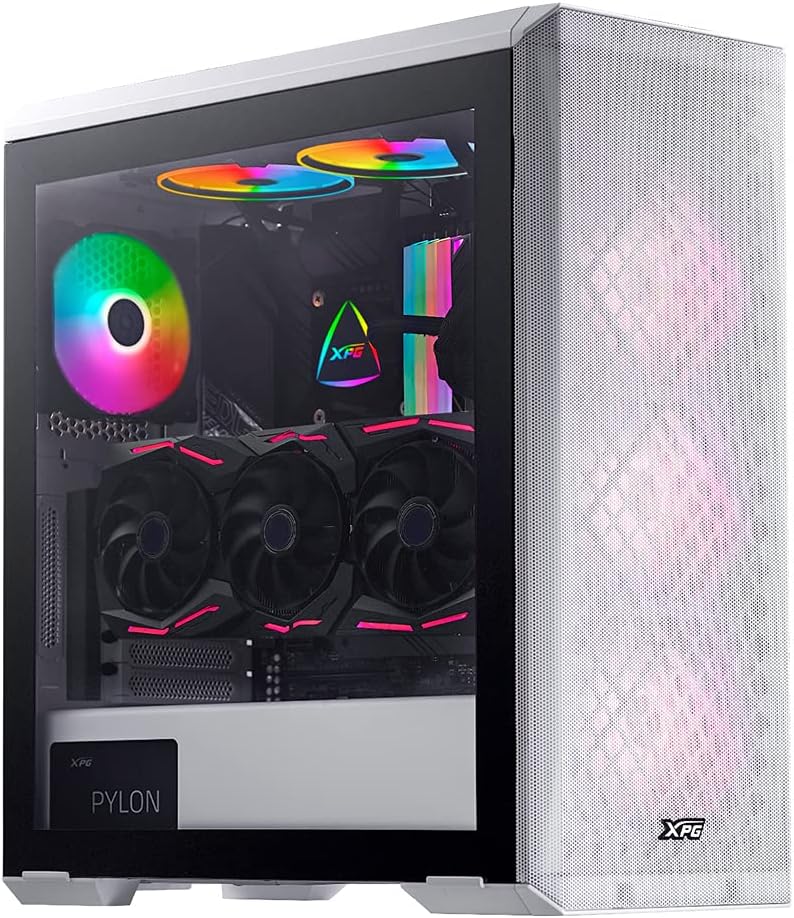
Image: XPG Defender PC Case, white, with tempered glass side panel and mesh front panel, showcasing internal components and RGB fans.
2. Налаштування та встановлення
2.1 Розпакування та підготовка
- Обережно вийміть корпус ПК з упаковки.
- Перевірте корпус на наявність будь-яких ознак пошкоджень під час транспортування.
- Поставте корпус на стійку, рівну поверхню.
2.2 Зняття панелей
The tempered glass side panel is secured with thumbscrews. Carefully remove these screws and gently pull the panel away from the chassis. The mesh front panel is magnetic and can be pulled off directly to access front fan mounts.

Image: XPG Defender PC Case, white, with the mesh front panel detached, revealing the fan mounting points behind it.
2.3 Встановлення материнської плати
The XPG Defender supports Mini-ITX, Micro-ATX, ATX, and E-ATX motherboards. Install the necessary standoffs for your motherboard size, then secure the motherboard with screws.

Зображення: Внутрішнє view of the XPG Defender PC Case, white, showing the spacious interior, motherboard tray, and cable management cutouts.
2.4 Встановлення приводу
The case provides space for two 2.5-inch drives and two convertible 2.5-inch/3.5-inch drive trays. Locate the drive bays and secure your storage devices using the provided screws or tool-less mechanisms.

Зображення: Внутрішнє view of the XPG Defender PC Case, white, focusing on the drive bays with trays for 2.5-inch and 3.5-inch drives.
2.5 Встановлення блоку живлення
Install your power supply unit (PSU) into the rear mount area at the bottom of the case. Secure it with screws from the rear of the chassis.

Image: Rear internal view of the XPG Defender PC Case, white, highlighting the power supply shroud and drive bay area.
2.6 Відеокарта та плати розширення
Install your graphics card and other expansion cards into the appropriate PCIe slots on your motherboard. The case offers ample space for long graphics cards.

Зображення: Внутрішнє view of the XPG Defender PC Case, white, showing a graphics card installed, emphasizing the ample space for long GPUs.
2.7 Організація кабелів
Використовуйте вирізи для прокладання кабелів та точки кріплення за лотком материнської плати, щоб упорядкувати кабелі для акуратного складання та покращеного потоку повітря.
3. Інструкція з експлуатації
3.1 Увімкнення
After connecting all internal components and external peripherals, connect the power cable to your PSU and press the power button located on the top I/O panel of the case.
3.2 Потік повітря та охолодження
The XPG Defender is designed with an efficient airflow layout, featuring a mesh front panel for optimal air intake. It comes with three pre-installed XPG VENTO 120 fans to facilitate cooling.

Зображення: спереду view of the XPG Defender PC Case, white, with its mesh front panel and three illuminated fans visible behind it.
4. Технічне обслуговування
4.1 Очищення пилового фільтра
To maintain optimal airflow and prevent dust buildup, regularly clean the dust filters. The magnetic mesh front panel can be easily removed for cleaning. The bottom dust filter is also detachable for convenient maintenance.

Image: Close-up of the removable bottom dust filter of the XPG Defender PC Case, white, illustrating its easy access for cleaning.
4.2 Генеральне прибирання
Use a soft, dry cloth to wipe down the exterior of the case. For the tempered glass panel, use a glass cleaner and a microfiber cloth. Avoid abrasive cleaners or solvents.
5. Вирішення проблем
- Немає живлення: Переконайтеся, що всі кабелі живлення (блок живлення до розетки, блок живлення до материнської плати, процесора, відеокарти) надійно підключені. Перевірте вимикач живлення на блоці живлення.
- Вентилятори не обертаються: Verify that the fan cables are correctly connected to the motherboard or fan controller.
- Перегрів: Ensure proper fan orientation for airflow (intake/exhaust). Clean dust filters and internal components regularly. Confirm CPU cooler and GPU fans are functioning correctly.
- Tempered Glass Handling: The tempered glass panel is durable but can shatter if subjected to sharp impacts or uneven pressure. Handle with care during installation and removal.
- Проблеми з введенням/виведенням на передній панелі: Check that the front panel connectors (USB, audio, power/reset switches) are correctly plugged into the motherboard headers.
6. Технічні характеристики
| Розміри продукту | 19.37 x 8.66 x 17.36 дюймів |
| Вага товару | 17.9 фунта |
| Номер моделі товару | DEFENDER-WHCWW |
| Сумісність материнської плати | Mini-ITX, Micro-ATX, ATX, E-ATX |
| Тип корпусу | Середній вежі |
| Колір | Білий |
| матеріал | Загартоване скло |
| Тип кріплення блоку живлення | Задня підвіска |
| Спосіб охолодження | вентилятор |
| Розмір вентилятора | 120 Millimeters (3 pre-installed) |
7. Гарантія та підтримка
For warranty information and technical support, please refer to the official XPG website or contact XPG customer service directly. Keep your proof of purchase for warranty claims.
You can visit the XPG Store for more information: XPG Store


