1. Вступ
This manual provides essential information for the setup, operation, and maintenance of your LOUTOC Universal Replacement Remote Control. This remote is designed to provide a seamless replacement experience for compatible Roku streaming devices.
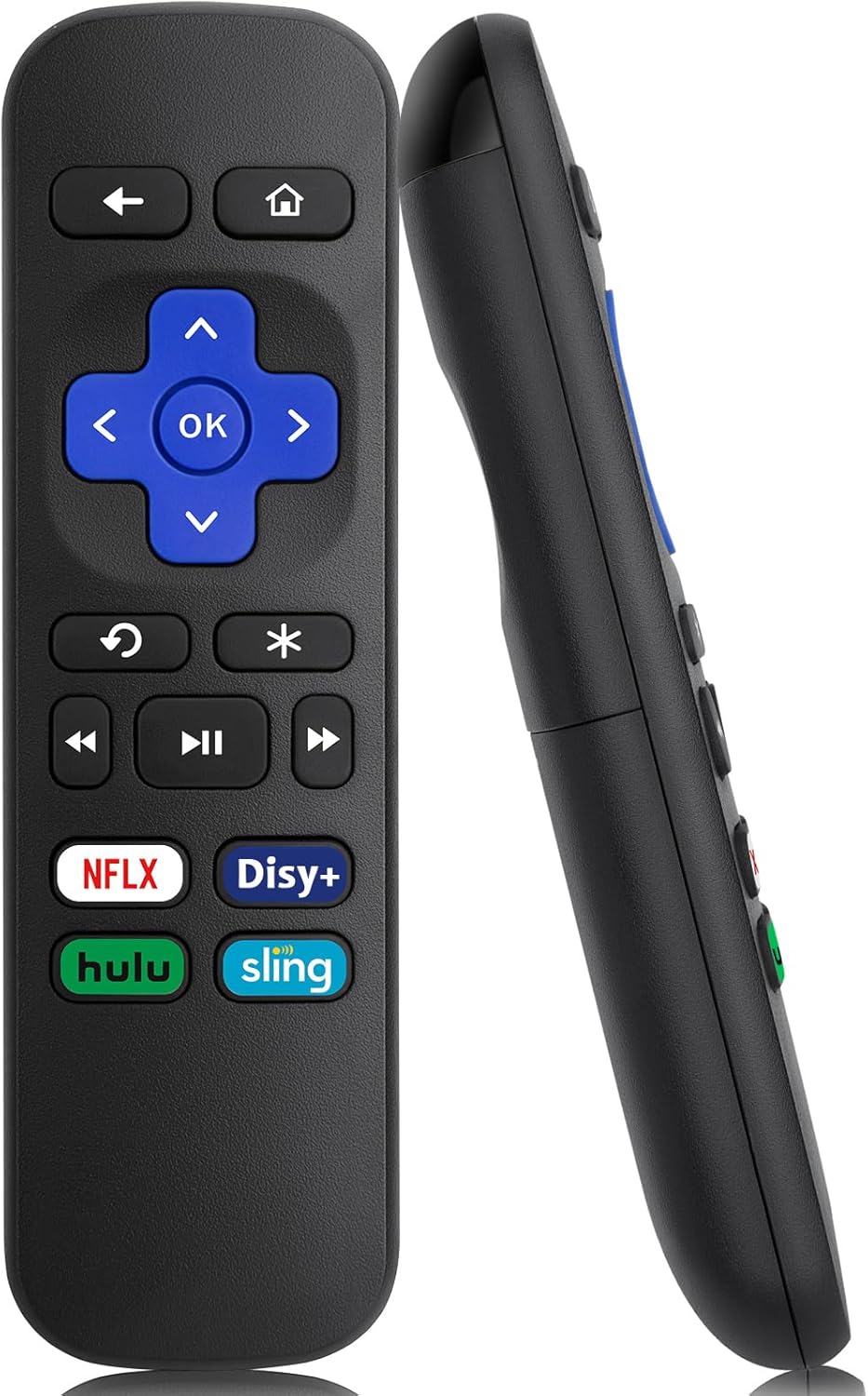
Зображення 1: Передня та бічна частини view of the LOUTOC Universal Replacement Remote Control.
2. Сумісність
The LOUTOC Universal Replacement Remote Control is compatible with a range of Roku streaming players and boxes. Please verify your Roku model against the list below to ensure compatibility.
2.1 Compatible Roku Models:
- Roku 1 SE (Model 2710)
- Roku 2 HD (Model 3000), Roku 2 XD (Model 3050), Roku 2 XS (Model 3100), Roku 2 (Models 2720, 4210)
- Roku 3 (Models 4200, 4230)
- Roku 4 (Model 4400)
- Roku HD (Models 2500, 2000, N1100), Roku LT (Models 2450, 2400), Roku XD (Model 2050), Roku XDS (Model 2100)
- Roku Express (Models 3700, 3900, 3930R)
- Roku Express+ (Models 3710, 3910, 3931W)
- Roku Premiere (Models 4620, 3920R)
- Roku Premiere+ (Models 4630, 3921RW)
2.2 Incompatible Devices:
This remote control is НІ compatible with the following devices:
- Any Roku Streaming Stick model
- Any Roku TV model (e.g., TCL Roku TV, Hisense Roku TV)
- Roku Ultra
- Roku devices requiring an RF (Radio Frequency) remote
- Roku Gaming devices
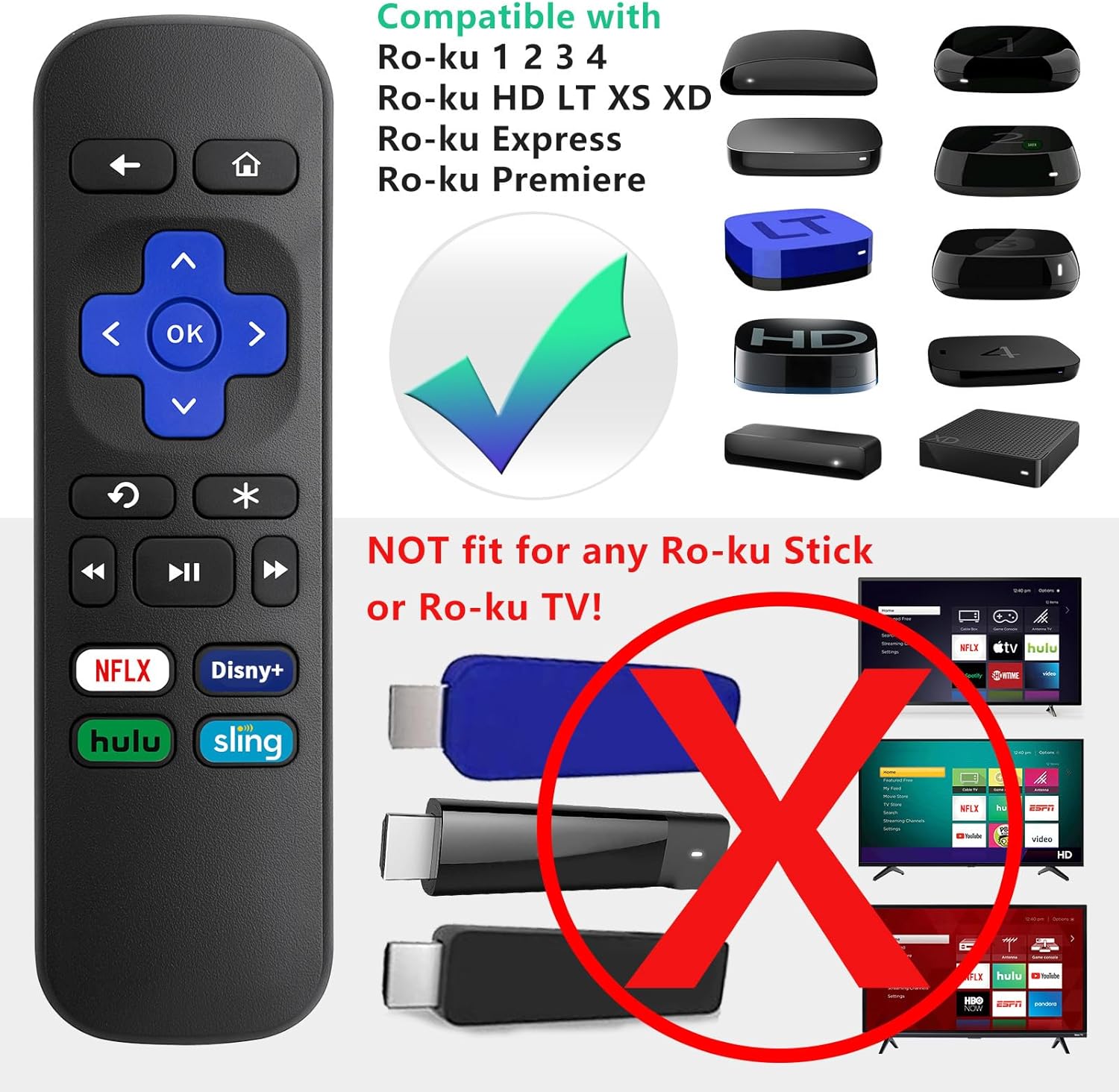
Image 2: Visual guide to compatible Roku players and incompatible Roku Sticks/TVs.

Image 3: Comprehensive compatibility chart for Roku devices.
3. Features and Limitations
3.1 основні характеристики:
- Інфрачервона (ІЧ) технологія: Operates using infrared signals, requiring a direct line of sight to your Roku device.
- Налаштування не потрібне: Functions immediately upon battery insertion with compatible Roku devices. No programming or pairing is needed.
- Спеціальні кнопки швидкого доступу: Includes four direct access buttons for popular streaming services: Netflix, Disney+, Hulu, and Sling.
- Міцна конструкція: Виготовлено з ABS-матеріалу для довговічності.

Image 4: Remote in use, emphasizing ease of use and IR technology.
3.2 Important Limitations:
Please note that this remote control does НІ include the following functionalities:
- No Headphone Jack
- No Pairing Button
- Немає регулятора гучності
- Немає голосового пошуку
- No Power Button
- Not an RF (Radio Frequency) Model

Image 5: Visual representation of features not included (volume, pairing, headphone jack).

Image 6: Visual representation of features not included (power, voice search, RF model).
4. Налаштування
4.1 Установка батареї:
- Знайдіть батарейний відсік на задній панелі пульта дистанційного керування.
- Посуньте кришку батарейного відсіку вниз, щоб відкрити її.
- Insert two (2) AAA batteries, ensuring correct polarity (+ and -) as indicated inside the compartment. Batteries are not included.
- Встановіть кришку батарейного блоку, посунувши її вгору, доки вона не зафіксується почутим клацання.

Image 7: Battery compartment for AAA batteries.
4.2 Початкове використання:
Once batteries are installed, the remote is ready for immediate use with your compatible Roku device. No additional programming or pairing steps are required.
5. Інструкція з експлуатації
Point the remote control directly at your Roku streaming device. Ensure there are no obstructions between the remote and the Roku player for optimal performance.
5.1 Функції кнопок:
| Кнопка | функція |
|---|---|
| додому | Повернення на головний екран Roku. |
| Назад | Повернення до попереднього екрана або меню. |
| Спрямована панель (Вгору, Вниз, Вліво, Вправо) | Навігація по меню та вмісту. |
| OK | Вибирає елемент або підтверджує дію. |
| Миттєвий повтор | Повторює останні кілька секунд відео. |
| Options (*) | Accesses additional options or settings within an app. |
| Перемотати назад | Перемотує відтворення відео назад. |
| Відтворення/Пауза | Plays or pauses video content. |
| Перемотування вперед | Швидке відтворення відео вперед. |
| Netflix | Прямий доступ до програми Netflix. |
| Дісней+ | Direct access to the Disney+ application. |
| Hulu | Direct access to the Hulu application. |
| Слінг | Direct access to the Sling application. |

Image 8: Remote control highlighting the dedicated streaming service buttons.
6. Вирішення проблем
6.1 Remote Not Responding:
- Перевірте батареї: Ensure the batteries are inserted correctly with the proper polarity. Replace old or depleted batteries with fresh AAA batteries.
- Пряма видимість: Confirm that there is a clear, unobstructed path between the remote control and the infrared receiver on your Roku device.
- Сумісність: Double-check that your Roku model is listed as compatible in Section 2.1. This remote will not work with Roku Sticks or Roku TVs.
- Перешкоди: Переконайтеся, що жодні сильні джерела світла (наприклад, прямі сонячні промені або яскраві люмінесцентні лампи) не перешкоджають ІЧ-сигналу.
7. Технічні характеристики
| Специфікація | Деталь |
|---|---|
| Розміри продукту | 5.5 x 1.65 x 0.79 дюйми (13.97 x 4.19 x 2.01 см) |
| Вага товару | 1.76 унцій (50 грам) |
| Джерело живлення | 2 батареї AAA (не входять в комплект) |
| Технологія підключення | Інфрачервоний (ІЧ) |
| матеріал | ABS |

Image 9: Remote control dimensions.
8. Гарантія та підтримка
LOUTOC offers a 60-денна заміна policy for this product. If you experience any issues within 60 days of purchase, please contact your retailer for a replacement.

Image 10: 60-Day Replacement icon.
For further assistance or inquiries, please refer to the contact information provided by your point of purchase or visit the official LOUTOC brand store.


