1. Вступ
This manual provides comprehensive instructions for the installation, operation, maintenance, and troubleshooting of your TP-Link TL-SG3210XHP-M2 Jetstream 8-Port Multi-Gigabit L2+ Managed PoE Switch. Please read this manual thoroughly before using the device to ensure proper functionality and safety.
2. Ключові характеристики
- Eight 2.5Gbps Ports: Features 8x 2.5-Gigabit ports for high-performance multi-gigabit connections.
- 10G SFP+ висхідний канал: Includes 2x 10 Gbps SFP+ slots for high-bandwidth connectivity and non-blocking switching capacity.
- Гнучка конфігурація портів PoE: Equipped with 8x PoE+ (802.3at/af) 10/100/1000 Mbps RJ45 ports, providing up to 30W per port with a total PoE budget of 240W.
- Інтеграція Omada SDN: Supports the Omada Software Defined Networking platform, integrating network devices like switches, APs, and gateways with multiple control options (Omada Hardware Controller, Software Controller, or Standalone Mode).
- Хмарний доступ: Offers remote cloud access and an Omada app for centralized cloud management of the entire network from various sites, all controlled from a single interface.
- Покращена мережева безпека: Advanced security features include 802.1Q VLAN, IP-MAC-Port binding, ACL, Port Security, DoS defense, Storm control, DHCP Snooping, and 802.1X radius authentication.
- L2+ Features: Static Routing helps optimize internal traffic for efficient use of network resources.
3. Вміст упаковки
Переконайтеся, що ваш пакет містить такі елементи:
- TL-SG3210XHP-M2 Switch
- Шнур живлення
- Посібник із швидкої установки (QIG)
- Комплект стійок
- Гумові ніжки
4. Фізичний overview
Familiarize yourself with the ports, LEDs, and physical features of the switch.

Малюнок 1: Спереду view of the TL-SG3210XHP-M2 switch, showing the TP-Link logo, model number, LED indicators, 8x 2.5Gbps PoE+ ports, and 2x 10G SFP+ slots.
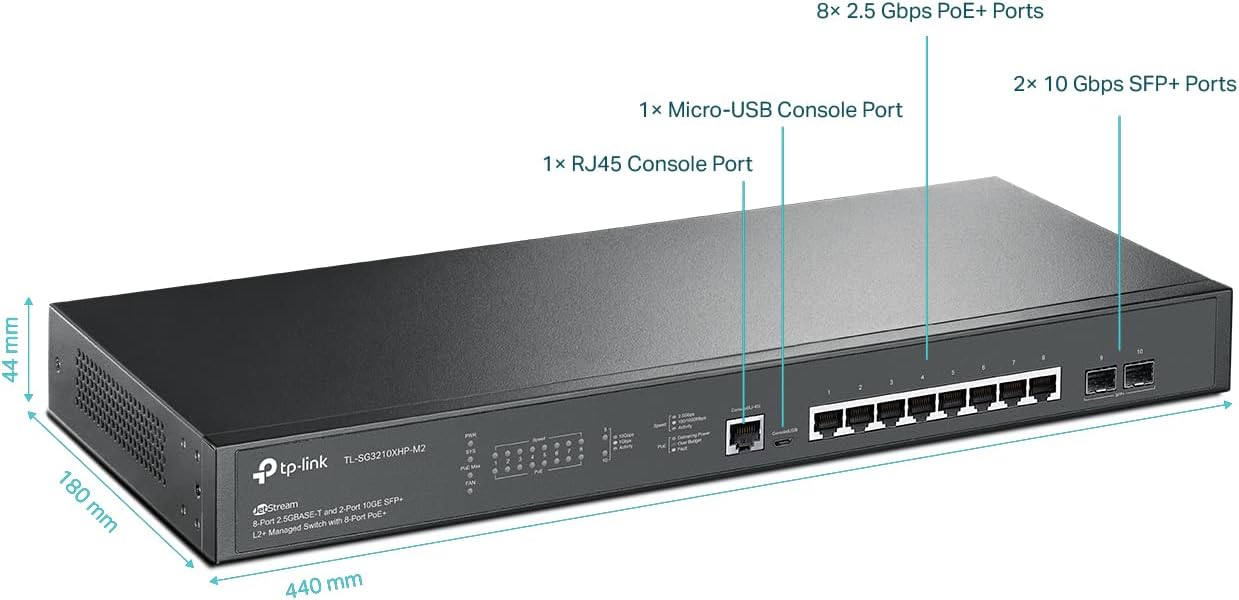
Малюнок 2: Детально view highlighting the dimensions (440 mm length, 180 mm depth, 44 mm height) and port types: 8x 2.5 Gbps PoE+ Ports, 1x Micro-USB Console Port, 1x RJ45 Console Port, and 2x 10 Gbps SFP+ Ports.
5. Налаштування
Follow these steps to set up your TL-SG3210XHP-M2 switch:
- Підключення живлення: Connect the provided power cord to the switch's power inlet and then to a power outlet. Ensure the power LED illuminates.
- Мережні підключення: Connect your network devices (e.g., computers, servers, access points, IP cameras) to the 2.5Gbps RJ45 ports using Ethernet cables. For high-speed uplinks, connect to the 10G SFP+ slots using appropriate SFP+ modules and fiber optic cables.
- Підключення пристроїв PoE: For PoE-powered devices, simply connect them to the PoE+ RJ45 ports. The switch will automatically detect and provide power.
- Доступ для управління: For initial configuration or advanced management, connect a computer to any RJ45 port. You can access the switch's web-based GUI or use the Omada SDN controller for centralized management.
Відео 1: Це відео надає оглядview of the TP-Link 8-Port 2.5G L2+ Managed Omada Switch with 2 10G SFP+ slots, demonstrating its features and connectivity options.
6. Інструкція з експлуатації
The TL-SG3210XHP-M2 switch can operate in standalone mode via its web GUI or be integrated into the Omada SDN for centralized management.
6.1 Standalone Mode (Web GUI)
Доступ до комутатора web-based management interface by entering its IP address into a web browser. Refer to the Quick Installation Guide for default IP address and login credentials. The GUI allows for configuration of VLANs, QoS, security features, and other L2+ functionalities.
6.2 Інтеграція Omada SDN
For seamless network management across multiple devices, integrate the switch into the Omada SDN platform. This allows for centralized control, monitoring, and configuration through the Omada Software Controller, Hardware Controller, or cloud-based controller.

Figure 3: This diagram shows the Omada Centralized Cloud Management system, illustrating how an Omada Hardware Controller or Software Controller can manage networks remotely via the cloud.
Video 2: This video demonstrates how to upgrade an office network using a 2.5G + 10G switch, showcasing its practical application in a business environment.
7. Технічне обслуговування
Регулярне технічне обслуговування забезпечує оптимальну продуктивність та довговічність вашого комутатора:
- Оновлення прошивки: Періодично перевіряйте TP-Link webсайт для оновлень прошивки, щоб забезпечити наявність найновіших функцій та покращень безпеки на вашому пристрої.
- Прибирання: Тримайте вимикач чистим і без пилу. Використовуйте м’яку суху тканину для очищення. Не використовуйте рідкі або аерозольні засоби для чищення.
- Умови навколишнього середовища: Ensure the switch is operated within the recommended temperature and humidity ranges to prevent overheating or damage.
- Автоматичне відновлення PoE: The switch supports PoE Auto Recovery, which automatically reboots unresponsive PoE-powered devices, minimizing manual intervention.

Figure 4: This diagram illustrates the System Self-Healing with PoE Auto Recovery feature, showing how the switch automatically detects and reboots an unresponsive IP camera.
8. Вирішення проблем
Якщо у вас виникли проблеми з комутатором, розгляньте такі поширені кроки для усунення несправностей:
- Немає живлення: Переконайтеся, що шнур живлення надійно підключено як до комутатора, так і до розетки. Перевірте, чи розетка справна.
- Без посилання/активності: Check that Ethernet cables are properly connected to both the switch and the network device. Ensure the connected device is powered on and functioning correctly.
- Пристрій PoE не вмикається: Verify that the connected device is PoE-compatible and within the switch's PoE budget. Check cable integrity.
- Низька швидкість мережі: Ensure all connected devices and cables support the desired speed (e.g., 2.5G or 10G). Check for network congestion or duplex mismatches.
- Доступ Web GUI: Confirm your computer's IP address is in the same subnet as the switch's management IP. Clear browser cache or try a different browser.
9. Технічні характеристики
| Атрибут | Значення |
|---|---|
| Номер моделі | TL-SG3210XHP-M2 |
| Бренд | TP-Link |
| Кількість портів | 8 (2.5Gbps PoE+ RJ45) + 2 (10Gbps SFP+) |
| Тип інтерфейсу | PoE, RJ45, SFP+ |
| Швидкість передачі даних | 2.5 Gigabit per second (RJ45), 10 Gigabit per second (SFP+) |
| Бюджет PoE | 240W total, up to 30W per port |
| Розміри продукту | 17.32 x 7.09 x 1.73 дюймів |
| Вага товару | 4.71 фунта (2.14 кілограма) |
| Колір | чорний |
| Верхня температура | 50 градусів Цельсія |
| Сумісні пристрої | Camera, Desktop, Laptop, Printer, VoIP phone, Wireless access point |
| Включені компоненти | TL-SG3210XHP-M2, Power Cord, QIG, Rackmount Kit, Rubber Feet |
10. Гарантія та підтримка
Your TP-Link TL-SG3210XHP-M2 switch is backed by an industry-leading 5-year manufacturer warranty. For technical assistance, please contact TP-Link support. Free technical support is available from 6am to 6pm PST, Monday to Friday.
For further support, visit the official TP-Link webсайт або зверніться до контактної інформації, зазначеної у вашому Посібнику зі швидкого встановлення.
Video 3: This is a general product overview video from Amazon Product Imaging, providing a visual summary of the switch's features and design.


