1. Вступ
The Energizer Connect Smart WiFi Plug allows you to control your electronic devices remotely using a mobile application or voice commands. This smart plug connects directly to your home's 2.4GHz Wi-Fi network, eliminating the need for a separate hub. It is compatible with Amazon Alexa, Google Assistant, and Siri for convenient voice control. This manual provides detailed instructions for setting up, operating, maintaining, and troubleshooting your smart plug.
2. Інформація про безпеку
Please read and understand all safety instructions before using this product. Failure to follow these instructions may result in electric shock, fire, or property damage.
- Тільки для внутрішнього використання.
- Не перевищуйте максимальне навантаження 15 Amps (120 Volts).
- Do not immerse the plug in water or expose it to moisture.
- Не намагайтеся розібрати чи модифікувати пристрій.
- Зберігати в недоступному для дітей місці.
- Переконайтеся, що вилка повністю вставлена в розетку.
- Unplug the device from the outlet before cleaning.
3. Вміст упаковки
- 1 x Energizer Connect Smart WiFi Plug
- 1 x Посібник користувача (цей документ)
4. Продукт закінчивсяview
The Energizer Connect Smart WiFi Plug features a compact design that allows access to the second outlet. It includes a power button and an LED indicator for status.

Зображення 4.1: The Energizer Connect Smart WiFi Plug shown with its retail packaging, highlighting key features like 15 Amps of power, grouping, voice control, and Wi-Fi connectivity. The plug itself is white and compact.

Зображення 4.2: Крупний план передньої частини view of the Energizer Connect Smart WiFi Plug, showing the standard Type B electrical outlet configuration (two vertical slots and a round ground hole).

Зображення 4.3: This image displays the compact dimensions of the Energizer Connect Smart WiFi Plug. The side view shows a depth of 1.0625 inches, and the front view indicates a diameter of 1.125 inches, illustrating its mini size.
4.1. Компоненти
- Кнопка живлення: Press to manually turn the connected device on or off. Press and hold for 5 seconds to initiate pairing mode (LED will blink rapidly).
- Світлодіодний індикатор:
- Світло -синій: Пристрій увімкнено.
- Вимкнено: Пристрій вимкнено.
- Rapidly Blinking Blue: Режим сполучення.
- Повільно блимає синім: Відключено від Wi-Fi.
5. Інструкції з налаштування
Follow these steps to set up your Energizer Connect Smart WiFi Plug.
5.1. Системні вимоги
- A stable 2.4GHz Wi-Fi network (5GHz networks are not supported).
- A smartphone or tablet running iOS 10.0 or higher, or Android 6.0 or higher.
- Access to the Apple App Store or Google Play Store.
5.2. Завантаження та встановлення програми
- Завантажити Додаток Energizer Connect з Apple App Store або Google Play Store. шукати "Energizer Connect".
- Відкрийте програму та дотримуйтеся вказівок на екрані, щоб створити обліковий запис або увійти.

Зображення 5.1: A smartphone displaying the Energizer Connect App interface, showing the smart plug in an "ON" state. The image also includes the physical smart plug and icons for downloading the app from the App Store and Google Play.
5.3. Pairing the Smart Plug
- Plug the Energizer Connect Smart WiFi Plug into a standard 120V wall outlet.
- The LED indicator on the plug should begin blinking rapidly, indicating it is in pairing mode. If not, press and hold the power button on the side of the plug for 5 seconds until it blinks rapidly.
- Відкрийте застосунок Energizer Connect.
- Tap the "+" icon (or "Add Device") to add a new device.
- Виберіть «Електрична розетка» або «Розумна вилка» зі списку пристроїв.
- Переконайтеся, що індикатор у застосунку швидко блимає.
- Enter your 2.4GHz Wi-Fi network name and password. Ensure your phone is connected to the same 2.4GHz network.
- The app will attempt to connect to the smart plug. This may take a few moments.
- Once successfully paired, the LED indicator on the plug will turn solid blue, and the app will confirm the connection.
- You can then rename your smart plug within the app for easier identification (e.g., "Living Room Lamp", "Кавоварка").

Зображення 5.2: A visual guide showing the three easy steps for setting up the Energizer Connect Smart WiFi Plug: download the app, install the device, and set up and control via the app or voice assistants. The image also features the Energizer bunny mascot.
6. Інструкція з експлуатації
Control your smart plug using the Energizer Connect App or compatible voice assistants.
6.1. Ручне управління
Press the power button on the side of the smart plug to manually turn the connected device on or off.
6.2. Контроль додатків
- Увімкнення/вимкнення: Open the Energizer Connect App, select your smart plug, and tap the power icon to toggle its state.
- Планування: Set custom schedules for your plug to turn on or off automatically at specific times or days. This is useful for lights, coffee makers, or other appliances.
- Таймери: Встановіть таймери зворотного відліку, щоб розетка вимикалася після встановленого часу.
- Віддалений доступ: Control your smart plug from anywhere with an internet connection, even when you are away from home.
- Групування: Group multiple Energizer Connect smart plugs together to control them simultaneously with a single command.
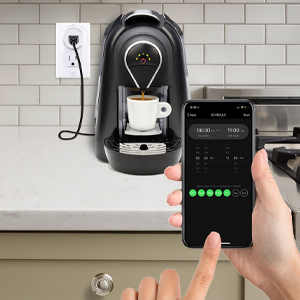
Зображення 6.1: A hand holding a smartphone displaying the Energizer Connect App's scheduling interface, set to turn on a coffee maker at a specific time. The smart plug is visible in the background, connected to the coffee machine.

Зображення 6.2: A person using a smartphone to remotely control a smart plug, demonstrating the ability to turn devices on or off from any location. The image shows a split view of the person and a living room with a lamp connected to a smart plug.
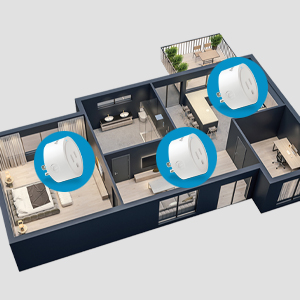
Зображення 6.3: An overhead diagram of a home showing multiple Energizer Connect Smart WiFi Plugs placed in different rooms, illustrating the concept of grouping and controlling several devices simultaneously.
6.3. Голосове керування
The Energizer Connect Smart WiFi Plug is compatible with Amazon Alexa, Google Assistant, and Siri. To enable voice control:
- Ensure your smart plug is successfully paired with the Energizer Connect App.
- Open your Amazon Alexa, Google Home, or Apple Home app.
- Follow the app's instructions to link the "Energizer Connect" skill or service. You will need to log in with your Energizer Connect account credentials.
- Після підключення ви можете використовувати голосові команди, такі як:
- "Alexa, turn on [Plug Name]."
- "Hey Google, turn off [Plug Name]."
- "Hey Siri, turn on [Plug Name]." (Requires setting up Siri Shortcuts in the Energizer Connect App)

Зображення 6.4: A living room scene demonstrating voice control capabilities. The image shows a smart plug connected to a fan, with icons for Google Assistant, Alexa, and Siri Shortcuts, indicating compatibility with these voice assistants.
7. Технічне обслуговування
To ensure optimal performance and longevity of your smart plug:
- Прибирання: Від’єднайте розумну вилку від розетки перед чищенням. Використовуйте м’яку суху тканину для протирання поверхні. Не використовуйте рідкі засоби для чищення або аерозолі.
- Зберігання: When not in use, store the smart plug in a cool, dry place away from direct sunlight and moisture.
- Умови навколишнього середовища: Avoid exposing the plug to extreme temperatures or humidity.
8. Вирішення проблем
If you encounter issues with your Energizer Connect Smart WiFi Plug, refer to the following solutions:
| проблема | Можлива причина | Рішення |
|---|---|---|
| Plug not connecting to Wi-Fi / LED blinking slowly | Incorrect Wi-Fi password, 5GHz network selected, plug too far from router, network interference. |
|
| App cannot find the plug during pairing | Plug not in pairing mode, incorrect app used, network issues. |
|
| Не працює голосове керування | Voice assistant not linked, incorrect device name, internet connectivity issues. |
|
| Plug unresponsive | Power otage, device malfunction. |
|
9. Технічні характеристики
| Особливість | Деталь |
|---|---|
| Номер моделі | B0929DFGZY |
| UPC | 805106871352 |
| Вхідний об'ємtage | 120 вольт |
| Максимальний струм навантаження | 15 Amps |
| Частота Wi-Fi | 2.4 ГГц (IEEE 802.11 b/g/n) |
| Сумісність | Amazon Alexa, Google Assistant, Siri (via Shortcuts) |
| Сертифікати | FCC Certified, ETL Certified |
| матеріал | Пластик, Гума |
| Колір | Білий |
| Вага товару | 2.89 унції |
| Dimensions (Approx. Plug Body) | 1.125" (Diameter) x 1.0625" (Depth from outlet face) |
10. Гарантія та підтримка
For warranty information and technical support, please contact the manufacturer or seller directly. The manufacturer of this product is Jem Accessories, and the brand is Energizer Connect (distributed by XTREME DIGITAL LIFESTYLE ACCESSORIES).
Зберігайте підтвердження покупки для гарантійних претензій.
For further assistance, visit the Energizer Connect webсайт або зверніться до контактної інформації, наданої на упаковці вашого продукту.


