вступ
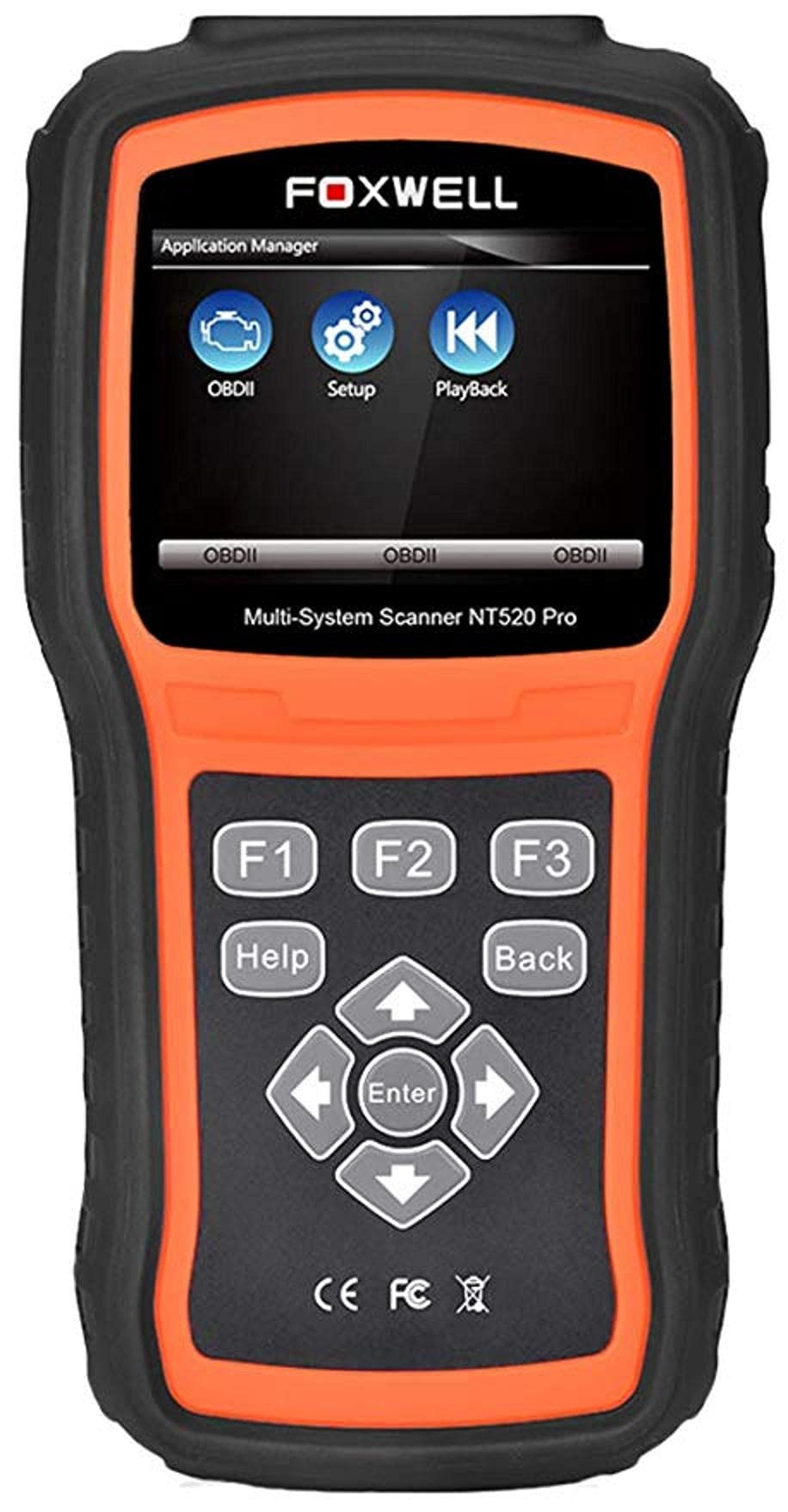
The Foxwell NT520 PRO is a professional-grade car fault diagnostic tool designed to help users identify and resolve issues in various vehicle systems. This device offers comprehensive diagnostic functions, including reading and clearing fault codes, viewing live data streams, and performing specialized tests and coding functions. It supports a wide range of car makes and models equipped with an OBD II - 16 pin connector.
1. Налаштування
1.1 Вміст упаковки
- Foxwell NT520 PRO Diagnostic Tool
- Діагностичний кабель OBD II
- USB Cable (for updates and data transfer)
- Посібник користувача (цей документ)
1.2 Початкове ввімкнення пристрою
- Connect the OBD II diagnostic cable to the NT520 PRO device.
- Locate the vehicle's OBD II port, typically found under the dashboard on the driver's side.
- Plug the diagnostic cable into the vehicle's OBD II port. The device should power on automatically. If not, ensure the vehicle's ignition is in the ON position.
1.3 Оновлення програмного забезпечення
The NT520 PRO offers free updates for one selected car brand. Additional brands (up to five) can be added via internet for a fee. Regular software updates ensure compatibility with newer vehicle models and provide access to the latest diagnostic features.
- Підключіть пристрій до комп’ютера за допомогою USB-кабелю, що входить у комплект.
- Install the Foxwell update client software on your computer (refer to the official Foxwell website for download).
- Follow the on-screen instructions in the update client to register your device and perform software updates.
2. Інструкція з експлуатації
The NT520 PRO features a color screen for easy navigation and data display.
2.1 Основна навігація
- Use the arrow keys to navigate through menus.
- Натисніть кнопку «Enter» або «OK», щоб вибрати опцію.
- Press the 'Back' or 'Exit' button to return to the previous screen.
2.2 Діагностичні функції
The device supports diagnostics for most available control units in a vehicle, including:
- Модуль керування двигуном (ECM)
- Модуль керування коробкою передач (TCM)
- Антиблокувальна система гальм (ABS)
- Система подушок безпеки
- Модуль керування кузовом (BCM)
2.2.1 Зчитування та видалення кодів несправностей
- From the main menu, select 'Diagnostics' or 'Scan'.
- Choose the vehicle make and model.
- Select the desired control unit (e.g., Engine, ABS).
- Виберіть «Зчитати коди», щоб view current and stored Diagnostic Trouble Codes (DTCs).
- Select 'Clear Codes' to erase the detected fault codes. This will also turn off the Malfunction Indicator Lamp (MIL), якщо несправність більше не присутня.
2.2.2 Потік даних у реальному часі
View дані в режимі реального часу від різних датчиків та компонентів.
- After selecting the control unit, choose 'Live Data'.
- Select the parameters you wish to monitor.
- The data will be displayed in numerical or graphical format.
2.2.3 Інформація про ECU
Access information about the Electronic Control Unit.
- After selecting the control unit, choose 'ECU Information'.
- View details such as VIN, calibration ID, and software version.
2.2.4 Component Testing and Coding
The device can perform tests on various car parts and supports programming and coding for different components.
- Component Tests: Select 'Active Test' or 'Component Test' from the menu to activate specific components and check their functionality.
- Programming and Coding: This function allows for programming and coding of various parts. Use with caution and only if you are familiar with the specific vehicle's requirements.
- Key Coding: For certain models, the device supports key coding functionality. Refer to your vehicle's service manual for specific procedures.
3. Технічне обслуговування
3.1 Догляд за пристроєм
- Тримайте пристрій чистим та без пилу й вологи.
- Зберігайте пристрій у прохолодному сухому місці, коли він не використовується.
- Не кидайте пристрій і не піддавайте його сильним ударам.
- Do not use harsh chemicals for cleaning; a soft, damp тканини достатньо.
3.2 Обслуговування програмного забезпечення
Regularly check for and install software updates to ensure optimal performance and compatibility with the latest vehicle models. Refer to section 1.3 for update instructions.
4. Вирішення проблем
4.1 Пристрій не вмикається
- Ensure the OBD II cable is securely connected to both the device and the vehicle's OBD II port.
- Verify that the vehicle's ignition is in the ON position.
- Check the vehicle's fuse for the OBD II port (consult your vehicle's owner's manual).
4.2 Помилка зв'язку
- Confirm the vehicle supports the OBD II protocol (most vehicles manufactured after 1996 do).
- Ensure the diagnostic cable is not damaged.
- Спробуйте підключитися до іншого транспортного засобу, щоб виключити проблему, пов'язану з конкретним транспортним засобом.
- Оновіть програмне забезпечення пристрою до останньої версії.
4.3 Індикатор несправності Lamp (MIL) Remains On
After clearing fault codes, if the MIL (Check Engine Light) remains illuminated, it indicates that the underlying fault has not been resolved or a new fault has occurred. Address the root cause of the fault before attempting to clear codes again.
5. Технічні характеристики
| Особливість | Деталь |
|---|---|
| Виробник | Фоксвелл |
| Бренд | Фоксвелл |
| Номер моделі | 111111111111 |
| Номер деталі виробника | 111111111111 |
| Джерело живлення | Провідний електричний |
| Вага товару | 818 г |
| Розміри доставки | 21.2 х 17.8 х 8.2 см |
| ASIN | B092326PXZ |
| Перша доступна дата | 8 квітня 2021 р |
6. Гарантія та підтримка
6.1 Гарантія на виріб
Please refer to the warranty card included with your product or visit the official Foxwell website for detailed warranty information. Warranty terms typically cover manufacturing defects for a specified period from the date of purchase.
6.2 Технічна підтримка
For technical assistance, software updates, or troubleshooting not covered in this manual, please contact Foxwell customer support through their official website or authorized service centers. Have your product model and serial number ready when contacting support.


