вступ
This user manual provides comprehensive instructions for the installation, operation, and maintenance of your wansview W9 Outdoor Security Camera. Please read this manual carefully before using the product to ensure proper functionality and safety. Keep this manual for future reference.
Що в коробці
Перевірте наявність усіх компонентів в упаковці:
- слабийview Зовнішня камера безпеки W9
- 5dBi WiFi Antenna
- Джерело живлення USB
- Набір монтажних кронштейнів
Продукт закінченийview
Familiarize yourself with the key components of your wansview Камера W9.

Рисунок 1: wansview W9 Outdoor Security Camera and Live View on Smartphone.
This image shows the wansview W9 outdoor security camera mounted on a wall, alongside a smartphone displaying a live feed from the camera. The camera is white with a black lens area, and the phone screen shows a dog in a grassy yard, illustrating the live monitoring capability.
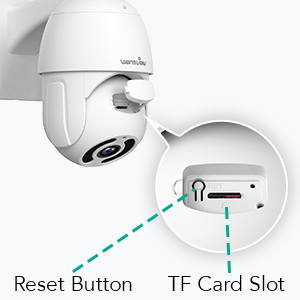
Figure 2: Reset Button and TF Card Slot Location.
This diagram highlights the location of the reset button and the TF (microSD) card slot on the wansview W9 camera, essential for initial setup and local storage.
Посібник із налаштування
1. Увімкнення камери
Connect the USB power supply to the camera and plug it into a power outlet. The camera will power on and initiate its self-test sequence.
2. Встановлення програми
Download the "Wansview Cloud" app from your smartphone's app store (available on iOS and Android). Register for a new account or log in if you already have one.
3. Підключення до мережі
Мандрівникиview W9 camera supports both Wi-Fi (2.4GHz only) and Ethernet connections.
Wi-Fi підключення:
- Відкрийте Wansview Cloud app and tap the "+" icon to add a new device.
- Select your camera model (W9) and follow the on-screen instructions.
- Ensure your phone is connected to a 2.4GHz Wi-Fi network. The camera does not support 5GHz Wi-Fi.
- Відскануйте QR-код, що відображається на вашому телефоні, за допомогою об'єктива камери.
- Wait for the camera to connect to your Wi-Fi network.

Figure 3: Wi-Fi Compatibility (2.4GHz only).
This image illustrates the wansview W9 camera with its upgraded 5dBi antenna, emphasizing its compatibility with 2.4GHz Wi-Fi networks for extended signal range and faster connection speeds. It explicitly shows that 5GHz Wi-Fi is not supported.
Підключення Ethernet:
- Connect an Ethernet cable from your router to the RJ45 port on the camera.
- The camera will automatically connect to the network.
- Дотримуйтеся вказівок програми, щоб додати камеру до свого облікового запису.
4. Монтаж камери
Мандрівникиview W9 camera is designed for wall mounting and outdoor use (IP65 waterproof).
- Виберіть відповідне місце для встановлення, забезпечивши чіткий view та стабільну монтажну поверхню.
- Use the provided mounting bracket set to securely attach the camera to the wall.
- Після встановлення відрегулюйте кут камери за потреби.
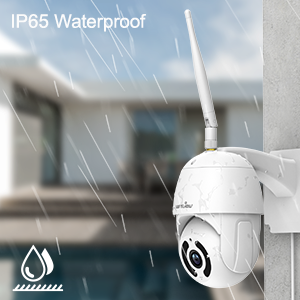
Figure 4: IP65 Waterproof Feature.
This image depicts the wansview W9 camera outdoors with rain falling on it, visually confirming its IP65 waterproof rating, making it suitable for various weather conditions.
Інструкція з експлуатації
1. Pan-Tilt Control
The camera features a 350° horizontal pan and 90° vertical tilt range, allowing you to monitor a wide area.
- In the Wansview Cloud app, access the live view вашої камери.
- Use the directional controls on the screen to remotely adjust the camera's pan and tilt angles.

Figure 5: 2K FHD PTZ Coverage.
This image demonstrates the wansview W9 camera's 2K FHD resolution and its Pan-Tilt-Zoom (PTZ) capabilities, showing a 350° pan and 95° tilt range for comprehensive area coverage, with a house in the background to illustrate its outdoor application.
2. Нічне бачення
The camera is equipped with 12pcs 850nm infrared LED lights, providing clear night vision up to 50 feet.
- Камера автоматично перемикається в режим нічного бачення в умовах слабкого освітлення.
- Ви можете view the night vision feed in real-time through the Wansview Хмарний додаток.

Figure 6: Excellent Night Vision Capability.
This image presents a split view comparing the daytime and night vision performance of the wansview W9 camera. The night vision segment clearly shows objects up to 50 feet away in darkness, highlighting the camera's effective infrared capabilities.
3. Двосторонній аудіозв'язок
Communicate with visitors or deter intruders using the built-in microphone and speaker.
- З прямого ефіру view in the Wansview Cloud app, tap the microphone icon to speak.
- Торкніться значка динаміка, щоб прослухати аудіо з місця розташування камери.

Figure 7: Two-Way Audio in Action.
This image illustrates the two-way audio feature of the wansview W9 camera, showing a person communicating with a delivery driver through the camera via a smartphone app. Speech bubbles indicate the conversation, demonstrating real-time interaction.

Figure 8: Deterring Intruders with Two-Way Audio.
This image shows the wansview W9 camera being used to deter an intruder. Speech bubbles indicate a command from the camera ("Move away from my house") and the intruder's response ("arrgg, no, I'm off"), demonstrating the camera's ability to act as a deterrent.
4. Виявлення руху та сповіщення
The camera uses motion sensors to detect activity and sends instant alerts to your phone.
- Customize sensor sensitivity and detection areas within the Wansview Хмарний додаток.
- Receive 10-second video alerts when motion is detected.

Figure 9: Instant Detection and Alerts.
This image shows a smartphone displaying a "Motion alarm" notification from the Wansview Cloud app, indicating that the wansview W9 camera has detected activity and sent an immediate alert to the user's phone.
5. Storage Options (SD Card & Cloud)
Мандрівникиview W9 camera offers flexible storage solutions for recorded footage.
- Пам'ять на картці SD: Supports up to 128GB microSD cards. Insert the card into the TF card slot (refer to Figure 2). Recorded video and images can be stored locally for preview.
- Хмарне сховище: Subscribe to the paid Cloud service via the Wansview Cloud app to save and upload videos securely to the cloud. This provides an additional layer of security against camera theft or damage.

Figure 10: Dual Storage Choices.
This image highlights the dual storage options for the wansview W9 camera: secure TF (microSD) card storage and encrypted cloud storage, providing users with flexible ways to back up recorded footage.
6. Інтеграція з Alexa
Control your wansview W9 camera and view live feeds using Amazon Alexa.
- Увімкніть WANview skill in the Alexa app.
- Link your Wansview Cloud account with Alexa.
- Use voice commands such as "Alexa, show me the [camera name]" to display the live video on compatible Alexa devices (e.g., Echo Show).
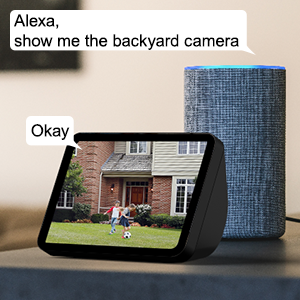
Рисунок 11: Інтеграція з Alexa.
This image shows an Amazon Echo Show displaying a live video feed from a wansview camera, with speech bubbles indicating a user's voice command ("Alexa, show me the backyard camera") and Alexa's response ("Okay"), demonstrating seamless integration with Alexa for voice control.
7. Multiple Family Members Sharing
Share access to your camera's live feed with up to 4 users simultaneously.
- Generate an invitation link within the Wansview Хмарний додаток.
- Share the link with family members to grant them access.
Технічне обслуговування
- Прибирання: Обережно протріть об’єктив та корпус камери м’якою сухою тканиною. Не використовуйте агресивні хімікати або абразивні засоби для чищення.
- Оновлення прошивки: Regularly check for and install firmware updates via the Wansview Cloud app to ensure optimal performance and security.
- Джерело живлення: Переконайтеся, що блок живлення надійно підключений і не має пошкоджень.
- Підключення до мережі: Verify a stable Wi-Fi or Ethernet connection for uninterrupted monitoring.
Усунення несправностей
| проблема | Можлива причина | Рішення |
|---|---|---|
| Камера офлайн | No power; Wi-Fi signal weak/disconnected; Router issue. | Check power connection; Move camera closer to router or use Ethernet; Restart router. |
| Неможливо підключитися до Wi-Fi | Incorrect Wi-Fi password; Connecting to 5GHz network; Too far from router. | Double-check password; Ensure connection to 2.4GHz Wi-Fi; Relocate camera or router. |
| Сповіщення про рух не отримано | Motion detection disabled; App notifications off; Sensitivity too low. | Увімкнути виявлення руху в додатку; Перевірити налаштування сповіщень телефону; Налаштувати чутливість. |
| Погана якість нічного бачення | Obstruction in front of lens; Infrared LEDs blocked. | Clear any obstructions; Ensure lens is clean. |
| Проблеми з двостороннім аудіо | Microphone/speaker blocked; App permissions. | Ensure clear path for audio; Check app permissions for microphone. |
Технічні характеристики
| Номер моделі | W9-W |
| Роздільна здатність захоплення відео | 1080p (2K HD) |
| Діапазон повороту/нахилу | Панорамування 350°, нахил 90° |
| Технологія підключення | Бездротовий зв'язок (Wi-Fi 2.4 ГГц), Ethernet |
| Технологія бездротового зв'язку | Wi-Fi |
| Джерело живлення | Провідний електричний |
| Діапазон нічного бачення | 50 футів |
| Міжнародний захист рейтингу | IP65 (водонепроникний) |
| Параметри зберігання | SD-карта (до 128 ГБ), хмарне сховище |
| Аудіо | Двосторонній аудіозв'язок (вбудований мікрофон і динамік) |
| Сумісні пристрої | Smartphone (iOS, Android), Alexa Echo Show |
| Тип монтажу | Настінне кріплення |
| Розміри (Д x Ш x В) | 6.3 x 6.1 x 3.94 дюймів |
| Вага товару | 1.6 фунта |
Гарантія та підтримка
For warranty information and technical support, please refer to the wansview офіційний website or contact their customer service directly. Details are typically available on the product packaging or the wansview brand store on Amazon.
Відвідайте слабийview Магазин для отримання додаткової інформації.


