MOUNTUP MU0034 Інструкція з монтажу на один монітор настільний
Бренд: MOUNTUP | модель: MU0034
1. Вступ
This manual provides detailed instructions for the installation, operation, and maintenance of your MOUNTUP MU0034 Single Monitor Desk Mount. Please read this manual thoroughly before installation to ensure correct setup and safe operation. This monitor mount is designed to enhance your workspace ergonomics by providing adjustable positioning for a single monitor.
2. Інформація про безпеку
- Перед встановленням переконайтеся, що всі компоненти присутні та не пошкоджені. Не використовуйте, якщо якісь деталі відсутні або несправні.
- This product is intended for monitors weighing up to 17.6 lbs (8 kg) and screen sizes from 17 to 32 inches. Do not exceed the maximum weight capacity.
- Compatible VESA patterns are 75x75mm and 100x100mm. Verify your monitor's VESA pattern before proceeding.
- Переконайтеся, що поверхня столу стійка та достатньо міцна, щоб витримати сумарну вагу кріплення та монітора.
- Tighten all screws firmly, but do not overtighten to avoid stripping threads or damaging components.
- Тримайте дітей і домашніх тварин подалі під час встановлення.
- Якщо у вас є сумніви щодо процесу встановлення, зверніться до кваліфікованого фахівця.
3. Вміст упаковки
Будь ласка, перевірте, чи всі деталі входять до вашої упаковки:
- Збірка кронштейна монітора
- Робочий стіл Клamp База
- Компоненти основи люверсу
- Пластина VESA
- Комплект кріпильних матеріалів (гвинти, шайби, шестигранні ключі)
- Інструкція з експлуатації
4. Технічні характеристики
| Особливість | Специфікація |
|---|---|
| Номер моделі | MU0034 |
| матеріал | Полірований алюміній |
| Сумісність розміру екрана | 17" to 32" (flat or curved) |
| Вага | До 17.6 фунтів (8 кг) |
| Сумісність VESA | 75х75 мм, 100х100 мм |
| Регулювання висоти | Up to 11" (16.3" total height adjustment range) |
| Діапазон нахилу | від +45° до -45° |
| Поворотний діапазон | 360° (arm), 180° (monitor plate) |
| Обертання | 360° (landscape to portrait) |
| Максимальна товщина столу (C-clamp) | 3.35" |
| Діаметр отвору люверсу | 0.39" - 3.1" |
5. Налаштування та встановлення
The MOUNTUP MU0034 offers two installation options: C-clamp mounting and Grommet mounting. Choose the method suitable for your desk.
5.1. C-Clamp Монтаж
This method is for desks without existing grommet holes, or if you prefer clamping to the edge of your desk. Ensure your desk thickness is no more than 3.35 inches.
- Приєднайте C-clamp: Зберіть C-clamp components to the base of the monitor arm. Position the base on the edge of your desk and tighten the clamp screw until it is secure.
- Приєднайте пластину VESA до монітора: Secure the VESA plate to the back of your monitor using the appropriate screws from the hardware kit. Ensure the screws are tightened securely.
- Slide Monitor onto Arm: Carefully slide the monitor (with the attached VESA plate) onto the monitor arm's VESA head. Ensure it clicks into place or is secured with the provided locking mechanism.
- Регулювання натягу: Refer to Section 6.1 for adjusting the gas spring tension to match your monitor's weight.

Figure 1: Illustration of C-clamp and Grommet mounting options. The C-clamp is shown securing the mount to the desk edge, while the grommet mount uses a desk hole.
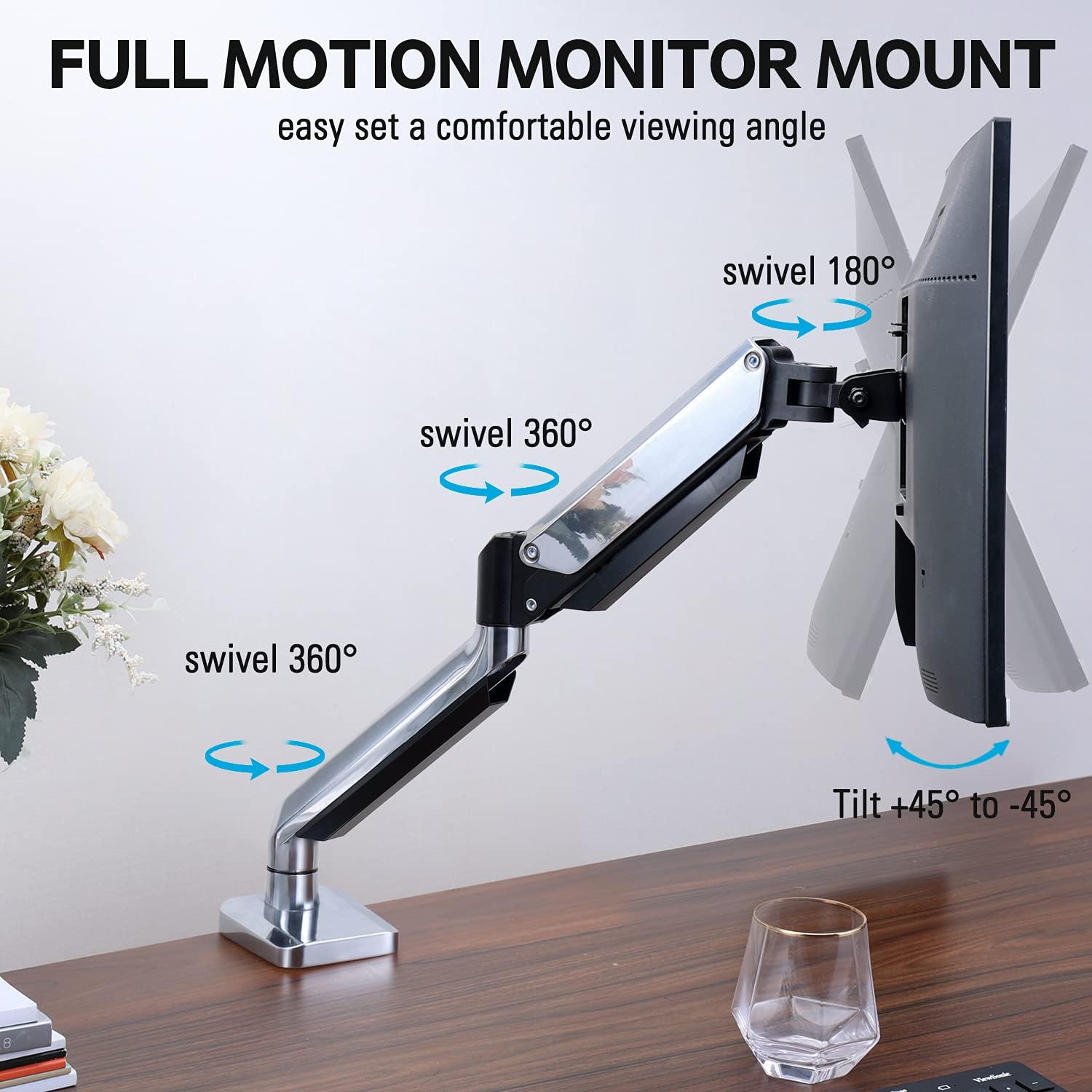
Figure 2: The removable VESA plate being attached to the back of a monitor, then sliding onto the monitor arm for easier installation.
5.2. Кріплення втулки
This method utilizes an existing hole in your desk. Ensure your desk thickness is no more than 3.35 inches and the grommet hole diameter is between 0.39 and 3.1 inches.
- Assemble Grommet Base: Insert the grommet base components through the desk hole and secure them from underneath the desk using the provided plate and nut.
- Приєднайте пластину VESA до монітора: Secure the VESA plate to the back of your monitor using the appropriate screws from the hardware kit. Ensure the screws are tightened securely.
- Slide Monitor onto Arm: Carefully slide the monitor (with the attached VESA plate) onto the monitor arm's VESA head. Ensure it clicks into place or is secured with the provided locking mechanism.
- Регулювання натягу: Refer to Section 6.1 for adjusting the gas spring tension to match your monitor's weight.
6. Експлуатація та регулювання
The MOUNTUP MU0034 monitor arm offers various adjustments for optimal viewкомфорту.
6.1. Регулювання натягу газової пружини
The gas spring tension needs to be adjusted to match the weight of your monitor. This ensures the monitor stays in position once adjusted.
- If the monitor drifts down, turn the adjustment screw (usually located on the arm joint) clockwise ("+") to increase tension.
- If the monitor floats up, turn the adjustment screw counter-clockwise ("-") to decrease tension.
- Регулюйте поступово, доки монітор не залишиться стабільним на будь-якій висоті.
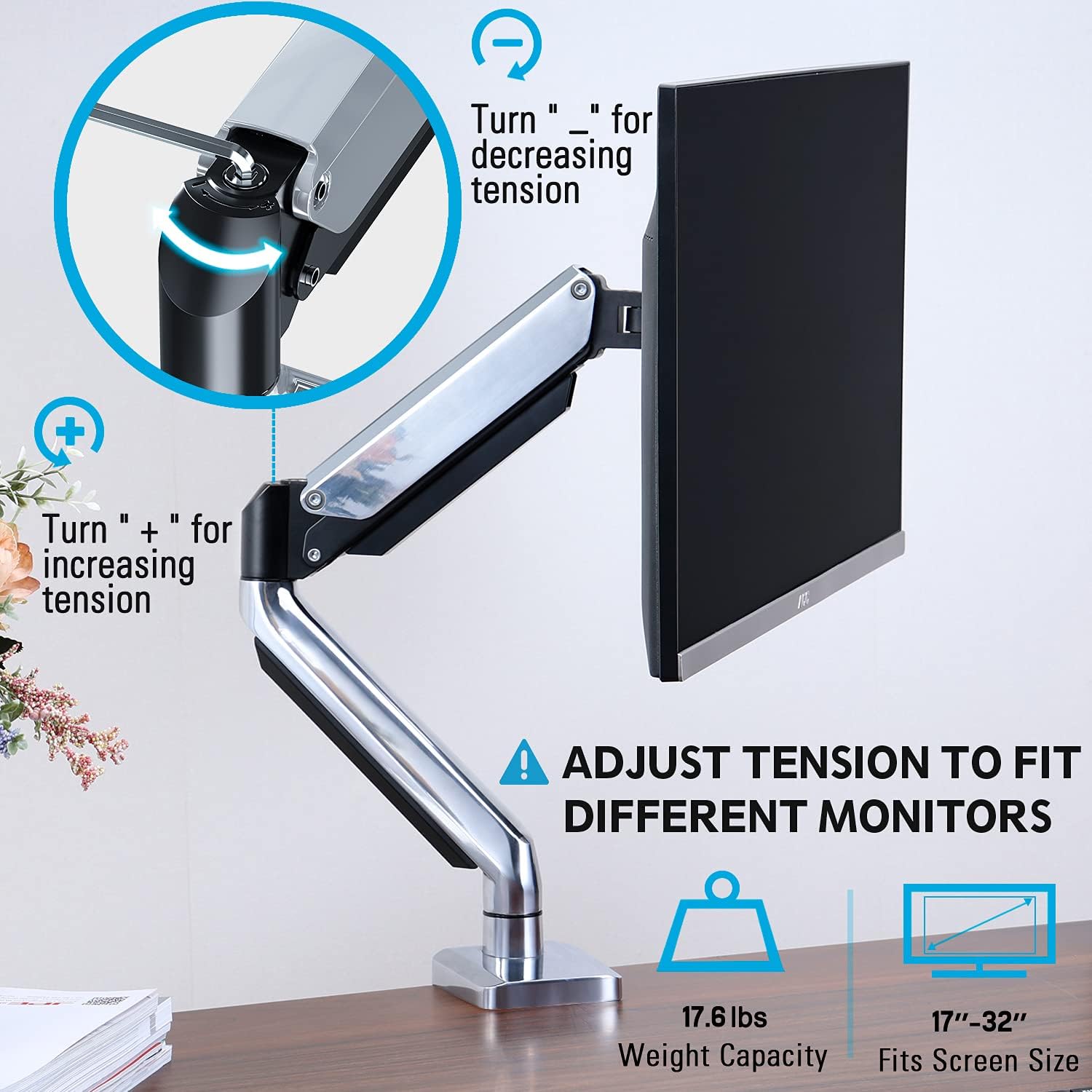
Figure 3: Instructions for adjusting the gas spring tension using an Allen key. Turning clockwise increases tension, counter-clockwise decreases it.
6.2. Регулювання висоти
Once the gas spring tension is correctly set, you can easily raise or lower your monitor to your desired ergonomic height. The arm allows for up to 11 inches of vertical adjustment.

Figure 4: Diagram illustrating the maximum height adjustment of 11 inches and maximum extension of 17.5 inches.
6.3. Нахил, поворот та обертання
The monitor arm provides full motion capabilities:
- Нахил: Adjust the monitor screen +45° to -45° to reduce glare or find a comfortable viewкут.
- Поворотний: The arm can swivel 360° at the base and 360° at the middle joint. The monitor plate itself can swivel 180°. This allows for easy screen sharing or repositioning.
- Обертання: Поверніть монітор на 360°, щоб перемикатися між альбомною та портретною орієнтаціями.

Figure 5: Visual representation of the monitor arm's full motion capabilities, including 360° swivel, 180° swivel at the monitor plate, and +45° to -45° tilt.

Figure 6: An image demonstrating the monitor's ability to rotate 360 degrees, allowing for both landscape and portrait viewрежими.
7. Кабельний менеджмент
The MOUNTUP MU0034 features integrated cable management to keep your workspace tidy.
- Прокладіть кабелі монітора (живлення, відео тощо) вздовж нижньої сторони кронштейна.
- Use the provided cable clips or covers to secure the cables within the arm channels.
- Ensure cables have enough slack to allow for full range of motion without tension.

Figure 7: Illustration of how cables are routed and organized through the integrated channels on the monitor arm, keeping the desk clear.
8. Технічне обслуговування
- Регулярно перевіряйте всі гвинти та з'єднання, щоб переконатися, що вони міцно затягнуті.
- Очистіть кріплення м’якою губкоюamp тканиною. Уникайте абразивних засобів для чищення або розчинників.
- Не змащуйте механізм газової пружини.
9. Вирішення проблем
| проблема | Можлива причина | Рішення |
|---|---|---|
| Monitor sags or won't stay up | Натяг газової пружини занадто низький для ваги монітора. | Increase gas spring tension by turning the adjustment screw clockwise ("+"). |
| Monitor floats up or is hard to push down | Натяг газової пружини занадто високий для ваги монітора. | Decrease gas spring tension by turning the adjustment screw counter-clockwise ("-"). |
| Monitor is wobbly | Mount not securely fastened to desk or VESA plate not tight. | Перевірте та затягніть усі болтиamp/grommet screws and VESA plate screws. |
| Difficulty rotating/tilting monitor | Суглоби занадто тугі. | Loosen the corresponding joint screws slightly (do not remove). |
10. Гарантія та підтримка
The MOUNTUP MU0034 Single Monitor Desk Mount is backed by a 3-year support period. For technical assistance, missing parts, or warranty claims, please contact MOUNTUP customer support through their official channels or the retailer where the product was purchased.
Будь ласка, збережіть підтвердження покупки для гарантійних цілей.


