1. Вступ
This manual provides detailed instructions for the installation, operation, and maintenance of the Geekworm VBO-to-HDMI Adapter Board. This board is designed to convert V-by-One signals to HDMI, enabling compatibility with a wide range of display devices.
2. Особливості продукту
- Designed to solve connection issues for electronic blackboards, large conference tablets, and 4K large screen simultaneous displays.
- Capable of illuminating the original 4K screen while adding a 4K HDMI signal output.
- Applicable in various fields including education systems, conference systems, commercial displays, matrix setups, advertising machines, and medical displays.
- Can be powered directly from the V-by-One input screen line, simplifying power management.
3. Налаштування та підключення
Follow these steps to properly connect your VBO-to-HDMI Adapter Board:
- V-by-One Input Connection: Connect the V-by-One signal source to the "V-by-One Input" port on the adapter board. This connection also provides power to the board.
- V-by-One Output Connection: Connect the "V-by-One Output" port to your V-by-One display device.
- HDMI Output Connection: Connect an HDMI cable from the "HDMI Output" port on the adapter board to your HDMI display device (e.g., monitor, TV, projector).
- Аудіовхід (додатково): If audio conversion is required, connect your digital audio source to the "Digital Audio Input" or your analog audio source to the "Analog Audio Input" as appropriate.
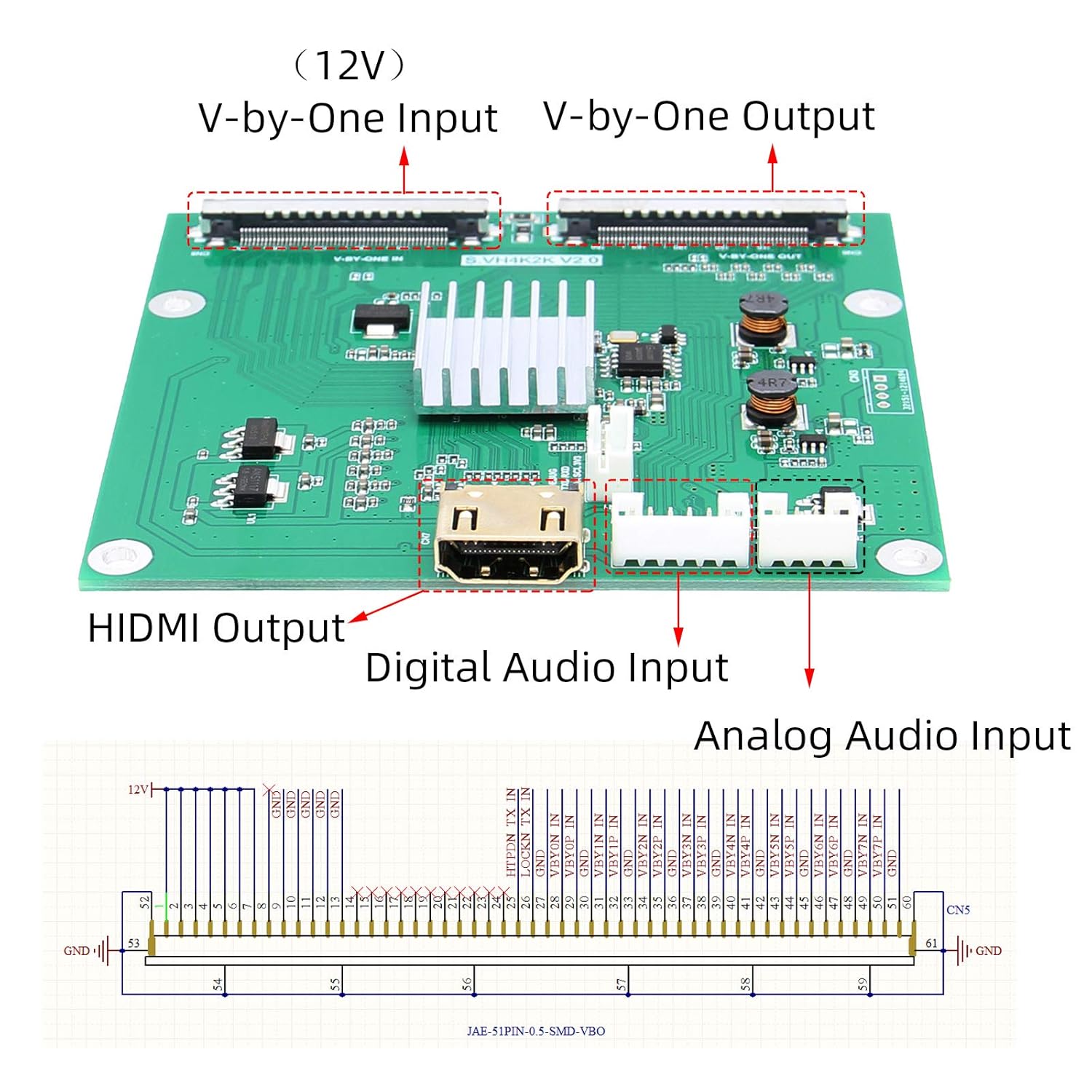
Малюнок 3.1: Закінченоview of the Geekworm VBO-to-HDMI Adapter Board with labeled input and output ports. This image shows the V-by-One Input, V-by-One Output, HDMI Output, Digital Audio Input, and Analog Audio Input connectors.
Перед увімкненням пристроїв переконайтеся, що всі з’єднання надійно закріплені.
4. Інструкція з експлуатації
Once all connections are made as described in Section 3, the adapter board operates automatically:
- The board will receive power directly from the V-by-One input signal.
- It will convert the V-by-One signal to an HDMI signal.
- The HDMI output supports resolutions up to 4K, 2K, and 1080P, depending on the source and display capabilities.
- The V-by-One output will pass through the original signal to the V-by-One display.
No additional software or drivers are typically required for operation.
5. Технічне обслуговування
To ensure the longevity and optimal performance of your adapter board, follow these maintenance guidelines:
- Прибирання: Використовуйте м’яку, суху тканину, щоб обережно протерти поверхню дошки. Уникайте використання рідких засобів для чищення або розчинників.
- Середовище: Зберігайте дошку в сухому, безпиловому середовищі. Уникайте впливу екстремальних температур або вологості.
- Обробка: Handle the board by its edges to avoid touching components. Do not apply excessive force to connectors.
- Потужність: Завжди відключайте живлення перед тим, як робити або змінювати підключення.
6. Вирішення проблем
If you encounter issues with your Geekworm VBO-to-HDMI Adapter Board, refer to the following common troubleshooting steps:
- No Display on HDMI Output:
- Ensure all cables (V-by-One input, V-by-One output, HDMI output) are securely connected.
- Verify that the V-by-One source is powered on and outputting a signal.
- Check if your HDMI display is set to the correct input source.
- Якщо можливо, протестуйте з іншим кабелем HDMI або дисплеєм.
- Немає аудіовиходу:
- Confirm that the digital or analog audio input is correctly connected and the source is playing audio.
- Check audio settings on your HDMI display and ensure volume is not muted.
- Періодичний сигнал:
- Перевірте кабелі на наявність пошкоджень.
- Переконайтеся, що з'єднання міцні та не розхитані.
- Verify that the power supply from the V-by-One input is stable.
7. Технічні характеристики
| Бренд | Geekworm |
| Виробник | Geekworm |
| Розміри продукту (ДxШxВ) | 5.4 x 1.9 x 3.2 см (2.13 x 0.75 x 1.26 дюйма) |
| Батарейки в комплекті | немає |
| ASIN | B08XGMPHR2 |
| Перший доступний | 6 березня 2021 р |

Figure 7.1: Dimensions of the Geekworm VBO-to-HDMI Adapter Board. The image indicates approximate overall dimensions of 90mm (3.54 inches) in width, 85mm (3.34 inches) in length, and 87mm (3.42 inches) in height.
8. Гарантія та підтримка
For warranty information and technical support, please contact Geekworm directly through their official webсайт або продавця, у якого ви придбали товар. Зберігайте чек про покупку як підтвердження покупки.


