вступ
The SHARP Digital Alarm Clock with AccuSet is designed for effortless timekeeping. Featuring automatic time setting, a clear LED display, and user-friendly controls, this clock is ideal for any bedroom. Its AccuSet technology ensures the time is always accurate, eliminating the need for manual adjustments, making it perfect for seniors, children, or anyone seeking a hassle-free alarm clock solution.

Малюнок 1: Спереду view of the SHARP Digital Alarm Clock with green LED display.
Ключові характеристики
- Автоматичне налаштування часу AccuSet: The clock is pre-programmed to automatically set the correct time, removing the need for manual adjustments. Simply select your time zone.
- Швидке налаштування переходу на літній час (DST): A convenient switch allows for easy adjustment for Daylight Savings Time (+1 hour) or Standard Time (-1 hour).
- Регулювання яскравості (високе/низьке): Adjust the brightness of the LED display to your preference, ensuring comfortable viewвдень чи вночі.
- Резервний акумулятор: A pre-installed CR2032 button cell battery provides backup for time settings during power outages, ensuring continuous accuracy.
- Вибір часового поясу: Easily select your local time zone from the options provided at the bottom of the clock.

Figure 2: Diagram illustrating the key features and functionalities of the alarm clock.
Посібник із налаштування
- Розпакування: Carefully remove the alarm clock from its packaging.
- Battery Installation (Pre-installed): The CR2032 button cell battery for backup is pre-installed in a screw-secured cabinet at the bottom of the clock. This battery is designed to last for several years. No immediate action is required for initial setup.
- Вибір часового поясу: Before plugging in the clock, locate the time zone selection switch at the bottom of the unit. Select your correct time zone (e.g., EST, CST, MST, PST). The default time zone is Eastern Standard Time.
- Підключення живлення: Plug the clock into an approved electrical source. The AccuSet feature will automatically program the correct time based on your selected time zone.
- Daylight Savings Time (DST) Adjustment: If applicable, slide the DST switch at the bottom of the clock to "ON" to add one hour (+1 hr) for Daylight Savings Time. For Standard Time, slide the switch to "OFF" to subtract one hour (-1 hr).

Figure 3: Top panel controls for setting time, alarm, and adjusting display.
Інструкція з експлуатації
Налаштування будильника
- Натисніть ТРИВОГА button once. The alarm time will appear on the display.
- Під час відображення часу будильника натисніть ГОДИНА кнопку для налаштування години будильника.
- Натисніть ХВИЛИНА кнопку, щоб відрегулювати хвилину будильника.
- Щоб увімкнути або вимкнути будильник, натисніть кнопку ТРИВОГА УВІМК. / ВИМК button. An alarm indicator light (usually a small LED) will illuminate when the alarm is active.
- To return to the current time display, press the ЧАС button or wait a few seconds for it to revert automatically.
Використання функції Snooze
Коли пролунає будильник, натисніть велику кнопку СНОЙЗ button located on the top of the clock. This will temporarily silence the alarm for a set period (typically 9 minutes), allowing for extra rest. The alarm will sound again after the snooze period ends.
Adjusting Display Brightness (Dimmer Control)
The clock features a High/Low dimmer control to adjust the display brightness. Locate the DIMMER HI/LO button on the top panel. Press this button to toggle between high and low brightness settings to suit your environment and preference.

Figure 4: Illustration of the High & Low Display Dimmer Control.
Технічне обслуговування
- Прибирання: To clean the clock, use a soft, dry cloth. Do not use abrasive cleaners or solvents, as they may damage the finish.
- Заміна батареї: The CR2032 backup battery is designed for long-term use. If the clock loses time during a power outage after several years, it may be time to replace the battery. This is located in a screw-secured compartment at the bottom of the clock.
- Розміщення: Place the clock on a stable, flat surface. Avoid placing it in direct sunlight, near heat sources, or in areas with high humidity.
Усунення несправностей
| проблема | Можлива причина | Рішення |
|---|---|---|
| Clock does not display time after plugging in. | Not connected to power, or power outlet is not active. | Переконайтеся, що шнур живлення надійно підключено до справної електричної розетки. |
| Час неправильний. | Incorrect time zone selected, or DST switch is set incorrectly. | Verify the time zone switch at the bottom of the clock is set to your local zone. Check the DST switch position. |
| Сигналізація не звучить. | Сигналізація не активована, або гучність будильника занадто низька (якщо її можна налаштувати). | Ensure the alarm is turned ON using the ALARM ON/OFF button. Check for an alarm indicator light. |
| Дисплей занадто яскравий або занадто тьмяний. | Потребує налаштування димера. | Press the DIMMER HI/LO button to cycle through brightness settings. |
| Годинник втрачає час під час відключення живленняtage. | Backup battery is depleted. | Replace the CR2032 backup battery located in the compartment at the bottom of the clock. |
Технічні характеристики
| Особливість | Деталь |
|---|---|
| Бренд | Гострий |
| Номер моделі | OZJONG |
| Колір | Black - Green Led |
| Тип дисплея | цифровий |
| Особливості | Alarm, Daylight Saving, Auto Dimmable |
| Розміри продукту | 5.5 см (Ш) x 2.6 см (В) |
| Джерело живлення | Електричний дріт, живлення від акумулятора |
| Резервна батарея | CR2032 (попередньо встановлений) |
| матеріал | пластик |
| Вага товару | 9.9 унції |
| Тип монтажу | Стільниця |
| UPC | 049353006079 |
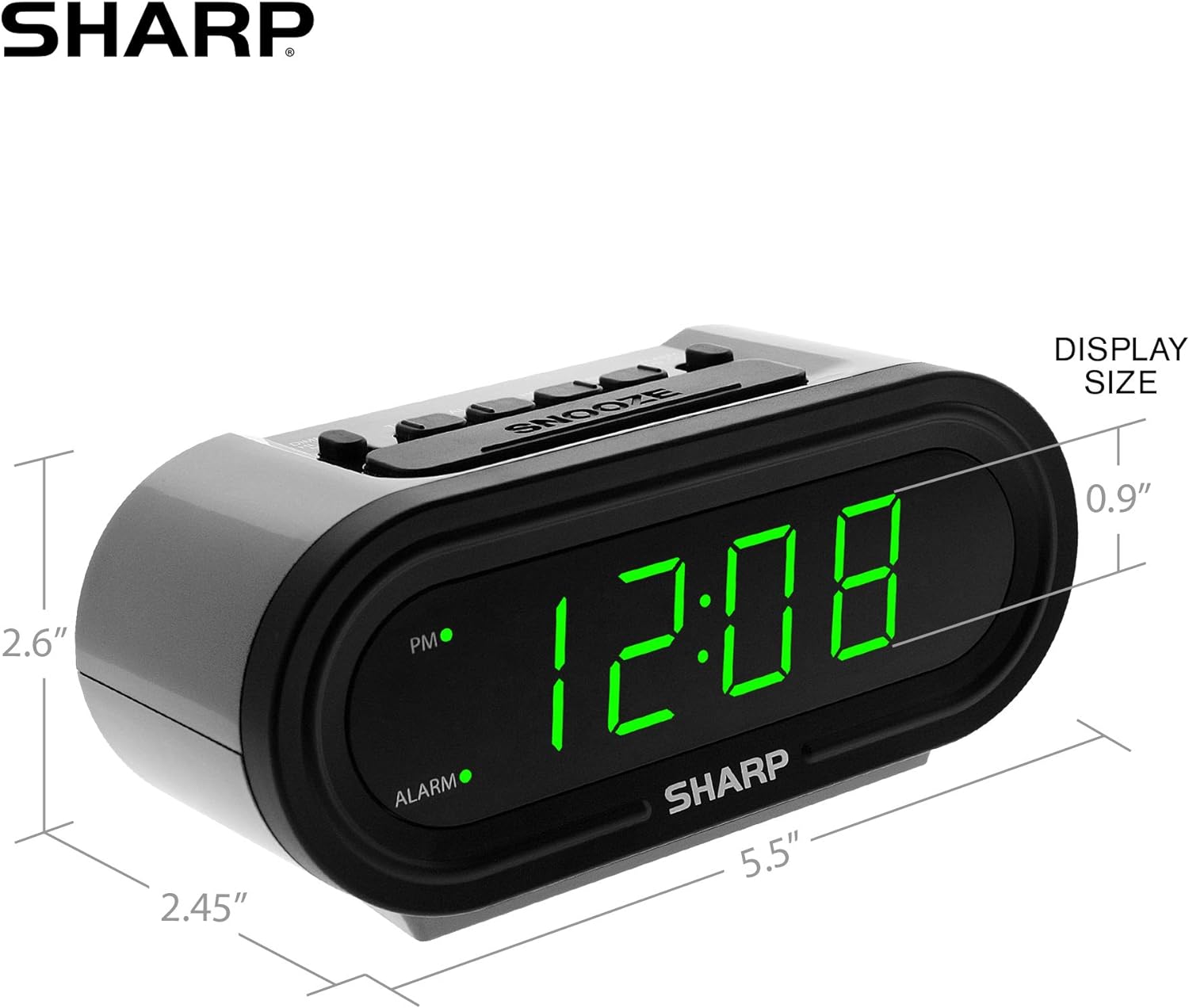
Рисунок 5: Розміри виробу для зручності.
Гарантія та підтримка
For warranty information or technical support, please refer to the contact details provided in your product packaging or visit the official Sharp webсайт. Зберігайте чек про покупку для гарантійних претензій.


